
Wireless Apple CarPlay and Android Auto for Toyota Sienna
One of the biggest advantages of upgrading a 2004–2010 Toyota Sienna is adding smartphone functionality that wasn’t available with the original factory radio.
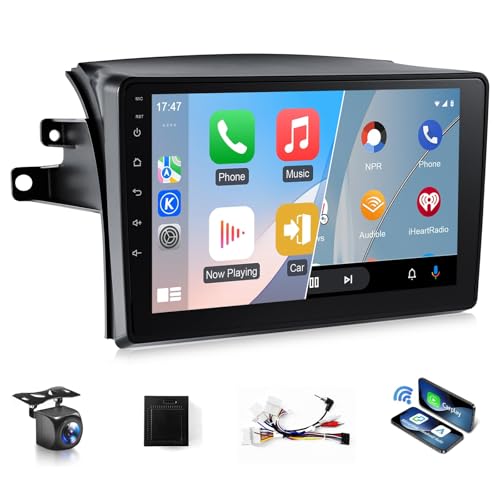
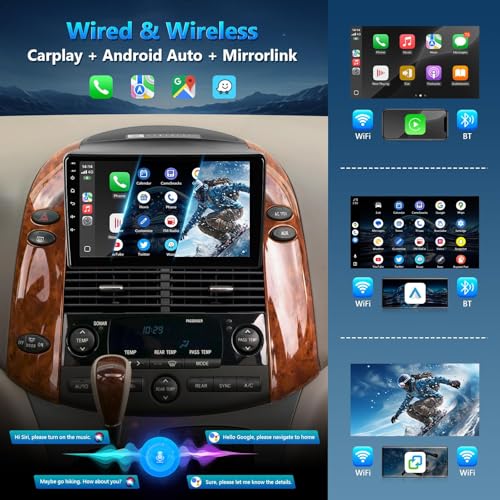
The XGU stereo supports both wired and wireless Apple CarPlay and Android Auto, allowing compatible smartphones to connect through Bluetooth, Wi-Fi, or USB depending on the selected connection method.
Access supported applications such as Apple Maps, Google Maps, Waze, Spotify, Pandora, and YouTube Music through the head unit’s touchscreen.
With compatible voice assistant functionality, drivers can manage supported calls, navigation, and music features while keeping their attention on the road.
Factory JBL Audio System Compatibility
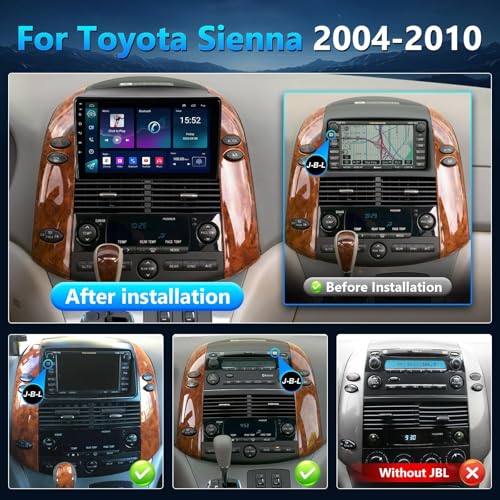
Unlike generic aftermarket radios, the XGU Model A is advertised to support Toyota Sienna models equipped with the factory JBL audio system.
This is especially important because factory-amplified vehicles can require different wiring and audio signal connections than standard non-amplified stereos.
The XGU’s vehicle-specific installation design is intended to simplify integration with supported factory JBL configurations.
However, owners should verify that the included wiring harness and interface hardware match their vehicle before beginning installation.
Why Factory Amplifier Integration Matters
Replacing a factory JBL radio isn’t always as simple as matching speaker wires.
Factory amplified systems may use dedicated amplifier turn-on signals, specialized connectors, and different audio signal requirements.
Incorrect connections can result in missing sound, distorted audio, or amplifier activation problems.
For a better understanding of aftermarket radio connections, our car audio wiring diagram and aftermarket stereo installation guide explains the fundamentals of power, ground, speaker polarity, and amplifier connections.
GPS Navigation with Online and Offline Maps
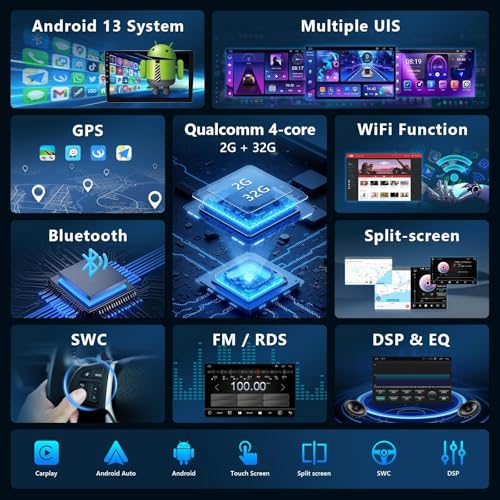
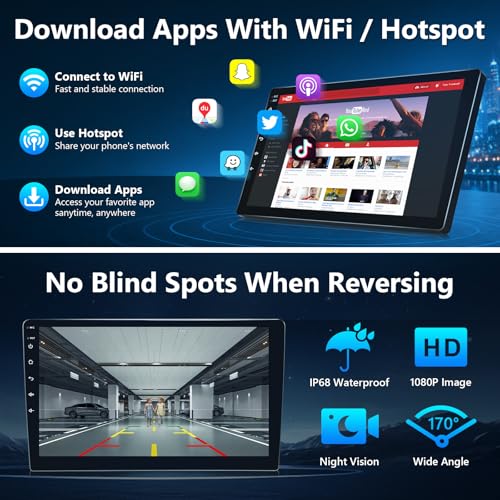
The XGU Toyota Sienna Android stereo features a built-in GPS receiver and Wi-Fi connectivity for compatible navigation applications.
Use supported mapping software for turn-by-turn directions, destination searches, and voice guidance.
When connected to a compatible Wi-Fi hotspot, the stereo can access online navigation services and download supported offline maps.
Offline navigation can remain useful when traveling through areas with limited cellular coverage, provided the required maps have been downloaded beforehand.
Wi-Fi, Bluetooth and Hands-Free Calling
The XGU stereo offers multiple connectivity options for entertainment and communication.
Built-in Wi-Fi allows access to compatible applications and internet-based services, while Bluetooth supports wireless music streaming, phone calls, and phonebook synchronization.
Enjoy streaming music through supported applications, listening to podcasts, or accessing internet radio when a network connection is available.
The stereo also includes traditional FM/RDS radio functionality for local broadcasts.
Upgrade Your Toyota Sienna Speakers for Better Sound
Installing a modern touchscreen head unit is an excellent starting point for a complete Toyota Sienna audio upgrade.
However, even the best aftermarket stereo cannot fully compensate for worn factory speakers or an improperly configured audio system.
If your Sienna’s original speakers have developed distortion, rattling, or reduced clarity, replacing them with properly matched aftermarket components can improve overall listening quality.
Before purchasing replacement speakers, verify mounting dimensions, impedance, factory JBL amplifier compatibility, and the available power from your existing audio system.
A factory JBL system may require more careful speaker selection than a basic non-amplified radio setup.
For owners planning an aftermarket amplifier or subwoofer installation, understanding speaker wiring, amplifier connections, and car audio signal routing can help avoid common installation problems.
Backup Camera with 170-Degree Wide-Angle Viewing
The XGU Android stereo supports a rear-view camera with an advertised 170-degree viewing angle and IP68-rated waterproof construction.
When correctly installed, the touchscreen automatically switches to the rear camera image when the vehicle is placed in reverse.
The wide-angle camera can assist with parking, backing out of driveways, and maneuvering a larger vehicle like the Toyota Sienna.
The manufacturer also advertises improved low-light visibility, although actual camera performance depends on the hardware and installation conditions.
Steering-Wheel Controls and Factory Convenience
The XGU stereo supports compatible factory steering-wheel audio controls, allowing drivers to adjust supported functions without reaching for the touchscreen.
Retaining these controls is especially convenient in a family vehicle where ease of use and driver attention are important.
Actual steering-wheel control functionality depends on the vehicle’s original wiring and the included interface configuration.
Split-Screen Display and Rear Passenger Entertainment
The XGU head unit supports split-screen functionality, allowing compatible applications to appear simultaneously on the touchscreen.
For example, drivers may be able to display navigation alongside another supported application, depending on the software configuration.
The stereo also advertises RCA video output for compatible rear-seat entertainment equipment.
This can be useful for families who want to integrate additional passenger displays into their Toyota Sienna.
Rear-seat video equipment requires compatible displays, wiring, and proper installation. Video playback on the driver’s display should only be used when parked.
Plug-and-Play Installation for Toyota Sienna 2004–2010
The XGU Model A is advertised with a vehicle-specific plug-and-play installation design for compatible factory JBL or large-screen configurations.
Before installation, confirm that the supplied connectors match the original radio and factory amplifier interfaces.
Installation Checklist
-
Verify the Toyota Sienna model year and original radio configuration.
-
Confirm factory JBL or compatible large-screen system compatibility.
-
Disconnect the battery according to the applicable service procedure.
-
Remove the original factory radio and dashboard trim.
-
Inspect the original wiring harness and amplifier connections.
-
Connect the XGU wiring harness and supported factory interfaces.
-
Install the touchscreen and secure the mounting hardware.
-
Test audio output, Bluetooth, navigation, backup camera, and steering-wheel controls.
-
Reassemble the dashboard after verifying proper operation.
If you’re troubleshooting an installation with alternator whine, grounding issues, or unwanted electrical noise, proper amplifier wiring and signal routing are essential. Our car audio installation resources can help you understand the electrical fundamentals before modifying your factory sound system.
Frequently Asked Questions
Will this XGU stereo fit a 2007 Toyota Sienna with JBL audio?
The manufacturer advertises compatibility with 2007 Toyota Sienna models equipped with the supported factory JBL or large-screen configuration. Verify the original radio connectors before ordering.
Does this Toyota Sienna stereo support wireless Apple CarPlay?
Yes. Both wired and wireless Apple CarPlay and Android Auto are advertised features.
Will my factory JBL amplifier still work?
The Model A stereo is designed for compatible JBL-equipped vehicles, but exact amplifier integration depends on the original system and supplied harness.
Can I use GPS navigation without internet access?
Yes, with compatible offline navigation applications and downloaded map data.
Does the stereo support a backup camera?
Yes. The product advertises support for a 170-degree rear-view camera. Confirm whether the camera is included with the specific package.
Can I retain my steering-wheel audio controls?
The stereo supports compatible factory steering-wheel controls, subject to correct installation and interface compatibility.
Does the XGU radio support rear-seat entertainment?
The product advertises RCA video output and split-screen functionality. External passenger displays and compatible wiring may be required.
Upgrade Your Toyota Sienna with Modern CarPlay and Android Auto
The XGU 9-Inch Android Car Stereo for Toyota Sienna 2004–2010 offers modern smartphone integration, GPS navigation, Bluetooth audio, Wi-Fi connectivity, backup camera support, and advertised compatibility with factory JBL systems.
Whether you’re updating your family minivan for daily commuting or preparing for a long road trip, this touchscreen head unit provides a practical way to bring modern infotainment features to an older Toyota Sienna.
Shop XGU Toyota Sienna Android Car Stereos at Pro Street Online and explore our selection of aftermarket speakers, amplifiers, subwoofers, and installation accessories.







There are no reviews yet.