
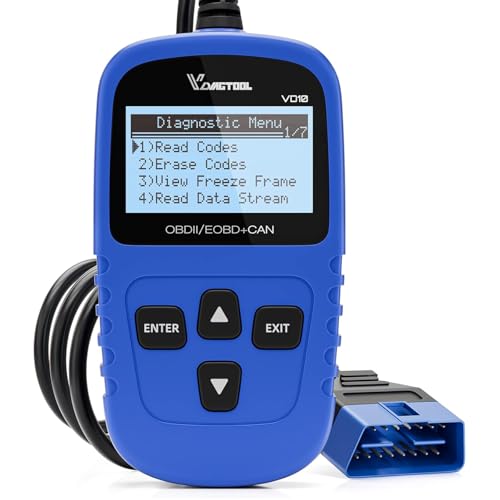


VDIAGTOOL VD10 OBD2 Scanner — Check Engine Code Reader with Live Data & I/M Readiness
The VDIAGTOOL VD10 OBD2 Scanner is a compact plug-and-play diagnostic tool for drivers and DIY mechanics who want to read Check Engine codes without using Bluetooth, a phone app, or a subscription.
It connects directly to a compatible vehicle’s 16-pin OBD-II diagnostic port and provides access to basic engine and emissions diagnostics including:
- Read diagnostic trouble codes
- Clear supported DTCs
- Display DTC definitions
- View live vehicle data
- Retrieve freeze-frame information
- Check I/M readiness
- Retrieve vehicle information
- Read VIN, Calibration IDs and CVNs where supported
The VD10 is best positioned as a:
low-cost standalone OBD-II code reader with live data
rather than a full-system automotive scanner.
VDIAGTOOL VD10 Specifications
| Specification | Details |
|---|---|
| Brand | VDIAGTOOL |
| Model | VD10 |
| Product Type | Wired handheld OBD-II code reader |
| Read Engine Codes | Yes |
| Clear Supported Codes | Yes |
| Built-In DTC Lookup | Yes |
| Live Data | Yes |
| Freeze Frame | Yes |
| I/M Readiness | Yes |
| Vehicle Information | Yes |
| VIN Retrieval | Yes, where supported |
| Calibration ID | Yes, where supported |
| CVN | Yes, where supported |
| Display | Backlit LCD |
| Resolution | 128 × 64 pixels |
| Contrast Adjustment | Yes |
| Wireless | No |
| Smartphone Required | No |
| External Battery Required | No |
| Power Source | Vehicle OBD-II port |
| Dimensions | Approx. 2.75 × 0.86 × 4.96 in |
| Weight | Approx. 5.9 oz |
| Operating Temperature | 32–140°F / 0–60°C |
| Warranty | 3 years per current VDIAGTOOL policy |
| Updates | Lifetime free updates advertised by VDIAGTOOL |
$18.99
Read Check Engine Codes
The VD10 can retrieve standardized OBD-II engine and emissions diagnostic trouble codes.
These can include common codes such as:
- P0171 — System Too Lean
- P0300 — Random/Multiple Cylinder Misfire
- P0301–P0308 — Cylinder-Specific Misfire
- P0420 — Catalyst Efficiency Below Threshold
- P0440-series — EVAP system faults
- P0507 — Idle Speed Higher Than Expected
- P0700 — Transmission Control System Malfunction notification
Once a code is retrieved, continue troubleshooting with the Pro Street DTC Doctor:
https://my.prostreetonline.com/dtc-obdii/
Complete P-Code library:
https://my.prostreetonline.com/dtc-doctor/p-code-obd-ii-codes/
Generic and Manufacturer-Specific Codes
VDIAGTOOL states that the VD10 can retrieve supported:
- P0 codes
- P1 codes
- P2 codes
- P3 codes
- U0 codes
- U1 codes
- Pending codes
The exact information available depends on the vehicle and ECU.
Manufacturer-specific code access within generic OBD-II does not mean the scanner has full access to every control module.
Built-In DTC Database
The supplied product listing advertises a built-in database containing:
more than 3,000 code definitions.
That allows the VD10 to display descriptions directly on its screen rather than requiring you to immediately search every DTC online.
Still:
a DTC definition is not a parts diagnosis.
A code identifies the condition the ECU detected.
It does not automatically identify the failed component.
Example: P0171
If the VD10 displays:
P0171 — System Too Lean Bank 1
possible causes can include:
- Vacuum leak
- Intake leak
- MAF sensor problem
- Low fuel pressure
- Injector issue
- Exhaust leak
- Oxygen-sensor problem
- Wiring fault
See:
https://my.prostreetonline.com/dtc-doctor/p0171-code-system-too-lean-bank-1/
Do not replace an oxygen sensor simply because a lean code appears.
Clear Check Engine Codes
The VD10 can erase supported engine trouble codes.
Once the underlying problem is repaired, clearing the DTC can turn off the:
Check Engine Light / MIL.
The proper workflow is:
- Read the code.
- Record the DTC.
- Check freeze-frame information.
- Review live data.
- Diagnose the fault.
- Repair the vehicle.
- Clear the code.
- Scan the vehicle again.
If the problem remains, the code can return.
Clearing a Code Does Not Repair the Vehicle
This is one of the most important things for first-time scanner owners to understand.
Pressing:
Erase Codes
does not fix:
- Vacuum leaks
- Failed ignition coils
- Bad injectors
- Catalytic converters
- Oxygen sensors
- Wiring faults
It only removes stored diagnostic information.
If the ECU detects the failure again, the Check Engine Light can return.
Live Data
The VD10 can display supported:
real-time OBD-II vehicle data.
Depending on the vehicle, available PIDs may include:
- Engine RPM
- Engine coolant temperature
- Intake-air temperature
- Short-term fuel trim
- Long-term fuel trim
- Vehicle speed
- Throttle position
- Engine load
- MAF readings
- MAP readings
- Oxygen-sensor data
- Additional supported OBD-II PIDs
Not every vehicle reports every PID.
Why Live Data Matters
Codes tell you:
what the ECU detected.
Live data can help show:
what the engine is actually doing.
For example, if you’re diagnosing:
- Lean codes
- Rich codes
- Idle problems
- Temperature issues
- Sensor faults
live data can help confirm whether the readings make sense before replacing parts.
Freeze-Frame Data
The VD10 also retrieves supported:
freeze-frame information.
Freeze frame captures selected vehicle operating conditions around the time a qualifying DTC was stored.
Depending on the vehicle, that may include:
- RPM
- Vehicle speed
- Engine load
- Coolant temperature
- Fuel trims
- Throttle position
This can be particularly helpful with intermittent problems.
I/M Readiness
The VD10 includes:
I/M readiness testing.
This allows you to see whether the vehicle’s emissions-related self-tests have completed.
Potential monitors can include:
- Misfire
- Fuel system
- Catalyst
- Oxygen sensor
- Oxygen sensor heater
- EVAP
- EGR/VVT
The monitor set depends on the vehicle.
Check Before a Smog Test
The I/M readiness function can be useful before:
- State emissions inspection
- Smog check
- Used-car inspection
The scanner can show whether supported monitors are:
Ready
or:
Not Ready.
For federal OBD and emissions information:
https://www.epa.gov/vehicle-and-fuel-emissions-testing
Don’t Clear Codes Immediately Before Emissions Testing
Clearing DTCs can reset readiness monitors.
Several may return to:
Not Ready.
The vehicle may then need to complete one or more drive cycles before emissions testing.
So the strategy should not be:
erase the light and immediately head to the smog station.
Repair the fault first.
Then verify readiness.
Vehicle Information
The VD10 can retrieve supported vehicle identification information such as:
- VIN
- Calibration ID
- Calibration Verification Number
where the vehicle makes those values available through OBD-II.
VIN
Vehicle Identification Number.
Calibration ID
Identifies ECU calibration software.
CVN
Calibration Verification Number.
These values can be useful during diagnosis and when evaluating a used vehicle.
Useful for Used-Car Shopping
A basic OBD-II scan can provide valuable clues when inspecting a used vehicle.
Before buying, you can check:
- Stored engine codes
- Pending codes
- Freeze-frame information
- Readiness monitor status
- Vehicle VIN information
If many monitors display:
Not Ready
the ECU may have recently been reset or had battery power disconnected.
That isn’t automatic proof somebody erased trouble codes to hide a problem, but it warrants additional inspection.
Plug-and-Play Operation
The VD10 does not require:
- Bluetooth
- Wi-Fi
- Smartphone
- App
- User account
- Subscription
Simply connect it to the vehicle’s OBD-II socket.
Power is supplied directly from the vehicle.
No Batteries Required
Because the scanner draws power from the diagnostic connector, you don’t have to:
- Charge it
- Replace batteries
- Remember whether it has power
Keep it in a glove box or toolbox and plug it in when needed.
Wired Connection
The VD10 communicates directly through its attached diagnostic cable.
VDIAGTOOL officially confirms:
no Bluetooth or Wi-Fi is built into the VD10.
For buyers who prefer dedicated hardware over phone apps, that simplicity is a benefit.
128 × 64 Backlit Display
VDIAGTOOL currently specifies the display as:
128 × 64 pixels
with:
- Backlighting
- Contrast adjustment
The seller description calling it a TFT display is therefore not the wording I would use.
A more accurate product description is:
backlit LCD display.
Supported OBD-II Protocols
VDIAGTOOL lists support for the major standard OBD-II protocol families:
- CAN
- ISO 9141
- ISO 14230 / KWP2000
- SAE J1850 PWM
- SAE J1850 VPW
That gives the VD10 broad compatibility across compliant vehicles.
U.S. Vehicle Compatibility
VDIAGTOOL markets the VD10 for compatible:
1996 and newer U.S.-market OBD-II vehicles.
Some 1994 and 1995 vehicles may also be OBD-II compliant, but support should be confirmed individually.
For SEO and customer expectations, I would advertise:
1996+ U.S. OBD-II vehicles
rather than promising every pre-1996 application.
European Vehicle Compatibility
VDIAGTOOL’s current pages contain slightly different year guidance across product descriptions.
The safest wording is:
compatible with supported EOBD vehicles; confirm exact year and market before purchase.
Do not use a single Europe cutoff as an absolute guarantee.
Asian Vehicle Compatibility
The seller copy lists:
2009+ Asian-market vehicles.
Again, this is better handled as a compatibility guideline rather than an absolute starting date because regional emissions regulations vary.
For imported or non-U.S. vehicles, confirm OBD-II/EOBD compliance before purchase.
Does the VD10 Work on Diesel Vehicles?
VDIAGTOOL’s current store FAQ states that diesel vehicles are supported:
if they are OBD-II compliant.
Therefore, I would not limit the product page strictly to gasoline vehicles.
Instead use:
Works with compatible OBD-II gasoline and diesel applications; verify exact vehicle compliance before purchase.
Does the VD10 Read ABS Codes?
No full ABS support should be assumed.
VDIAGTOOL’s own product FAQ clarifies that the VD10 is designed to:
read and clear OBD-II codes only.
It is not a full-system scan tool.
If ABS diagnostics are required, choose a scanner that specifically supports the ABS control module.
Does It Read Airbag Codes?
Likewise, do not advertise:
SRS / airbag diagnostics.
The VD10 is primarily an engine and emissions OBD-II scanner.
Does It Read TPMS Codes?
Do not assume TPMS module access.
The VD10 does not belong in the same category as enhanced scanners such as BlueDriver that specifically document TPMS support on selected vehicles.
Does It Perform Oil Resets?
No.
Do not advertise the VD10 for:
- Oil reset
- EPB service
- BMS reset
- ABS bleeding
- Throttle relearn
- Injector coding
- Key programming
- ECU coding
Those require a more advanced diagnostic platform.
Can It Read Transmission Codes?
Generic transmission-related P-codes can sometimes be available through standard OBD-II.
For example:
P0700
may be displayed.
But P0700 is often only a notification that the transmission control module has stored a more specific fault.
Direct TCM access may require a more advanced scanner.
See:
https://my.prostreetonline.com/dtc-doctor/p0700-code-transmission-control-system-malfunction/
Six Languages
The seller lists support for:
- English
- French
- German
- Spanish
- Italian
- Russian
If multilingual support is important for the exact unit you’re stocking, verify the firmware version before listing all six languages as guaranteed.
Warranty Correction — 3 Years, Not 5
The marketplace listing supplied says:
5-year warranty.
VDIAGTOOL’s current official VD10 product page instead lists:
3-year warranty + lifetime free update.
VDIAGTOOL’s general warranty policy also states:
3 years for non-tablet diagnostic tools.
For Pro Street Online, I would therefore publish:
3-year manufacturer warranty, subject to current VDIAGTOOL terms.
Lifetime Free Updates
VDIAGTOOL currently advertises:
lifetime free updates
for the VD10.
Because this is an inexpensive basic code reader, software updates are less central to the buying decision than they are on a full-system scan platform, but they remain a worthwhile benefit.
60-Day Money-Back Guarantee
VDIAGTOOL’s official store currently advertises a:
60-day money-back guarantee.
Return eligibility should still be checked against the actual seller and purchase channel.
Lifetime Customer Support
VDIAGTOOL also currently advertises:
lifetime customer support.
Official support information:
https://www.vdiagtool.com/support
VDIAGTOOL VD10 vs Generic M6
These two products occupy a similar entry-level category.
Generic M6
Good for:
- Basic code reading
- Code clearing
- I/M readiness
- Simple standalone use
VDIAGTOOL VD10
Adds better brand documentation around:
- Live data
- Freeze frame
- VIN / calibration information
- Defined OBD-II protocol coverage
- Manufacturer support
- Firmware/update support
- Published warranty
If pricing is close, the VD10 is the more defensible branded listing.
VD10 vs Autel AL319
VDIAGTOOL VD10
Best for:
- Low-cost entry
- Basic live data
- Freeze frame
- Readiness checks
- Simple engine diagnostics
Autel AL319
Steps up with:
- Color TFT display
- Dedicated one-click I/M readiness
- Color readiness LEDs
- Built-in speaker
- Established Autel diagnostic platform
The VD10 should remain the lower-cost option.
VD10 vs BlueDriver
These products are in different classes.
VD10
- Wired
- Dedicated display
- Basic OBD-II
- Engine/emissions focus
- No phone required
BlueDriver
- Bluetooth
- Smartphone app
- Enhanced ABS support
- SRS support
- Transmission support
- TPMS support
- Repair Reports
Buy the VD10 for simplicity.
Buy BlueDriver when enhanced system diagnostics matter.
VD10 vs OBDLink MX+
OBDLink MX+ is aimed at serious enthusiasts who want:
- Multiple diagnostic apps
- OEM-enhanced data
- FORScan
- BimmerCode
- AlfaOBD
- MS-CAN
- SW-CAN
The VD10 is much simpler.
It is designed primarily to answer:
Why is my Check Engine Light on?
VD10 vs Innova 5610
The Innova 5610 belongs several tiers above the VD10.
Innova provides supported:
- Full-system diagnostics
- OEM live data
- ABS/SRS access
- Bidirectional tests
- Relearns
- Service functions
The VD10 remains a basic OBD-II engine/emissions code reader.
Who Should Buy the VDIAGTOOL VD10?
The VD10 is a good fit for:
- First-time scanner buyers
- DIY mechanics
- Everyday drivers
- Used-car shoppers
- Road-trip kits
- Glove-box emergency tools
- Drivers who do not want Bluetooth
- Drivers who do not want a phone app
Who Should Buy Something More Advanced?
Move up to an enhanced or full-system scanner if you need:
- ABS codes
- Airbag codes
- TPMS diagnostics
- Direct transmission module access
- Bidirectional tests
- Oil resets
- EPB service mode
- Battery registration
- Vehicle coding
The VD10 is intentionally simple.
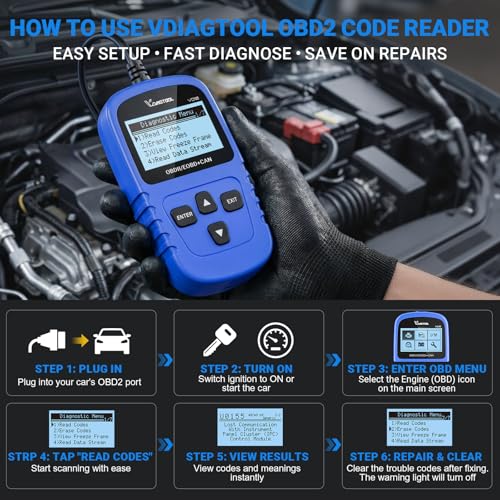
How to Use the VDIAGTOOL VD10
1. Locate the OBD-II Port
Find the 16-pin diagnostic connector, usually underneath the driver’s dashboard.
2. Plug In the VD10
Connect the diagnostic cable securely.
3. Turn the Ignition On
The VD10 receives power through the vehicle.
4. Read Codes
Retrieve stored and pending engine DTCs.
5. Record the DTCs
Do this before erasing anything.
6. Check Freeze Frame
Review the operating conditions associated with the fault.
7. Review Live Data
Compare relevant sensor values when diagnosing the problem.
8. Repair the Vehicle
Correct the underlying mechanical or electrical issue.
9. Clear Supported Codes
Erase the DTC only after diagnosis and repair.
10. Verify I/M Readiness
Check monitor status if an emissions inspection is approaching.
Official VDIAGTOOL Resources
VDIAGTOOL VD10
https://www.vdiagtool.com/products/VD10/
VDIAGTOOL Support
https://www.vdiagtool.com/support
Warranty Information
https://www.vdiagtool.com/about-us/warranty-return
Pro Street Diagnostic Resources
DTC Doctor
https://my.prostreetonline.com/dtc-obdii/
Complete P-Code Library
https://my.prostreetonline.com/dtc-doctor/p-code-obd-ii-codes/
OBD-II Diagnostic Articles
https://my.prostreetonline.com/category/dtc-obdii/
Most Common OBD2 Codes Explained
https://my.prostreetonline.com/2026/07/16/most-common-obd2-codes-explained/
Shop Automotive Diagnostic Tools
Find more code readers, OBD-II scanners and automotive repair tools at:
Final Take
The VDIAGTOOL VD10 OBD2 Scanner is exactly what an entry-level code reader should be:
simple
wired
inexpensive
and:
easy to use.
It gives DIY owners the functions that matter most when a Check Engine Light appears:
read codes
clear supported codes
view live data
check freeze frame
check emissions readiness
and:
retrieve vehicle information.
There is no Bluetooth connection to troubleshoot.
No app to install.
No account to create.
No subscription.
Plug it in and start scanning.
Just keep its limitations clear.
The VD10 is not a full-system ABS/SRS/TPMS scanner, and it should not be marketed as a service-reset or bidirectional tool.
For basic OBD-II engine and emissions diagnosis, however, it gives your catalog a strong branded entry-level option below products like the Autel AL319 and far below BlueDriver or the Innova 5610.
Specification: VDIAGTOOL VD10 OBD2 Scanner — Check Engine Code Reader with Live Data & I/M Readiness
|
User Reviews
Be the first to review “VDIAGTOOL VD10 OBD2 Scanner — Check Engine Code Reader with Live Data & I/M Readiness”
You must be logged in to post a review.



There are no reviews yet.