
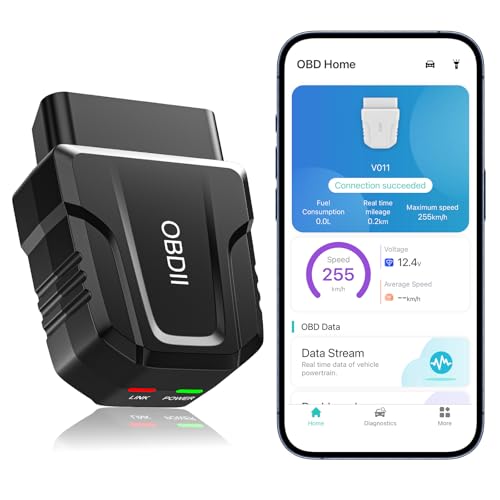


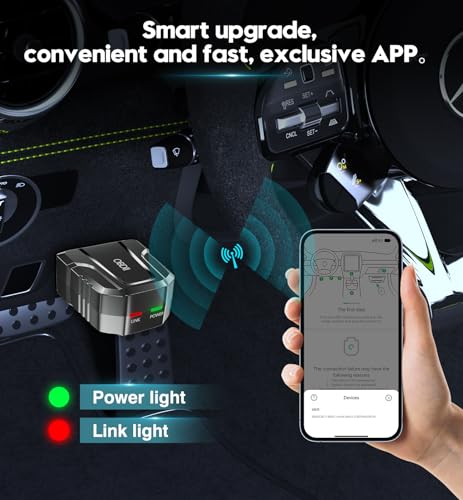
V011 Bluetooth OBD2 Scanner for iPhone & Android — Live Data, Code Reading & Emissions Diagnostics
Turn your smartphone into a convenient vehicle diagnostic tool with the V011 Bluetooth OBD2 Scanner for iPhone and Android.
Designed for DIY mechanics, automotive enthusiasts and drivers who want more information when the Check Engine Light comes on, the V011 connects to a compatible OBD-II vehicle and works with its dedicated mobile application to access common engine and emissions diagnostic information.
Depending on vehicle support, the scanner can help you:
- Read diagnostic trouble codes
- Clear supported engine fault codes
- Turn off the Check Engine Light after a successful repair
- View pending and stored DTCs
- Check emissions readiness monitors
- Monitor live vehicle data
- Retrieve freeze-frame information
- Read vehicle VIN information
- Monitor engine RPM
- View vehicle speed
- Monitor engine coolant temperature
- View control-module voltage
- Review sensor data
- Display live information in graphs
- Generate diagnostic information through the companion app
Instead of guessing why a warning light appeared, the V011 gives you access to the information already being reported by the vehicle’s OBD-II system.
V011 OBD2 Scanner Specifications
| Specification | Details |
|---|---|
| Product | V011 Bluetooth OBD2 Scanner |
| Connection | Bluetooth |
| Advertised Bluetooth Version | Bluetooth 5.4 |
| Mobile Compatibility | iOS and Android |
| Companion Software | Dedicated OBD Home app |
| Trouble Code Reading | Yes, supported OBD-II DTCs |
| Trouble Code Clearing | Yes |
| Check Engine Light Reset | Yes, after supported DTC clearing |
| Live Data | Yes |
| Freeze Frame | Yes, where supported |
| Readiness Monitors | Yes |
| VIN Retrieval | Yes, where vehicle reports VIN through OBD-II |
| Sensor Data | Yes, supported PIDs |
| Data Graphing | Yes |
| Languages | Multiple languages advertised |
| Connection Type | Wireless |
| Recommended Storage | Unplug after use |
$29.99
Read Check Engine Light Codes From Your Phone
The V011 allows compatible iPhone and Android devices to communicate with a vehicle’s OBD-II system.
When the Check Engine Light appears, the scanner can retrieve the stored diagnostic trouble code and provide a starting point for troubleshooting.
Common codes include:
- P0300 — Random or multiple cylinder misfire
- P0301–P0308 — Cylinder-specific misfires
- P0171 — System too lean
- P0172 — System too rich
- P0420 — Catalyst efficiency below threshold
- P0440-series codes — EVAP system problems
- P0500-series codes — Speed or idle-related faults
- P0700 — Transmission control system malfunction notification
Once you retrieve the code, use the Pro Street DTC Doctor to research its meaning, symptoms, causes and proper diagnostic steps:
https://my.prostreetonline.com/dtc-obdii/
You can also browse the complete Pro Street P-Code library:
https://my.prostreetonline.com/dtc-doctor/p-code-obd-ii-codes/
Clear Supported OBD2 Fault Codes
The V011 can send a request to clear supported OBD-II engine trouble codes.
That can also turn off the:
Check Engine Light / MIL
after an appropriate repair has been completed.
However:
Clearing the code does not repair the vehicle.
If the underlying fault remains, the ECU can detect the problem again and turn the light back on.
A better diagnostic process is:
- Read the trouble code.
- Record freeze-frame information.
- Review live data.
- Diagnose the cause.
- Repair the problem.
- Clear the code.
- Verify that the code does not return.
Deleting the warning light without fixing the malfunction is not vehicle repair.
It’s just making the dashboard quieter.
Important Note About the Seller’s Code-Clearing Claim
The source listing says that an unrepaired fault may only be clearable using a dealership computer.
That wording is misleading.
A generic OBD-II scanner can usually request that supported engine DTCs be cleared.
However, if the malfunction remains, the fault can return immediately or after the ECU reruns the applicable monitor.
Some manufacturer-specific codes or modules may require more advanced diagnostic equipment, but an ordinary persistent engine fault does not automatically require dealership hardware simply because the underlying problem has not been repaired.
Live OBD2 Data Monitoring
The V011 can display supported live vehicle information through its mobile application.
Depending on the vehicle, available PIDs may include:
- Engine RPM
- Vehicle speed
- Coolant temperature
- Control-module voltage
- Throttle position
- Engine load
- Intake air temperature
- Fuel trims
- Oxygen sensor information
- Manifold pressure
- Mass airflow
- Ignition timing
- Fuel-system status
Not every vehicle reports every PID.
Available information depends on:
- Vehicle manufacturer
- Model year
- ECU
- OBD-II protocol
- Software support
Graph Live Vehicle Data
One useful feature of the V011 system is its graphical display.
Instead of viewing every parameter as a number, the companion application can plot supported data over time.
This can make it easier to spot:
- Temperature changes
- Voltage drops
- RPM fluctuations
- Fuel-trim movement
- Sensor irregularities
Graphing can be especially useful when troubleshooting intermittent conditions.
Monitor Engine Coolant Temperature
A compatible vehicle may report actual coolant-temperature values through OBD-II.
That can help when diagnosing:
- Overheating
- Thermostat problems
- Cooling fan issues
- Coolant temperature sensor problems
- Slow engine warmup
For additional cooling-system diagnostics, visit:
https://my.prostreetonline.com/
Monitor Engine RPM
The V011 can display engine RPM when the vehicle reports that PID.
RPM data can help investigate:
- High idle
- Low idle
- Stalling
- Throttle problems
- Idle-control faults
For example, if your vehicle stores P0507, see the Pro Street diagnostic guide:
https://my.prostreetonline.com/dtc-doctor/p0507-code-idle-control-system-rpm-higher-than-expected/
Monitor Vehicle Speed
Supported vehicles can transmit vehicle-speed information through OBD-II.
That data can be displayed alongside other engine information inside the application.
This can be useful for:
- Diagnostic testing
- Data logging
- Sensor comparison
- Custom dashboards
Never interact with diagnostic software while driving unless it can be done safely and legally.
Monitor Control-Module Voltage
The app is also advertised as displaying control-module voltage.
Voltage information can help identify situations involving:
- Low battery voltage
- Charging-system problems
- Voltage drops
- Electrical instability
However, OBD-II voltage information should not replace direct electrical testing with a quality digital multimeter when diagnosing a charging or starting problem.
Freeze-Frame Data
Freeze frame can be one of the most useful pieces of OBD-II information.
When certain faults are detected, the ECU may capture a snapshot of operating conditions around the time the code was stored.
Depending on vehicle support, freeze frame may include:
- Engine RPM
- Vehicle speed
- Coolant temperature
- Engine load
- Fuel trim
- Throttle position
- Other available PIDs
That helps answer:
What was the vehicle doing when the fault happened?
A lean condition at idle may point you in a different diagnostic direction from a lean condition under heavy load.
Check Emissions Readiness Monitors
The V011 can display supported OBD-II readiness status.
Readiness monitors help indicate whether the ECU has completed its self-tests for systems such as:
- Catalyst
- Oxygen sensors
- EVAP
- Misfire monitoring
- Fuel system
This can be useful before:
- Smog inspection
- Emissions testing
- Used-car inspection
Learn more through Pro Street’s OBD-II technical library:
https://my.prostreetonline.com/category/dtc-obdii/
For federal emissions information, visit:
https://www.epa.gov/vehicle-and-fuel-emissions-testing
Clearing Codes Can Reset Readiness Monitors
When you clear OBD-II trouble codes, emissions readiness monitors may also reset to:
Not Ready
The ECU may then need to complete specific driving conditions before those monitors become ready again.
That means clearing a code immediately before an emissions inspection can create another reason for the vehicle to fail or be rejected for testing.
Repair first.
Reset second.
Drive cycle third.
Inspection last.
Retrieve Vehicle VIN Information
The V011 is advertised as being able to retrieve the:
Vehicle Identification Number
when the vehicle provides that information through OBD-II.
VIN retrieval can be useful when working with:
- Multiple vehicles
- Used vehicles
- Fleet cars
- Diagnostic reports
Some vehicles may not provide complete VIN information through generic OBD-II, particularly older implementations.
Bluetooth 5.4 Connectivity
The seller describes the V011 as using:
Bluetooth 5.4.
The most useful benefit of Bluetooth connectivity is that it eliminates the cable between the scanner and your phone.
That gives you more flexibility to:
- Sit inside the vehicle
- Monitor data from the driver’s seat
- Position the phone on a mount
- View graphs while performing stationary diagnostics
The Bluetooth version alone does not determine scan speed.
Vehicle protocol, ECU response time, adapter electronics and software can all affect actual diagnostic performance.
V011 OBD2 Scanner for iPhone
The scanner is advertised as compatible with:
Apple iOS devices.
The seller’s instructions specifically state that iPhone users should:
- Turn Bluetooth on.
- Plug the scanner into the vehicle.
- Open the OBD Home app.
- Allow the app to discover the scanner.
The source instructions say not to manually pair the adapter through the normal iPhone Bluetooth settings.
Follow the current app instructions supplied with the unit.
V011 OBD2 Scanner for Android
Android compatibility is also advertised.
Typical setup is:
- Plug the scanner into the OBD-II connector.
- Turn the vehicle ignition on.
- Enable Bluetooth.
- Launch the OBD Home app.
- Follow the application’s connection process.
Exact steps may vary by Android version and device.
Dedicated OBD Home App
The V011 uses a dedicated companion application referred to in the supplied listing as:
OBD Home.
The app is intended to provide:
- Trouble code reading
- Code explanations
- Live data
- Data visualization
- Freeze-frame information
- Diagnostic reports
- Emissions readiness information
Before buying, verify that the app is currently available for your phone’s operating system and that your device meets its current requirements.
How to Connect the V011
Step 1 — Locate the OBD-II Port
Find the vehicle’s 16-pin diagnostic connector.
It is commonly located:
- Under the dashboard
- Near the steering column
- Above the driver’s footwell
- Behind a small dashboard panel
Step 2 — Plug In the Scanner
Insert the V011 securely into the diagnostic connector.
Step 3 — Turn the Ignition On
Depending on the test, the vehicle may need:
- Ignition on
- Engine running
Follow the app instructions.
Step 4 — Enable Bluetooth
Turn Bluetooth on through your phone.
Step 5 — Open OBD Home
Launch the dedicated application.
Step 6 — Connect to the Vehicle
Allow the software to establish communication.
Step 7 — Begin Diagnosis
Read:
- Stored codes
- Pending codes
- Live data
- Freeze frame
- Readiness information
Supports Multiple OBD-II Communication Protocols
The seller advertises support for:
nine OBD-II protocols.
That is intended to provide compatibility across vehicles using different standardized OBD-II communication methods.
Common OBD-II communication families include:
- ISO 9141
- ISO 14230/KWP
- ISO 15765 CAN
- SAE J1850 PWM
- SAE J1850 VPW
Exact protocol support should be confirmed from the manufacturer’s current technical documentation.
Vehicle Compatibility
The seller advertises compatibility with more than:
96% of vehicle makes and models
and lists brands including:
- Toyota
- Honda
- Chevrolet
- Ford
- Mercedes-Benz
- Jeep
- BMW
- Porsche
- Subaru
- Nissan
- Cadillac
- Volkswagen
- Lexus
We recommend treating the “96%” figure as a seller claim rather than a universal guarantee.
Compatibility depends on:
- Country
- Model year
- OBD-II implementation
- ECU
- Fuel type
- Diagnostic protocol
- App support
What Years Does the V011 OBD2 Scanner Work With?
For U.S.-market gasoline passenger vehicles and light trucks, 1996 and newer is the typical starting point for standardized OBD-II compatibility.
Vehicles sold in other markets may have different implementation dates.
A 1996-or-newer model year alone does not guarantee that every advanced function will be available.
Is This OBD2 Scanner Universal?
Not literally.
“Universal OBD2 scanner” is a common marketplace phrase, but no basic diagnostic adapter should be assumed to work with every system on every vehicle.
The V011 is better described as:
a multi-vehicle generic OBD-II diagnostic scanner.
Does the V011 Read ABS Codes?
Do not assume it does.
The supplied feature list focuses primarily on:
OBD-II engine and emissions diagnostics.
Standard generic OBD-II does not guarantee access to:
- ABS
- Airbag/SRS
- TPMS
- Body control
- Electronic parking brake
- Immobilizer
Those systems may require vehicle-specific software and more advanced diagnostic hardware.
Does It Read Airbag Codes?
Basic generic OBD-II compatibility does not automatically include SRS or airbag modules.
If airbag diagnosis is one of your primary requirements, use a scanner that explicitly lists:
SRS/airbag module coverage
for your exact vehicle.
Can It Diagnose Transmission Problems?
Generic OBD-II may provide some transmission-related information.
For example:
P0700
can indicate that the transmission control system has requested the MIL.
Our full P0700 diagnostic guide is available here:
https://my.prostreetonline.com/dtc-doctor/p0700-code-transmission-control-system-malfunction/
However, a basic scanner may not retrieve every manufacturer-specific transmission code stored inside the transmission control module.
Diagnose P0300 Misfire Codes
If the V011 retrieves:
P0300
the ECU has detected random or multiple cylinder misfires.
Possible causes can include:
- Ignition coils
- Spark plugs
- Injectors
- Vacuum leaks
- Fuel pressure
- Compression
- Wiring
Use the code as your starting point rather than immediately purchasing ignition parts.
Browse the P-Code diagnostic library:
https://my.prostreetonline.com/dtc-doctor/p-code-obd-ii-codes/
Diagnose P0171 Lean Codes
A P0171 code indicates:
System Too Lean — Bank 1
Potential causes include:
- Vacuum leak
- Intake leak
- MAF sensor issue
- Low fuel pressure
- Injector problem
- Exhaust leak
- Sensor fault
Our P0171 troubleshooting guide is here:
https://my.prostreetonline.com/dtc-doctor/p0171-code-system-too-lean-bank-1/
Diagnose P0420 Codes
P0420 is another common OBD-II code.
It indicates catalyst-system efficiency has fallen below the threshold expected by the ECU.
That does not automatically mean:
replace the catalytic converter.
Diagnosis may involve:
- Oxygen sensor operation
- Exhaust leaks
- Misfire history
- Fuel control
- Catalyst condition
Start with the code and diagnostic evidence rather than replacing the most expensive component first.
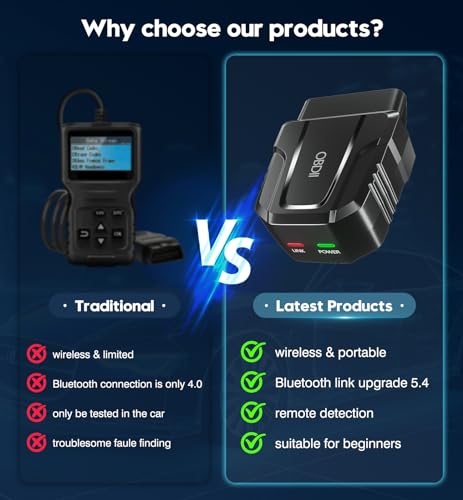
V011 vs Basic Handheld OBD2 Scanner
V011 Bluetooth Scanner
Advantages include:
- Wireless connection
- Smartphone display
- Graphs
- Portable size
- Live-data visualization
Traditional Handheld Scanner
Advantages can include:
- Built-in screen
- No phone required
- Dedicated controls
- No separate app dependency
Which is better depends on how you prefer to diagnose vehicles.
V011 vs Professional Scan Tool
The V011 is best suited to:
- Generic engine DTCs
- Check Engine Light diagnosis
- Live OBD-II data
- Freeze frame
- Emissions readiness
- VIN retrieval
A professional bidirectional scanner may add:
- ABS
- SRS
- Body modules
- Active tests
- Key programming
- Coding
- Adaptations
- Service resets
- Electronic parking brake functions
- Manufacturer-specific data
They are different tool categories.
Useful for Used-Car Inspections
A compact Bluetooth scanner can also be useful when evaluating a used vehicle.
Check for:
- Stored DTCs
- Pending codes
- Readiness status
- Freeze-frame information
- Available live data
If many emissions monitors show:
Not Ready
the ECU may have recently been reset or the battery disconnected.
That does not prove somebody erased trouble codes, but it’s worth asking why.
Helpful for DIY Mechanics
The V011 is particularly useful for:
- Home mechanics
- Car enthusiasts
- First-time DIY diagnostics
- Students
- Used-car shoppers
- Owners of multiple vehicles
It gives you a relatively simple way to see what the ECU is reporting before you start replacing parts.
Multi-Language Support
The supplied product description advertises support for multiple languages, including:
- English
- German
- Spanish
- Finnish
- French
- Italian
- Dutch
- Portuguese
- Chinese
Actual language availability may depend on the current app version.
Diagnostic Reports
The dedicated software is advertised as supporting diagnostic reports.
That can make it easier to document:
- Trouble codes
- Vehicle information
- Diagnostic findings
- Live-data observations
Reports can be particularly useful when discussing a vehicle problem with a mechanic or comparing data before and after a repair.
Unplug the Scanner After Use
The seller recommends removing the V011 when diagnostic work is complete.
That’s good practice.
The vehicle’s OBD-II connector supplies electrical power to the adapter.
While an individual scanner may use relatively little current, leaving accessory devices connected for extended periods can contribute to battery drain.
For long-term parking:
unplug it.
What Comes With the V011?
According to the supplied listing, the package includes:
- V011 Bluetooth OBD2 code reader
- Instruction manual
- Access to the companion application
- Seller troubleshooting support
Confirm current package contents before ordering.
Who Should Buy the V011?
The V011 makes the most sense for someone looking for an affordable mobile tool for:
- Check Engine Light diagnostics
- OBD-II trouble codes
- Live vehicle monitoring
- Freeze-frame data
- Emissions readiness
- VIN retrieval
- Basic DIY troubleshooting
Who Should Buy a More Advanced Scanner?
Consider a more advanced tool if you regularly need:
- ABS diagnostics
- SRS diagnostics
- Bidirectional control
- Electronic parking brake service
- TPMS programming
- Injector coding
- Key programming
- Module coding
- Manufacturer-specific adaptations
Don’t buy a generic OBD-II adapter expecting dealer-level capability.
Shop Automotive Diagnostic Tools
Find automotive tools, diagnostic equipment and replacement parts at:
For additional automotive troubleshooting information, visit:
https://my.prostreetonline.com/
Pro Street OBD-II Diagnostic Resources
Complete DTC Doctor
https://my.prostreetonline.com/dtc-obdii/
P-Series OBD-II Code Library
https://my.prostreetonline.com/dtc-doctor/p-code-obd-ii-codes/
OBD-II Diagnostic Articles
https://my.prostreetonline.com/category/dtc-obdii/
Most Common OBD2 Codes Explained
https://my.prostreetonline.com/2026/07/16/most-common-obd2-codes-explained/
Final Take
The V011 Bluetooth OBD2 Scanner for iPhone and Android gives DIY vehicle owners an easy way to access basic diagnostic information without carrying a traditional handheld scan tool.
Its useful functions include:
reading engine trouble codes
clearing supported codes
checking emissions readiness
viewing live data
retrieving freeze frame
reading VIN information
and:
graphing supported sensor information.
The dedicated mobile app also makes the V011 approachable for someone who is just starting to learn automotive diagnostics.
Just keep its role in perspective.
A scanner can tell you:
what the ECU detected.
It cannot automatically tell you:
which part to buy.
Retrieve the code, study the freeze-frame and live data, then use the Pro Street DTC Doctor to investigate the actual cause:
https://my.prostreetonline.com/dtc-obdii/
That’s how you turn an inexpensive code reader into an actual diagnostic tool.
Specification: V011 Bluetooth OBD2 Scanner for iPhone & Android — Live Data, Code Reading & Emissions Diagnostics
|
User Reviews
Be the first to review “V011 Bluetooth OBD2 Scanner for iPhone & Android — Live Data, Code Reading & Emissions Diagnostics”
You must be logged in to post a review.




There are no reviews yet.