
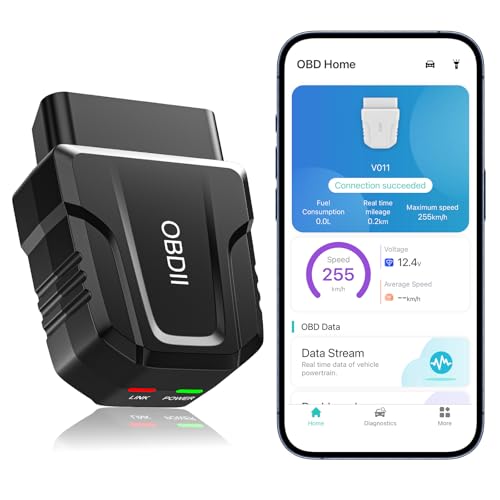


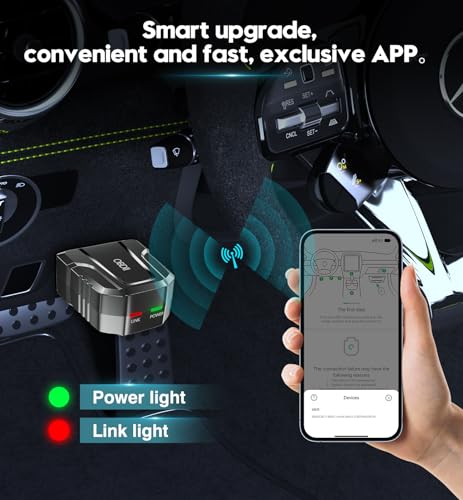
V011 Bluetooth OBD2 Scanner for iPhone & Android
Turn your smartphone into a convenient vehicle diagnostic tool with the V011 Bluetooth OBD2 Scanner for iPhone and Android.
Designed for DIY mechanics, automotive enthusiasts and everyday drivers, the V011 connects to a compatible OBD-II vehicle and works with the dedicated OBD Home mobile application to access common engine and emissions diagnostic information.
Depending on vehicle support, the scanner can help you:
- Read diagnostic trouble codes
- Clear supported engine fault codes
- Turn off the Check Engine Light after a successful repair
- Check emissions readiness monitors
- View live OBD-II data
- Retrieve freeze-frame information
- Read VIN information
- Monitor engine RPM
- View vehicle speed
- Monitor engine coolant temperature
- View control-module voltage
- Display sensor data in graphs
- Record diagnostic information
- Review supported onboard monitor data
Instead of guessing why a warning light appeared, the V011 gives you direct access to information reported by the vehicle’s OBD-II system.
V011 OBD2 Scanner Specifications
| Specification | Details |
|---|---|
| Product | V011 Bluetooth OBD2 Scanner |
| Connection | Bluetooth |
| Advertised Bluetooth Version | Bluetooth 5.4 |
| Mobile Compatibility | iOS and Android |
| Companion App | OBD Home |
| Trouble Code Reading | Yes |
| Trouble Code Clearing | Yes |
| Check Engine Light Reset | Yes, after supported code clearing |
| Live Data | Yes |
| Freeze Frame | Yes, where supported |
| Readiness Monitors | Yes |
| VIN Retrieval | Yes, where vehicle reports VIN |
| Sensor Data | Yes, supported PIDs |
| Data Graphing | Yes |
| Diagnostic Reports | Advertised |
| Supported Protocols | Seller states 9 OBD-II protocols |
| Languages | Multiple languages advertised |
| Recommended Storage | Unplug after use |
$29.99
Read Check Engine Light Codes From Your Phone
The V011 allows compatible iPhone and Android devices to communicate with a vehicle’s OBD-II system.
When the Check Engine Light appears, the scanner can retrieve stored diagnostic trouble codes and give you a starting point for troubleshooting.
Common codes include:
- P0300 — Random or multiple cylinder misfire
- P0301–P0308 — Cylinder-specific misfires
- P0171 — System too lean
- P0172 — System too rich
- P0420 — Catalyst efficiency below threshold
- P0440-series — EVAP system faults
- P0507 — Idle speed higher than expected
- P0700 — Transmission control system malfunction notification
Once you retrieve a code, use the Pro Street DTC Doctor to continue the diagnosis:
https://my.prostreetonline.com/dtc-obdii/
You can also browse the full Pro Street P-Code library:
https://my.prostreetonline.com/dtc-doctor/p-code-obd-ii-codes/
Clear Supported OBD-II Fault Codes
The V011 can request that supported engine trouble codes be cleared.
That may also turn off the:
Check Engine Light / MIL
after the underlying problem has been repaired.
However:
Clearing a code does not fix the vehicle.
If the malfunction remains, the ECU can detect it again and the warning light can return.
The proper process is:
- Read the code.
- Record the code.
- Review freeze-frame data.
- Check live data.
- Diagnose the fault.
- Repair the vehicle.
- Clear the code.
- Verify the fault does not return.
Important Correction About Code Clearing
The supplied marketplace copy says that if the vehicle is not repaired, the fault code can only be cleared using dealership equipment.
That is misleading.
A generic OBD-II scanner can usually request clearing of supported engine DTCs whether or not the underlying problem has been fixed.
If the fault remains, the ECU can simply detect it again.
Some manufacturer-specific modules and fault codes may require more advanced diagnostic equipment, but an unrepaired generic engine fault does not automatically require dealership hardware.
Live OBD2 Data Monitoring
The V011 can display supported live information through the OBD Home app.
Depending on the vehicle, available PIDs may include:
- Engine RPM
- Vehicle speed
- Coolant temperature
- Control-module voltage
- Throttle position
- Engine load
- Intake air temperature
- Fuel trims
- Oxygen sensor information
- Manifold pressure
- Mass airflow
- Ignition timing
- Fuel-system status
Available data depends on the vehicle and ECU.
Graph Live Vehicle Data
The V011 can display supported diagnostic information in graphical form.
The supplied listing describes:
- Line graphs
- Numerical values
- Real-time data visualization
This can make changing values easier to understand than simply watching raw numbers.
Graphing may help when troubleshooting:
- Temperature changes
- Voltage drops
- RPM fluctuations
- Fuel-trim movement
- Sensor irregularities
Monitor Engine Coolant Temperature
A compatible vehicle may report actual coolant temperature through OBD-II.
That can help when investigating:
- Overheating
- Thermostat problems
- Cooling fan issues
- Coolant temperature sensor faults
- Slow engine warm-up
For additional automotive technical information:
https://my.prostreetonline.com/
Monitor Engine RPM
The V011 can display engine RPM when the vehicle reports that PID.
RPM information may be useful when diagnosing:
- High idle
- Low idle
- Stalling
- Throttle problems
- Idle-control faults
For example, if the vehicle stores P0507, see:
https://my.prostreetonline.com/dtc-doctor/p0507-code-idle-control-system-rpm-higher-than-expected/
Monitor Vehicle Speed
Supported vehicles can transmit vehicle-speed information through OBD-II.
The app can display that information alongside other engine data.
This can be useful for:
- Diagnostic testing
- Data logging
- Comparing sensor information
Do not interact with diagnostic software while driving unless it can be done safely and legally.
Monitor Control-Module Voltage
The V011 is advertised as displaying control-module voltage.
This can help provide clues involving:
- Low battery voltage
- Charging-system issues
- Voltage instability
However, OBD-II voltage data should not replace direct electrical testing with a proper digital multimeter when diagnosing charging or starting problems.
Freeze-Frame Data
Freeze frame is one of the most useful standard OBD-II features.
When certain faults are detected, the ECU can save a snapshot of operating conditions around the time the code was stored.
Depending on the vehicle, freeze frame may include:
- Engine RPM
- Vehicle speed
- Coolant temperature
- Engine load
- Fuel trim
- Throttle position
That can help answer:
What was the vehicle doing when the fault occurred?
Check Emissions Readiness Monitors
The V011 can display supported OBD-II readiness information.
Readiness monitors indicate whether the ECU has completed self-tests for systems such as:
- Catalyst
- Oxygen sensors
- EVAP
- Misfire
- Fuel system
This can be useful before:
- Smog inspection
- Emissions testing
- Used-car inspection
For federal emissions information:
https://www.epa.gov/vehicle-and-fuel-emissions-testing
Clearing Codes Can Reset Readiness
When OBD-II trouble codes are cleared, readiness monitors may reset to:
Not Ready.
The vehicle may then need to complete specific driving conditions before those monitors become ready again.
That means clearing a code immediately before an emissions inspection can create another problem.
Repair first.
Clear second.
Complete the drive cycle.
Then verify readiness.
Retrieve Vehicle VIN Information
The V011 is advertised as being able to retrieve:
Vehicle Identification Number information
when the vehicle reports that information through OBD-II.
VIN retrieval can be useful when working with:
- Multiple vehicles
- Used vehicles
- Diagnostic records
Not every vehicle provides complete VIN data through generic OBD-II.
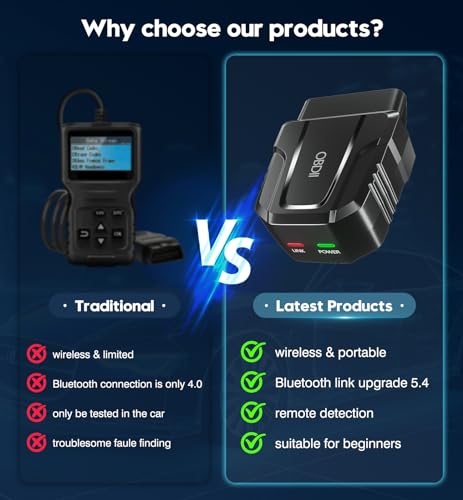
Bluetooth 5.4 Connectivity
The seller describes the V011 as using:
Bluetooth 5.4.
That provides a wireless connection between the scanner and compatible mobile devices.
However, Bluetooth version alone does not determine scan speed.
Actual performance can also depend on:
- Vehicle protocol
- ECU response time
- Adapter hardware
- Mobile device
- Application software
V011 OBD2 Scanner for iPhone
The V011 is advertised as compatible with:
Apple iOS devices.
According to the supplied instructions, iPhone users should:
- Turn Bluetooth on.
- Plug the scanner into the vehicle.
- Open the OBD Home app.
- Allow the application to establish the connection.
The seller specifically says not to manually pair the device from normal iPhone Bluetooth settings.
Follow the current OBD Home instructions for your app version.
V011 OBD2 Scanner for Android
Android compatibility is also advertised.
Typical setup is:
- Plug in the V011.
- Turn the vehicle ignition on.
- Enable Bluetooth.
- Open OBD Home.
- Follow the application’s connection instructions.
Exact steps may vary depending on Android version.
Dedicated OBD Home App
The supplied listing identifies the companion software as:
OBD Home.
The app is advertised as providing:
- Trouble code reading
- Code explanations
- Live data
- Freeze frame
- Readiness information
- Diagnostic reports
- Data visualization
- Vehicle information
Before purchasing, verify that the current app is available for your mobile device and operating system.
Supports Multiple OBD-II Protocols
The seller claims the V011 supports:
nine OBD-II protocols.
Common standardized protocol families include:
- ISO 9141
- ISO 14230 / KWP
- ISO 15765 CAN
- SAE J1850 PWM
- SAE J1850 VPW
The exact nine-protocol implementation should be confirmed from the manufacturer if protocol-level compatibility is important.
Vehicle Compatibility
The marketplace copy claims:
over 96% of car makes and models
and lists brands including:
- Toyota
- Honda
- Chevrolet
- Ford
- Mercedes-Benz
- Jeep
- BMW
- Porsche
- Subaru
- Nissan
- Cadillac
- Volkswagen
- Lexus
I would treat the 96% number as a seller claim rather than a guaranteed compatibility figure.
Actual support depends on:
- Model year
- Market
- ECU
- OBD-II protocol
- App support
- Vehicle implementation
What Years Does the V011 Work With?
For U.S.-market gasoline passenger cars and light trucks, 1996 and newer is the typical starting point for standardized OBD-II.
Vehicles sold outside the United States may have different implementation dates.
Also remember:
1996+ does not mean every advanced feature works on every vehicle.
Is the V011 Universal?
Not literally.
“Universal OBD2 scanner” is common marketplace wording, but no basic adapter should be assumed to work with every module on every vehicle.
A more accurate description is:
multi-vehicle generic OBD-II diagnostic scanner.
Does It Read ABS Codes?
Do not assume ABS support.
The supplied feature list focuses mainly on:
OBD-II engine and emissions diagnostics.
Generic OBD-II does not guarantee access to:
- ABS
- SRS
- TPMS
- Body modules
- Electronic parking brake
- Immobilizer systems
Does It Read Airbag Codes?
Standard OBD-II does not automatically include SRS/airbag module access.
If airbag diagnostics are important, choose a tool that explicitly lists SRS support for your vehicle.
Can It Diagnose Transmission Problems?
Some transmission-related generic codes may be visible.
For example:
P0700
can indicate that the transmission control system has requested illumination of the MIL.
However, the actual manufacturer-specific transmission DTC may require more advanced module access.
See:
https://my.prostreetonline.com/dtc-doctor/p0700-code-transmission-control-system-malfunction/
Diagnose Lean Codes
If the V011 retrieves:
P0171
possible causes can include:
- Vacuum leak
- Intake leak
- MAF sensor issue
- Low fuel pressure
- Fuel injector problem
- Exhaust leak
- Sensor fault
Our P0171 guide:
https://my.prostreetonline.com/dtc-doctor/p0171-code-system-too-lean-bank-1/
Diagnose Misfire Codes
A P0300-series code may involve:
- Spark plugs
- Ignition coils
- Injectors
- Vacuum leaks
- Compression
- Fuel pressure
- Wiring
Do not automatically replace the part most commonly associated with the code.
Use the code as a starting point.
V011 vs Generic ELM327 Adapter
Generic ELM327 Adapter
Typically focuses on:
- Basic engine codes
- Live data
- Third-party apps
- Low-cost OBD-II access
V011
Adds a more integrated experience with:
- Dedicated OBD Home app
- Graphical data
- Freeze frame
- Readiness information
- VIN retrieval
- Diagnostic reports
- Guided app interface
V011 vs TOPDON CarPal
TOPDON CarPal belongs to a higher diagnostic tier with supported features such as:
- Full-system scanning
- Additional vehicle modules
- Maintenance reset functions
The V011 is best positioned as:
an affordable smartphone-based engine and emissions diagnostic scanner.
That keeps the product’s capability clear and avoids overselling it.
V011 vs FIXD
FIXD places more emphasis on:
- Plain-language code explanations
- Maintenance reminders
- Multi-vehicle management
- Optional premium services
The V011 focuses more directly on:
- Generic OBD-II diagnostics
- Live data
- Graphs
- Freeze frame
- Readiness status
Different buyers may prefer one approach over the other.
Used-Car Inspection Tool
The V011 can be useful during a basic used-car inspection.
You can potentially check:
- Stored engine codes
- Pending codes
- Readiness status
- Freeze frame
- Available live data
If several emissions monitors show:
Not Ready
the ECU may have been recently reset.
That does not prove codes were intentionally erased, but it is worth investigating.
Multi-Language Support
The supplied listing advertises support for:
- English
- German
- Spanish
- Finnish
- French
- Italian
- Dutch
- Portuguese
- Chinese
Actual language availability depends on the current app version.
Diagnostic Reports
The OBD Home app is advertised as supporting diagnostic reports.
These can be useful for documenting:
- Trouble codes
- Vehicle information
- Diagnostic findings
That information may be useful when discussing a vehicle problem with a repair shop.
Unplug the Scanner After Use
The seller recommends removing the V011 when diagnostic work is complete.
That is good practice.
The OBD-II port supplies power to the adapter.
Leaving accessory devices plugged in for long periods can contribute to battery drain, especially on a vehicle that sits unused.
For long-term parking:
unplug it.
What Comes With the V011?
According to the supplied listing, the package includes:
- V011 Bluetooth OBD2 scanner
- Instruction manual
- Access to the OBD Home app
- Seller troubleshooting support
Exact package contents should be confirmed before purchase.
Who Should Buy the V011?
The V011 is a good fit for:
- DIY mechanics
- First-time code-reader buyers
- Automotive enthusiasts
- Used-car shoppers
- Drivers who want smartphone diagnostics
- Owners who want live-data graphs
- People who want a compact wireless scanner
Who Needs Something More Advanced?
Consider a full-system scanner if you need:
- ABS diagnostics
- SRS diagnostics
- EPB service
- TPMS programming
- BMS registration
- Bidirectional tests
- ECU coding
- Key programming
The V011 is primarily an:
engine and emissions OBD-II scanner.
Shop Automotive Diagnostic Tools
Find more diagnostic tools, repair products and automotive accessories at:
Pro Street OBD-II Resources
DTC Doctor
https://my.prostreetonline.com/dtc-obdii/
Complete P-Code Library
https://my.prostreetonline.com/dtc-doctor/p-code-obd-ii-codes/
OBD-II Articles
https://my.prostreetonline.com/category/dtc-obdii/
Most Common OBD2 Codes Explained
https://my.prostreetonline.com/2026/07/16/most-common-obd2-codes-explained/
Final Take
The V011 Bluetooth OBD2 Scanner for iPhone and Android gives vehicle owners an affordable way to access useful diagnostic information directly from a smartphone.
Its strongest features include:
engine trouble code reading
supported code clearing
live data
freeze-frame information
emissions readiness
VIN retrieval
and:
graphical sensor monitoring.
It is not a replacement for a professional full-system diagnostic platform, but that is not what this product needs to be.
For someone who wants to understand why the Check Engine Light came on, review live engine data and perform basic OBD-II diagnostics without carrying a traditional handheld scanner, the V011 fills that role well.
Once the scanner retrieves a code, continue the diagnosis with Pro Street:
https://my.prostreetonline.com/dtc-obdii/
Because the scanner finds the code.
The repair still starts with understanding what caused it.
Specification: V011 Bluetooth OBD2 Scanner for iPhone & Android
|
User Reviews
Be the first to review “V011 Bluetooth OBD2 Scanner for iPhone & Android”
You must be logged in to post a review.




There are no reviews yet.