
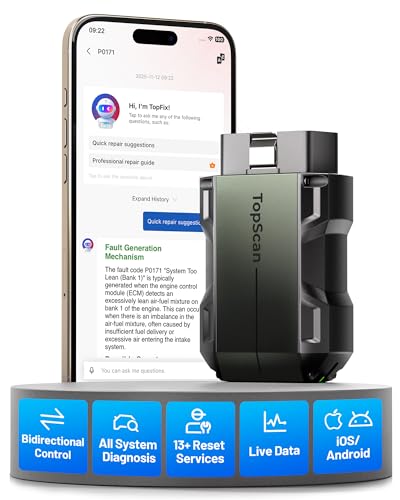
Full-System Diagnostics in a Pocket-Size Scanner
TopScan Pro plugs into the vehicle’s diagnostic connector and communicates with the TOPDON application through Bluetooth.
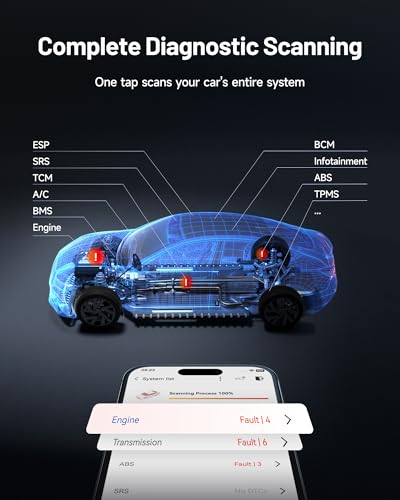
Depending on the vehicle, it can scan systems such as:
- Engine management
- Automatic transmission
- Antilock brakes
- Supplemental restraints
- Electronic power steering
- Body control
- Climate control
- Tire-pressure monitoring
- Battery management
- Electronic parking brake
- Suspension control
- Lighting systems
- Door and window electronics
- Gateway modules
- Driver-assistance systems
- Immobilizer systems
A complete health scan can identify fault codes stored in supported modules across the vehicle.
The app can then generate a report showing:
- Vehicle information
- Scanned control modules
- Current trouble codes
- Historical faults
- Module communication status
- Available code definitions
- Pre-repair and post-repair results
After retrieving a fault, use the My Pro Street DTC Doctor to research its definition, common causes and correct testing sequence.
The dedicated code libraries include:
- P-code OBD-II codes for engine and transmission faults
- B-code OBD-II codes for body and restraint faults
- C-code OBD-II codes for ABS, steering and chassis faults
Bidirectional Control and Active Tests
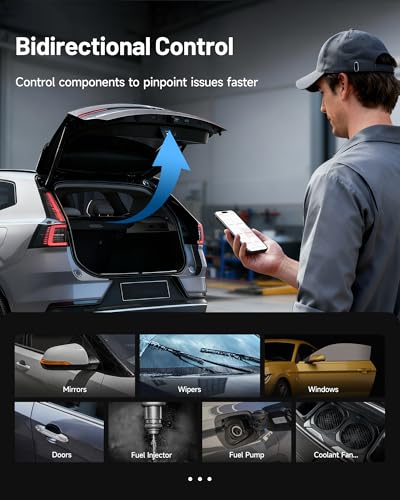
Bidirectional control allows TopScan Pro to send commands to compatible vehicle control modules.
Depending on the vehicle, supported active tests may include:
- Fuel-injector activation
- Fuel-pump operation
- Cooling-fan activation
- Electric coolant-pump testing
- Headlight control
- Horn operation
- Windshield-wiper operation
- Window movement
- Door-lock activation
- Mirror adjustment
- A/C clutch activation
- HVAC actuator control
- Electronic-throttle operation
- EVAP purge-valve testing
- EGR-valve control
- ABS pump cycling
- Electronic parking-brake operation
TOPDON confirms that TopScan can send activation commands to supported actuators and relays, helping technicians evaluate components without immediately disassembling the vehicle. TOPDON Technology USA, Inc
How Active Testing Locates a Fault
Suppose a cooling fan does not operate when the engine becomes hot.
TopScan Pro may allow the technician to command the fan through the engine controller.
The result helps narrow the fault:
- If the fan runs when commanded, the motor and power circuit can operate.
- If it does not run, the fan, relay, wiring, power or ground requires testing.
- If the module cannot command it, the diagnosis may move toward communication, sensor inputs or controller logic.
An active test does not prove which part failed. It creates a controlled operating condition so the circuit can be tested properly.
That is still considerably better than replacing the fan, relay and coolant sensor in alphabetical order.
All 10 Standardized OBD2 Modes
TopScan Pro supports all 10 generic OBD2 test modes on compatible vehicles.
Functions include:
- Reading emissions-related DTCs
- Clearing powertrain codes
- Viewing freeze-frame information
- Monitoring live engine data
- Checking I/M readiness
- Reviewing oxygen-sensor test results
- Viewing onboard-monitor results
- Performing supported component tests
- Retrieving vehicle information
- Reading permanent codes
These standardized engine-diagnostic functions are separate from the manufacturer-specific full-system features.
Diagnose Check Engine Light Problems
TopScan Pro can retrieve powertrain faults involving:
- Ignition misfires
- Fuel delivery
- Airflow measurement
- Manifold pressure
- Electronic throttle control
- Oxygen sensors
- Fuel trims
- EVAP operation
- EGR systems
- Catalyst efficiency
- Variable valve timing
- Turbocharger control
- Diesel aftertreatment
For example, a P0302 code identifies a combustion problem associated with Cylinder 2. It does not automatically condemn the ignition coil.
The P0302 Cylinder 2 misfire guide explains how to separate ignition, fuel, air and mechanical causes.
When misfires affect several cylinders, use the P0300 multiple-cylinder misfire guide to investigate shared problems such as fuel pressure, unmetered air or incorrect sensor data.
Full-System Live Data
With advanced software access, TopScan Pro can display supported live data from different vehicle modules.
The app can present information as:
- Numerical values
- Waveform graphs
- Dashboard-style gauges
- Four-item combined graphs
- Recorded sessions
- Saved diagnostic reports
Available parameters may include:
- Engine speed
- Coolant temperature
- Fuel trims
- Throttle position
- Manifold pressure
- Mass airflow
- Oxygen-sensor readings
- Wheel speeds
- Steering angle
- Transmission temperature
- Commanded gear
- Battery voltage
- Door and switch states
- Climate-control information
Comparing several related values can reveal:
- Intermittent sensor dropouts
- Slow response
- Commanded-versus-actual differences
- Wheel-speed disagreements
- Incorrect pressure relationships
- Temperature changes under load
The P0069 diagnostic guide shows why comparing manifold and barometric-pressure information is more useful than replacing the first sensor mentioned in a generic definition.
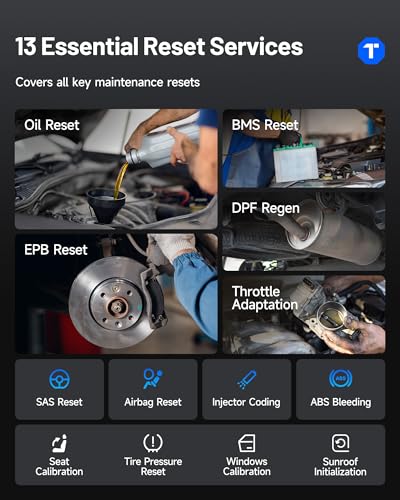
Thirteen Service and Maintenance Functions
TopScan Pro expands the eight Lite services with five additional functions.
Oil-Service Reset
Reset the maintenance reminder after completing the required oil and filter service.
Throttle Adaptation
Relearn electronic-throttle positions after cleaning, replacement or certain battery-disconnection events.
Electronic Parking-Brake Reset
Place supported electronic parking-brake systems into service mode for rear brake work.
Steering-Angle Reset
Calibrate the steering-angle sensor after alignment, steering repair or sensor replacement.
DPF Regeneration
Initiate or assist diesel particulate-filter regeneration on compatible diesel vehicles.
Forced regeneration creates extreme exhaust temperatures and must be performed under the manufacturer’s specified conditions.
Battery Management Reset
Register or initialize a replacement battery on supported vehicles equipped with battery-management systems.
Airbag Reset
Clear supported restraint-system codes after the underlying fault has been repaired.
ABS Bleeding
Cycle compatible ABS hydraulic components during brake bleeding.
Injector Coding
Enter injector calibration or compensation information after injector replacement on supported vehicles.
TPMS Reset
Reset or initialize compatible tire-pressure monitoring systems after tire or sensor service.
Some vehicles require a separate sensor-activation tool.
Sunroof Initialization
Restore supported sunroof position, travel and anti-pinch limits.
Seat Calibration
Calibrate supported power-seat positions, seat modules or occupancy-related functions.
Window Calibration
Relearn supported window travel and anti-pinch limits following repair or power loss.
TOPDON officially lists these 13 TopScan Pro functions, adding injector coding, TPMS reset, sunroof initialization, seat calibration and window calibration to the eight Lite services. TOPDON Technology USA, Inc
Service coverage varies by year, model, system and control module.
TopFix AI Diagnostic Assistant
TopFix AI is TOPDON’s automotive repair assistant integrated into the diagnostic application.
Depending on the vehicle and reported fault, TopFix may provide:
- Plain-language code explanations
- Likely causes
- Related symptoms
- Repair suggestions
- Structured testing directions
- Wiring diagrams
- Component locations
- System schematics
- AI question-and-answer support
- One-click translation
- Saved repair history
TOPDON states that TopFix provides vehicle-aware diagnostic information and professional repair resources such as wiring diagrams and component-location maps. Its unlimited diagnostic-tool access is tied to an active product subscription. HK TOPDON TECHNOLOGY CO.,LIMITED
TopFix can shorten research time, but it does not replace voltage tests, pressure measurements, mechanical inspection or manufacturer service information.
“Likely cause” is not another way to spell “confirmed failed part.”
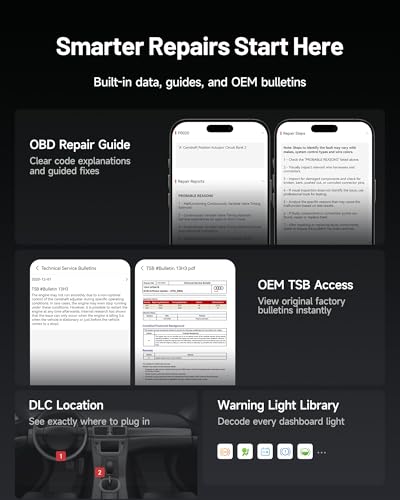
Built-In Repair Intelligence
TopScan Pro also provides supporting information such as:
- Diagnostic trouble-code guides
- Technical Service Bulletins
- Diagnostic connector locations
- Warning-light explanations
- Possible fault causes
- Recommended repair directions
Technical Service Bulletins can be valuable when a recurring fault is linked to:
- Revised software
- Updated wiring
- A known connector problem
- A modified component
- A specific inspection procedure
- A manufacturer-approved repair
Always verify that a TSB applies to the exact model year, engine, transmission and production range.
ABS and Airbag Diagnostics
TopScan Pro can retrieve faults from supported ABS and SRS modules.
Possible ABS problems include:
- Wheel-speed sensor faults
- Damaged tone rings
- Pump-motor circuits
- Hydraulic solenoids
- Steering-angle correlation
- Low-voltage events
- Network communication problems
The C0110 diagnostic guide explains how an ABS pump or motor circuit should be tested before replacing the hydraulic control unit.
Possible SRS faults include:
- Airbag circuits
- Seat-belt pretensioners
- Impact sensors
- Occupant-detection systems
- Clock springs
- Under-seat wiring
- Restraint-control modules
The B0062 code guide provides a code-specific example of restraint-system diagnosis.
Never probe an airbag circuit using an ordinary test light or resistance check unless the manufacturer specifically instructs it.
CAN-FD Support
TopScan Pro supports CAN-FD communication for compatible newer vehicles.
CAN-FD transfers larger data frames at higher speeds than conventional CAN and is used by a growing number of modern vehicle platforms.
Compatible applications may include selected:
- General Motors vehicles
- Chrysler vehicles
- Other late-model platforms
TOPDON currently lists CAN-FD support for TopScan Lite and Pro. DoIP support is reserved for TopScan Master. HK TOPDON TECHNOLOGY CO.,LIMITED
Do not advertise TopScan Pro as a DoIP scanner.
Secure-Gateway Access
TopScan Pro supports authorized gateway access for selected:
- FCA vehicles
- Nissan vehicles
- Renault vehicles
Gateway access may enable protected operations such as:
- Code clearing
- Bidirectional testing
- Service resets
- Full-system diagnosis
Separate manufacturer or third-party accounts may be required.
For FCA vehicles, users may need:
- An AutoAuth account
- Identity verification
- A separate AutoAuth subscription
- Internet connectivity
- Current TopScan software
Gateway fees are separate from the TOPDON TopScan Pro subscription.
The scanner does not bypass manufacturer security. It provides a compatible route for authorized access.
Supported IMMO Functions
TopScan Pro includes supported immobilizer and key-related functionality.
Depending on the vehicle, possible functions may include:
- Detecting key quantity
- Reading supported PIN information
- Key learning
- Remote-control learning
- Key deletion
- Adding replacement keys
- Selected all-keys-lost procedures
TOPDON states that TopScan Pro includes IMMO support for compatible vehicles. Security-related operations may require active NASTF Vehicle Security Professional credentials. TOPDON Technology USA, Inc
IMMO coverage varies substantially. Confirm the exact year, model and key procedure before accepting the job.
TopScan Pro is not a universal key programmer.
AutoVIN and AutoScan
AutoVIN can retrieve the vehicle identification number and load the appropriate diagnostic profile automatically.
AutoScan can then scan supported control modules for faults.
These functions help reduce:
- Manual setup
- Incorrect vehicle selection
- Missed modules
- Repeated entry of vehicle information
AutoVIN does not work on every vehicle. Manual VIN entry and vehicle selection remain available.
Complete Vehicle Health Reports
TopScan Pro can generate reports showing:
- Vehicle identification
- Scanned modules
- Diagnostic trouble codes
- Code status
- Available repair information
- Before-and-after results
A proper workflow includes:
- Perform a complete pre-scan.
- Save the original report.
- Record freeze-frame information.
- Diagnose the underlying fault.
- Complete the repair.
- Clear applicable codes.
- Perform required relearns.
- Road-test the vehicle.
- Run a complete post-scan.
- Confirm that no faults return.
Clearing a code demonstrates that the command worked. A clean post-scan demonstrates that the repair might have worked. The road test and completed monitor provide the rest of the evidence.
I/M Readiness and Emissions Checks
TopScan Pro can display emissions-monitor readiness before a smog inspection.
Common monitors include:
- Misfire
- Fuel system
- Comprehensive components
- Catalyst
- Evaporative emissions
- Oxygen sensor
- Oxygen-sensor heater
- EGR system
- Secondary-air injection
A monitor listed as “not ready” may mean:
- Codes were recently cleared
- The battery was disconnected
- The required drive cycle is incomplete
- Operating conditions have not been satisfied
The scanner can check readiness but cannot guarantee that the vehicle will pass an official inspection.
Performance and Engine-Efficiency Testing
TopScan Pro includes performance-testing tools that may measure:
- Zero-to-60-mph acceleration
- Eighth-mile time
- Quarter-mile time
- Fixed-distance acceleration
- Vehicle speed
- Volumetric efficiency
Use acceleration testing only at a legal motorsports facility, closed course or appropriate private property with permission.
The app can measure acceleration. It cannot explain to law enforcement that the quarter-mile function looked lonely.
Bluetooth 5.0 Wireless Connection
TopScan Pro communicates through Bluetooth 5.0 at a stated distance of up to 33 feet or 10 meters.
Wireless operation lets users:
- Diagnose from the driver’s seat
- Monitor data near the engine
- Observe components during active tests
- Move around a vehicle on a lift
- Avoid routing a cable through the interior
- Conduct supported road-test recording
Remove the adapter during extended periods of non-use unless TOPDON specifically approves continuous connection.
iPhone and Android Compatibility
TOPDON currently lists:
- Android 7.0 or newer
- iOS 11.0 or newer
Android users connect through the TopScan application. Compatible iOS users connect through TOPDON’s TopGuru application family.
Before purchase, confirm:
- Current app availability
- Operating-system support
- Required phone permissions
- Account-registration requirements
- Vehicle compatibility
- Subscription pricing
- Regional feature availability
The supplied listing advertises support for up to 45 app languages. Language selection and availability may vary by operating system, app release and region.
One-Year Advanced Software Access
The purchase includes one year of advanced software access.
During that period, users receive access to applicable features such as:
- Bidirectional active tests
- Thirteen maintenance functions
- Full-system live data
- Full-system code clearing
- Secure-gateway integration
- TopFix AI
- Current software updates
After the first year, TOPDON currently lists renewal at $99 per year for TopScan Pro. TOPDON Technology USA, Inc
Subscription pricing and terms can change. Confirm them through the official app or product listing before purchase.
What Remains Free Without Renewal?
TOPDON currently divides TopScan features into permanently available core functions and subscription-dependent advanced features.
Core Functions Listed as Always Available
- Generic engine inspection
- Full OBD2 modes
- Full-system code reading
- I/M readiness
- Vehicle performance testing
- Volumetric-efficiency calculation
- Repair information
Functions Requiring Renewal
- Bidirectional active tests
- Thirteen maintenance services
- Full-system code clearing
- Full-system live-data streaming
- Secure-gateway access
- TopFix AI
- Continued updated coverage
This means the adapter remains useful as a code-reading and engine-inspection tool without renewal, but its most advanced functions require an active plan.
Buyers should pay close attention to the difference between reading and clearing full-system codes after the subscription expires.
Apparently, knowing the code is free. Persuading it to leave requires a membership.
TopScan Lite vs. Pro vs. Master
| Feature | TopScan Lite | TopScan Pro | TopScan Master |
|---|---|---|---|
| Generic OBD2 modes | Yes | Yes | Yes |
| Full-system scanning | Yes | Yes | Yes |
| Bidirectional testing | Subscription | Subscription | Subscription |
| Maintenance functions | 8 | 13 | 30 |
| IMMO capability | Paid add-on | Included where supported | Included where supported |
| CAN-FD | Yes | Yes | Yes |
| DoIP | No | No | Yes |
| Current annual renewal | $49 | $99 | $129 |
| Best use | DIY diagnosis | Advanced DIY and mobile technicians | Broader professional coverage |
Current pricing and feature packages should be verified before purchase.
What TopScan Pro Does Not Replace
TopScan Pro does not provide:
- SAE J2534 pass-thru programming
- OE network topology mapping
- Broad ECU coding
- Universal online module programming
- DoIP communication
- Oscilloscope hardware
- Complete ADAS calibration equipment
- Heavy-duty truck diagnosis
- Universal key programming
- Permanent subscription-free active tests
It is a capable smartphone diagnostic platform, not a complete dealership programming system.
Who Should Buy TopScan Pro?
TopScan Pro is suited for:
- Advanced DIY mechanics
- Mobile technicians
- Independent repair professionals
- Used-car inspectors
- Multi-car households
- Users needing 13 service functions
- Technicians wanting basic IMMO coverage
- Owners working on newer CAN-FD vehicles
- Users comfortable with smartphone diagnostics
- Buyers who accept the annual software model
Who May Prefer Another Scanner?
Consider a dedicated tablet scanner if you:
- Want a standalone display
- Need permanent bidirectional access
- Dislike recurring subscription fees
- Diagnose vehicles professionally every day
- Require ECU coding or programming
- Need J2534 pass-thru support
- Need DoIP communication
- Require OE topology mapping
- Work without reliable phone or internet access
For more options, see the 7 Best OBD2 Diagnostic Scanners for Garage Builds.
How to Use TOPDON TopScan Pro
- Confirm vehicle and function compatibility.
- Install the appropriate TOPDON application.
- Register or sign into the required account.
- Enable Bluetooth and required permissions.
- Turn the vehicle ignition off.
- Locate the OBD2 diagnostic connector.
- Plug in the TopScan Pro adapter.
- Turn the ignition on as directed.
- Connect through the application.
- Allow AutoVIN to identify the vehicle or select it manually.
- Run a complete vehicle health scan.
- Save the original report.
- Review codes and freeze-frame information.
- Examine relevant live data.
- Research the reported faults.
- Perform active tests only when safe.
- Complete the necessary repairs.
- Clear applicable codes.
- Perform required resets or relearns.
- Road-test the vehicle.
- Run a post-repair scan.
Frequently Asked Questions
Is TopScan Pro a full-system scanner?
It can scan supported modules throughout the vehicle. Coverage varies by model, year and installed equipment.
Does TopScan Pro have bidirectional control?
Yes. Active tests are included during the first year and require an advanced-feature subscription afterward.
What can it activate?
Depending on the vehicle, it may command injectors, fuel pumps, cooling fans, coolant pumps, windows, locks, headlights, wipers, A/C components and other actuators.
How many service functions does TopScan Pro have?
Thirteen.
Which services does it include?
Oil, Throttle, EPB, Steering, DPF, BMS, Airbag, ABS Bleeding, Injector Coding, TPMS, Sunroof, Seat and Window functions.
Does it support injector coding?
Yes, on compatible vehicles.
Does it perform ABS bleeding?
Yes, on supported applications.
Does it support TPMS reset?
Yes. Some vehicles may require a separate sensor-activation tool.
Does it support key programming?
Compatible IMMO functions are included, but coverage varies and security procedures may require NASTF credentials.
Does it support CAN-FD?
Yes, on compatible vehicles.
Does it support DoIP?
No. TOPDON currently reserves DoIP for TopScan Master.
Does it support FCA AutoAuth?
It supports authorized FCA gateway communication, but a separate AutoAuth subscription and credentials may be required.
Does TopFix AI require a subscription?
Yes. TopFix is an advanced subscription feature.
What happens after the first year?
Core code-reading, OBD2, readiness, performance and repair-information functions remain available. Active tests, service functions, code clearing, full-system live data, gateway access and TopFix require renewal.
How much is renewal?
TOPDON currently lists TopScan Pro renewal at $99 per year.
Does it work with iPhone?
Yes. TOPDON currently lists iOS 11.0 or newer.
Does it work with Android?
Yes. Android 7.0 or newer is currently listed.
Can TopScan Pro program ECUs?
No. It is not a J2534 pass-thru programmer or universal ECU programming tool.
Final Verdict
The TOPDON TopScan Pro packs a surprising amount of diagnostic capability into a Bluetooth adapter.
Its strongest features include:
- Full-system scanning
- Bidirectional active tests
- Thirteen maintenance functions
- Supported IMMO procedures
- All 10 OBD2 modes
- CAN-FD support
- Secure-gateway compatibility
- TopFix AI
- AutoVIN and AutoScan
- Repair guides and TSB access
- Four-item live-data graphs
- iPhone and Android support
The key tradeoff is subscription cost. After the included first year, the advanced features that separate TopScan Pro from a basic code reader require a $99 annual renewal under TOPDON’s current U.S. pricing.
For advanced DIY users and mobile technicians, the combination of full-system access, active testing and 13 service functions can offer excellent value. Buyers who want permanent, subscription-free professional functions may be happier with a dedicated diagnostic tablet.
TopScan Pro is a powerful scanner that fits in a pocket. Just remember that after year one, some of that pocket is apparently reserved for the subscription fee.



There are no reviews yet.