


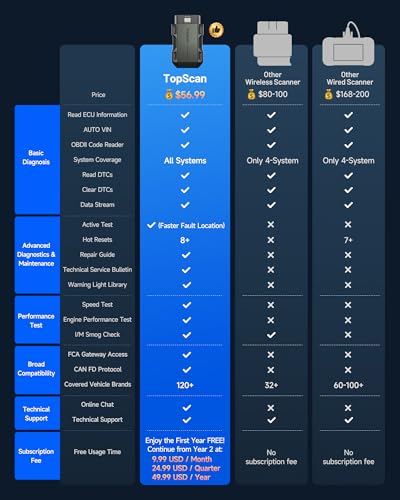


Turn Your Phone Into a Full-System Scanner
TopScan Lite plugs into the vehicle’s OBD2 diagnostic connector and communicates with the TOPDON app through Bluetooth.
Instead of carrying a dedicated scan tablet, users can perform diagnostics through a compatible:
- Android smartphone
- iPhone
- Supported mobile device
The app provides access to supported systems such as:
- Engine management
- Automatic transmission
- Antilock brakes
- Supplemental restraints
- Electronic power steering
- Body control
- Climate control
- Electronic parking brake
- Battery management
- Tire-pressure monitoring
- Suspension control
- Lighting systems
- Door and window electronics
Full-system availability depends on the vehicle. Every manufacturer uses different control modules, communication structures and diagnostic permissions.
A scanner cannot access a module the vehicle does not have, and it cannot perform a command the manufacturer did not expose.
Full-System Diagnostics
A basic OBD2 adapter normally concentrates on emissions-related engine and transmission data. TopScan Lite expands diagnosis across supported vehicle modules.
Users can:
- Run a complete vehicle scan
- Read full-system fault codes
- View ECU information
- Identify modules containing faults
- Generate a vehicle-health report
- Research code definitions
- Access repair information
After TopScan retrieves a fault, use the My Pro Street DTC Doctor to research the code, likely causes and correct testing process.
The dedicated code libraries include:
- P-code OBD-II codes for engine and transmission faults
- B-code OBD-II codes for body and restraint faults
- C-code OBD-II codes for ABS, steering and chassis faults
Reading a code is the start of diagnosis. It is not a digitally signed confession from the part nearest the code description.
Bidirectional Active Tests
TopScan Lite supports bidirectional communication on compatible vehicles while its advanced-feature subscription is active.
A conventional scanner receives information from a control module. A bidirectional scanner can also send supported commands back to the vehicle.
Available tests may include:
- Cooling-fan activation
- Fuel-pump operation
- Injector control
- Headlight activation
- Horn operation
- Windshield-wiper testing
- Window movement
- Door-lock control
- A/C clutch activation
- Electronic-throttle operation
- EVAP purge-valve activation
- EGR-valve control
- ABS pump operation
- HVAC actuator movement
- Electronic parking-brake commands
TOPDON’s current product information confirms that TopScan can command supported actuators and relays to help isolate component faults. TOPDON Technology USA, Inc
Why Active Tests Matter
Suppose a cooling fan does not operate normally.
TopScan may allow the user to command that fan through the engine controller. The response helps narrow the diagnosis:
- If the fan runs, the motor and power circuit can operate.
- If the fan does not run, further circuit testing is necessary.
- If the control module cannot command it, the problem may involve communication, inputs or module logic.
The scanner does not automatically identify the failed wire, relay or motor. It provides a controlled test that reduces unnecessary disassembly.
Available commands vary by manufacturer, model, control module and software version.
All 10 OBD2 Test Modes
TopScan Lite provides all 10 standardized OBD2 modes for compatible vehicles.
These include:
- Reading diagnostic trouble codes
- Clearing emissions-related codes
- Viewing freeze-frame information
- Monitoring live engine data
- Checking I/M readiness
- Reviewing oxygen-sensor tests
- Viewing onboard-monitor results
- Performing supported component tests
- Retrieving vehicle information
- Reading permanent powertrain codes
These engine-inspection features remain useful even when a vehicle does not support every advanced system function.
Check Engine Light Diagnosis
TopScan can retrieve stored, pending and permanent powertrain codes.
It can help diagnose faults involving:
- Ignition misfires
- Fuel delivery
- Oxygen sensors
- EVAP systems
- Electronic throttle control
- Engine temperature
- Airflow measurement
- Manifold pressure
- Catalyst performance
- Turbocharger control
- Variable valve timing
For example, a P0302 code indicates a combustion problem associated with Cylinder 2. It does not automatically prove that the ignition coil failed.
The P0302 Cylinder 2 misfire guide explains how to investigate ignition, fuel, air and mechanical causes.
If the scanner reports misfires across several cylinders, the P0300 multiple-cylinder misfire guide provides a system-wide diagnostic direction.
Full-System Live Data
With an active advanced subscription, TopScan Lite can display supported live data from vehicle control modules.
Depending on the application, that may include:
- Engine speed
- Coolant temperature
- Fuel trims
- Oxygen-sensor values
- Throttle position
- Manifold pressure
- Mass airflow
- Wheel speeds
- Steering angle
- Transmission temperature
- Gear commands
- Battery voltage
- Door and switch states
- Climate-control information
Graphing several related values can expose:
- Intermittent sensor dropouts
- Slow sensor response
- Disagreement between related inputs
- Wheel-speed differences
- Commanded values that do not match actual behavior
The P0069 diagnostic guide demonstrates why comparing related pressure values is more informative than replacing the sensor named in a generic description.
Eight Maintenance Functions
TopScan Lite includes eight advanced service functions during its included first-year access and with a paid subscription afterward.
Oil-Service Reset
Reset the maintenance reminder after completing the required oil and filter service.
Throttle Adaptation
Relearn supported electronic-throttle positions after cleaning, replacement or certain battery-disconnection events.
Electronic Parking-Brake Reset
Place compatible electronic parking brakes into service mode for rear brake work and complete the required initialization.
Steering-Angle Reset
Calibrate the steering-angle sensor after alignment, steering repair, sensor replacement or loss of learned data.
DPF Regeneration
Initiate or assist diesel particulate-filter regeneration on compatible diesel vehicles.
Forced regeneration creates extreme exhaust temperatures and should only be performed under the manufacturer’s specified conditions.
Battery Management Reset
Register or initialize a replacement battery on supported vehicles equipped with battery-management systems.
Airbag Reset
Clear supported SRS codes after the underlying restraint-system fault has been repaired.
An airbag reset does not repair a damaged sensor, clock spring, connector or deployment circuit.
ABS Bleeding
Cycle supported ABS pump and solenoid components during brake bleeding.
Conventional brake bleeding and leak inspection may still be required.
TOPDON officially identifies these eight TopScan Lite services as Oil, Throttle, EPB, Steering, DPF, BMS, Airbag and ABS Bleeding functions. TOPDON Technology USA, Inc
TopFix AI Repair Assistant
TopFix AI provides automotive-specific repair information inside the TopScan application.
Depending on the vehicle and fault, it may supply:
- Plain-language code explanations
- Likely causes
- Related symptoms
- Repair suggestions
- Wiring diagrams
- Component locations
- System schematics
- AI question-and-answer assistance
- Translation tools
- Stored repair history
TOPDON states that TopFix uses vehicle-aware automotive information and provides repair resources such as wiring diagrams and component-location maps. Continued TopFix access requires an active diagnostic-product subscription. HK TOPDON TECHNOLOGY CO.,LIMITED
TopFix can shorten research time, but it does not replace circuit testing, measurements or professional service information.
AI can explain why a relay might not activate. It cannot crawl under the dashboard and discover that someone installed an alarm system using household wire nuts and unearned confidence.
Technical Service Bulletins and Repair Information
TopScan Lite includes access to a repair-information library containing resources such as:
- Diagnostic trouble-code guidance
- Technical Service Bulletins
- Diagnostic-port locations
- Possible fault causes
- Suggested repair directions
- Vehicle-specific technical information
Technical Service Bulletins can be valuable because they document known conditions and manufacturer-approved diagnostic directions.
A repeat fault may require:
- Updated software
- Revised wiring
- A replacement connector
- An updated component
- A specific inspection procedure
Always verify that a bulletin applies to the exact model year, powertrain and production range.
AutoVIN Identification
AutoVIN can retrieve the vehicle identification number and load the appropriate diagnostic software automatically.
This reduces setup time and helps prevent incorrect vehicle selection.
AutoVIN may not work on every vehicle. Manual VIN entry and vehicle selection remain available when necessary.
Vehicle Health Reports
TopScan Lite can generate a complete health report showing supported modules and reported faults.
This helps users:
- Save the original pre-scan
- Identify modules containing codes
- Separate current and historical faults
- Document a used-car inspection
- Share information with a repair shop
- Verify repairs with a post-scan
The original report should be saved before codes are cleared.
A cleared code only proves that the erase command worked. A clean post-scan after the proper drive cycle provides actual repair evidence.
I/M Readiness and Smog Checks
TopScan Lite can check emissions-monitor status before an inspection.
Common readiness monitors include:
- Misfire
- Fuel system
- Comprehensive components
- Catalyst
- Evaporative emissions
- Oxygen sensor
- Oxygen-sensor heater
- EGR system
- Secondary-air injection
A monitor marked “not ready” may mean:
- Codes were recently cleared
- The battery was disconnected
- The drive cycle is incomplete
- Operating conditions have not been satisfied
TopScan can show monitor status but cannot guarantee that the vehicle will pass an official emissions inspection.
Vehicle Performance Testing
The application includes performance-testing tools such as acceleration measurement.
Possible functions include:
- Zero-to-60-mph timing
- Speed measurement
- Acceleration data
- Vehicle performance recording
- Volumetric-efficiency calculation
Acceleration testing should only be performed at a legal motorsports facility, closed course or suitable private property with permission.
Public roads are not dynamometers, despite what the nearest straight on-ramp occasionally whispers.
CAN-FD Support
TopScan Lite supports CAN-FD communication for compatible late-model vehicles.
CAN-FD can transmit larger data frames at higher speeds than conventional CAN communication. It is used by a growing number of newer platforms, including selected General Motors and Chrysler vehicles.
TOPDON currently lists CAN-FD support for TopScan Lite and Pro, while DoIP is reserved for TopScan Master. m.topdon.com
Do not advertise TopScan Lite as a DoIP scanner.
Secure-Gateway Access
TopScan supports authorized gateway access for selected newer vehicles, including:
- FCA secure gateway
- Renault gateway
- Nissan gateway
Gateway access may allow protected functions such as:
- Code clearing
- Active testing
- Maintenance procedures
- Full-system diagnosis
Separate manufacturer or third-party accounts may be required. TOPDON specifically notes that secure-gateway access requires the applicable manufacturer subscription. m.topdon.com
Users may need:
- An AutoAuth account
- Identity verification
- A manufacturer account
- Additional fees
- An active internet connection
- A current TopScan subscription
The adapter does not bypass vehicle security. It provides a supported path for authorized access.
Bluetooth 5.0 Wireless Diagnostics
TopScan communicates through Bluetooth 5.0 at a stated distance of up to 33 feet or 10 meters.
Wireless operation allows users to:
- Diagnose from the driver’s seat
- Monitor readings from the engine bay
- Watch components during active tests
- Move around a vehicle on a lift
- Avoid routing a cable through the cabin
The adapter receives power from the diagnostic connector.
Remove it during extended periods of non-use unless TOPDON specifically approves continuous connection for the vehicle.
Android and iPhone Compatibility
TOPDON currently lists:
- Android 7.0 or newer
- iOS 11.0 or newer
The Android version uses the TopScan application. TOPDON identifies the TopGuru application for compatible iOS devices.
Before purchasing, confirm:
- Current app availability
- Phone operating-system support
- Required permissions
- Account-registration requirements
- Vehicle coverage
- Subscription pricing
- Regional functionality
A compatible phone does not guarantee that every function is supported on a particular vehicle.
TopScan Lite Subscription Explained
TopScan Lite includes one year of advanced features.
After that period, TOPDON currently separates its functions into two groups.
Features Listed as Permanently Free
TOPDON currently lists the following as always-free TopScan Lite and Pro features:
- Full generic OBD2 engine inspection
- Full-system code reading
- I/M readiness
- Vehicle performance testing
- Volumetric-efficiency calculator
- Repair information
Features Requiring a Subscription After Year One
TOPDON currently lists these TopScan Lite functions as subscription-dependent:
- Eight maintenance services
- Bidirectional active tests
- Full-system code clearing
- Full-system live-data streaming
- Secure-gateway access
- TopFix AI
This means the scanner can continue reading full-system codes after the included period, but clearing those full-system codes and accessing advanced data may require renewal.
The official U.S. TOPDON store currently lists TopScan Lite renewal at $49 per year. TOPDON Technology USA, Inc
The supplied retailer description also mentions monthly and quarterly plans. Confirm those options inside the app, as TOPDON’s public U.S. product page presently displays only the annual renewal price.
Subscription terms can change. Review the current app and product listing before purchase.
TopScan Lite vs. TopScan Pro vs. TopScan Master
| Feature | TopScan Lite | TopScan Pro | TopScan Master |
|---|---|---|---|
| Full OBD2 modes | Yes | Yes | Yes |
| Full-system scanning | Yes | Yes | Yes |
| Bidirectional tests | Subscription | Subscription | Subscription |
| Maintenance functions | 8 | 13 | 30 |
| IMMO functions | Optional add-on | Included on compatible vehicles | Included on compatible vehicles |
| CAN-FD | Yes | Yes | Yes |
| DoIP | No | No | Yes |
| Current annual renewal | $49 | $99 | $129 |
| Best use | DIY diagnosis | Advanced DIY and mobile technicians | Broader professional coverage |
Prices and function packages should be verified at the time of purchase.
What TopScan Lite Does Not Do
TopScan Lite should not be confused with a professional programming tablet.
It does not provide:
- J2534 pass-thru programming
- OE network topology mapping
- Broad ECU coding
- Online module programming
- DoIP communication
- Heavy-duty truck diagnosis
- Oscilloscope hardware
- Complete ADAS calibration
- Unlimited subscription-free active tests
Key or immobilizer programming may be available as a paid expansion, but supported security functions can require NASTF credentials and vehicle-specific coverage.
Who Should Buy TopScan Lite?
TopScan Lite is suited for:
- DIY mechanics
- Home garages
- Used-car shoppers
- Mobile technicians
- Multi-car households
- Drivers wanting full-system scans
- Users who need occasional active tests
- Owners comfortable diagnosing through a phone
- Buyers who understand the subscription model
It provides substantial diagnostic capability for a low initial hardware price.
Who May Prefer Another Scanner?
Consider a dedicated scanner if you:
- Dislike subscription-dependent service functions
- Want a standalone screen
- Need permanent bidirectional control
- Perform daily professional diagnostics
- Require ECU coding or programming
- Need DoIP support
- Work without dependable phone or internet access
- Do not want diagnostic capability tied to an app account
For additional options, see the 7 Best OBD2 Diagnostic Scanners for Garage Builds.
How to Use TOPDON TopScan Lite
- Confirm vehicle and function compatibility.
- Install the appropriate TOPDON application.
- Create or sign into the required account.
- Enable Bluetooth and necessary app permissions.
- Turn the vehicle ignition off.
- Locate the OBD2 diagnostic connector.
- Plug in the TopScan adapter.
- Turn the ignition on as directed.
- Connect to the adapter through the app.
- Allow AutoVIN to identify the vehicle or select it manually.
- Run a complete health scan.
- Save the original report.
- Review codes and module status.
- Examine freeze-frame and live data.
- Research the faults before clearing anything.
- Perform active tests only when safe.
- Complete the necessary repair.
- Clear supported codes.
- Perform required relearns or calibrations.
- Run a post-repair scan.
Frequently Asked Questions
Is TopScan Lite a full-system scanner?
It can read codes from supported systems throughout the vehicle. Module and function coverage varies by application.
Does TopScan Lite have bidirectional control?
Yes, during the included first year and afterward with an active advanced-feature subscription.
What active tests can it perform?
Supported tests may include injectors, cooling fans, fuel pumps, headlights, windows, wipers, door locks and A/C components.
How many service functions does TopScan Lite include?
Eight: Oil, Throttle, EPB, Steering, DPF, BMS, Airbag and ABS Bleeding.
Are the eight services permanently free?
No. TOPDON currently lists them as advanced functions requiring a subscription after the first included year.
Can it still read codes without a subscription?
TOPDON currently lists full-system code reading and generic OBD2 engine inspection as always-free functions.
Can it clear codes without a subscription?
TOPDON currently places full-system code clearing in the subscription-required category. Review the current app terms for any distinction involving generic engine-code clearing.
How much does renewal cost?
The current official U.S. annual renewal is listed at $49 for TopScan Lite. Pricing may change.
Does TopScan Lite support CAN-FD?
Yes, on compatible vehicles.
Does it support DoIP?
No. TOPDON currently reserves DoIP for TopScan Master.
Does it support AutoAuth?
It supports compatible secure-gateway access, but a separate manufacturer or AutoAuth account and related fees may be required.
Does TopFix AI require a subscription?
Yes. TOPDON lists TopFix AI as an advanced subscription feature.
Does TopScan Lite work with iPhone?
Yes. TOPDON currently lists iOS 11.0 or newer.
Does it work with Android?
Yes. Android 7.0 or newer is currently listed.
Can it program keys?
Key-programming functions may be offered as a paid expansion. Coverage varies, and supported security operations may require active NASTF credentials.
Can it program an ECU?
No. TopScan Lite is not a J2534 programming device or professional online-programming platform.
Final Verdict
The TOPDON TopScan Lite delivers impressive diagnostic capability from a compact Bluetooth adapter.
Its strongest features include:
- Full-system code reading
- Bidirectional active tests
- All 10 OBD2 modes
- Eight maintenance functions
- AutoVIN identification
- CAN-FD support
- Secure-gateway compatibility
- TopFix AI repair assistance
- Technical Service Bulletins
- Vehicle-health reports
- Smartphone convenience
The tradeoff is the subscription.
After the included first year, the functions that make TopScan Lite especially attractive—active tests, maintenance resets, full-system live data, code clearing, gateway access and TopFix AI—require paid renewal.
Buy it for inexpensive first-year access to advanced smartphone diagnostics and continued basic scanning afterward. Do not buy it under the assumption that every advertised feature remains permanently unlocked.
TopScan Lite is inexpensive hardware attached to a capable software platform. That can still represent excellent value, provided the annual fee does not arrive as a surprise wearing a “continue diagnosis” button.



There are no reviews yet.