

TOPDON CarPal Bluetooth OBD2 Scanner — Full-System Diagnostics, 6 Reset Functions & Smartphone Live Data
Upgrade from a basic check-engine code reader with the TOPDON CarPal Bluetooth OBD2 Scanner, a compact wireless diagnostic tool designed to give DIY mechanics and everyday vehicle owners significantly deeper access to their car’s systems.
Unlike a simple generic OBD-II adapter that focuses primarily on engine and emissions codes, the CarPal is designed for:
- Full-system vehicle health scans
- Read and clear diagnostic trouble codes
- Live data monitoring
- AutoVIN vehicle identification
- Battery testing
- Emissions readiness checks
- Freeze-frame data
- Six common maintenance/reset functions
- Performance testing
- Repair information
- Warning-light explanations
- Diagnostic reports
TOPDON currently lists the CarPal as a compact Bluetooth diagnostic scanner with full-system diagnostics, six maintenance functions, Bluetooth 5.0 connectivity, and support for a broad range of vehicles.
https://www.topdon.us/collections/service-tools/products/carpal
TOPDON CarPal Specifications
| Specification | Details |
|---|---|
| Brand | TOPDON |
| Model | CarPal |
| Product Type | Bluetooth automotive diagnostic scanner |
| Connection | Bluetooth 5.0 |
| Advertised Range | Up to 33 ft / 10 m |
| Smartphone Support | iOS 11.0+ / Android 7.0+ |
| Full-System Scan | Yes, supported vehicles |
| Read / Clear DTCs | Yes |
| Live Data | Yes |
| AutoVIN | Yes |
| Freeze Frame | Yes |
| I/M Readiness | Yes |
| Battery Test | Yes |
| Performance Test | Yes |
| Maintenance Functions | 6 |
| Update Period | 1 year included |
| Vehicle Brand Binding | Up to 3 brands at once |
| Warranty | 1 year, per TOPDON U.S. listing |
$42.99
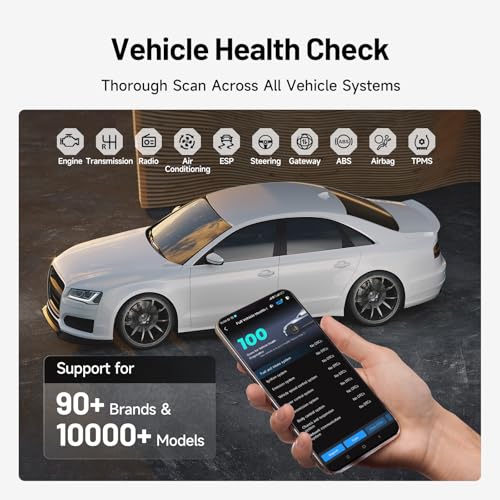
Full-System Vehicle Diagnostics
The biggest advantage of the TOPDON CarPal over a basic Bluetooth OBD2 reader is its ability to perform full-system diagnostics on supported vehicles.
TOPDON states that CarPal can scan systems throughout the vehicle rather than limiting diagnosis to the generic engine-management system.
That can include supported modules associated with systems such as:
- Engine
- Transmission
- ABS
- Airbag/SRS
- Steering
- Body electronics
- Brake systems
- Other manufacturer-specific control modules
Exact system coverage varies by year, make, model and ECU.
Before purchasing, use TOPDON’s vehicle coverage tool:
https://www.topdon.us/pages/vehicle-coverage-tool
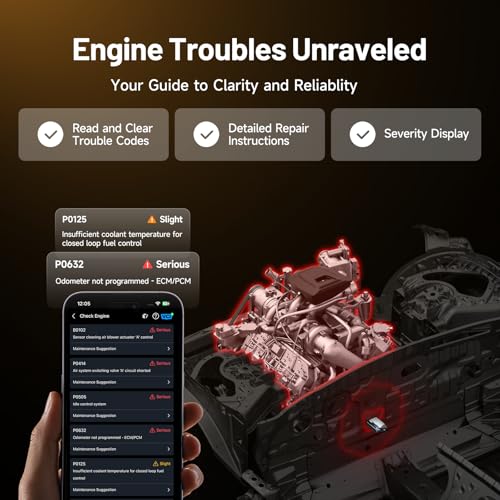
Read and Clear Diagnostic Trouble Codes
CarPal can read and clear supported DTCs from compatible modules.
That can give you considerably more diagnostic information than a basic P-code reader.
For example, a generic scanner may show:
P0301 — Cylinder 1 Misfire
while a full-system scanner may also reveal faults stored in:
- ABS
- SRS
- Body control module
- Steering
- Battery management
- Electronic parking brake
depending on the vehicle.
Once you retrieve an engine DTC, use the Pro Street DTC Doctor to research what the code means:
https://my.prostreetonline.com/dtc-obdii/
You can also browse the full P-Code library:
https://my.prostreetonline.com/dtc-doctor/p-code-obd-ii-codes/
Diagnostic Fault Severity
TOPDON states that CarPal can classify some faults based on severity and provide repair guidance.
This helps users determine whether a fault is:
- Relatively minor
- Potentially urgent
- Worth investigating immediately
That can be useful when several codes are present simultaneously.
However, diagnostic severity should never replace mechanical judgment.
A scanner can prioritize information.
It cannot inspect the failed component for you.
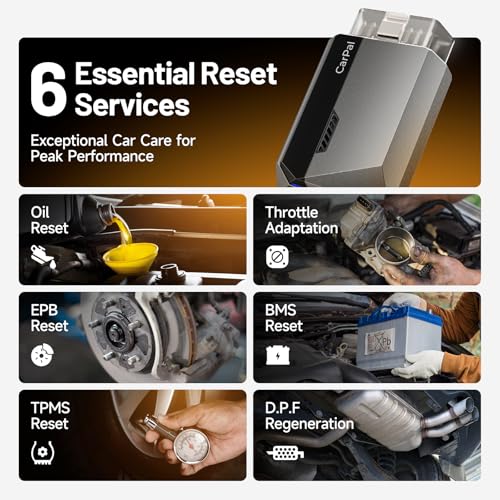
Six Maintenance and Reset Functions
The CarPal includes six commonly used service functions:
- Oil Reset
- Throttle Adaptation
- EPB Reset
- BMS Reset
- TPMS Reset
- DPF Regeneration
TOPDON confirms these six functions in its current CarPal product documentation.
https://www.topdon.com/products/carpal
Oil Service Reset
After completing an oil change, the CarPal can reset supported:
oil maintenance / service reminder systems.
This can restore the vehicle’s maintenance counter so the dashboard reminder accurately tracks the next service interval.
Function availability varies by vehicle.
Electronic Parking Brake Reset
The CarPal supports:
EPB reset
on compatible vehicles.
This can be useful when servicing rear brakes equipped with an electronic parking brake.
Depending on the vehicle, EPB service mode may be required when:
- Replacing rear brake pads
- Retracting electronic calipers
- Completing parking-brake service
Always follow the vehicle manufacturer’s brake-service procedure.
Battery Management System Reset
The CarPal includes:
BMS reset / battery matching
for supported vehicles.
Some modern vehicles monitor battery condition and charging behavior through a battery-management system.
After battery replacement, certain vehicles may require battery registration or BMS reset so the charging system can properly adapt to the new battery.
Throttle Adaptation
The CarPal supports:
throttle adaptation
on compatible vehicles.
This can be useful after certain procedures involving:
- Throttle-body cleaning
- Throttle-body replacement
- ECU reset
- Related engine-management service
Do not perform throttle adaptation unless it is appropriate for the vehicle and repair.
TPMS Reset
TOPDON lists a:
TPMS reset
function among CarPal’s six maintenance services.
This can help reset or relearn supported tire-pressure-monitoring functions after tire or TPMS service.
However, this should not be confused with a dedicated TPMS programming tool.
Sensor programming and new-sensor creation may require additional equipment.
DPF Regeneration
CarPal also supports:
DPF regeneration
on compatible diesel vehicles.
A diesel particulate filter captures soot from exhaust gases.
When required conditions are met, regeneration burns accumulated soot from the filter.
Forced regeneration should only be performed when:
- The vehicle supports the procedure
- The underlying fault has been diagnosed
- All safety conditions are met
Do not initiate DPF regeneration simply to erase a warning light.
Live Vehicle Data
The CarPal can stream supported ECU data directly to your phone.
Depending on the vehicle, available live information can include:
- Engine RPM
- Vehicle speed
- Coolant temperature
- Fuel trim
- Oxygen sensor information
- Throttle position
- Airflow
- Manifold pressure
- Module voltage
- Transmission data
- Other system-specific values
Available parameters vary by vehicle and module.
Graph Multiple Data Streams
TOPDON’s current CarPal materials describe live-data visualization using:
- Numerical values
- Graphs
- Gauge displays
- Multi-stream graphical views
This can make diagnostic patterns easier to recognize than watching numbers alone.
For example, you may be able to compare:
RPM + short-term fuel trim + MAF + O2 sensor data
while troubleshooting a drivability problem.
Record and Replay Diagnostic Data
CarPal can record supported diagnostic data for later review.
That can be useful when tracking intermittent faults that only occur during specific operating conditions.
Instead of trying to memorize every parameter, you can review the recorded data afterward.
AutoVIN Vehicle Identification
CarPal includes:
AutoVIN
to automatically identify supported vehicles.
This helps reduce manual setup when connecting the scanner.
Instead of entering the vehicle information every session, CarPal can attempt to retrieve the VIN and identify:
- Manufacturer
- Model
- Model year
where supported.
Battery Testing
The CarPal includes battery-health monitoring functions.
TOPDON’s documentation states that it can display:
- Real-time battery voltage
- Cranking voltage
This can help identify potential:
- Weak battery conditions
- Low cranking voltage
- Charging-system concerns
For complete battery diagnostics, electrical readings should still be verified using appropriate test equipment when necessary.
Smog Check and I/M Readiness
CarPal includes an:
I/M Readiness / Smog Check
function.
This lets you review emissions-monitor status before taking the car for an official inspection.
Readiness information may include monitors such as:
- Catalyst
- Oxygen sensors
- EVAP
- Fuel system
- Misfire
A scanner cannot guarantee that a vehicle will pass an emissions inspection, but readiness status can help identify whether required OBD-II monitors have completed.
For additional emissions information:
https://www.epa.gov/vehicle-and-fuel-emissions-testing
Don’t Clear Codes Immediately Before Smog
Clearing OBD-II codes may reset emissions monitors to:
Not Ready.
That can create problems during an emissions inspection.
The correct process is:
- Diagnose the fault.
- Repair the problem.
- Clear the code if appropriate.
- Complete the required drive cycle.
- Verify monitor readiness.
- Go to inspection.
For more OBD-II diagnostic information:
https://my.prostreetonline.com/category/dtc-obdii/
Performance Testing
The CarPal includes a vehicle performance-testing function.
TOPDON states that CarPal can measure acceleration, including:
0–60 mph / 0–100 km/h
testing.
This gives enthusiasts a simple way to compare acceleration before and after:
- Repairs
- Maintenance
- Modifications
Always conduct acceleration testing legally and in a safe, controlled environment.
Bluetooth 5.0 Connectivity
The CarPal uses:
Bluetooth 5.0
for wireless communication with the smartphone.
TOPDON lists an operating range of approximately:
33 feet / 10 meters.
That gives users flexibility to view diagnostic information away from the driver’s seat while working around the vehicle.
Works With iPhone and Android
CarPal is designed to work with compatible mobile devices.
TOPDON currently lists:
iOS 11.0 or later
for its CarPal application, while its product materials also support compatible Android devices.
Check current application requirements before purchase.
Smartphone-Based Diagnostic Interface
Using a smartphone as the display provides several practical advantages:
- Larger screen than many small handheld scanners
- Touch interface
- Graphical live data
- Easy software updates
- Portable diagnostic reports
- No separate display hardware
The CarPal adapter itself remains compact enough for a pocket or toolbox.
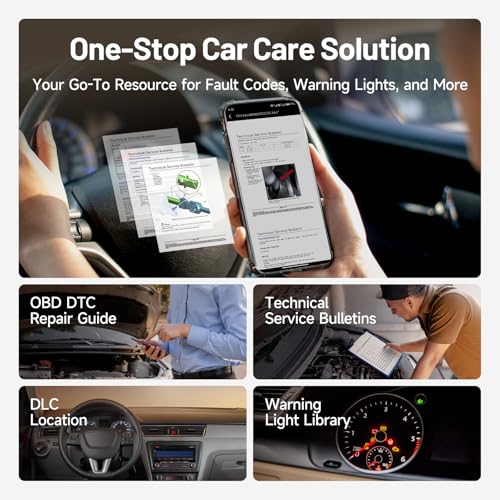
Repair Information
TOPDON advertises repair information as part of the CarPal ecosystem.
This can include:
- DTC explanations
- Possible causes
- Repair guidance
- Diagnostic-port location
- Vehicle information
Having diagnostic information inside the same app can make troubleshooting easier for newer DIY users.
Technical Service Bulletin Information
The supplied product description also advertises access to:
Technical Service Bulletin information.
TSBs can be useful when troubleshooting known manufacturer issues.
A service bulletin may document:
- Known symptoms
- Updated diagnostic procedures
- Revised components
- Software updates
- Repair recommendations
Coverage and availability can vary by vehicle.
Warning Light Library
The CarPal app also includes dashboard-warning information.
This can help explain lights related to:
- Check Engine
- ABS
- Airbag
- TPMS
- Brake system
- Battery
- Other vehicle systems
This is especially useful for new owners who encounter a warning symbol they don’t recognize.
Vehicle Compatibility
TOPDON’s current global CarPal page states that the tool supports approximately:
98% of vehicle models from 1996 through 2023 worldwide.
The U.S. product listing also advertises extensive vehicle coverage and CAN-FD support.
https://www.topdon.com/products/carpal
However, no diagnostic scanner should be assumed to provide every function on every supported vehicle.
Function coverage can depend on:
- Vehicle manufacturer
- Model
- Year
- ECU
- Market
- Software version
Always check TOPDON’s current compatibility database:
https://www.topdon.us/pages/vehicle-coverage-tool
Supports Multiple Vehicle Brands
CarPal is useful for households that maintain multiple vehicles.
However, an important limitation is:
one CarPal can have up to three vehicle brands bound at the same time.
TOPDON’s support documentation confirms that users can remove a previously selected brand and add another where needed.
https://service.topdon.com/portal/zh/kb/articles/topscan-carpal
That makes it suitable for a multi-car household, but it should not be marketed as unlimited-brand storage.
Software Updates and Subscription Costs
This is another detail worth explaining clearly.
TOPDON currently provides:
1 year of software updates
with the CarPal.
According to TOPDON, core functions continue to remain available after that period, while maintenance/service functions can require a software subscription after the included update period.
TOPDON currently lists subscription pricing of approximately:
$29.99 per year
for updates/service access.
Current pricing can change, so buyers should verify subscription terms before purchasing.
https://www.topdon.com/products/carpal
Core Functions That Remain Available
TOPDON states that CarPal will not simply stop working when the update period ends.
Core functions such as:
- Full vehicle health check
- Read and clear codes
- Engine inspection
- Battery testing
- Smog check
remain available according to TOPDON’s current product information.
Maintenance/service function access should be checked against current subscription terms.
CarPal vs Basic Bluetooth OBD2 Scanner
Basic Bluetooth Adapter
Usually focused on:
- Generic engine codes
- Check Engine Light
- Basic live OBD-II data
- Freeze frame
- Emissions readiness
TOPDON CarPal
Adds supported capabilities such as:
- Full-system diagnostics
- Oil reset
- EPB reset
- BMS reset
- TPMS reset
- Throttle adaptation
- DPF regeneration
- AutoVIN
- Battery testing
- Repair guidance
For someone who wants more than basic engine-code reading, that difference can be significant.
CarPal vs Professional Bidirectional Scanner
CarPal offers much deeper functionality than an entry-level OBD-II reader, but it should not automatically be treated as a replacement for TOPDON’s professional diagnostic tablets.
Higher-end tools can offer features such as:
- More service functions
- Advanced active tests
- ECU coding
- Key programming
- Guided diagnostics
- Wider manufacturer-specific coverage
If you need shop-level functions daily, choose a professional tool designed for that workload.
Diagnose Engine Trouble Codes
For engine-related DTCs, use the CarPal to retrieve the code and associated data.
Common examples include:
- P0171
- P0300
- P0301
- P0420
- P0440
- P0507
- P0700
Then use the Pro Street DTC Doctor:
https://my.prostreetonline.com/dtc-obdii/
Diagnose Misfire Codes
A code such as:
P0302 — Cylinder 2 Misfire
does not automatically mean the ignition coil is bad.
Possible causes include:
- Spark plug
- Ignition coil
- Injector
- Compression
- Vacuum leak
- Fuel pressure
- Wiring
CarPal’s live data and full-system information can provide additional evidence before parts are replaced.
Used-Car Inspection Tool
The CarPal can also be useful when inspecting a used vehicle.
You can potentially check:
- Engine codes
- Transmission codes
- ABS faults
- Airbag/SRS faults
- Emissions readiness
- Battery voltage
- Freeze-frame information
- Full-system health report
That is considerably more informative than only looking for a Check Engine Light.
Great for Multi-Car Households
Because CarPal supports numerous manufacturers, it can be a useful tool for households with vehicles from different brands.
For example:
- Honda
- Toyota
- Ford
- Chevrolet
- BMW
- Mercedes-Benz
- Subaru
- Nissan
- Volkswagen
- Lexus
Exact vehicle/function coverage must still be verified.
Compact Mobile Diagnostic Tool
CarPal’s compact Bluetooth design makes it suitable for:
- Glove-box storage
- Toolbox storage
- Road trips
- Used-car inspections
- Home garages
- Mobile diagnostics
Instead of carrying a large diagnostic tablet, you use the smartphone you already have.
Who Should Buy the TOPDON CarPal?
CarPal is a strong fit for:
- DIY mechanics
- Automotive enthusiasts
- Multi-car households
- Used-car buyers
- Drivers maintaining newer vehicles
- Owners who want more than generic OBD-II
- Home garages that need basic service-reset functions
Who Should Buy Something More Advanced?
Consider a professional diagnostic tool if your work regularly requires:
- ECU coding
- Immobilizer programming
- Advanced bidirectional testing
- Dozens of service functions
- Professional shop-level diagnostics
CarPal occupies the useful middle ground between a basic Bluetooth code reader and a much more expensive professional scan tablet.
Shop Automotive Diagnostic Tools
Find additional diagnostic equipment, replacement parts and automotive products at:
Pro Street OBD-II Diagnostic Resources
After CarPal retrieves your engine code, continue troubleshooting with Pro Street.
DTC Doctor
https://my.prostreetonline.com/dtc-obdii/
P-Series OBD-II Codes
https://my.prostreetonline.com/dtc-doctor/p-code-obd-ii-codes/
OBD-II Diagnostic Articles
https://my.prostreetonline.com/category/dtc-obdii/
Most Common OBD2 Codes Explained
https://my.prostreetonline.com/2026/07/16/most-common-obd2-codes-explained/
Official TOPDON Resources
TOPDON CarPal Product Page
https://www.topdon.us/collections/service-tools/products/carpal
TOPDON Vehicle Coverage Tool
https://www.topdon.us/pages/vehicle-coverage-tool
TOPDON Support
https://www.topdon.com/pages/support-main
Final Take
The TOPDON CarPal Bluetooth OBD2 Scanner is a meaningful upgrade from inexpensive engine-only Bluetooth adapters.
Its strongest features include:
full-system diagnostics
six maintenance/reset functions
AutoVIN
live data
battery testing
I/M readiness
freeze frame
repair information
and:
wireless smartphone diagnostics.
For DIY mechanics who want access to more than just generic P-codes, the CarPal sits in a useful middle ground between a basic code reader and a full professional scan tablet.
The six included service functions make it particularly useful for owners of newer cars where simple maintenance jobs can require electronic resets.
And once CarPal finds an engine fault code, use the Pro Street DTC Doctor to dig into the actual diagnosis:
https://my.prostreetonline.com/dtc-obdii/
Because reading the code is easy.
Figuring out why it happened is where the real diagnostic work begins.
Specification: TOPDON CarPal Bluetooth OBD2 Scanner — Full-System Diagnostics, 6 Reset Functions & Smartphone Live Data
|
User Reviews
Be the first to review “TOPDON CarPal Bluetooth OBD2 Scanner — Full-System Diagnostics, 6 Reset Functions & Smartphone Live Data”
You must be logged in to post a review.



There are no reviews yet.