

Read Check Engine Codes
The MP69033 can retrieve supported engine and emissions diagnostic trouble codes stored by the vehicle’s ECU.
Typical codes may include:
- P0171 — System Too Lean
- P0300 — Random/Multiple Cylinder Misfire
- P0301–P0308 — Cylinder-specific misfire
- P0420 — Catalyst Efficiency Below Threshold
- P0440-series — EVAP system faults
- P0507 — Idle Speed Higher Than Expected
- P0700 — Transmission Control System Malfunction notification
Once you retrieve a code, continue diagnosing it with the Pro Street DTC Doctor:
https://my.prostreetonline.com/dtc-obdii/
Complete P-Code library:
https://my.prostreetonline.com/dtc-doctor/p-code-obd-ii-codes/
Built-In DTC Lookup
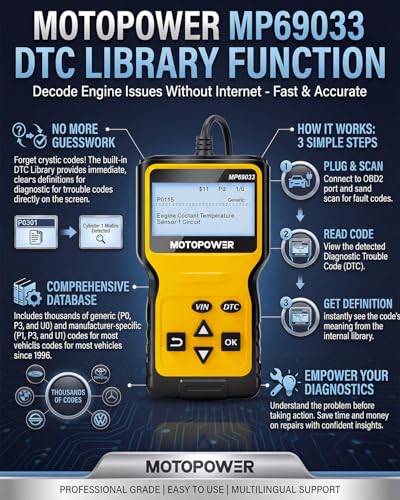
The MP69033 includes a built-in diagnostic trouble code lookup function.
That lets you enter or retrieve a DTC and view its basic definition without immediately reaching for a phone.
For example:
P0302 — Cylinder 2 Misfire Detected
gives you the direction of the fault.
It does not automatically tell you which component is bad.
Possible causes can include:
- Spark plug
- Ignition coil
- Fuel injector
- Low compression
- Vacuum leak
- Wiring fault
- Fuel-delivery issue
A scanner gives you evidence.
It does not eliminate the need for diagnosis.
Read and Clear Codes
The MP69033 can erase supported OBD-II trouble codes after repairs are completed.
The recommended workflow is:
- Scan the vehicle.
- Write down the codes.
- Review freeze-frame data.
- Inspect live data.
- Diagnose the underlying issue.
- Repair the problem.
- Clear the DTC.
- Drive and scan again.
If the fault is still present, the ECU may set the same code again.
Clearing the Check Engine Light Does Not Fix the Problem
Do not treat the erase function as a repair.
Clearing a DTC only removes stored fault information and turns off the MIL when permitted by the ECU.
It does not repair:
- Failed sensors
- Bad ignition coils
- Vacuum leaks
- Catalytic converters
- Fuel pumps
- Injectors
- Wiring problems
If the problem is still present, the light can return.
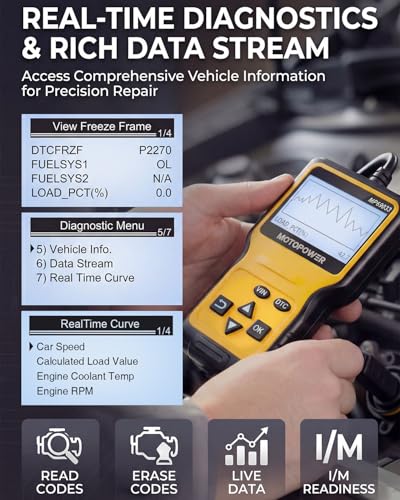
Live Data
One of the MP69033’s more useful features compared with ultra-basic code readers is:
live OBD-II data.
Depending on the vehicle, available parameters can include:
- Engine RPM
- Vehicle speed
- Engine coolant temperature
- Calculated load
- Intake-air temperature
- Short-term fuel trim
- Long-term fuel trim
- Throttle position
- MAF data
- MAP data
- Oxygen-sensor information
- Additional supported PIDs
Not every vehicle reports every parameter.
Why Live Data Matters
A trouble code tells you:
what condition the ECU detected.
Live data helps you see:
what the engine is doing now.
For example, when troubleshooting a lean condition, you might compare:
- Short-term fuel trim
- Long-term fuel trim
- MAF readings
- MAP readings
- Engine RPM
- Coolant temperature
That can help determine whether the fault points toward:
- Vacuum leak
- Air-metering problem
- Fuel delivery
- Sensor bias
- Wiring issue
rather than simply replacing the first sensor mentioned in the DTC description.
Real-Time Curve / Waveform Display
The supplied MP69033 listing advertises:
real-time curve display
for supported live data.
The available MP69033 manual also includes a dedicated:
Waveform Display
function.
This allows certain live parameters to be displayed graphically instead of only as changing numbers.
That can make changing values easier to follow.
Freeze-Frame Data
The MP69033 can retrieve:
freeze-frame information
stored by the PCM with supported DTCs.
Freeze frame may include values such as:
- Engine RPM
- Vehicle speed
- Calculated load
- Coolant temperature
- Fuel trims
- Throttle position
depending on the vehicle.
Freeze-frame data is especially useful with intermittent faults because it gives you a snapshot of what was happening when the ECU detected the problem.
I/M Readiness
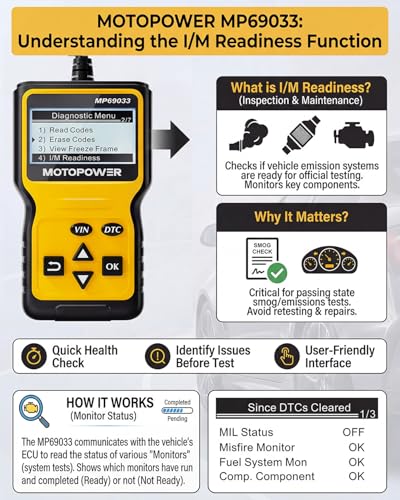
The MP69033 also includes:
I/M readiness monitoring.
This lets you check whether the vehicle’s emissions monitors have completed their self-tests.
Depending on the vehicle, monitored systems may include:
- Misfire
- Fuel system
- Catalyst
- Oxygen sensors
- Oxygen-sensor heater
- EVAP
- EGR/VVT
Check Readiness Before a Smog Inspection
A vehicle may have no Check Engine Light and still have incomplete emissions monitors.
The MP69033 can help you identify monitors showing:
Ready
or:
Not Ready.
This is useful before:
- Smog inspections
- Emissions testing
- Used-car inspections
For general U.S. emissions information:
https://www.epa.gov/vehicle-and-fuel-emissions-testing
Clearing Codes Can Reset Readiness
If you erase DTCs, many vehicles reset their emissions monitors.
Those monitors may then display:
Not Ready.
The vehicle generally needs to complete the appropriate drive cycle before they return to Ready status.
So do not clear codes immediately before an emissions test and assume the vehicle is ready.
Vehicle Information
The MP69033 can retrieve supported vehicle information.
Depending on the ECU, this can include:
- VIN
- Calibration information
- Other standardized OBD-II vehicle data
VIN retrieval can be especially helpful when scanning a used vehicle.
Dedicated VIN Shortcut
The seller describes one of the MP69033’s six physical buttons as providing quick access to:
VIN / vehicle information.
That makes basic identification functions easier to reach than navigating through several menus.
Dedicated DTC Lookup Shortcut
A separate shortcut also provides faster access to:
DTC lookup.
For a basic handheld scanner, those shortcut controls can make the unit simpler to operate than a one-button or two-button budget code reader.
Six-Button Interface
The scanner uses physical buttons for functions such as:
- Up
- Down
- Enter
- Exit
- VIN query
- DTC lookup
This gives the MP69033 a traditional handheld diagnostic-tool interface.
No Smartphone Required
Unlike:
- BlueDriver
- Veepeak
- OBDLink MX+
- Generic ELM327 adapters
the MP69033 does not require a smartphone.
There is no need for:
- Bluetooth pairing
- App compatibility
- App subscriptions
- Mobile service
- Wi-Fi
Plug it into the vehicle and operate it from its built-in screen.
No Batteries Required
The scanner receives power from the vehicle’s Data Link Connector.
The MP69033 manual specifies approximately:
8–15 volts DC
as the input-voltage range.
That means you do not have to charge or replace batteries.
Backlit LCD Display
The seller advertises the MP69033 with an approximately:
2.8-inch LCD screen.
Available product manuals specify:
128 × 64-pixel LCD resolution
with backlighting.
For Pro Street, I would describe it as:
large backlit handheld LCD with 128 × 64 resolution
rather than calling it a high-resolution or color display.
Contrast Adjustment
The scanner includes display contrast adjustment, allowing the screen to be tuned for viewing conditions.
2.5-Foot Diagnostic Cable
The seller specifies an approximately:
2.5-foot cable
with flexible insulation.
That provides enough distance to hold the scanner while seated in the driver’s seat without relying on a wireless connection.
Nine Supported OBD-II Protocol Variants
The MP69033 manual lists nine protocol configurations:
- SAE J1850 PWM
- SAE J1850 VPW
- ISO 9141-2
- ISO 14230-4 KWP — 5-baud initialization
- ISO 14230-4 KWP — fast initialization
- ISO 15765-4 CAN — 11-bit / 500 kbaud
- ISO 15765-4 CAN — 29-bit / 500 kbaud
- ISO 15765-4 CAN — 11-bit / 250 kbaud
- ISO 15765-4 CAN — 29-bit / 250 kbaud
These cover the major standardized communication families used by OBD-II-compliant vehicles.
U.S. Vehicle Compatibility
MOTOPOWER documentation describes compatibility with most:
1996 and newer U.S.-market OBD-II vehicles.
That includes many:
- Cars
- SUVs
- Light trucks
- Domestic vehicles
- Imports
Exact vehicle compliance should still be verified before purchase.
European and Asian Vehicle Compatibility
The seller and manual describe support for many:
2000 and newer European and Asian vehicles
that use the supported OBD-II/EOBD protocols.
Because emissions regulations and implementation dates vary by market, I would not market the year cutoff as universal.
Safer wording:
Compatible with many supported European and Asian OBD-II/EOBD vehicles; verify exact market and model before purchase.
Six Advertised Languages
The seller lists:
- English
- German
- Dutch
- Spanish
- French
- Italian
Language availability may depend on the specific firmware supplied with the unit.
Does the MP69033 Read ABS Codes?
No.
The supplied listing specifically states that:
ABS codes are not supported.
The MP69033 is focused on the standardized OBD-II engine and emissions system.
Does It Read Airbag Codes?
No.
The seller explicitly excludes:
Airbag / SRS diagnostics.
If the airbag warning light is illuminated, use a scanner specifically designed to communicate with the SRS control module.
Does It Diagnose TPMS?
Do not assume dedicated TPMS access.
The MP69033 is not designed as a full-system module scanner.
Does It Reset the Oil-Service Light?
No.
The supplied product description specifically excludes:
Oil Service Light
functions.
Do not advertise it for:
- Oil reset
- Maintenance reset
- EPB reset
- BMS registration
- ABS bleeding
- TPMS programming
- Throttle relearn
- Injector coding
- Key programming
Does It Perform Bidirectional Tests?
No bidirectional control capability should be assumed.
The MP69033 can read ECU information.
It is not designed to command:
- Fuel pumps
- Cooling fans
- Relays
- Solenoids
- Windows
- Electronic parking brakes
For those functions, use a true bidirectional scanner such as an appropriately supported Innova 5610 or higher-level diagnostic platform.
Can It Read Transmission Codes?
Some generic transmission-related OBD-II P-codes may be visible.
For example:
P0700
can indicate that the transmission control module requested illumination of the Check Engine Light.
However, the underlying transmission fault may require direct communication with the TCM.
See:
https://my.prostreetonline.com/dtc-doctor/p0700-code-transmission-control-system-malfunction/
Used-Car Inspection
The MP69033 can be useful for a quick used-car check because it allows you to inspect:
- Stored DTCs
- Pending faults
- Freeze-frame data
- I/M readiness
- VIN information
- Basic live data
If multiple readiness monitors show:
Not Ready
the ECU may have recently been reset or the battery may have been disconnected.
That is not proof that the seller erased codes intentionally, but it is worth investigating.
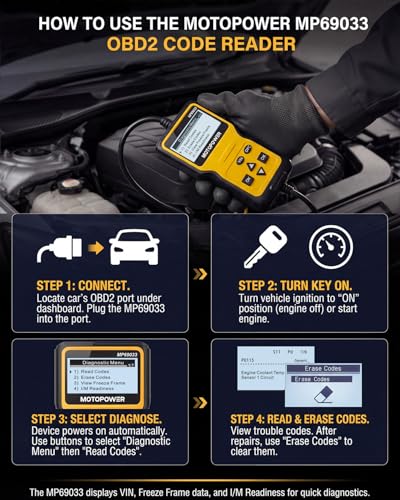
Connection Instructions
Using the MP69033 is straightforward.
1. Locate the OBD-II Port
Find the 16-pin diagnostic connector, normally under the driver’s side dashboard.
2. Connect the Scanner
Plug the scanner cable firmly into the port.
3. Turn the Ignition On
Switch the ignition on.
The unit should receive power from the vehicle.
4. Press OK to Establish Communication
Follow the scanner prompts.
5. Start the Engine for Live Data
The supplied instructions recommend starting the engine when viewing live running parameters.
6. Read Trouble Codes
Save the DTCs before clearing anything.
7. Review Freeze Frame
Check operating conditions associated with the fault.
8. Review Live Data
Compare relevant sensor values.
9. Repair the Underlying Problem
Use proper mechanical and electrical testing.
10. Clear the Code
Erase supported DTCs after repairing the vehicle.
11. Scan Again
Verify the code does not return.
Screen Protective Film
New units may ship with a:
transparent protective film
on the display.
Minor marks visible on a new unit may only be on this removable film rather than on the actual LCD.
MOTOPOWER MP69033 vs Generic M6
These scanners compete closely.
M6
Best for:
- Basic Check Engine diagnostics
- I/M readiness
- Low-cost plug-and-play use
MOTOPOWER MP69033
Adds a clearer feature story around:
- Live data
- Real-time curve display
- Freeze frame
- VIN shortcut
- DTC shortcut
- Nine documented protocol configurations
- Large physical LCD
The MOTOPOWER listing can therefore target shoppers looking for a slightly more capable budget handheld scanner.
MP69033 vs VDIAGTOOL VD10
These two are especially close.
VDIAGTOOL VD10
Best positioned around:
- Branded entry-level diagnostics
- Live data
- Freeze frame
- VIN / calibration information
- Simple handheld operation
MOTOPOWER MP69033
Best positioned around:
- Larger screen
- Waveform display
- Physical shortcut buttons
- Nine-protocol marketing
- Budget DIY diagnostics
Avoid optimizing both pages for identical long-tail phrases.
MP69033 vs Autel AL319
The Autel AL319 remains the more premium basic handheld.
Autel AL319
Adds:
- TFT color display
- One-click I/M readiness
- Readiness LEDs
- Built-in speaker
- Autel support ecosystem
MOTOPOWER MP69033
Focuses on:
- Lower-cost diagnostics
- Large LCD
- Live data
- Waveform viewing
- No-frills operation
MP69033 vs BlueDriver
BlueDriver belongs in a higher diagnostic tier.
MOTOPOWER
Provides:
- Generic OBD-II
- Engine codes
- Freeze frame
- Basic live data
- Readiness
BlueDriver
Adds supported:
- ABS
- SRS
- Transmission
- TPMS
- Enhanced manufacturer diagnostics
- Repair Reports
The MOTOPOWER is for simplicity.
BlueDriver is for broader module diagnosis.
MP69033 vs OBDLink MX+
OBDLink MX+ is designed for advanced app-based diagnostics such as:
- FORScan
- BimmerCode
- AlfaOBD
- Enhanced OEM data
- MS-CAN
- SW-CAN
The MP69033 is a standalone generic OBD-II code reader.
They target very different buyers.
MP69033 vs Innova 5610
The Innova 5610 is a major step up with supported:
- Full-system scanning
- ABS
- SRS
- OEM data
- Bidirectional tests
- Service functions
- Relearns
The MP69033 does not compete in that category.
Who Should Buy the MOTOPOWER MP69033?
The MP69033 makes sense for:
- Beginner DIY mechanics
- Everyday drivers
- Used-car shoppers
- Home garages
- Road-trip kits
- First-time scanner buyers
- Drivers who do not want Bluetooth
- Drivers who do not want smartphone apps
Who Needs a More Advanced Scanner?
Choose another platform if you need:
- ABS diagnosis
- SRS diagnosis
- TPMS module diagnostics
- Bidirectional tests
- Service resets
- Electronic parking brake control
- Battery registration
- ECU coding
- Key programming
The MP69033 is intentionally focused on:
standard OBD-II engine and emissions diagnostics.
Official and Technical Resources
MOTOPOWER Customer Support
EPA Vehicle and Emissions Information
https://www.epa.gov/vehicle-and-fuel-emissions-testing
Pro Street Diagnostic Resources
DTC Doctor
https://my.prostreetonline.com/dtc-obdii/
P-Series OBD-II Code Library
https://my.prostreetonline.com/dtc-doctor/p-code-obd-ii-codes/
OBD-II Articles
https://my.prostreetonline.com/category/dtc-obdii/
Most Common OBD2 Codes Explained
https://my.prostreetonline.com/2026/07/16/most-common-obd2-codes-explained/
Shop Automotive Diagnostic Tools
Browse additional scan tools, code readers and automotive diagnostic products:
Final Take
The MOTOPOWER MP69033 OBD2 Scanner is a straightforward budget diagnostic tool that provides more information than simply displaying a Check Engine code.
Its useful functions include:
reading and clearing DTCs
live data
freeze frame
I/M readiness
vehicle information
and:
real-time waveform viewing.
The physical screen and buttons also mean you do not have to deal with:
- Bluetooth pairing
- Smartphone compatibility
- Apps
- User accounts
- Subscriptions
Plug it in and start diagnosing.
Just keep the capability claims realistic.
The MP69033 does not support:
ABS
SRS / airbag
oil-service reset
or other non-OBD-II system functions.
That makes it best suited to drivers who primarily want to answer one question:
Why is my Check Engine Light on?
For basic engine diagnostics, emissions readiness and simple live-data troubleshooting, the MP69033 gives your catalog another affordable standalone option with a stronger display and data-graphing angle than many ultra-basic code readers.



There are no reviews yet.