


MagSafe-Compatible iPhone Support
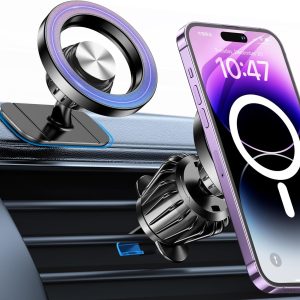
The mount is designed to attach directly to compatible MagSafe iPhones or MagSafe cases, including supported models in these families:
- iPhone 12 series
- iPhone 13 series
- iPhone 14 series
- iPhone 15 series
- Compatible iPhone 16 models
- iPhone 17 series
- iPhone Air
- iPhone 18 Pro
- iPhone 18 Pro Max
- Other models identified by Apple as MagSafe-accessory compatible
Apple’s current MagSafe compatibility information should be used to confirm a specific phone model.
Not every iPhone supports direct magnetic attachment. Models without a MagSafe magnet array may require the included metal ring or a compatible magnetic case.
Android Phone Compatibility
Android compatibility depends on the phone, case and magnetic interface.
The included adhesive metal rings can make many non-MagSafe phones or cases compatible with the mount. However, “all Android phones” should not be interpreted as guaranteed compatibility with every device.
Before installation, verify:
- The ring fits the phone or case.
- The case surface accepts adhesive.
- The phone remains secure at the chosen angle.
- The ring does not interfere with wireless charging.
- The case is not excessively thick.
- The device is not unusually heavy.
- The ring does not cover cameras or sensors.
Phones and cases supporting Qi2 magnetic alignment may attach without an added ring, depending on their construction. Test the connection before driving.
Strong Magnetic Attachment
The circular magnetic face is designed to hold a compatible phone during ordinary driving conditions, including:
- City streets
- Highway driving
- Normal braking
- Routine cornering
- Speed bumps
- Moderately uneven roads
Actual holding strength depends on:
- Phone weight
- Case thickness
- Case material
- Magnet alignment
- Metal-ring placement
- Mount angle
- Dashboard vibration
- Road conditions
A thick, soft or nonmagnetic case can weaken the connection. For best results, use a properly aligned MagSafe-compatible case or install the included ring centrally on a clean, rigid case.
No dashboard mount should be assumed to retain a device during a collision, severe impact or extreme off-road use.
High-Bond Dashboard Adhesive
The mount uses a high-bond adhesive pad to attach its base to the dashboard. Successful installation depends heavily on surface condition and material.
The best mounting surfaces are generally:
- Smooth
- Flat
- Rigid
- Clean
- Dry
- Nonporous
- Free from protectants and wax
Avoid attaching the mount to:
- Heavily textured dashboards
- Soft-touch materials
- Leather or stitched surfaces
- Curved panels
- Silicone-treated plastic
- Airbag covers
- Loose trim
- Cracked panels
- Areas exposed to extreme leverage
- Surfaces with peeling coatings
The adhesive should not be described as compatible with every dashboard. Some automotive plastics and coatings resist adhesive or may become marked during removal.
The mounting-surface preparation principles in our Car Camera Mount Installation Guide also apply here: a clean-looking panel can still contain dressing, oil or residue that weakens adhesion.
360-Degree Viewing Adjustment
An adjustable ball joint allows the magnetic face to rotate and tilt for different viewing positions.
The phone can be configured for:
- Portrait navigation
- Landscape navigation
- Music controls
- Hands-free calls
- Rideshare applications
- Passenger use
- Vehicle-data applications when parked
Position the phone where it can be viewed with a brief glance without blocking the road, mirrors, dashboard indicators or vehicle controls.
Tighten the ball joint sufficiently to hold the selected angle, but do not overtighten it and damage the adjustment mechanism.
Does This Mount Charge the Phone?
No charging feature is stated in the supplied product specifications.
Although the mount uses a MagSafe-style magnetic interface, that does not automatically mean it contains a wireless charger. “MagSafe-compatible” can describe magnetic attachment alone.
The phone must be charged separately using:
- USB-C cable
- Lightning cable where applicable
- Separate wireless charger
- Vehicle charging port
- Compatible power adapter
Keep the charging cable clear of the steering wheel, pedals, gear selector and other controls.
Compact Dashboard Placement
The small mounting base helps reduce visual obstruction compared with larger windshield-mounted holders. It can be positioned on a suitable dashboard area where the screen remains visible without requiring the driver to look significantly downward.
Possible locations include:
- Center dashboard trim
- Upper center stack
- Flat area near the infotainment display
- Passenger-side dashboard for passenger use
- Commercial-driver dashboard area where legally permitted
Never install it:
- Over an airbag cover
- Directly in front of the driver
- Where it blocks windshield visibility
- Over warning lights or gauges
- On movable controls
- Where the phone could strike an occupant
- Where it interferes with factory screens
- Where local law prohibits device mounting
Passenger airbags can deploy with substantial force. Do not place the mount or phone within an airbag deployment path.
How to Install the MagSafe Dashboard Mount
1. Choose the Mounting Position
Sit in the normal driving position and identify a flat location that keeps the phone visible without obstructing the road.
Check:
- Windshield visibility
- Airbag deployment areas
- Steering-wheel clearance
- Shifter movement
- Factory-screen visibility
- Climate-control access
- Charging-cable routing
- Phone clearance in portrait and landscape modes
Test the location with the adhesive backing still covered.
2. Inspect the Dashboard Surface
Confirm that the panel is rigid, smooth and compatible with adhesive mounting.
Do not install over:
- Dashboard seams
- Soft padding
- Raised grain
- Existing adhesive residue
- Protective films
- Cracked trim
- Curved edges
3. Clean the Surface
Use a cleaner approved for the dashboard material. Remove:
- Dust
- Oil
- Silicone dressing
- Interior protectant
- Wax
- Fingerprints
Dry the surface completely. Harsh solvents can discolor or damage interior trim, so do not attack the dashboard with whatever chemical happened to be closest in the garage.
4. Warm the Area if Necessary
Adhesive performs poorly on extremely cold surfaces. Bring the cabin and mounting components to a moderate temperature before installation.
Do not use excessive heat that could deform the dashboard or mount.
5. Remove the Adhesive Liner
Avoid touching the exposed adhesive. Align the base carefully because repositioning it can reduce bond strength.
6. Press the Mount Firmly Into Place
Apply even pressure across the base for the period specified in the product instructions.
Do not load the mount immediately unless the manufacturer permits it. High-bond adhesive commonly needs time to reach useful strength.
7. Install the Metal Ring if Needed
MagSafe-compatible phones and cases generally attach directly. Other devices may require the supplied ring.
Before applying the ring:
- Clean the case.
- Center it around the compatible magnetic or charging area.
- Confirm camera clearance.
- Check wireless-charging requirements.
- Press it evenly.
- Allow its adhesive to cure.
Attaching the ring directly to the phone may leave adhesive residue. Installing it on a replaceable case is usually the more practical approach.
8. Attach and Adjust the Phone
Place the phone centrally on the magnetic face. Rotate and tilt it to the intended viewing angle.
Confirm that the phone does not shift when:
- Tapped lightly
- Rotated
- Connected to a cable
- Positioned horizontally
- Exposed to normal dashboard vibration
9. Perform a Stationary Security Test
With the vehicle parked, gently check the dashboard base, ball joint and magnetic connection.
If any component moves or releases, remove the phone and correct the installation before driving.
10. Recheck After Initial Use
Inspect the adhesive base after the first few drives and during hot or cold weather. Dashboard temperatures can vary dramatically and may affect adhesive performance.
Metal-Ring Installation and Wireless Charging
A metal ring may interfere with wireless charging if installed incorrectly.
To reduce problems:
- Use a ring rather than a solid metal plate when wireless charging is required.
- Center the ring accurately.
- Follow the phone or case manufacturer’s instructions.
- Test charging before permanently attaching the ring.
- Remove cards and sensitive items from between the phone and charger.
Apple warns that credit cards, security badges, passports and key fobs should not be placed between an iPhone and a MagSafe charger because magnetic strips or RFID components may be affected.
This mount is not stated to provide charging, but the warning still matters if the same phone case contains cards or is later placed on a wireless charger.
Useful for Navigation and Rideshare Driving
The mount can provide convenient phone positioning for:
- Apple Maps
- Google Maps
- Waze
- Hands-free calling
- Music playback
- Delivery applications
- Rideshare applications
- Parking applications
- Roadside-assistance apps
Commercial and rideshare drivers should confirm that the selected position complies with local device-mounting rules.
A mount can make a phone easier to see. It does not make typing, scrolling or watching video while driving safe.
Design Patent Information
The product references U.S. Design Patent D1,112,194, issued on February 10, 2026, for the ornamental design of a magnetic car mount.
A design patent protects the illustrated appearance of a product. It does not independently certify:
- Magnetic holding strength
- Crashworthiness
- Adhesive performance
- Phone compatibility
- Charging performance
- Road legality
- Safety testing
The patent can be reviewed through the U.S. Patent and Trademark Office by searching for D1112194.
Common Installation Mistakes
Mounting Over Dashboard Protectant
Silicone-based dressings can prevent adhesive from bonding correctly.
Installing on Textured Plastic
The adhesive needs broad, consistent contact. Deep grain creates gaps and reduces holding strength.
Loading the Mount Immediately
Adhesive may require curing time before supporting the phone.
Misaligning the Metal Ring
Poor alignment weakens magnetic retention and may interfere with wireless charging.
Using an Oversized Case
Thick cases increase the distance between the magnets and reduce holding strength.
Blocking an Airbag
Never mount accessories over an airbag cover or within its deployment path.
Mounting Too Low
A phone positioned far below the driver’s normal sightline can increase the time spent looking away from the road.
Assuming Magnetic Means Wireless Charging
This model is described as a magnetic holder. No integrated charging system is specified.
Removing the Mount
Do not pull the mount straight away from the dashboard with excessive force.
A safer removal process may include:
- Remove the phone.
- Warm the adhesive gently.
- Apply slow, controlled tension.
- Use adhesive-removal line or dental floss if appropriate.
- Clean remaining residue with a trim-safe product.
- Inspect the surface for damage.
Never use metal pry tools against dashboard trim.
Adhesive removal can mark certain soft-touch, painted or leather-covered surfaces. Confirm compatibility before installation.
Frequently Asked Questions
Does this mount charge an iPhone?
No wireless charging capability is listed. It is a magnetic phone holder, not necessarily a MagSafe charger.
Does it fit the iPhone 18 Pro Max?
The product lists compatibility with the iPhone 18 Pro Max. Apple also identifies that model as compatible with MagSafe accessories.
Does it work with older MagSafe iPhones?
Yes. Compatible iPhone 12, 13, 14, 15, 16 and 17 models can attach directly when used without an incompatible case.
Will it work with an Android phone?
Many Android phones can work with the included metal ring or an appropriate magnetic case. Compatibility is not guaranteed for every phone and case combination.
Can I use it with a thick phone case?
A thick or weakly magnetic case may reduce holding strength. A MagSafe-compatible case is recommended for compatible iPhones.
Does it mount to the windshield?
The product is described as an adhesive dashboard mount. Do not attach it to glass unless the manufacturer specifically approves that installation.
Will it stick to a textured dashboard?
Adhesion may be poor on heavily textured, soft or curved surfaces. Use a smooth, rigid mounting area.
Can it rotate into landscape mode?
Yes. The ball joint supports 360-degree adjustment for portrait or landscape positioning.
Is a metal plate required for an iPhone with MagSafe?
No. A compatible MagSafe iPhone and case should attach directly.
Will the metal ring affect wireless charging?
It can if installed incorrectly. Align the supplied ring carefully and test wireless charging before permanent installation.
Is the magnet safe for the phone?
Compatible magnetic mounts are generally designed for modern smartphones. Keep magnetic-stripe cards, key cards and similar sensitive items away from the magnetic interface.
Can I install it over an airbag panel?
No. Never install the mount or phone within an airbag deployment area.
Final Thoughts
This MagSafe-compatible dashboard mount offers a compact way to position a smartphone for navigation, calls and vehicle applications. Its magnetic face provides fast one-handed attachment, while the adjustable ball joint supports portrait and landscape viewing.
For the strongest installation, use a compatible MagSafe case, select a smooth dashboard surface and allow the adhesive adequate time to bond. Android and non-MagSafe phones may work with the included metal rings, but compatibility should be verified instead of declared by royal decree.
Most importantly, mount the phone where it can be seen without blocking the road or becoming the most interesting thing happening while you drive.








There are no reviews yet.