
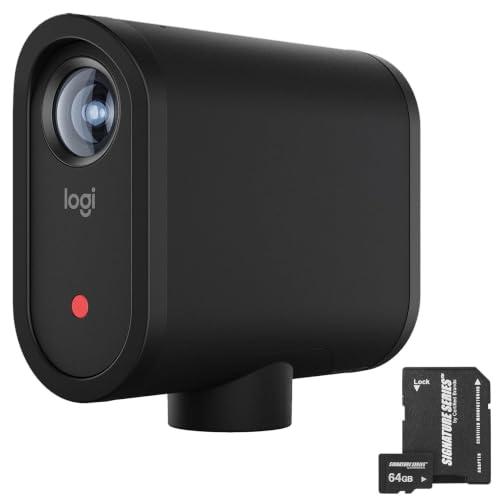


Why wireless streaming matters for automotive creators
Traditional streaming setups often require cameras, capture cards, computers, power supplies, and multiple cables.
The Mevo Start simplifies some of that equipment burden by combining camera capture, audio, and wireless streaming features into one compact device.
For a creator filming at an outdoor automotive event, this can make setup and relocation easier.
A stable internet connection remains essential for dependable live broadcasting.
Multi-Camera Streaming With Up to Three Mevo Start Cameras
The Mevo Start supports compatible multi-camera production through the Mevo Multicam app.
According to the manufacturer, creators can connect up to three Mevo Start cameras for multi-angle HD broadcasting.
This is especially useful for automotive content where a single camera angle may not capture everything happening.
Example: Three-camera automotive garage setup
Camera 1 — Main presentation angle
Position the first camera to capture the host explaining the repair, upgrade, or project.
Camera 2 — Engine bay or workbench
Use a second camera to show mechanical components, tools, or installation details.
Camera 3 — Close-up or alternate angle
Position a third camera to capture another perspective of the work.
The Mevo Multicam app allows the creator to switch between compatible camera feeds.
This can help produce more engaging live demonstrations without relying on a traditional hardware video switcher.
The included bundle contains one Mevo Start camera. Additional cameras must be purchased separately for multi-camera production.
Mevo Multicam App With Auto-Director
The Mevo Start can be controlled through Logitech’s compatible mobile applications.
The Mevo Multicam app provides production features that allow creators to manage connected cameras and switch between video sources.
One of the advertised features is Auto-Director, which can assist with automated camera switching in supported configurations.
For creators who work without a dedicated camera operator, automated production tools can simplify certain broadcasts.
Manual control is also useful when recording technical automotive content where specific details need to remain on screen.
For example, a host demonstrating a brake installation may want to keep the close-up camera active while explaining caliper hardware.
App features, platform compatibility, and supported workflows should be confirmed against the current Mevo software documentation.
Up to Six Hours of Battery-Powered Operation
Portability is another important selling point of the Mevo Start.
The camera features an integrated rechargeable battery with an advertised operating time of up to six hours.
This makes it useful for temporary recording setups where convenient access to AC power may be limited.
For example, a creator could use the camera for a stationary interview booth at a car show or for a series of garage demonstrations.
The camera can also operate while connected to an appropriate external power source, allowing longer recording or streaming sessions.
Actual battery life varies depending on streaming settings, network activity, environmental conditions, and device configuration.
Built-In Microphone and External Audio Options
Good video quality is important, but audio often determines whether viewers stay engaged.
The Mevo Start includes built-in microphone functionality, allowing users to record audio without immediately purchasing a separate microphone.
For basic presentations, interviews, and quiet indoor environments, this can provide a convenient starting point.
However, automotive environments can present challenging recording conditions.
Exhaust noise, shop tools, crowds, and wind can interfere with speech intelligibility.
For more demanding production work, the Mevo Start supports compatible external audio workflows.
An appropriately connected external microphone or audio source may provide better results for interviews, tutorials, and commentary.
Before purchasing external audio equipment, verify the camera’s supported connection types and the current app’s audio-routing capabilities.
Signature Series 64GB microSDXC Card Included
This bundle includes a Signature Series 64GB microSDXC memory card.
The supplied card is described as a Class 10, U3/V30 model and includes an adapter.
The card provides removable storage for compatible recording applications.
Memory card specifications
| Feature | Details |
|---|---|
| Brand | Signature Series |
| Capacity | 64GB |
| Card format | microSDXC |
| Speed class | Class 10 |
| Video speed class | V30 |
| Adapter | Included |
| Intended applications | Compatible HD and 4K-capable devices |
The V30 classification indicates a minimum sustained sequential write speed of 30MB/s under the applicable standard.
That rating does not increase the Mevo Start’s maximum video resolution.
How much 1080p video can a 64GB card hold?
Recording duration depends on the selected bitrate and available formatted capacity.
The following figures are approximate calculations rather than verified Mevo Start recording times.
| Recording bitrate | Approximate theoretical recording time |
|---|---|
| 5 Mbps | 28.4 hours |
| 10 Mbps | 14.2 hours |
| 15 Mbps | 9.5 hours |
| 20 Mbps | 7.1 hours |
Actual recording duration may be lower because of filesystem overhead, recording settings, file management, and other factors.
Why the Mevo Start Is Useful for Automotive Content Creators
Automotive video production presents several challenges that differ from traditional indoor content creation.
Car shows are often crowded, garages can be noisy, and filming locations may not have convenient access to power or wired internet.
The Mevo Start addresses several of these practical considerations through its compact form factor and integrated streaming features.
Live car show coverage
A Mevo Start camera can be positioned at a stationary booth or presentation area to broadcast interviews, event highlights, or vehicle discussions.
Garage repair tutorials
The camera can record a mechanic explaining a repair or installation process.
With additional compatible cameras, creators can add close-up angles of the work.
Automotive podcasts
The camera’s multi-camera compatibility makes it suitable for small discussion setups where hosts want to switch between different speakers.
Product demonstrations
Automotive businesses can use the camera to demonstrate accessories, replacement components, and workshop equipment.
Vehicle walkarounds
The camera can capture stationary vehicle presentations, interior demonstrations, and owner interviews.
For additional automotive technical guides, enthusiast stories, and project-car content, explore My Pro Street Online.
Logitech Mevo Start vs. Traditional Action Cameras
The Mevo Start and conventional action cameras serve different purposes.
A typical action camera is designed around portability, movement, wide-angle footage, and recording in demanding environments.
The Mevo Start emphasizes wireless live production, app control, and multi-camera workflows.
| Feature | Logitech Mevo Start | Typical Action Camera |
|---|---|---|
| Primary purpose | Live streaming and video production | Action and POV recording |
| Maximum advertised resolution | 1080p | Varies, often higher |
| Wireless streaming | Built-in Wi-Fi workflow | Model-dependent |
| Multi-camera app control | Supported | Model-dependent |
| Integrated microphone | Yes | Usually |
| External audio support | Compatible workflows | Model-dependent |
| Battery operation | Up to 6 hours advertised | Model-dependent |
| Best automotive use | Interviews, events, tutorials | Driving POV, track footage, action shots |
For stationary automotive broadcasts and controlled presentations, the Mevo Start may be more convenient than a conventional action camera.
For high-speed driving footage, rugged outdoor recording, or vehicle-mounted action shots, a purpose-built action camera may be more appropriate.
Logitech Mevo Start Camera Specifications
| Specification | Details |
|---|---|
| Brand | Logitech for Creators |
| Camera model | Mevo Start |
| Camera type | Wireless live streaming camera |
| Maximum advertised video resolution | 1080p Full HD |
| Live streaming | Supported |
| Local recording | Supported |
| Wireless connection | Wi-Fi |
| Cellular streaming | Via compatible external LTE internet connection |
| Multi-camera capability | Up to three Mevo Start cameras in advertised setup |
| Mobile app control | Mevo Multicam and compatible Mevo software |
| Automated switching | Auto-Director in supported configurations |
| Built-in microphone | Yes |
| External audio support | Yes, with compatible equipment |
| Battery life | Up to 6 hours advertised |
| External power operation | Supported |
| Included storage | 64GB microSDXC card |
| Memory card rating | Class 10, V30 |
| 4K recording | No |
What’s Included in the Logitech Mevo Start Bundle?
The advertised package includes:
- Logitech Mevo Start all-in-one wireless streaming camera.
- Signature Series 64GB microSDXC memory card.
- Memory card adapter.
Other accessories, including tripods, external microphones, charging accessories, and additional Mevo cameras, should not be assumed to be included unless confirmed by the seller.
How to Set Up the Mevo Start for Live Streaming
Step 1: Charge the camera
Charge the Mevo Start before the recording session or connect it to a compatible external power source.
Step 2: Insert the memory card
Install the included microSDXC card according to the camera instructions.
Confirm that the card is recognized and formatted appropriately.
Step 3: Install the Mevo app
Download the compatible Mevo application on a supported mobile device.
Step 4: Connect to a network
Connect the camera to an appropriate Wi-Fi network.
For cellular streaming, use a compatible hotspot or mobile internet connection.
Step 5: Configure the stream
Select the intended streaming platform and adjust the available video and audio settings.
Step 6: Position the camera
Mount the camera on a stable, compatible support.
For automotive tutorials, choose a position that clearly shows the host and the work area.
Step 7: Test audio and video
Check the camera framing, microphone levels, network performance, and recording settings.
Step 8: Start recording or streaming
Begin the session through the supported application.
For longer broadcasts, consider external power and monitor the internet connection.
Is the Logitech Mevo Start Bundle Worth Buying?
The Logitech Mevo Start remains an interesting option for creators who prioritize simple wireless production over maximum recording resolution.
Its strongest features include 1080p live streaming, app-based camera control, compatible multi-camera operation, and a built-in battery advertised for up to six hours of use.
The included 64GB microSDXC card also adds practical value for local recording.
However, buyers should consider the camera’s Full HD resolution limit and verify current app compatibility and streaming-platform support.
For automotive content creators focused on live car shows, interviews, garage tutorials, and product demonstrations, the Mevo Start offers a useful alternative to more complicated streaming setups.
Final verdict: The Logitech Mevo Start Wireless Live Streaming Camera Bundle is worth considering for creators who want a portable 1080p production camera with wireless streaming, multicamera expansion, and convenient app-based control.
For automotive parts, performance upgrades, and replacement components featured in your videos, visit Pro Street Online.
Editorial note: Product specifications and bundle contents are based on the supplied seller description. No independent hands-on testing has been performed. Confirm current app compatibility, platform support, and bundle contents before purchasing.



There are no reviews yet.