

Read Check Engine Codes
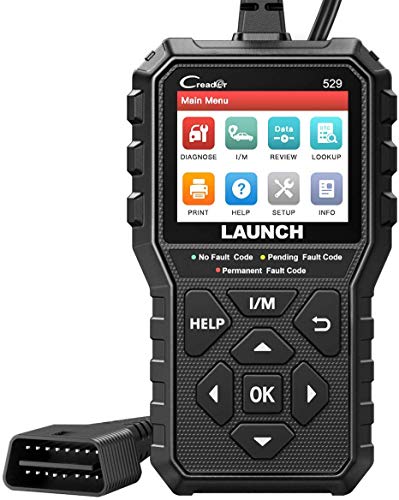
The CR529 can retrieve supported OBD-II engine and emissions diagnostic trouble codes.
Typical examples include:
- P0171 — System Too Lean Bank 1
- P0300 — Random/Multiple Cylinder Misfire
- P0301–P0308 — Cylinder-specific misfires
- P0420 — Catalyst Efficiency Below Threshold
- P0430 — Catalyst Efficiency Below Threshold Bank 2
- P0440-series — EVAP system faults
- P0507 — Idle Speed Higher Than Expected
- P0700 — Transmission Control System Malfunction notification
After retrieving a code, continue diagnosis with the Pro Street DTC Doctor:
https://my.prostreetonline.com/dtc-obdii/
Browse the complete P-Series OBD-II code library:
https://my.prostreetonline.com/dtc-doctor/p-code-obd-ii-codes/
Read and Clear Supported DTCs
The CR529 can retrieve and erase supported engine and emissions DTCs.
A proper diagnostic workflow is:
- Scan the vehicle.
- Record stored and pending codes.
- Review freeze-frame data.
- Inspect relevant live-data PIDs.
- Use Mode 6 where appropriate.
- Diagnose the actual fault.
- Complete the repair.
- Clear the supported DTC.
- Drive the vehicle.
- Scan it again.
Clearing the Code Does Not Fix the Car
Erasing a trouble code does not repair:
- Failed sensors
- Ignition problems
- Vacuum leaks
- Fuel-delivery faults
- Catalytic-converter problems
- Wiring issues
If the original problem remains, the ECU can detect it again and reset the code.
A DTC Is Diagnostic Evidence
Suppose the scanner displays:
P0171 — System Too Lean Bank 1
Potential causes can include:
- Vacuum leak
- Intake leak
- MAF problem
- Fuel-pressure problem
- Injector issue
- Exhaust leak
- Oxygen-sensor fault
- Wiring problem
See:
https://my.prostreetonline.com/dtc-doctor/p0171-code-system-too-lean-bank-1/
The scanner tells you what condition the ECU saw.
Further testing tells you why.
Live Data
The CR529 can display supported real-time OBD-II data.
Depending on the vehicle, available parameters can include:
- Engine RPM
- Vehicle speed
- Coolant temperature
- Intake-air temperature
- Calculated engine load
- Throttle position
- Short-term fuel trim
- Long-term fuel trim
- MAF data
- MAP data
- Oxygen-sensor values
- Fuel-system status
- Additional supported PIDs
Not every vehicle supports every parameter.
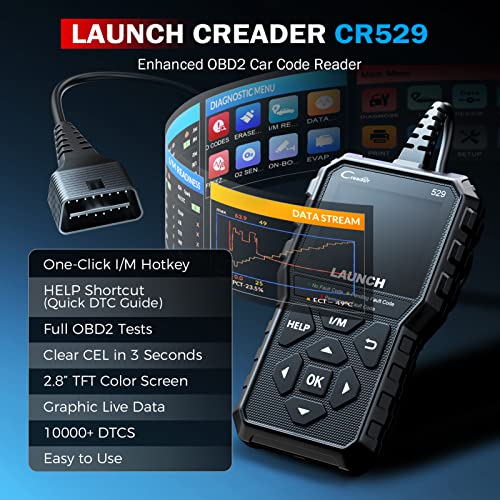
Graphical Live Data
The CR529 can display supported live data in:
text or graph format.
Graphing is especially useful when looking for:
- Sensor dropouts
- Fuel-trim trends
- Temperature changes
- O2 sensor switching
- Throttle irregularities
- MAF response
This gives the CR529 a stronger troubleshooting angle than inexpensive scanners that display only static numbers.
Data Recording
The CR529 also advertises:
live-data recording.
That allows diagnostic information to be captured for later review.
This can be useful when the problem occurs:
- During acceleration
- At highway speed
- Under load
- After warm-up
- During a specific drive condition
Playback Recorded Data
Recorded diagnostic data can be replayed after the test.
This allows the technician or owner to review a problem without trying to operate the scanner while driving.
For road testing, have a passenger operate the scan tool whenever interaction is required.
Diagnostic Reports
The CR529 can create diagnostic report information that helps organize:
- DTC results
- Vehicle information
- Scan findings
This provides a useful record before and after repairs.
Print Reports Through a PC
The seller advertises PC-based report printing.
This is a useful feature for:
- DIY maintenance records
- Customer records
- Pre-purchase inspections
- Repair documentation
I would avoid promising direct email capability unless the exact software workflow used with your inventory confirms it.
Freeze-Frame Data
The CR529 can retrieve:
freeze-frame information
stored by the ECU with qualifying DTCs.
Freeze-frame data may include:
- RPM
- Speed
- Coolant temperature
- Engine load
- Fuel trims
- Throttle position
depending on the vehicle.
This helps determine the conditions under which the fault occurred.
Mode 6 Onboard Monitoring
LAUNCH’s current OBD-II product documentation identifies:
On-board Monitoring
as part of this class of CReader scanner.
This corresponds to OBD-II Mode 6 functionality on supported vehicles.
Mode 6 can provide test-result information associated with:
- Misfire monitoring
- Catalyst monitoring
- O2 sensor tests
- EVAP monitoring
- Other emissions-related onboard tests
Why Mode 6 Matters
A vehicle can have a developing emissions problem before it produces a mature Check Engine DTC.
Mode 6 may provide additional monitor data that helps identify a component or system approaching a failure threshold.
It is especially valuable when diagnosing:
- Intermittent misfires
- Marginal catalytic converters
- O2 sensor performance
- EVAP problems
Mode 6 Is Not OE-Level Full-System Diagnostics
The seller uses the phrase:
“OE-Level features.”
That overstates what the CR529 is designed to do.
The scanner provides advanced OBD-II functions.
It should not be marketed as having factory-level access to:
- ABS modules
- Airbag modules
- BCMs
- Full TCM systems
- Immobilizer systems
- Coding functions
- Programming functions
A better description is:
advanced OBD-II engine and emissions diagnostics.
Mode 8 / EVAP Testing
LAUNCH documents EVAP-system integrity testing on this OBD-II scanner class.
This is generally associated with:
OBD-II Mode 8
component-control/test requests.
On supported vehicles, the scanner may request an EVAP system test.
EVAP Test Does Not Mean Smoke Testing
The CR529 is not an EVAP smoke machine.
It cannot physically show you where a leak is located.
An EVAP Mode 8 test request may help the vehicle initiate a supported onboard test, but a physical leak may still require:
- Smoke testing
- Pressure testing
- Hose inspection
- Valve testing
Do not advertise the CR529 as a universal EVAP leak locator.
Oxygen-Sensor Test
The CR529 includes:
O2 Sensor Test
capability on supported vehicles.
This can help review available oxygen-sensor monitor data and test information.
Oxygen-sensor performance should still be interpreted alongside:
- Fuel trims
- MAF readings
- MAP readings
- Exhaust leaks
- Fuel pressure
- Engine operating condition
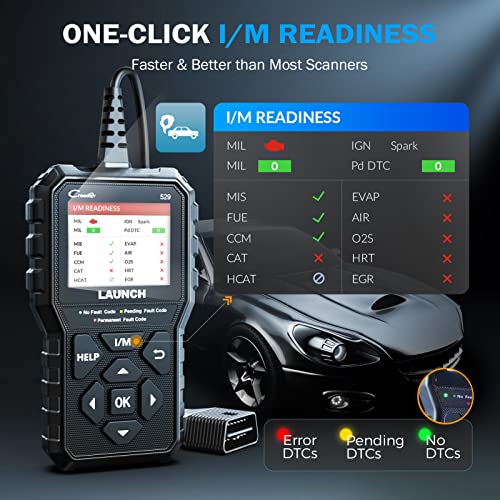
I/M Readiness
The CR529 includes a dedicated:
I/M readiness function.
This helps determine whether emissions monitors have completed their diagnostic self-tests.
Common monitors include:
- Misfire
- Fuel system
- Catalyst
- EVAP
- Oxygen sensor
- O2 sensor heater
- EGR/VVT
Exact monitor availability depends on the vehicle.
One-Touch Smog Check
The seller calls this:
Patented One-Click Smog Check.
Unless your exact supplier documentation confirms an applicable LAUNCH patent, I would simplify this to:
one-touch I/M readiness check.
That says what the feature actually does without adding a difficult-to-substantiate patent claim.
Red, Yellow and Green Readiness LEDs
The CR529 uses color status indicators to make readiness information easier to interpret.
The seller identifies:
- Red
- Yellow
- Green
LED indicators.
These provide a quick visual reference when preparing for emissions inspection.
A Green Light Is Not a Guaranteed Smog Pass
The scanner can help determine whether the ECU appears ready for OBD-based inspection.
It cannot guarantee the vehicle will pass every state inspection requirement.
For general federal emissions information:
https://www.epa.gov/vehicle-and-fuel-emissions-testing
Don’t Clear DTCs Right Before Smog Testing
Clearing diagnostic information can reset readiness monitors to:
Not Ready.
The vehicle usually needs to complete the required drive cycles before those monitors become Ready again.
Therefore:
repair first, clear codes if needed, drive the vehicle, then verify readiness.
Vehicle Information
The CR529 can retrieve standardized vehicle information where supported.
This can include:
- VIN
- CIN / Calibration ID
- CVN / Calibration Verification Number
VIN Retrieval
VIN access is useful when:
- Identifying a vehicle
- Performing a used-car inspection
- Verifying ECU information
- Documenting diagnostic reports
CIN and Calibration ID
Calibration identifiers help identify the software/calibration programmed into the vehicle’s control module.
CVN
Calibration Verification Numbers can help verify calibration integrity where the vehicle supports this standardized information.
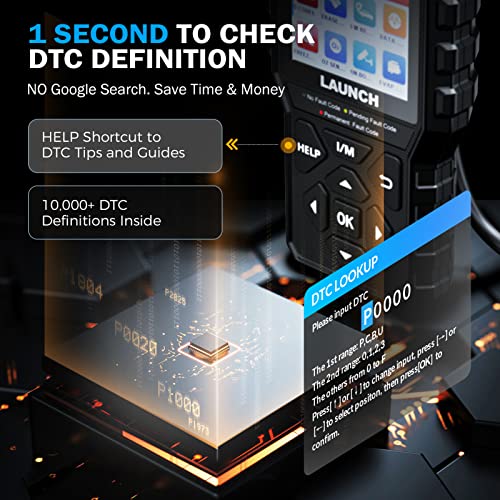
Built-In DTC Lookup
The CR529 incorporates a DTC library for quick trouble-code definitions.
This can save time when working in the garage.
Still, the definition is only the starting point of diagnosis.
Plug-and-Play Operation
The CR529 is powered directly through the vehicle’s OBD-II Data Link Connector.
No internal battery is required for routine use.
You do not need:
- Smartphone
- Bluetooth
- Wi-Fi
- Mobile app
- Charger
Connect it to the vehicle and begin scanning.
2.8-Inch Color Display
LAUNCH’s current CReader OBD platform uses a:
2.8-inch 320 × 240 LCD color display.
The CR529 seller listing likewise identifies a 2.8-inch color display.
This provides enough screen area for:
- Codes
- Live data
- Graphs
- Readiness status
- Vehicle information
Seven Advertised Languages
The supplied CR529 listing advertises:
- English
- French
- Spanish
- German
- Portuguese
- Russian
- Japanese
Language availability should be verified against the firmware included with the exact unit being stocked.
LAUNCH’s current CReader OBD platform supports multiple language options, though exact language sets can vary by model and region.
Vehicle Compatibility
The CR529 is designed for OBD-II-compliant vehicles.
For U.S.-market passenger cars and light trucks, the standard starting point is generally:
1996 and newer OBD-II vehicles.
Supported Protocol Families
The seller specifies compatibility with:
- KWP2000
- ISO 9141
- SAE J1850 VPW
- SAE J1850 PWM
- CAN
These cover the major standardized OBD-II protocol families.
Don’t Call It Universal
The seller says it can be used regardless of vehicle type as long as the vehicle is OBD-II compliant.
That is directionally reasonable, but:
universal
is still too broad for an automotive product page.
A better claim is:
Compatible with most supported OBD-II-compliant 1996+ U.S.-market passenger cars and light trucks.
Regional and vehicle implementation can still vary.
Does the CR529 Read ABS Codes?
Do not advertise full ABS diagnostics.
The CR529 is an OBD-II engine and emissions scanner.
It is not an all-system ABS scanner.
Does the CR529 Read Airbag Codes?
No full SRS/airbag module access should be assumed.
Does It Read TPMS Codes?
Do not advertise dedicated TPMS diagnostics.
That requires a scanner with documented TPMS module support.
Does It Perform Oil Reset?
Do not assume oil-service reset functionality unless the exact CR529 firmware and supplier documentation explicitly confirms it.
The core documented selling point is full OBD-II diagnostics, not manufacturer-specific service resets.
Is the CR529 Bidirectional?
Not in the same sense as a full-system bidirectional scanner.
Mode 8 allows supported standardized OBD-II test requests.
That does not mean the CR529 can universally command:
- Cooling fans
- Fuel pumps
- Windows
- Door locks
- ABS pumps
- EPB actuators
- Transmission solenoids
Does It Perform ABS Bleeding?
No universal ABS bleed function should be advertised.
Does It Reset Electronic Parking Brakes?
No general EPB service capability should be assumed.
Does It Program Keys?
No.
Do not market the CR529 as a:
- Key programmer
- Immobilizer tool
- Locksmith scanner
Does It Program or Code ECUs?
No universal coding or flashing capability should be advertised.
The CR529 is not a:
- J2534 programmer
- ECU flashing interface
- OEM module coding platform
Can It Read Transmission Codes?
Some generic transmission-related P-codes may appear through standardized OBD-II.
For example:
P0700
can indicate that the TCM requested Check Engine Light illumination.
The underlying TCM code may require a scanner with direct transmission-module access.
See:
https://my.prostreetonline.com/dtc-doctor/p0700-code-transmission-control-system-malfunction/
Lifetime Free Updates
The CR529 is currently listed by LAUNCH under the supported:
CReaderX / CR-series update tools
on its official download page.
The seller advertises:
lifetime free updates.
For Pro Street, I would phrase this as:
Lifetime free software updates advertised for the CR529; use LAUNCH’s supported CR-series update utility.
Correct Update Website
Do not reproduce the seller’s intentionally altered:
“en.cnlaunch.c0m/d0wnload”
text.
Use the actual LAUNCH download page:
https://en.cnlaunch.com/download/
PC Update Requirement
The supplied listing indicates that updates are handled from a compatible PC and specifically states:
not compatible with iOS for updating.
I would simply say:
Updates are performed through LAUNCH’s supported computer-based CR-series update utility.
That avoids implying that an iPhone should work as an updater.
Data Printing and Reporting
The CR529’s data-recording and reporting functions are one of its better differentiators against simpler scanners.
This makes it useful for:
- Before-and-after repair documentation
- Used-car inspections
- Emissions troubleshooting
- Customer records
- Home garage diagnostics
Used-Car Inspection
Before buying a used car, the CR529 can help inspect:
- Stored DTCs
- Pending codes
- Freeze-frame information
- I/M readiness
- VIN data
- Live data
Multiple:
Not Ready
monitors may indicate the ECU was recently cleared or lost power.
That is not proof that someone intentionally hid trouble codes, but it should prompt further investigation.
CR529 vs FOXWELL NT301
This is probably the most important comparison for your catalog.
FOXWELL NT301
Strong points:
- Excellent branded OBD-II scanner
- Graphical live data
- Mode 6
- O2 sensor testing
- One-touch I/M readiness
- Red/yellow/green LEDs
- Built-in speaker
- Lifetime updates
LAUNCH CR529
Strong points:
- Graphical live data
- Data recording
- Data playback
- Diagnostic reports
- PC printing
- Mode 6
- Mode 8 / EVAP test requests
- O2 testing
- VIN / CIN / CVN retrieval
- Color readiness indicators
- Lifetime update positioning
I would not simply claim the CR529 is “more powerful than the NT301.”
The stronger SEO comparison is:
CR529 offers a particularly good reporting, playback and PC-printing workflow, while both tools occupy the premium basic OBD-II scanner tier.
CR529 vs Autel AL319
Autel AL319
Best known for:
- One-Click I/M readiness
- Color status LEDs
- Audible readiness
- Live PCM data
- Freeze frame
- Strong Autel brand recognition
LAUNCH CR529
Adds a stronger story around:
- Live-data graphs
- Recording
- Playback
- Mode 6
- Mode 8
- O2 test
- Diagnostic reports
- PC printing
The CR529 can target buyers who want more diagnostic data handling.
CR529 vs Vecooneen V529
These scanners have overlapping feature lists.
V529
Advertises:
- Mode 6
- Mode 8
- Battery voltage
- Oil reset
- Graphing
LAUNCH CR529
Has the advantage of:
- Established LAUNCH diagnostic brand
- Better official software support
- Diagnostic report workflow
- Data recording/playback
- Supported update infrastructure
I would put the CR529 above the generic V529 in the catalog.
CR529 vs BlueDriver
CR529
- Standalone handheld
- Engine/emissions diagnostics
- Mode 6
- Mode 8
- Graphing
- Reports
- No phone required
BlueDriver Pro Next-Gen
Adds supported:
- ABS
- SRS
- Transmission
- TPMS
- Enhanced manufacturer diagnostics
- Repair Reports
BlueDriver provides broader module coverage.
The CR529 provides a dedicated standalone interface.
CR529 vs OBDLink MX+
LAUNCH CR529
Best for:
- Dedicated handheld operation
- Engine and emissions diagnosis
- Graphical data
- Mode 6
- Readiness
- Reporting
OBDLink MX+
Best for:
- Multiple smartphone/PC apps
- FORScan
- BimmerCode
- AlfaOBD
- Enhanced OEM diagnostics
- MS-CAN
- SW-CAN
These should not cannibalize each other.
CR529 vs Innova 5610
The Innova 5610 remains much more advanced.
It offers supported:
- All-system scanning
- ABS
- SRS
- Transmission diagnostics
- OEM data
- Bidirectional active tests
- Relearns
- Service functions
The CR529 provides advanced generic OBD-II diagnostics but is not a full-system bidirectional platform.
Who Should Buy the LAUNCH CR529?
The CR529 is a strong fit for:
- DIY mechanics
- Automotive enthusiasts
- Used-car shoppers
- Home garages
- Drivers preparing for emissions testing
- Buyers who want a dedicated handheld
- Users who value live-data recording
- Users who want printed diagnostic reports
- Buyers who do not want a Bluetooth scanner
Who Needs Something More Advanced?
Choose a higher-level scanner if you need:
- ABS module diagnostics
- SRS diagnostics
- TPMS access
- Full TCM scanning
- Bidirectional active tests
- Oil/service resets
- EPB control
- ABS bleeding
- Battery registration
- Injector coding
- ECU programming
- Key programming
How to Use the LAUNCH CR529
1. Locate the OBD-II Connector
Find the vehicle’s 16-pin diagnostic port, normally under the driver’s dashboard.
2. Connect the CR529
Insert the diagnostic connector securely.
3. Turn the Ignition On
The scanner powers through the vehicle.
4. Read Codes
Retrieve stored and pending DTCs.
5. Record the Codes
Save the information before clearing anything.
6. Review Freeze Frame
Check operating conditions when the fault occurred.
7. Analyze Live Data
Use text or graphical display to evaluate relevant PIDs.
8. Use Mode 6 if Needed
Review supported onboard monitor results.
9. Use Mode 8 Only When Supported
Request appropriate EVAP/component tests only where the vehicle allows them.
10. Diagnose the Actual Fault
Test the related mechanical and electrical systems.
11. Repair the Vehicle
Correct the underlying problem.
12. Clear Supported Codes
Erase the DTC after repair.
13. Rescan
Confirm the fault does not return.
14. Check I/M Readiness
Make sure emissions monitors have completed before inspection.
Official LAUNCH Resources
LAUNCH Download and Update Center
https://en.cnlaunch.com/download/
LAUNCH OBD-II Diagnostic Tools
https://en.cnlaunch.com/products-detail/i-270.html
LAUNCH CReader OBD Platform
https://en.cnlaunch.com/products-detail/i-272.html
LAUNCH Support
https://en.cnlaunch.com/query/
Pro Street Diagnostic Resources
DTC Doctor
https://my.prostreetonline.com/dtc-obdii/
Complete P-Series OBD-II Code Library
https://my.prostreetonline.com/dtc-doctor/p-code-obd-ii-codes/
OBD-II Diagnostic Articles
https://my.prostreetonline.com/category/dtc-obdii/
Most Common OBD2 Codes Explained
https://my.prostreetonline.com/2026/07/16/most-common-obd2-codes-explained/
Shop Automotive Diagnostic Tools
Browse additional scanners, code readers and automotive diagnostic products:
Final Take
The LAUNCH CR529 OBD2 Scanner is a strong option for buyers who want more diagnostic capability than a cheap Check Engine reader without paying for a full-system scan tablet.
Its strongest features are:
graphical live data
data recording
playback
freeze frame
Mode 6
Mode 8 EVAP testing where supported
O2 sensor testing
diagnostic reporting
PC printing
and:
one-touch emissions readiness.
That gives it a genuine step up over inexpensive basic scanners.
Where the listing goes too far is calling those functions:
OE-level diagnostics.
They aren’t.
The CR529 is best understood as an advanced OBD-II engine and emissions scanner.
It should not be confused with a full-system X-431 tablet capable of accessing ABS, SRS, body modules, special functions, coding and extensive bidirectional controls.
For your Pro Street catalog, that distinction actually helps.
The CR529 can be your premium LAUNCH handheld for live-data recording, Mode 6/8 and printable diagnostic reports, while BlueDriver and OBDLink MX+ own enhanced module/app-based diagnostics and Innova 5610 remains the more advanced bidirectional tier.



There are no reviews yet.