


Wireless Apple CarPlay – Convenient iPhone Integration
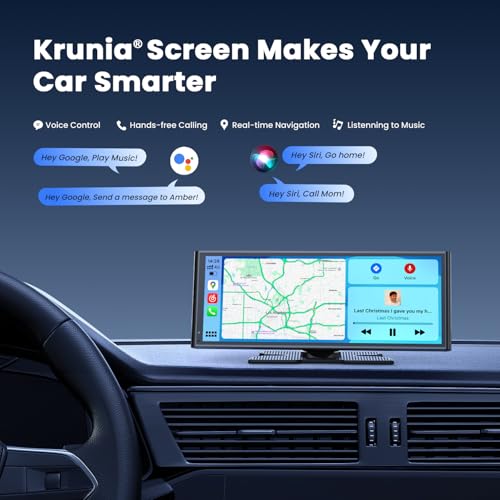
Wireless Apple CarPlay allows compatible iPhone users to access supported smartphone functions through the Krunia touchscreen.
Once connected, drivers can use supported applications without repeatedly plugging a phone into the display.
Compatible features may include:
- Apple Maps
- Google Maps
- Waze
- Apple Music
- Compatible streaming music services
- Hands-free calling
- Supported messaging
- Siri voice commands
The dedicated display provides a convenient alternative to mounting a smartphone directly on the dashboard.
Wireless Android Auto – Modern Connectivity for Android Drivers
The Krunia screen also supports wireless Android Auto for compatible Android smartphones.
Android Auto provides access to supported navigation, music, communication, and voice assistant functions.
Drivers can use Google Assistant to request directions, make calls, and control supported applications.
Wireless Android Auto requires a compatible smartphone and supported Android software.
5GHz Wi-Fi and Bluetooth 5.0 Connectivity
The Krunia display uses 5GHz Wi-Fi and Bluetooth 5.0 for supported wireless functions.
These technologies help establish communication between the portable display and compatible smartphones.
Wireless Connectivity Features
- 5GHz Wi-Fi support
- Bluetooth 5.0
- Wireless Apple CarPlay
- Wireless Android Auto
- Compatible audio connectivity
The manufacturer advertises improved responsiveness compared with competing displays.
However, the stated percentage improvements have not been independently verified, and actual performance depends on the connected smartphone, wireless environment, and device software.
Over-the-Air Firmware Updates
One of the Krunia display’s notable features is its advertised support for over-the-air firmware updates.
OTA updates allow supported system software to be updated without the traditional process of manually installing firmware from removable media.
Depending on manufacturer support, firmware updates may address:
- Software stability
- Smartphone compatibility
- Connectivity performance
- Interface behavior
- Supported system features
Important: OTA capability does not guarantee that updates will always be available or that every future iOS or Android version will be supported.
Follow Krunia’s official instructions when installing firmware updates.
Waterproof Backup Camera with Night Vision
The Krunia system includes a backup camera advertised with waterproof construction and night vision support.
When properly installed and configured, the camera provides an additional view behind the vehicle during reversing.
Backup Camera Benefits
- Additional rearward visibility
- Automatic reverse display when correctly wired
- Waterproof construction advertised
- Night vision support advertised
- Convenient viewing on the 9.26-inch touchscreen
The rear camera can be useful when parking or maneuvering in tight spaces.
Important: The supplied description does not specify the camera’s native resolution, viewing angle, IP waterproof rating, or exact reverse-trigger wiring requirements.
A backup camera is a supplemental visibility aid and does not replace mirrors or checking the surrounding area.
Smartphone GPS Navigation with Real-Time Traffic
The Krunia CarPlay screen supports smartphone-based navigation through Apple CarPlay and Android Auto.
Compatible applications may include:
- Apple Maps
- Google Maps
- Waze
Depending on the smartphone and application, drivers can access:
- Turn-by-turn directions
- Real-time traffic information
- Alternate routes
- Destination searches
- Estimated arrival times
- Voice-guided navigation
The wide touchscreen provides a convenient view of navigation information.
GPS clarification: The supplied specifications do not confirm independent GPS hardware or a standalone offline map database. Navigation depends on a compatible connected smartphone.
Real-time traffic updates require a supported navigation application and available data connectivity.
Siri and Google Assistant Voice Control
The Krunia display supports voice assistant functionality through compatible smartphones.
Drivers can use Siri or Google Assistant to perform supported tasks such as:
- Requesting navigation directions
- Making hands-free phone calls
- Sending supported messages
- Controlling music playback
- Searching for destinations
Voice control can reduce the need for manual touchscreen interaction, although drivers should remain attentive to road conditions.
Multiple Audio Output Options
The Krunia portable CarPlay screen offers several ways to hear music, navigation instructions, and supported phone audio.
Bluetooth Audio
Use supported Bluetooth connectivity with compatible smartphones and vehicle audio systems.
Actual audio routing depends on the capabilities of the connected devices and factory stereo.
AUX Audio
Connect the display to a compatible auxiliary input on the vehicle’s factory or aftermarket stereo.
AUX can provide a straightforward wired audio connection when the vehicle has a suitable input.
FM Transmission
Use the display’s FM transmitter to play supported audio through the vehicle’s existing FM radio.
Audio quality may vary depending on local FM interference.
These options provide flexibility for vehicles with different audio configurations.
Steering Wheel Control Support
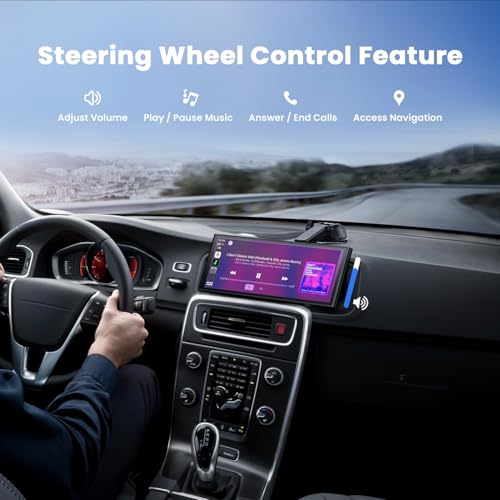
The manufacturer advertises steering wheel control compatibility for supported functions such as:
- Volume adjustment
- Call management
- Track selection
Compatibility note: Steering wheel control support depends on the vehicle, connection method, and any required accessories or configuration.
The supplied description does not explain whether additional hardware is needed or which vehicle controls are compatible.
Do not assume universal factory steering wheel button integration without confirming compatibility.
Plug-and-Play Installation Without Replacing the Factory Stereo
The Krunia display is designed as a portable infotainment accessory.
It connects to a compatible vehicle cigarette lighter or accessory outlet, eliminating the need to replace the original factory radio for basic CarPlay and Android Auto functionality.
General Installation Steps
- Choose a safe dashboard mounting location.
- Install the compatible mounting hardware according to the manufacturer’s instructions.
- Secure the 9.26-inch touchscreen.
- Connect the display to the vehicle’s compatible accessory power outlet.
- Turn on the display.
- Pair a compatible smartphone through the supported wireless connection process.
- Configure Apple CarPlay or Android Auto.
- Select the preferred audio output.
- Install the included backup camera.
- Route the camera wiring safely through the vehicle.
- Complete any required reverse-trigger wiring.
- Test navigation, audio, and backup camera operation before driving.
The rear camera may require additional wiring and removal of interior trim.
Mounting reminder: The supplied description does not identify the exact mounting bracket or accessories. Verify package contents and mounting compatibility before installation.
Designed for a Wide Range of Driving Conditions
The manufacturer advertises an operating temperature range of -20°C to 70°C.
This specification suggests the device is designed for use across a range of vehicle interior temperatures.
However, actual operating conditions, mounting location, ventilation, and direct sunlight can affect device temperature.
Avoid leaving the display exposed to excessive heat or conditions outside the manufacturer’s stated operating limits.
2-Year Warranty and Manufacturer Support
Krunia advertises a 2-year warranty and 24/7 customer support.
Warranty coverage, exclusions, registration requirements, and service procedures should be verified with the manufacturer or authorized seller.
The product description also mentions an anniversary promotion involving a possible 256GB memory card or additional CarPlay screen.
Because promotional availability and eligibility can change, that offer should be treated separately from the standard product package.
A Practical Upgrade for Older Vehicles
Many older vehicles lack factory Apple CarPlay, Android Auto, and backup camera functionality.
Replacing the original stereo can require additional wiring harnesses, dashboard conversion kits, and installation work.
A portable CarPlay display offers another approach.
For example, a first-generation Lexus IS300 can gain wireless smartphone navigation, hands-free communication, and a rear camera display while retaining its original factory radio.
The same approach may be useful for older Honda, Toyota, Nissan, Subaru, Ford, Chevrolet, and other vehicles, subject to power, mounting, and camera installation compatibility.
Product Specifications
| Specification | Details |
|---|---|
| Brand | Krunia |
| Product type | Portable wireless CarPlay and Android Auto display |
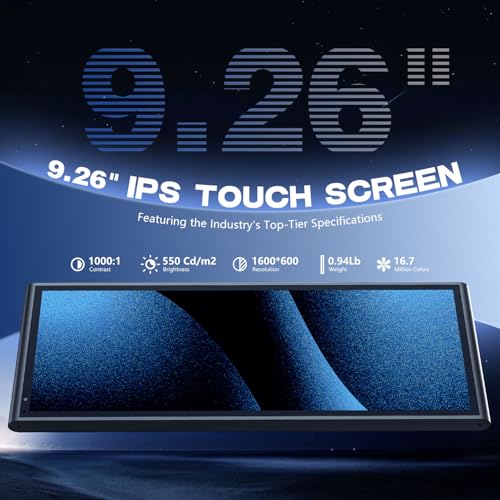
| Display size | 9.26 inches |
| Display technology | IPS touchscreen |
| Display resolution | 1600 × 600 pixels |
| Brightness | 550 cd/m² |
| Contrast ratio | 1000:1 |
| Color support | 16.7 million colors |
| Apple CarPlay | Wireless |
| Android Auto | Wireless |
| Wi-Fi | 5GHz |
| Bluetooth | Version 5.0 |
| OTA firmware updates | Supported |
| Backup camera | Included |
| Rear camera construction | Waterproof advertised |
| Rear camera night vision | Advertised |
| Automatic reverse display | Supported with proper installation |
| Rear camera resolution | Not specified |
| GPS navigation | Smartphone-based |
| Voice assistants | Siri and Google Assistant |
| Audio options | Bluetooth, AUX, FM transmitter |
| Steering wheel control support | Advertised; vehicle compatibility unspecified |
| Power connection | Vehicle accessory outlet |
| Operating temperature | -20°C to 70°C advertised |
| Warranty | 2 years advertised |
| Customer support | 24/7 advertised |
| Factory stereo replacement required | No |
Frequently Asked Questions
Does the Krunia 9.26-inch screen support wireless Apple CarPlay?
Yes. Wireless Apple CarPlay is advertised for compatible iPhones.
Does it support wireless Android Auto?
Yes. Wireless Android Auto is advertised for compatible Android smartphones.
What is the screen resolution?
The 9.26-inch IPS touchscreen has a stated resolution of 1600 × 600 pixels.
How bright is the screen?
The manufacturer specifies 550 cd/m² brightness.
Does it support OTA firmware updates?
Yes. Over-the-air firmware update capability is advertised.
Does it include a backup camera?
Yes. A waterproof backup camera with advertised night vision support is included.
What is the backup camera resolution?
The supplied product description does not specify its resolution.
Can I use Google Maps and Waze?
Yes, through compatible Apple CarPlay or Android Auto smartphone connections.
Does it support Siri and Google Assistant?
Yes. Voice assistant functionality is supported through compatible smartphones.
Can I play music through my factory speakers?
Yes, where compatible, using Bluetooth audio routing, AUX, or FM transmission.
Does it work with factory steering wheel controls?
The manufacturer advertises steering wheel control support, but compatibility depends on the vehicle and connection requirements.
Does it include a warranty?
Krunia advertises a 2-year warranty. Verify applicable terms with the seller.
Does it come with a free 256GB memory card?
The manufacturer mentions a separate anniversary promotion. The 256GB card should not be considered part of the standard package unless eligibility and fulfillment are confirmed.
Do I need to replace my factory stereo?
No. The display is designed as a portable accessory that works alongside the original radio.
Upgrade Your Vehicle with the Krunia 9.26-Inch Wireless CarPlay Screen
The Krunia 9.26-Inch Wireless Apple CarPlay and Android Auto Screen combines a high-resolution IPS touchscreen, modern wireless connectivity, smartphone navigation, backup camera assistance, and flexible audio options in one portable system.
With 5GHz Wi-Fi, Bluetooth 5.0, OTA firmware updates, and manufacturer-advertised warranty support, it offers a convenient way to modernize your vehicle while retaining the original factory stereo.
Shop Krunia CarPlay Screens at Pro Street Online and explore portable infotainment displays, backup cameras, and automotive electronics accessories.







There are no reviews yet.