

Innova 5610 Bidirectional OBD2 Scan Tool — All-System Diagnostics, OEM Live Data & Active Tests
Move beyond basic Check Engine Light diagnostics with the Innova 5610 Bidirectional OBD2 Scan Tool.
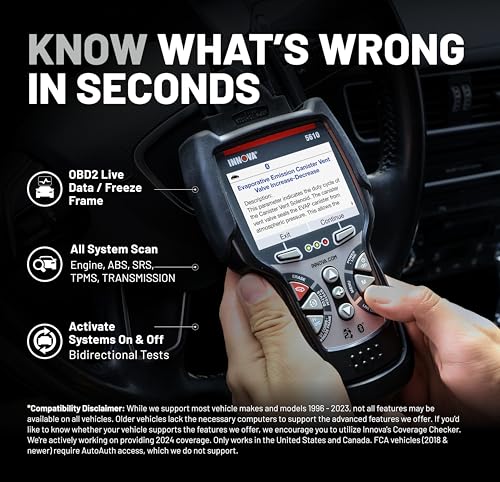
The 5610 is Innova’s advanced handheld diagnostic platform for DIY mechanics, serious enthusiasts and technicians who need more than a simple code reader. In addition to standard OBD-II diagnostics, the scanner can access supported vehicle systems, display enhanced OEM live data, perform bidirectional active tests, and run selected relearn, reset and calibration procedures.
Depending on the vehicle, the Innova 5610 can provide access to systems including:
- Engine
- Transmission
- ABS
- SRS / airbag
- Electronic parking brake
- Body and convenience modules
- Additional supported control modules
It can also command selected components on and off, allowing you to test whether a circuit, actuator or system responds before replacing parts.
That makes the Innova 5610 a much more capable diagnostic tool than a conventional handheld OBD-II scanner.
Innova 5610 Key Features
- Bidirectional active testing
- All-system scanning on supported vehicles
- OEM live data
- Standard OBD-II diagnostics
- Read and erase supported fault codes
- ABS diagnostics
- SRS diagnostics
- Transmission data
- Enhanced engine data
- Special functions
- Relearn procedures
- Calibration functions
- Electronic parking brake functions on supported vehicles
- Battery/BMS functions on supported vehicles
- I/M readiness
- Emissions diagnostics
- RepairSolutions2 app compatibility
- Free software updates
- No required subscription
- U.S.-based technical support
Innova 5610 Specifications
| Specification | Details |
|---|---|
| Brand | Innova |
| Model | 5610 |
| Product Type | Advanced handheld bidirectional scan tool |
| Standard OBD-II | Yes |
| All-System Scan | Yes, vehicle dependent |
| Bidirectional Controls | Yes, vehicle dependent |
| OEM Live Data | Yes |
| Engine Diagnostics | Yes |
| ABS Diagnostics | Supported vehicles |
| SRS Diagnostics | Supported vehicles |
| Transmission Diagnostics | Supported vehicles |
| EPB Functions | Supported vehicles |
| BMS Functions | Supported vehicles |
| Special Functions | Yes, vehicle dependent |
| Relearns / Calibrations | Yes, supported vehicles |
| Check Engine Codes | Yes |
| Clear DTCs | Yes |
| I/M Readiness | Yes |
| RepairSolutions2 App | Optional |
| Subscription Required | No |
| Software Update Fees | None advertised |
| Technical Support | U.S.-based |
| Warranty | Limited 1-year warranty per Innova |
| Vehicle Coverage | Verify exact vehicle/function through Innova coverage checker |
Original price was: $349.99.$268.98Current price is: $268.98.
What Makes the Innova 5610 Different?
A basic OBD-II scanner mainly answers:
What engine code is stored?
The Innova 5610 can go much further.
Depending on vehicle support, it can help answer:
Which module has a fault?
What is that module reporting in real time?
Will the commanded component actually turn on?
Did the repair solve the issue?
That difference is what separates a conventional code reader from a genuine bidirectional diagnostic tool.
All-System Vehicle Scanning
Innova currently describes the 5610 as capable of scanning supported systems throughout the vehicle.
That can include:
- Engine control module
- Transmission control module
- ABS
- SRS
- Body modules
- Audio modules
- Window systems
- Other available controllers
Exact module access depends on:
- Year
- Make
- Model
- Engine
- ECU
- Software version
Before purchasing for a particular system, use Innova’s coverage checker.
Official Innova 5610 information:
https://www.innova.com/pages/innova-5610
Bidirectional Active Tests
One of the strongest features of the Innova 5610 is:
bidirectional control.
A bidirectional scan tool can send a command to a supported ECU and ask a component or system to perform an action.
Innova lists examples including:
- Fuel pump activation
- Cooling fan activation
- Fuel injector commands
- Ignition timing-related tests
- Other supported actuators
This can dramatically improve troubleshooting.
Instead of guessing whether a component works, the scanner may allow you to command it directly.
Example: Fuel Pump Testing
Suppose a vehicle has:
- Hard starting
- Intermittent stalling
- Low fuel pressure
A basic scanner may show related trouble codes.
A supported bidirectional test may allow the 5610 to command the:
fuel pump relay or pump circuit
on and off.
That helps separate problems involving:
- Pump operation
- Relay control
- Wiring
- PCM command
- Fuel delivery
from unrelated faults.
Example: Cooling Fan Testing
If a vehicle overheats or the cooling fan does not run, a supported active test may allow the 5610 to command the fan.
That can help determine whether the problem lies with:
- Fan motor
- Relay
- Wiring
- Control module
- Temperature input
without waiting for the engine to reach operating temperature.
Bidirectional Does Not Mean Every Function Works on Every Vehicle
This is critical.
The Innova 5610 has bidirectional capability, but available tests are:
vehicle-specific.
Do not assume that every vehicle supports:
- Fuel pump activation
- Fan activation
- Injector testing
- EPB control
- ABS functions
- Body-module functions
Use Innova’s compatibility system to verify the exact function needed.
OEM Live Data
The 5610 can access enhanced OEM data beyond basic generic OBD-II PIDs on supported vehicles.
Potential data includes:
- Engine parameters
- ABS data
- SRS information
- Transmission data
- Transmission temperature
- Tire-pressure information
- Manufacturer-specific sensors
This can be extremely useful when a generic scanner simply does not expose enough information.
Engine Live Data
Supported engine information may include:
- RPM
- Coolant temperature
- Fuel trims
- Throttle position
- MAF
- MAP
- Oxygen-sensor data
- Ignition timing
- Fuel pressure information
- Engine load
- Additional manufacturer PIDs
Transmission Live Data
Depending on the vehicle, the 5610 can access enhanced transmission information such as:
- Transmission fluid temperature
- Gear selection
- Shift information
- Solenoid data
- Additional TCM parameters
This is a major step up from generic adapters that may only retrieve a P0700 notification.
For more on P0700:
https://my.prostreetonline.com/dtc-doctor/p0700-code-transmission-control-system-malfunction/
ABS Diagnostics
The Innova 5610 supports ABS diagnostics on compatible vehicles.
Potential functionality may include:
- Reading ABS DTCs
- Clearing supported ABS codes
- Viewing wheel-speed data
- Reviewing brake-system parameters
- Selected active tests
Function availability varies by vehicle.
SRS / Airbag Diagnostics
The 5610 can also access supported:
SRS / airbag systems.
That can help diagnose faults involving:
- Airbag modules
- Occupant systems
- Impact sensors
- Seat-related circuits
SRS diagnosis should always be performed according to proper manufacturer safety procedures.
Special Functions
Innova currently states that the 5610 supports selected special functions such as:
- Throttle body relearn
- Steering angle reset
- DPF regeneration
- Other calibrations and routines
Exact support depends on the vehicle.
Do not market every special function as universally available.
Throttle Body Relearn
After cleaning, replacing or servicing a throttle body, some vehicles require:
throttle adaptation or relearn.
On supported applications, the 5610 may provide the necessary procedure.
Steering Angle Sensor Reset
Steering-angle calibration may be required after:
- Alignment work
- Steering repairs
- Suspension work
- Sensor replacement
The 5610 supports this function on selected vehicles.
DPF Regeneration
Innova also lists:
DPF regeneration
among supported special functions.
This applies only to compatible diesel vehicles and should be used according to the vehicle manufacturer’s required procedure.
Do not force a regeneration when an underlying fault has not been diagnosed.
Electronic Parking Brake Functions
Supported vehicles may allow the 5610 to perform:
EPB-related functions.
This can be useful during rear brake service where the electronic parking brake needs to be moved into a service position.
Again:
verify your exact vehicle before purchase.
Battery and BMS Functions
Innova’s scanner comparison information lists battery-management functionality on the 5610.
Supported functions may include:
- Battery reset
- Battery initialization
- Related BMS procedures
Actual capability varies by vehicle.
Standard Check Engine Diagnostics
The 5610 still performs the basic OBD-II functions expected from a diagnostic scanner.
These include:
- Reading engine DTCs
- Erasing supported codes
- Checking emissions readiness
- Viewing standard OBD-II information
Common codes include:
- P0171
- P0300
- P0420
- P0440-series
- P0507
- P0700
Continue diagnosis with the Pro Street DTC Doctor:
https://my.prostreetonline.com/dtc-obdii/
Complete P-Code library:
https://my.prostreetonline.com/dtc-doctor/p-code-obd-ii-codes/
A Trouble Code Is Still Not a Parts List
Even with a more advanced scanner, the same diagnostic rule applies:
A trouble code identifies a detected condition.
It does not automatically prove which component failed.
For example, P0171 can be caused by:
- Vacuum leaks
- MAF issues
- Low fuel pressure
- Injector problems
- Exhaust leaks
- Wiring faults
See:
https://my.prostreetonline.com/dtc-doctor/p0171-code-system-too-lean-bank-1/
The 5610 gives you more information to test the system instead of simply throwing parts at it.
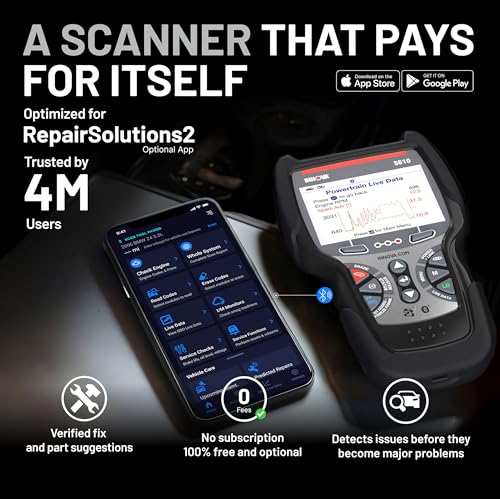
RepairSolutions2 App
The Innova 5610 also works with the:
RepairSolutions2 app.
The app is optional.
You do not have to use it to operate the scanner.
However, RepairSolutions2 can add features such as:
- Diagnostic report storage
- Scan sharing
- Repair guidance
- Maintenance information
- Predicted repair information
- ASE-verified fixes
- Repair parts information
The app is available for compatible mobile devices.
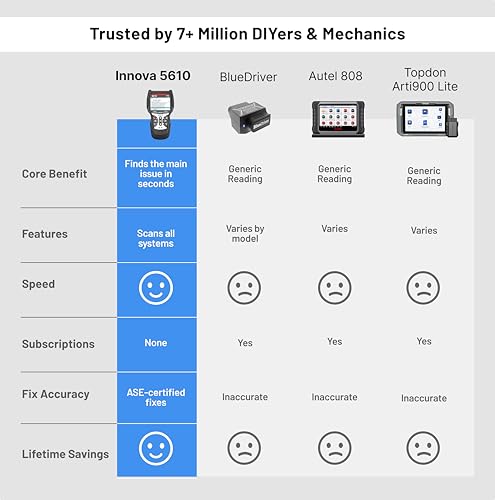
No Required Subscription
One of the strongest ownership advantages of the Innova 5610 is:
no required subscription.
Innova currently advertises:
- No subscription fees
- No software update fees
- Unlimited scans
- Unlimited report exports
That can be especially appealing compared with professional diagnostic platforms that require recurring software subscriptions.
Free Software Updates
Innova currently advertises:
no update fees
for the 5610.
That’s worth highlighting because advanced scan-tool update costs can become significant over several years.
Always follow Innova’s current update instructions and policies.
Pre- and Post-Repair Scanning
A useful advanced diagnostic workflow is:
Before Repair
Scan the vehicle and record:
- DTCs
- Module faults
- Live-data observations
Complete Repair
Perform the mechanical or electrical work.
After Repair
Scan again.
Compare results to verify:
- Codes remain cleared
- Module faults are resolved
- Live data appears correct
RepairSolutions2 can help save and share scan reports.
Verify the Repair Instead of Guessing
Bidirectional testing can also help verify whether a repair worked.
For example:
Replace a faulty cooling fan.
Then command the fan with the scan tool.
If it responds correctly, you’ve confirmed more than simply seeing the Check Engine Light disappear.
Emissions Readiness
The 5610 also supports standard:
I/M readiness checks.
This helps determine whether emissions monitors have completed before:
- Smog testing
- State inspection
- Used-car inspection
For federal emissions information:
https://www.epa.gov/vehicle-and-fuel-emissions-testing
Clearing Codes Can Reset Readiness
Erasing engine DTCs can reset readiness monitors.
If you clear codes immediately before an emissions test, the vehicle may show:
Not Ready.
Complete the appropriate drive cycle before testing.
Vehicle Coverage
The Innova 5610 supports broad vehicle coverage, but advanced features depend on the specific application.
That’s why the most important step before ordering is:
check coverage.
Use Innova’s current compatibility checker:
https://www.innova.com/pages/innova-5610
Enter the:
- Year
- Make
- Model
- Engine
and verify the specific functions required.
Do Not Treat “1996+” as Full Feature Coverage
Standard OBD-II compatibility beginning around 1996 does not mean every 1996+ vehicle supports all of the 5610’s advanced functions.
An older vehicle may have:
- Fewer modules
- Less live data
- Fewer active tests
- Fewer relearn procedures
The scanner can only use functionality supported by the vehicle architecture.
FCA Vehicle Coverage
Innova’s current documentation notes that FCA access depends on the version of the 5610.
Newer versions of the hardware provide additional FCA diagnostic support.
If purchasing specifically for:
- Chrysler
- Dodge
- Jeep
- Ram
verify that the exact scanner version being sold supports your vehicle and desired functions.
Works Without the App
The 5610 remains a dedicated handheld scanner.
It can perform diagnostics without:
- Mobile data
- Wi-Fi
- A phone app
RepairSolutions2 simply provides optional additional functionality.
This makes the tool useful:
- In garages
- On the road
- In locations without cellular service
No Registration Required for Basic Use
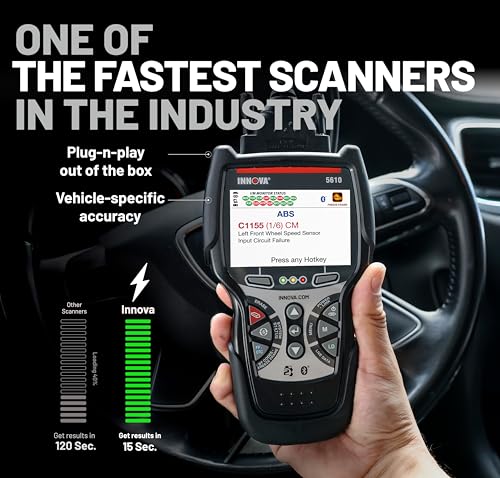
Innova describes the 5610 as usable directly out of the box.
Plug it into the vehicle and begin scanning without requiring app registration just to perform basic diagnostics.
US-Based Technical Support
Innova currently provides American technical support for the 5610.
Support hours listed by Innova are:
Monday–Friday, 6 AM–6 PM Pacific Time
Phone:
1-800-544-4124
Email:
Official support:
https://www.innova.com/pages/innova-5610
ASE-Verified Repair Guidance
Innova’s RepairSolutions2 ecosystem also provides:
ASE-verified repair information
for supported diagnostic results.
That can help DIY users understand:
- Common causes
- Potential fixes
- Repair direction
It should still be treated as diagnostic guidance rather than proof that a specific part has failed.
Innova 5610 vs Autel AL319
Autel AL319
Best for:
- Check Engine diagnostics
- Basic live data
- Freeze frame
- I/M readiness
- Simple handheld operation
Innova 5610
Adds:
- All-system diagnostics
- OEM live data
- ABS
- SRS
- Transmission data
- Bidirectional tests
- Special functions
- Relearns
- Calibrations
These two tools belong in completely different diagnostic tiers.
Innova 5610 vs TOPDON CarPal
Both provide more advanced diagnostics than basic code readers.
TOPDON CarPal
Focused on:
- Smartphone diagnostics
- Bluetooth
- Full-system scanning
- Selected maintenance resets
Innova 5610
Focused on:
- Dedicated handheld operation
- OEM live data
- Bidirectional active tests
- Special functions
- Optional RepairSolutions2 integration
The Innova is especially attractive to users who want a standalone tool with real active-test capability.
Innova 5610 vs OBDLink CX
OBDLink CX is primarily a communication adapter for:
- BMW/MINI coding
- BimmerCode
- Smartphone diagnostics
The Innova 5610 is a much broader diagnostic platform.
It is designed to diagnose and test systems rather than simply serve as an interface for a third-party app.
Innova 5610 vs Basic Bluetooth OBD2 Adapter
Generic Bluetooth adapters are excellent for:
- Engine DTCs
- Basic live data
- Emissions diagnostics
The 5610 moves into:
- Module-level diagnostics
- OEM data
- Active tests
- Resets
- Relearns
- Calibrations
That makes it far more suitable for complex troubleshooting.
Who Should Buy the Innova 5610?
The 5610 makes sense for:
- Serious DIY mechanics
- Automotive enthusiasts
- Home garages
- Professional technicians needing a supplemental scanner
- Used-car inspectors
- Advanced troubleshooters
- Owners maintaining multiple vehicles
- Anyone who wants bidirectional capability without a required subscription
Who May Not Need the 5610?
If you only want to:
- Read a Check Engine Light
- Clear a basic engine code
- Check emissions readiness
a simpler scanner such as an Autel AL319 or M6 may provide everything you need.
The 5610’s value comes from its:
advanced diagnostic access.
Who May Need an Even More Advanced Tool?
Consider a higher-end professional platform if you require:
- ECU programming
- J2534 pass-thru programming
- Key programming
- Advanced immobilizer work
- Full topology mapping
- Extensive ECU coding
- Dealer-level flashing
Bidirectional capability does not automatically mean complete factory programming capability.
Is the Innova 5610 a Dealer-Level Scanner?
The marketplace description uses wording such as:
“dealership-level relearn procedures.”
It is better to describe the 5610 as:
an advanced aftermarket diagnostic scanner with supported OEM-level data, bidirectional tests, and vehicle-specific service functions.
That avoids implying it replaces every factory diagnostic platform.
Is It Truly “For All Cars”?
No.
That marketplace phrase is too broad.
The Innova 5610 supports many vehicles, but:
advanced coverage is not universal.
The exact:
- Module
- Active test
- Reset
- Relearn
- Calibration
must be verified for the specific vehicle.
Warranty
Innova currently states that the 5610 includes a:
limited one-year warranty.
Current policy and eligibility should be confirmed at time of purchase.
How to Use the Innova 5610
1. Verify Coverage
Before purchase, confirm your exact vehicle and required function through Innova’s coverage checker.
2. Locate the OBD-II Connector
Find the 16-pin diagnostic connector.
3. Connect the Scanner
Plug the Innova 5610 into the vehicle.
4. Scan the Vehicle
Retrieve available control-module faults.
5. Review Codes
Record stored diagnostic trouble codes.
6. Examine OEM Live Data
Compare sensor and module information relevant to the fault.
7. Perform Supported Active Tests
Command the suspected component when appropriate.
8. Diagnose the Cause
Use fault codes, live data and test results together.
9. Complete the Repair
Repair the underlying mechanical or electrical issue.
10. Perform Required Resets or Relearns
Run any supported vehicle-specific procedures required after service.
11. Scan Again
Verify that codes are resolved and data has returned to normal.
Official Innova Resources
Innova 5610
https://www.innova.com/pages/innova-5610
Innova Scanner Comparison
https://www.innova.com/pages/scanners
Innova Support
Pro Street Diagnostic Resources
DTC Doctor
https://my.prostreetonline.com/dtc-obdii/
Complete P-Series Code Library
https://my.prostreetonline.com/dtc-doctor/p-code-obd-ii-codes/
OBD-II Diagnostic Articles
https://my.prostreetonline.com/category/dtc-obdii/
Most Common OBD2 Codes Explained
https://my.prostreetonline.com/2026/07/16/most-common-obd2-codes-explained/
Shop Automotive Diagnostic Tools
Find more OBD-II scanners, repair tools and automotive accessories at:
Final Take
The Innova 5610 Bidirectional OBD2 Scan Tool is where your diagnostic catalog starts moving beyond simple code reading and into real troubleshooting.
A basic scanner tells you:
there’s a fault.
The 5610 can potentially help you determine:
which module sees the fault
what that module is reporting
and:
whether the suspected component actually responds when commanded.
That is a much more powerful diagnostic workflow.
With supported features including:
all-system scanning
OEM live data
ABS and SRS diagnostics
transmission data
bidirectional active tests
special functions
relearns
and:
calibrations
the 5610 is a strong choice for serious DIY users who want professional-style diagnostic capability without stepping immediately into a high-cost subscription-based tablet platform.
The one rule that matters most:
check vehicle coverage first.
The scanner may support bidirectional tests, resets and relearns, but the exact functions available depend on the vehicle.
Verify your exact year, make, model and engine before purchase.
Specification: Innova 5610 Bidirectional OBD2 Scan Tool — All-System Diagnostics, OEM Live Data & Active Tests
|
User Reviews
Be the first to review “Innova 5610 Bidirectional OBD2 Scan Tool — All-System Diagnostics, OEM Live Data & Active Tests”
You must be logged in to post a review.



There are no reviews yet.