

FOXWELL NT726 All-System Bidirectional OBD2 Scanner — 12 Service Functions & FCA AutoAuth
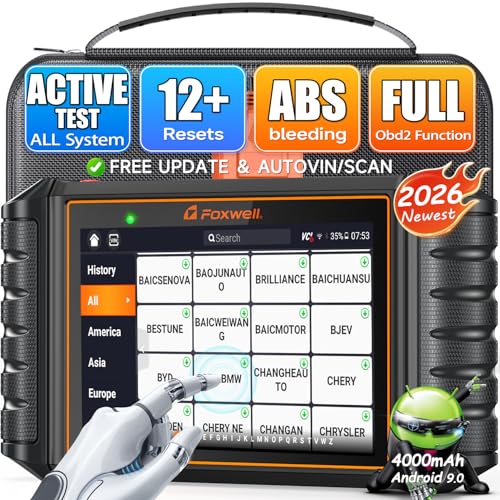
The FOXWELL NT726 is a full-system automotive diagnostic scanner designed for serious DIY mechanics, enthusiasts and independent repair work that requires substantially more capability than a basic Check Engine code reader.
Unlike entry-level tools such as the FOXWELL NT301, LAUNCH CR529 or Autel AL319, the NT726 can communicate with multiple vehicle control modules and supports bidirectional active testing on compatible vehicles.
That means the scanner can do more than simply read what a control module sees.
On supported applications, it can also send commands to vehicle systems to help test whether components actually respond.
Current FOXWELL documentation positions the NT726 with:
- All-system diagnostics
- Bidirectional active tests
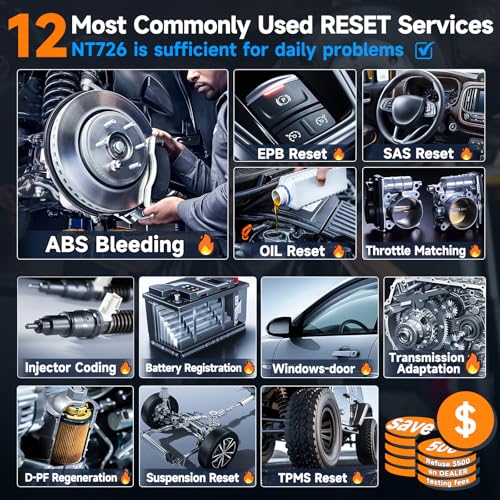
- 12 service and maintenance functions
- Engine diagnostics
- Transmission diagnostics
- ABS diagnostics
- SRS / airbag diagnostics
- BCM and body-system access on supported vehicles
- Live data
- Four-data-stream graphing
- AutoVIN
- Automatic vehicle scanning
- DTC reading and clearing
- Freeze-frame data
- ECU information
- ABS bleeding
- Oil-service reset
- Electronic parking brake service
- Steering-angle calibration
- DPF regeneration
- TPMS reset functions
- Injector coding
- Throttle relearn
- Battery registration
- Suspension reset
- Transmission adaptation
- Window and door initialization
- FCA Secure Gateway access through AutoAuth
- Lifetime software updates currently advertised for the NT726
The NT726 therefore occupies a completely different diagnostic tier from a standard OBD-II code reader.
FOXWELL NT726 Specifications
| Specification | Details |
|---|---|
| Brand | FOXWELL |
| Model | NT726 |
| Product Type | All-system bidirectional diagnostic scanner |
| Operating System | Android 9.0 on current retail version |
| Display | Current retail version advertised with 5.5-inch touchscreen |
| Memory | Current retail version advertised with 32GB storage |
| Vehicle Connection | Wired diagnostic cable |
| Full-System Scan | Yes, supported vehicles |
| Engine | Yes |
| Transmission | Yes |
| ABS | Yes |
| SRS / Airbag | Yes |
| BCM / Body Systems | Supported applications |
| Bidirectional Active Tests | Yes, vehicle dependent |
| Service Functions | 12 currently advertised |
| ABS Bleeding | Yes, supported vehicles |
| Oil Reset | Yes |
| EPB Service | Yes |
| SAS Calibration | Yes |
| DPF Regeneration | Yes |
| TPMS Reset | Yes, supported applications |
| Injector Coding | Yes |
| Throttle Relearn | Yes |
| Battery Registration | Yes |
| Suspension Reset | Yes |
| Transmission Adaptation | Yes |
| Window / Door Initialization | Yes |
| AutoVIN | Yes |
| FCA Secure Gateway | Supported through FOXWELL / AutoAuth |
| Live Data | Yes |
| Multi-Graph Live Data | Up to four data streams displayed together |
| Wi-Fi | Used for supported update/report functions |
| Updates | Lifetime free updates currently advertised |
| ECU Coding | No general ECU coding capability advertised |
| Key Programming | No general key programming capability |
| Advanced TPMS Programming | No |
| CAN-FD | Do not advertise without vehicle/model confirmation |
Original price was: $379.99.$303.95Current price is: $303.95.
This Is an All-System Scanner
This is the biggest difference between the NT726 and inexpensive OBD-II scanners.
A basic scanner generally communicates with standardized engine and emissions functions.
The NT726 is designed to access supported modules throughout the vehicle.
Depending on the year, make, model and installed equipment, those modules can include:
- Engine control module
- Transmission control module
- ABS
- SRS / airbag
- Body control module
- Electronic parking brake
- HVAC
- Instrument cluster
- Steering
- Suspension
- Door modules
- Immobilizer-related systems
- Seat modules
- Lighting modules
- Additional manufacturer-specific controllers
Exact module coverage varies by vehicle.
Engine Diagnostics
For the engine control module, the NT726 can perform functions such as:
- Read DTCs
- Clear supported DTCs
- View live data
- Retrieve ECU information
- View freeze-frame information
- Perform supported active tests
- Access applicable service procedures
For standard engine trouble codes, continue diagnosis using the Pro Street DTC Doctor:
https://my.prostreetonline.com/dtc-obdii/
Complete P-Series code library:
https://my.prostreetonline.com/dtc-doctor/p-code-obd-ii-codes/
Transmission Diagnostics
Unlike basic OBD-II readers that may only display something like:
P0700 — Transmission Control System Malfunction
the NT726 can access the transmission controller on supported vehicles.
Depending on application, this may allow you to:
- Read TCM trouble codes
- Clear supported transmission DTCs
- View transmission live data
- Read temperature information
- Inspect gear and sensor data
- Perform supported active tests
- Run transmission adaptation procedures
See our P0700 diagnostic guide:
https://my.prostreetonline.com/dtc-doctor/p0700-code-transmission-control-system-malfunction/
ABS Diagnostics
The NT726 can communicate with supported ABS control modules.
That provides substantially more capability than scanners such as the NT301.
Depending on the vehicle, ABS diagnostics may include:
- Read ABS trouble codes
- Clear supported ABS codes
- View wheel-speed data
- Inspect brake-switch data
- View ABS live parameters
- Perform supported active tests
- Run ABS bleeding procedures
ABS Bleeding
ABS bleeding is one of the NT726’s supported maintenance functions.
On compatible vehicles, the scanner can command the ABS hydraulic control unit as required by the manufacturer’s automated bleeding procedure.
This can be useful after:
- ABS hydraulic repairs
- Master-cylinder replacement
- Brake-line work
- Hydraulic control unit replacement
- Air entering the ABS system
Important
ABS bleeding support is vehicle-specific.
A menu item existing on the NT726 does not guarantee that every vehicle supports an automated ABS bleed procedure.
Always verify coverage for the exact:
year + make + model + engine + system
before purchasing the scanner specifically for this function.
SRS and Airbag Diagnostics
The NT726 can also diagnose supported Supplemental Restraint System modules.
Functions may include:
- Read SRS DTCs
- Clear supported SRS DTCs
- View SRS module information
- View supported live data
This makes it useful when troubleshooting warning lights related to:
- Airbag system
- Seat-belt pretensioners
- Occupant detection
- Impact sensors
- SRS wiring
Clearing an SRS code does not repair an active restraint-system fault.
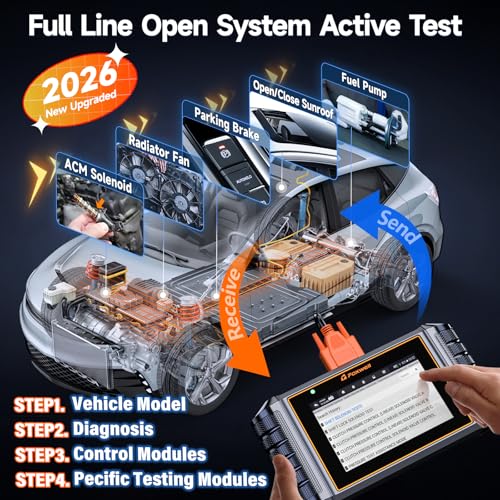
Bidirectional Active Tests
One of the most important upgrades in current NT726 software is:
bidirectional control.
FOXWELL currently advertises active-test capability allowing the scanner to send commands directly to supported vehicle ECUs.
Instead of simply asking:
“What does the computer see?”
you can sometimes ask:
“Will this component actually operate when I command it?”
Examples of Active Tests
Depending on the vehicle and control module, supported tests may include commands involving:
- Cooling fan
- Windows
- Door locks
- Mirrors
- Sunroof
- Wipers
- Fuel injectors
- ABS components
- Relays
- Lamps
- Pumps
- Solenoids
- Other electronically controlled devices
Coverage varies substantially between vehicles.
Why Bidirectional Control Matters
Suppose the cooling fan does not operate.
A conventional scanner may show:
- Coolant temperature
- Fan command percentage
- Related DTCs
A bidirectional scanner may additionally allow you to command the fan.
If the fan operates when commanded, the test helps narrow the problem toward areas such as:
- Sensor input
- ECU command logic
- Wiring conditions
- Operating strategy
If the fan does not operate when properly commanded, diagnosis can move toward:
- Fan motor
- Relay
- Fuse
- Wiring
- Module output
That is why bidirectional control can save substantial diagnostic time.
Bidirectional Does Not Mean Every Test on Every Vehicle
The seller claims coverage for:
99% of 3,000+ active tests.
I would not use that statistic as a blanket Pro Street claim.
Active-test availability depends on:
- Manufacturer
- Model
- Model year
- Installed ECU
- Vehicle configuration
- Scanner software version
The accurate wording is:
Supports extensive bidirectional active tests on compatible vehicles. Verify exact coverage before purchase.
Four-in-One Live Data
The NT726 can display multiple live-data parameters together.
FOXWELL currently markets this as:
4-in-1 data view.
This allows several parameters to be compared at the same time.
For example:
- Engine RPM
- MAF
- Short-term fuel trim
- Long-term fuel trim
or:
- Four wheel-speed sensors
or:
- Transmission input speed
- Output speed
- Commanded gear
- Transmission temperature
Seeing several related PIDs together can make diagnostic patterns much easier to identify.
Graphical Live Data
Supported parameters can be displayed graphically, making it easier to identify:
- Intermittent dropouts
- Sensor spikes
- Slow response
- Fuel-trim changes
- Temperature trends
- Wheel-speed discrepancies
Graphing is particularly useful during intermittent diagnosis.
Auto Scan
The NT726 supports vehicle-wide scanning on compatible vehicles.
Instead of entering every ECU individually, a full scan can quickly identify modules reporting trouble codes.
This gives you a broader picture of vehicle health.
AutoVIN
The NT726 also supports:
AutoVIN
on compatible applications.
AutoVIN attempts to identify the vehicle automatically from its VIN information.
This reduces manual vehicle selection and helps minimize incorrect model selection.
AutoVIN availability still varies by vehicle.
12 Maintenance and Service Functions
Current FOXWELL retail documentation advertises:
12 service functions
for the NT726.
These functions are:
- Oil Reset
- EPB Reset
- SAS Calibration
- TPMS Reset
- DPF Regeneration
- Injector Coding
- Throttle Relearn / Matching
- ABS Bleeding
- Battery Registration
- Suspension Reset
- Transmission Adaptation
- Window / Door Initialization
Older NT726 packaging may advertise:
8 service functions.
FOXWELL subsequently expanded the feature set through software updates.
For current inventory, update the scanner before evaluating available functions.
Oil Service Reset
On supported vehicles, the NT726 can reset the oil-maintenance reminder after the required service has been completed.
This may include:
- Oil-life reset
- Maintenance interval reset
- Service reminder reset
Support varies by manufacturer.
EPB Reset
The Electronic Parking Brake service function can place supported EPB systems into service mode.
This can be required when:
- Replacing rear brake pads
- Servicing calipers
- Retracting electronic parking-brake actuators
Never mechanically force an electronic parking-brake actuator simply because the piston does not retract normally.
Steering Angle Sensor Calibration
The NT726 supports:
SAS calibration
on compatible vehicles.
Calibration may be required after:
- Alignment
- Steering repair
- Steering-angle sensor replacement
- Battery or module work
- Certain ABS/ESC repairs
Follow the vehicle manufacturer’s procedure.
DPF Regeneration
The NT726 can perform supported:
Diesel Particulate Filter regeneration
procedures.
A forced regeneration may be required when soot loading reaches a point where normal passive or active regeneration is not completing successfully.
Do not initiate a forced DPF regeneration without checking:
- DTCs
- Soot loading
- Exhaust temperature sensors
- Differential-pressure readings
- Oil level
- Fuel level
- Vehicle-specific safety conditions
DPF regeneration produces extremely high exhaust temperatures.
TPMS Reset
The NT726 includes a TPMS-related reset function on supported vehicles.
This should not be confused with a dedicated TPMS programming system.
TPMS Reset Is Not Sensor Programming
The NT726 should not be marketed as universally capable of:
- Activating every TPMS sensor
- Cloning sensor IDs
- Programming blank universal sensors
- Replacing a dedicated TPMS tool
FOXWELL’s own current comparison chart does not classify the NT726 as an advanced TPMS programming device.
Injector Coding
Injector coding is supported on compatible applications.
This function can be required when replacement injectors use calibration or correction values that must be entered into the ECU.
Do not confuse:
injector coding
with:
ECU performance tuning.
They are completely different functions.
Throttle Relearn
Throttle relearn or throttle matching can help perform supported adaptations after:
- Throttle-body replacement
- Cleaning
- ECU reset
- Battery disconnection
- Certain engine repairs
Exact procedure varies by vehicle.
Battery Registration
Battery registration is one of the functions added to later NT726 software.
On supported vehicles, registration tells the battery-management system that a new battery has been installed.
Depending on vehicle design, the system may consider:
- Battery age
- Capacity
- Chemistry
- Charge strategy
This is common on many newer European vehicles and increasingly common elsewhere.
Suspension Reset
Supported electronically controlled suspension systems may require:
- Height calibration
- Reset
- Initialization
after certain suspension repairs.
The NT726 includes a suspension reset function for compatible applications.
Transmission Adaptation
Transmission adaptation functions may be useful after supported:
- Transmission repairs
- Valve-body work
- Solenoid work
- TCM procedures
- Adaptation resets
This is highly manufacturer-specific.
Do not reset transmission adaptations casually simply because the function is available.
Window and Door Initialization
Current NT726 software also includes supported:
window and door initialization.
This may help restore automatic window or door functions after:
- Battery disconnection
- Window motor replacement
- Glass replacement
- Module work
FCA AutoAuth Secure Gateway Support
This is an important verified feature.
FOXWELL officially lists the NT726 among its diagnostic tools supporting FCA Secure Gateway access through its AutoAuth integration.
FCA began using its Secure Gateway Module on many vehicles starting around the 2018 model year.
Affected brands can include:
- Chrysler
- Dodge
- Jeep
- Ram
- Fiat
- Alfa Romeo
Without authorized gateway access, a scanner may be limited to read-only functions on protected modules.
With proper AutoAuth access, supported FOXWELL tools can perform authorized functions such as:
- Clearing DTCs
- Active tests
- Relearns
- Calibrations
- Adjustments
Official FOXWELL FCA Secure Gateway information:
https://www.foxwelltech.us/support-fcaWeb.html
AutoAuth Account Requirements
FCA Secure Gateway access generally requires the technician or shop to maintain the appropriate AutoAuth credentials and any applicable access arrangement.
The scanner itself does not eliminate FCA’s authorization requirements.
What About the 12+8 FCA Adapter?
Some marketplace listings state that a separate:
12+8 bypass adapter
is required.
That should not be confused with authorized AutoAuth Secure Gateway access.
The exact connection method can depend on the vehicle and diagnostic workflow.
For Pro Street, I would advertise:
FCA AutoAuth Secure Gateway support on compatible vehicles; additional account, authorization or vehicle-specific connection requirements may apply.
CAN-FD Claim — Do Not Publish Yet
The seller title advertises:
CAN-FD.
I would remove this from the Pro Street product title and primary feature list unless your specific NT726 supplier can document it.
FOXWELL clearly advertises CAN-FD on higher platforms such as its NT909.
Current FOXWELL NT726 pages emphasize:
- All-system diagnostics
- Bidirectional tests
- 12 resets
- AutoVIN
- Wi-Fi updates
- FCA gateway support
but I could not confirm an equivalent current manufacturer CAN-FD specification for the NT726.
Therefore:
Do not promise CAN-FD compatibility for this listing until your exact hardware revision is verified.
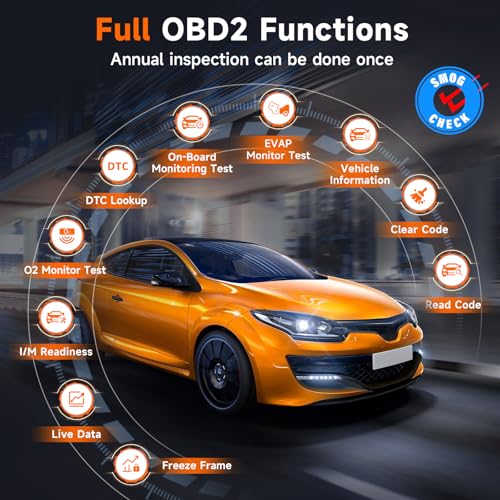
Complete OBD-II Functions
In addition to enhanced manufacturer-specific diagnostics, the NT726 supports standard OBD-II/EOBD functions.
These include functions such as:
- Read codes
- Clear supported codes
- Live data
- Freeze frame
- I/M readiness
- Vehicle information
- O2 monitoring
- Onboard monitor testing
I/M Readiness
The scanner can check emissions-monitor status before an inspection.
Common readiness monitors may include:
- Misfire
- Fuel system
- Catalyst
- EVAP
- Oxygen sensor
- O2 heater
- EGR/VVT
For federal vehicle emissions information:
https://www.epa.gov/vehicle-and-fuel-emissions-testing
Clearing Codes Can Reset Readiness
When diagnostic information is cleared, readiness monitors can return to:
Not Ready.
The vehicle may need to complete its appropriate drive cycles before emissions testing.
Repair the fault first.
Then confirm monitor readiness.
Permanent Codes
The seller correctly raises an important point about permanent DTCs.
Some emissions-related:
Permanent Diagnostic Trouble Codes
cannot simply be erased by pressing Clear Codes.
They are designed to remain until the vehicle’s onboard diagnostic system verifies that the underlying problem has been corrected under the required operating conditions.
This is different from an ordinary stored or pending DTC.
Diagnostic Reports
The NT726 can generate diagnostic reports from supported vehicle scans.
These reports can provide a record of:
- Vehicle identification
- Control modules
- DTCs
- Scan results
This can be valuable for:
- Repair shops
- Pre-purchase inspections
- Before-and-after repair records
- Customer documentation
PDF Reports
Current marketplace listings advertise one-click PDF report generation.
Because report format and export options may change with software revisions, I would market this more conservatively as:
Generate and export supported diagnostic reports.
Wi-Fi
Current NT726 hardware uses Wi-Fi for functions such as:
- Software updates
- Supported report workflows
- Online scanner functions
Vehicle communication itself remains wired on the standard NT726.
Lifetime Free Updates
FOXWELL’s current comparison chart lists the NT726 with:
Lifetime free updates
and no extended software subscription fee.
That is a significant difference from many professional scanners that require annual software renewals.
Official FOXWELL software and support:
https://www.foxwelltech.us/support-tools.html
Android 9.0
Current FOXWELL NT726 retail documentation identifies the scanner as running:
Android 9.0.
This provides a more modern interface than traditional button-only scan tools.
5.5-Inch Touchscreen and 32GB Storage
Current FOXWELL retail material advertises the updated NT726 with:
- 5.5-inch touchscreen
- 32GB storage
- Quad-core processor
- Android 9.0
However, FOXWELL has published inconsistent hardware specifications across different comparison and legacy pages.
Some older/reference material lists different screen and control configurations.
For Pro Street inventory, I recommend verifying the physical hardware in the actual shipment before hardcoding:
5.5-inch touchscreen / 32GB
into structured product specifications.
A safe catalog description is:
Current-generation Android NT726 diagnostic platform; hardware configuration should be verified against supplied inventory.
Vehicle Coverage
FOXWELL advertises broad American, Asian and European manufacturer coverage.
Supported brands include applications from manufacturers such as:
- Acura
- Alfa Romeo
- Audi
- Bentley
- BMW
- Chrysler
- Ferrari
- Fiat
- Ford
- GM
- Honda
- Hyundai
- Kia
- Lexus
- Mercedes-Benz
- Mitsubishi
- Saab
- Toyota
- Volkswagen
- Additional supported manufacturers
Do Not Call It Universal
The seller uses phrases such as:
“all vehicles”
and:
“universal coverage.”
Those claims are too broad.
No aftermarket scan tool provides every diagnostic, active-test and service function on every vehicle.
Use:
Broad multi-brand vehicle coverage across supported American, Asian and European applications. Function availability varies by year, make, model and installed control modules.
What About Tesla?
The seller includes Tesla among its claimed 100+ brands.
I would not use Tesla as a headline compatibility claim without verifying the exact vehicle and intended diagnostic functions through FOXWELL’s coverage database.
EV diagnostics can differ significantly from generic OBD-II and conventional ICE vehicle support.
Older Boxes Showing Eight Functions
This seller warning is believable and consistent with FOXWELL’s product evolution.
Earlier NT726 documentation described:
8 service functions.
Current FOXWELL retail documentation advertises:
12 service functions.
FOXWELL states that later software added:
- Battery Registration
- Suspension Reset
- Transmission Adaptation
- Window / Door functions
Existing compatible NT726 units can receive updated software.
For inventory carrying an older box, the scanner should be updated before assuming the old printed feature count reflects current software.
Is the FOXWELL NT726 Really Bidirectional?
Current FOXWELL retail documentation says yes.
FOXWELL states that bidirectional control was added as a software upgrade and gives examples including:
- Windows
- Mirrors
- Sunroof
- Wipers
- Radiator fan
Existing NT726 devices are advertised as being able to receive this upgrade through the scanner’s update system.
However, FOXWELL has older comparison material that does not reflect this newer bidirectional upgrade.
For the current product page, use:
Bidirectional active testing on supported vehicles with current software installed.
Is the NT726 an ECU Coding Tool?
No general ECU coding capability should be advertised.
FOXWELL’s current comparison charts reserve broader coding/programming features for higher-level products.
Do not advertise the NT726 for:
- General ECU coding
- Online programming
- Offline ECU programming
- Module flashing
- J2534 programming
- Variant coding across all brands
Does It Program Keys?
Do not advertise general key programming.
The NT726 should not be positioned as:
- Locksmith scanner
- Immobilizer programmer
- Universal key programmer
NT726 vs FOXWELL NT301
These are not close competitors.
FOXWELL NT301
Designed primarily for:
- Check Engine Light diagnosis
- Generic OBD-II codes
- Live engine data
- Freeze frame
- Mode 6
- I/M readiness
FOXWELL NT726
Adds:
- Full-system scanning
- ABS
- SRS
- Transmission
- Body systems
- Bidirectional tests
- 12 maintenance functions
- ABS bleeding
- Battery registration
- Injector coding
- DPF regeneration
- Transmission adaptation
- FCA gateway access
The NT726 represents several major steps up in capability.
NT726 vs LAUNCH CR529
The CR529 remains primarily an advanced OBD-II engine/emissions scanner.
LAUNCH CR529
Good for:
- Engine DTCs
- Live data
- Mode 6
- Mode 8
- I/M readiness
- Data recording
- Diagnostic reports
FOXWELL NT726
Adds true manufacturer-specific access to:
- ABS
- SRS
- Transmission
- Body modules
- Bidirectional active tests
- Service functions
They belong in different product categories.
NT726 vs BlueDriver Pro Next-Gen
BlueDriver
Strong for consumer-friendly:
- Bluetooth diagnostics
- ABS
- SRS
- Transmission
- TPMS on supported vehicles
- Repair Reports
- Phone-based operation
FOXWELL NT726
Goes further into professional-style service work with:
- Bidirectional active tests
- ABS bleeding
- EPB service
- DPF regeneration
- Injector coding
- Battery registration
- SAS calibration
- Transmission adaptation
BlueDriver is easier for casual owners.
The NT726 offers substantially deeper maintenance capability.
NT726 vs OBDLink MX+
OBDLink MX+ remains valuable for enthusiasts who want:
- FORScan
- AlfaOBD
- BimmerCode
- OBD Fusion
- Multiple third-party apps
But the adapter itself depends heavily on the software being used.
The NT726 provides an integrated standalone diagnostic platform with:
- All-system coverage
- Active tests
- Maintenance procedures
- Guided scanner interface
NT726 vs Innova 5610
This is a much more realistic comparison.
Innova 5610
Strong points include:
- All-system scanning
- OEM live data
- Bidirectional controls
- Service functions
- RepairSolutions2 ecosystem
- Strong North American DIY support
FOXWELL NT726
Strong points include:
- Broad multi-brand full-system diagnostics
- Bidirectional controls
- 12 maintenance functions
- ABS bleeding
- Injector coding
- DPF regeneration
- Transmission adaptation
- FCA AutoAuth support
- Lifetime update positioning
The better choice depends heavily on exact vehicle coverage and required functions.
NT726 vs FOXWELL NT809
FOXWELL’s NT809 occupies the next tier up within the company’s product family.
The NT809 currently offers:
- All-system diagnostics
- Bidirectional control
- Approximately 30+ reset/service functions
- Broader advanced service coverage
The NT726 offers:
- All-system diagnostics
- Bidirectional control
- 12 resets
For buyers who need the NT726’s supported functions but do not require the much larger service-function library of the NT809, the NT726 can provide better value.
NT726 vs FOXWELL NT909
The NT909 moves another step toward a professional shop platform.
FOXWELL currently advertises the NT909 with features such as:
- 30+ service functions
- ECU coding
- CAN-FD
- DoIP
- FCA AutoAuth
- Additional advanced functions
Those are important differences.
The NT726 should therefore not borrow NT909 marketing claims such as:
CAN-FD
or:
ECU coding
unless FOXWELL specifically documents those functions for your exact NT726 hardware revision.
Who Should Buy the FOXWELL NT726?
The NT726 is best suited to:
- Serious DIY mechanics
- Automotive enthusiasts
- Independent technicians
- Home garages
- Used-car inspectors
- Owners maintaining multiple vehicles
- Buyers needing ABS/SRS diagnostics
- Buyers needing bidirectional active tests
- Drivers performing common service resets
- Shops that want a lower-cost secondary scanner
Who Should Buy Something More Advanced?
Consider moving to an NT809, NT909 or another higher-level professional platform when you require:
- 30+ service functions
- ECU coding
- CAN-FD confirmed across newer applications
- DoIP
- Advanced programming
- Topology mapping
- Advanced TPMS sensor programming
- Broader shop-level workflow features
Diagnostic Workflow
1. Connect the NT726
Plug the vehicle communication cable into the diagnostic connector.
2. Identify the Vehicle
Use AutoVIN where supported or select the vehicle manually.
3. Run a Full-System Scan
Identify modules with stored DTCs.
4. Save the Results
Generate a pre-repair diagnostic record.
5. Enter the Affected System
Review DTC definitions, module information and live data.
6. Analyze Live Data
Compare related sensors and commands.
7. Run Supported Active Tests
Command relevant components where the vehicle allows it.
8. Perform Mechanical or Electrical Tests
Verify wiring, voltage, pressure, resistance and mechanical condition as required.
9. Complete the Repair
Correct the underlying fault.
10. Run Required Service Procedures
Perform applicable relearns, calibrations or resets.
11. Clear Supported DTCs
Erase codes after completing the repair.
12. Rescan the Vehicle
Confirm that faults do not return.
13. Generate a Post-Repair Report
Document the completed diagnosis.
Official FOXWELL Resources
FOXWELL NT726 Manufacturer Page
https://www.foxwelltech.us/product-detail-717.html
FOXWELL FCA Secure Gateway Information
https://www.foxwelltech.us/support-fcaWeb.html
FOXWELL Diagnostic Coverage
https://www.foxwelltech.us/support-fun-list.html
FOXWELL Update Tools
https://www.foxwelltech.us/support-tools.html
FOXWELL Support
https://www.foxwelltech.us/support.html
Pro Street Diagnostic Resources
DTC Doctor
https://my.prostreetonline.com/dtc-obdii/
Complete P-Series OBD-II Code Library
https://my.prostreetonline.com/dtc-doctor/p-code-obd-ii-codes/
OBD-II Diagnostic Articles
https://my.prostreetonline.com/category/dtc-obdii/
Most Common OBD2 Codes Explained
https://my.prostreetonline.com/2026/07/16/most-common-obd2-codes-explained/
Shop Automotive Diagnostic Tools
Browse additional scanners and automotive diagnostic equipment:
Final Take
The 2026 FOXWELL NT726 is the point in your scanner catalog where the products stop being sophisticated Check Engine readers and start becoming genuinely useful vehicle diagnostic platforms.
The major difference is:
bidirectional control.
Reading an ABS code is useful.
Being able to look at wheel-speed data, activate supported components and then run an ABS bleed procedure is an entirely different level of diagnostic capability.
The same applies to:
SRS
transmission
body modules
battery registration
DPF regeneration
injector coding
EPB service
and:
transmission adaptations.
FOXWELL’s current retail documentation also confirms that the NT726 has evolved. Earlier units were marketed with eight service functions, while current software provides twelve, and bidirectional control has been added through software updates.
There are, however, several marketplace claims I would remove from the Pro Street listing.
Do not call it universally compatible with every vehicle.
Do not promise 99% of 3,000+ active tests.
Do not advertise TPMS reset as universal TPMS sensor programming.
And most importantly:
do not currently put CAN-FD in the product title.
FOXWELL explicitly documents CAN-FD on higher scanners such as the NT909, while its current NT726 documentation does not give me enough evidence to make the same blanket claim for the NT726.
FCA AutoAuth is different.
That one is verified: FOXWELL officially includes the NT726 in its list of supported Secure Gateway tools.
For a buyer who wants full-system diagnostics, active tests and the most commonly needed service procedures without moving into a $500–$1,000 professional tablet, the NT726 has a very strong position in the Pro Street lineup.
Specification: FOXWELL NT726 All-System Bidirectional OBD2 Scanner — 12 Service Functions & FCA AutoAuth
|
User Reviews
Be the first to review “FOXWELL NT726 All-System Bidirectional OBD2 Scanner — 12 Service Functions & FCA AutoAuth”
You must be logged in to post a review.




There are no reviews yet.