

FOXWELL NT301 OBD2 Scanner — Live Data, I/M Readiness & Check Engine Code Reader
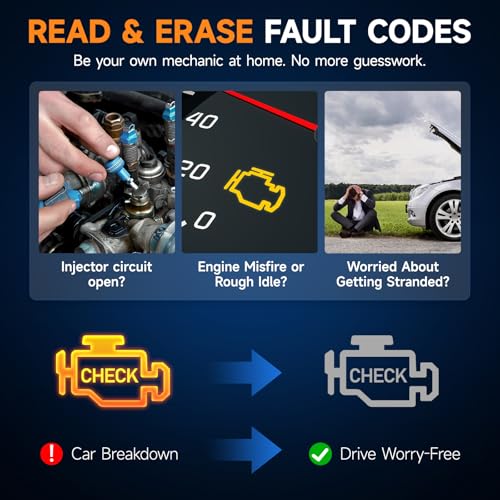
The FOXWELL NT301 OBD2 Scanner is a dedicated handheld diagnostic code reader designed for drivers, DIY mechanics and automotive enthusiasts who want a reliable way to diagnose Check Engine Light problems without using a smartphone, Bluetooth adapter or subscription service.
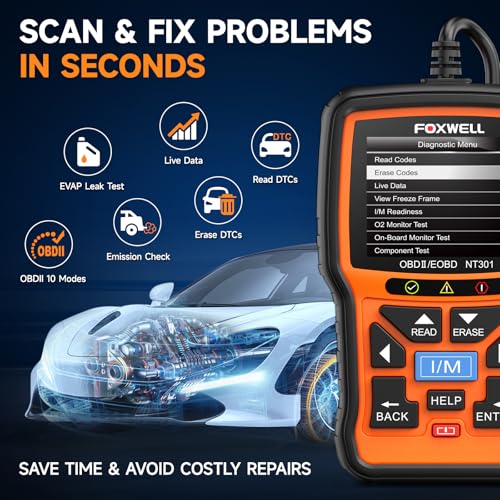
The NT301 combines standard OBD-II and EOBD diagnostics with a 2.8-inch TFT color display, graphical live data, freeze-frame information, oxygen-sensor testing, onboard monitor testing and a dedicated emissions-readiness system with:
- Red LED
- Yellow LED
- Green LED
- Built-in audible indicator
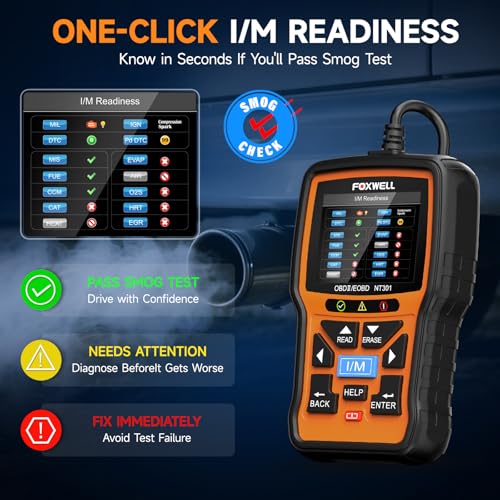
- One-touch I/M readiness shortcut
It connects directly to the vehicle’s 16-pin diagnostic connector and receives power from the vehicle.
No batteries are required.
No phone is required.
No Bluetooth pairing is required.
No subscription is required for normal scanner operation.
For anyone who wants a dedicated scanner primarily for engine and emissions diagnostics, the NT301 sits above generic entry-level code readers without pretending to be a full-system professional diagnostic tablet.
FOXWELL NT301 Key Features
- Read supported OBD-II trouble codes
- Clear supported Check Engine codes
- Built-in DTC definitions and help
- Stored and pending DTC retrieval
- Live OBD-II data
- Graph live sensor data
- Record supported PID data
- Freeze-frame retrieval
- I/M readiness
- Dedicated emissions-readiness hotkey
- Red/yellow/green readiness LEDs
- Built-in audible readiness feedback
- Oxygen-sensor testing
- Mode 6 onboard-monitor data
- Mode 8 component-test requests where supported
- Vehicle information
- VIN retrieval where supported
- Calibration ID information where supported
- Calibration Verification Number where supported
- Data printing through supported PC software
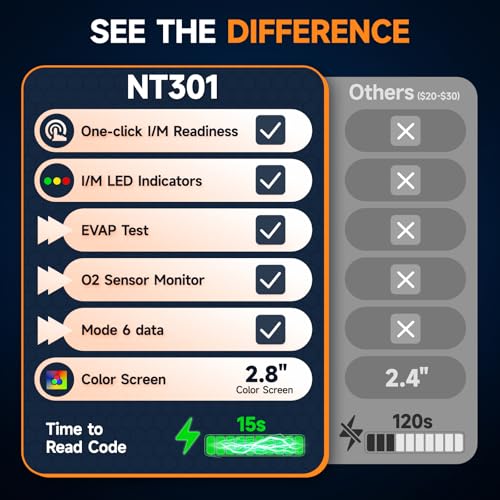
- 2.8-inch TFT color screen
- Plug-and-play vehicle power
- Lifetime free updates currently advertised by FOXWELL
Original price was: $69.99.$55.95Current price is: $55.95.
FOXWELL NT301 Specifications
| Specification | Details |
|---|---|
| Brand | FOXWELL |
| Model | NT301 |
| Product Type | CAN OBD-II / EOBD code reader |
| Display | 2.8-inch TFT color screen |
| Read Engine Codes | Yes |
| Clear Supported Codes | Yes |
| DTC Definitions | Yes |
| Live Data | Yes |
| Live Data Graphing | Yes |
| Data Recording | Yes |
| Freeze Frame | Yes |
| I/M Readiness | Yes |
| Readiness LEDs | Red / Yellow / Green |
| Audible Indicator | Yes |
| O2 Sensor Test | Yes |
| Mode 6 | Yes |
| Mode 8 | Supported OBD-II functions where available |
| Vehicle Information | Yes |
| VIN Retrieval | Yes, where supported |
| ABS Module Diagnostics | No |
| SRS / Airbag Diagnostics | No |
| TPMS Module Diagnostics | No |
| Oil Reset | No |
| EPB Service | No |
| ABS Bleeding | No |
| ECU Coding | No |
| Bidirectional Full-System Tests | No |
| Smartphone Required | No |
| Bluetooth | No |
| Battery Required | No |
| Power | Vehicle diagnostic connector |
| Updates | Lifetime free updates currently advertised |
| Update Platform | Windows via NT Wonder |
| Warranty | One year currently advertised by FOXWELL retail channel |
Read Check Engine Codes
The FOXWELL NT301 can retrieve standardized OBD-II engine and emissions trouble codes from compatible vehicles.
Examples include:
- P0171 — System Too Lean Bank 1
- P0300 — Random/Multiple Cylinder Misfire
- P0301–P0308 — Cylinder-specific misfires
- P0420 — Catalyst System Efficiency Below Threshold
- P0430 — Catalyst Efficiency Below Threshold Bank 2
- P0440-series — EVAP system faults
- P0507 — Idle Speed Higher Than Expected
- P0700 — Transmission Control System Malfunction notification
Once you retrieve a trouble code, continue diagnosis with the Pro Street DTC Doctor:
https://my.prostreetonline.com/dtc-obdii/
Browse the P-Series OBD-II code library:
https://my.prostreetonline.com/dtc-doctor/p-code-obd-ii-codes/
Read and Clear Supported DTCs
The NT301 can read and erase supported emissions-related diagnostic trouble codes.
A good diagnostic process looks like this:
- Connect the scanner.
- Read all stored and pending codes.
- Record the DTC numbers.
- Save or review freeze-frame information.
- Check relevant live data.
- Diagnose the actual fault.
- Complete the repair.
- Clear the supported DTC.
- Drive the vehicle.
- Scan it again.
Correction: The Scanner Does Not Wait Until the Car Is Repaired
Some marketplace descriptions claim that the NT301:
“only clears the Check Engine Light after the underlying issue has been fixed.”
That is misleading.
An OBD-II scanner can send a request to clear supported diagnostic information when the ECU permits it.
The scanner does not independently inspect the repair and decide whether the problem has been fixed.
If the fault is still present, the ECU may detect it again and:
- Reset the DTC
- Illuminate the MIL again
The correct message for customers is:
The NT301 can clear supported engine codes, but the code can return if the underlying fault remains.
A Trouble Code Does Not Tell You Which Part to Buy
If the scanner displays:
P0171 — System Too Lean Bank 1
that does not automatically mean the oxygen sensor failed.
Possible causes can include:
- Vacuum leak
- Intake leak
- MAF sensor problem
- Low fuel pressure
- Weak fuel pump
- Restricted injector
- Exhaust leak
- Oxygen-sensor problem
- Wiring fault
See:
https://my.prostreetonline.com/dtc-doctor/p0171-code-system-too-lean-bank-1/
The code is the beginning of the diagnosis.
Not the checkout page.
Live Data
One of the NT301’s strongest advantages over very basic handheld code readers is:
graphical live-data support.
Depending on the vehicle, you may be able to monitor parameters such as:
- Engine RPM
- Vehicle speed
- Engine coolant temperature
- Intake-air temperature
- Throttle position
- Calculated engine load
- Short-term fuel trim
- Long-term fuel trim
- MAF
- MAP
- Oxygen-sensor readings
- Fuel-system status
- Additional supported OBD-II PIDs
The exact PID list depends on the vehicle.
Graph Live Data
The NT301 can display supported live values graphically.
Graphing can make it easier to spot:
- Sensor dropouts
- Sudden voltage changes
- Temperature trends
- Abnormal fuel-trim movement
- O2 sensor activity
- Irregular throttle readings
Instead of staring at a number changing from:
0.42
to:
0.76
to:
0.18
you can see the trend visually.
That gives the NT301 a useful advantage over many inexpensive text-only readers.
Record Live Data
FOXWELL also documents PID recording/data logging for the NT301.
This can be useful when diagnosing intermittent problems that do not occur while the car is sitting in the driveway.
For example, you may want to review:
- Fuel trims while cruising
- Coolant temperature during warm-up
- Throttle data under acceleration
- O2 sensor behavior
- Engine-load changes
Recorded information can then be reviewed after the drive.
Freeze-Frame Data
The NT301 can retrieve:
freeze-frame information
stored by the PCM with supported faults.
Freeze frame can show vehicle operating conditions when the fault was recorded.
Depending on the vehicle, those values can include:
- RPM
- Vehicle speed
- Coolant temperature
- Engine load
- Fuel trims
- Throttle position
- Additional emissions-related PIDs
This is valuable when diagnosing intermittent issues.
Why Freeze Frame Is Important
Suppose the vehicle has a misfire code.
Freeze-frame data might show the problem occurred:
- At cold start
- At idle
- At highway speed
- Under heavy load
- After full warm-up
Those details can completely change the diagnostic direction.
Built-In DTC Help
The NT301 incorporates DTC lookup and diagnostic help information.
Where available, the scanner can provide:
- Code definition
- Additional trouble-code information
- Possible-cause guidance
Use this information as a starting point rather than treating it as proof that a particular component failed.
Dedicated I/M Readiness Button
One of the NT301’s best physical features is its dedicated:
I/M readiness hotkey.
This gives the user quick access to emissions-monitor status without navigating through several menus.
That is especially useful for drivers preparing for:
- Smog inspection
- State emissions testing
- Used-car inspection
Red, Yellow and Green Readiness LEDs
The NT301 incorporates three highly visible status lights:
Green
Yellow
Red
to make emissions-readiness information easier to interpret.
Combined with the built-in audible indicator, this is one of the features that separates the NT301 from basic generic readers.
What the I/M Readiness Test Does
OBD-II vehicles run self-tests known as:
readiness monitors.
Depending on the vehicle, these may include:
- Misfire monitor
- Fuel-system monitor
- Comprehensive components
- Catalyst monitor
- Heated catalyst
- EVAP monitor
- Secondary-air system
- Oxygen-sensor monitor
- Oxygen-sensor heater
- EGR/VVT monitor
The exact monitor set varies by vehicle.
Can the NT301 Tell You Whether You Will Pass Smog?
It can help determine whether the vehicle’s OBD-II system appears ready for an emissions inspection.
However, do not promise:
“Green light means guaranteed smog pass.”
State inspection requirements vary.
A vehicle may also fail for reasons outside the generic readiness data available to the scanner.
For federal emissions information:
https://www.epa.gov/vehicle-and-fuel-emissions-testing
Don’t Clear Codes Right Before a Smog Test
When diagnostic information is erased, readiness monitors may reset to:
Not Ready.
The vehicle then has to complete enough appropriate driving for its self-tests to run again.
So this usually does not work:
- Check Engine Light comes on.
- Clear it in the parking lot.
- Drive directly to the emissions station.
The light may be off, but the monitors can still be incomplete.
Repair the problem first.
Mode 6 Onboard Monitor Tests
The NT301 supports:
Mode 6 onboard monitoring information.
Mode 6 can expose results from diagnostic tests that the ECU performs internally.
Depending on the vehicle, that can include information associated with:
- Misfire monitoring
- Catalyst monitoring
- Oxygen sensors
- EVAP system
- Other emissions monitors
Mode 6 can be particularly useful when investigating an intermittent or developing emissions problem.
Mode 6 Is Not Full-System Diagnostics
Mode 6 does not give the NT301 access to every electronic module in the vehicle.
It does not automatically provide:
- ABS diagnostics
- Airbag diagnostics
- BCM diagnostics
- TPMS module access
- Transmission module scanning
- Vehicle coding
FOXWELL itself classifies the NT301 as a:
CAN OBDII/EOBD Code Reader
rather than an all-system scanner.
O2 Sensor Test
The NT301 supports OBD-II oxygen-sensor test information where the vehicle protocol provides it.
This can help evaluate supported oxygen-sensor monitoring data.
You may also use live data to observe:
- O2 sensor activity
- Fuel trims
- MAF readings
- MAP readings
- Engine load
during diagnosis.
An O2 Sensor Test Does Not Automatically Diagnose the Sensor
An oxygen-sensor-related fault can be influenced by:
- Vacuum leaks
- Exhaust leaks
- Fuel pressure
- Injectors
- Wiring
- Engine mechanical condition
- Air-metering problems
Do not replace an oxygen sensor simply because an O2-related test or code looks unusual.
Mode 8 / EVAP System Testing
The seller describes the NT301 as performing an:
EVAP leak test.
This needs more precise wording.
The NT301 supports the standard OBD-II functions, including Mode 8 component-test requests where supported.
On certain vehicles, Mode 8 may allow the scanner to request an:
EVAP system leak test
or related onboard test.
However:
the vehicle must support the requested Mode 8 function.
The NT301 Is Not an EVAP Smoke Machine
An OBD-II EVAP test command should not be confused with physical leak detection.
The NT301 does not replace:
- Smoke machine
- Pressure tester
- Vacuum tester
- Visual hose inspection
It cannot physically show where an EVAP hose is cracked.
It may request a supported onboard EVAP test and provide diagnostic information.
That is a very different claim from:
“finds EVAP leaks.”
Vehicle Information
The NT301 can retrieve standardized vehicle information where supported.
That may include:
- VIN
- Calibration ID
- Calibration Verification Number
This information can be helpful during:
- Diagnosis
- ECU verification
- Used-car inspection
Used-Car Inspection
The NT301 makes a useful basic used-car inspection tool.
Before buying, check:
- Stored engine codes
- Pending codes
- Freeze frame
- I/M readiness
- VIN information
- Live data
One useful clue is the readiness-monitor status.
If multiple monitors display:
Not Ready
the ECU may have recently been cleared or lost power.
That is not proof the seller intentionally erased codes.
It is simply a reason to investigate further.
2.8-Inch TFT Color Display
FOXWELL officially specifies the NT301 with a:
2.8-inch TFT color screen.
That is a meaningful advantage over monochrome budget readers.
The display provides more room for:
- DTC information
- Live parameters
- Graphs
- Readiness data
- Menu navigation
Dedicated Read/Clear Hotkeys
The scanner includes direct-access controls for commonly used functions such as:
- Reading DTCs
- Clearing DTCs
- I/M readiness
This speeds up common garage diagnostics.
Built-In Speaker
The NT301 includes an audible indicator that works with its readiness system.
For a quick smog-readiness check, the combination of:
- Screen
- LEDs
- Audio feedback
makes the tool easier to interpret than a basic text-only code reader.
Plug and Play
There is no wireless setup.
Connect the NT301 to the vehicle’s OBD-II port and the tool receives power through the Data Link Connector.
You do not need:
- Batteries
- Charger
- Smartphone
- Bluetooth
- App subscription
Supported OBD-II Protocol Families
The NT301 supports the common standardized OBD-II/EOBD protocol families, including:
- ISO 15765-4 CAN
- ISO 14230-4 KWP2000
- ISO 9141-2
- SAE J1850 VPW
- SAE J1850 PWM
This provides broad compatibility across compliant domestic and imported vehicles.
U.S. Vehicle Compatibility
The NT301 is intended for OBD-II-compliant vehicles, including most:
1996 and newer U.S.-market gasoline cars and light trucks.
Exact vehicle compatibility should still be verified when there is any uncertainty.
European and Asian Vehicles
Many later European and Asian vehicles using EOBD/OBD-II standards are also supported.
Do not advertise a single non-U.S. year as universally correct across every country.
Emission-standard adoption dates vary by market and fuel type.
Safer wording:
Compatible with many OBD-II/EOBD-compliant European and Asian vehicles; verify the exact year, model and market before purchase.
Diesel Compatibility
The supplied seller listing advertises support for:
12V diesel vehicles equipped with OBD-II.
That is the important qualification.
Do not simply advertise:
works on diesel trucks.
A diesel vehicle still needs compatible OBD-II/EOBD implementation.
This becomes especially important with:
- Older diesels
- Medium-duty vehicles
- Heavy-duty trucks
- Non-U.S. vehicles
The NT301 is not a heavy-duty J1939 truck scanner.
Does the NT301 Read ABS Codes?
No.
This is one of the most important distinctions on the product page.
FOXWELL’s current scanner comparison lists the NT301 with:
no electronic-system coverage.
That means it should not be advertised as an ABS-module scanner.
Does the NT301 Read Airbag Codes?
No.
Do not advertise:
- SRS diagnosis
- Airbag-module codes
- Occupant-restraint diagnostics
Those require a higher-level scanner.
Does It Read TPMS Codes?
No dedicated TPMS module access should be assumed.
The NT301 is not a TPMS service tool.
Does It Diagnose the Transmission?
Some standardized transmission-related P-codes may appear through generic OBD-II.
For example:
P0700
may tell you that the transmission controller requested MIL illumination.
The underlying transmission DTC can require direct TCM communication that the NT301 does not provide.
See:
https://my.prostreetonline.com/dtc-doctor/p0700-code-transmission-control-system-malfunction/
Does the NT301 Reset Oil Service?
No.
FOXWELL’s current comparison information lists:
no special functions
for the NT301.
Do not advertise it for:
- Oil reset
- EPB reset
- BMS reset
- Battery registration
- Steering-angle reset
- DPF service
- Injector coding
- Transmission adaptation
Does the NT301 Perform ABS Bleeding?
No.
The NT301 does not provide the full ABS-module control required for automated ABS bleeding.
Is the NT301 Bidirectional?
This needs an important distinction.
The NT301 supports standard OBD-II service modes, including supported Mode 8 commands.
That does not make it a full-system bidirectional scan tool.
It should not be marketed as a universal tool for commanding:
- Fuel pumps
- Cooling fans
- Door locks
- Windows
- ABS pumps
- Transmission solenoids
- Electronic parking brakes
For extensive vehicle-dependent actuator testing, use a genuine bidirectional diagnostic platform.
Does the NT301 Program Keys?
No.
Do not advertise it as:
- Immobilizer scanner
- Key programmer
- Locksmith tool
Can It Program or Code an ECU?
No general ECU coding or programming capability should be advertised.
The NT301 is not a:
- J2534 pass-thru device
- Factory ECU programming interface
- Module coding tablet
- Performance tuning device
Lifetime Free Updates
FOXWELL currently lists:
Lifetime Free Update
for the NT301 through its scanner update system.
The current FOXWELL update page also identifies the NT301 as eligible for lifetime free updates.
Updates are handled using FOXWELL’s:
NT Wonder
PC software.
Official update page:
https://www.foxwelldiag.com/pages/update-tools
Windows Update Support
FOXWELL currently provides Windows-based updating for the NT301.
The current FOXWELL update page lists support including:
- Windows XP
- Windows 7
- Windows 10
- Windows 11
depending on the currently distributed NT Wonder package.
This PC requirement applies to updating the scanner.
It does not mean a laptop is needed while diagnosing the vehicle.
One-Year Warranty
FOXWELL’s current retail product page advertises:
One Year Warranty
for the NT301.
Because warranty eligibility can depend on purchase channel, seller and region, Pro Street should word it as:
One-year manufacturer/seller warranty subject to current FOXWELL and retailer terms.
Lifetime Technical Support
FOXWELL’s current NT301 retail listing also advertises:
Lifetime Tech Support.
For current support information:
https://www.foxwelltech.us/support.html
FOXWELL NT301 vs MOTOPOWER MP69033
These scanners both provide basic engine and emissions diagnostics.
MOTOPOWER MP69033
Strongest points:
- Budget price positioning
- Live data
- Freeze frame
- Basic waveform display
- VIN shortcut
- Simple standalone operation
FOXWELL NT301
Steps up with:
- Established diagnostic brand
- 2.8-inch TFT color display
- Dedicated I/M readiness key
- Red/yellow/green LEDs
- Audible readiness feedback
- O2 sensor test
- Mode 6
- Data logging
- Lifetime free updates
For a relatively small price difference, the NT301 has the stronger premium-basic story.
FOXWELL NT301 vs VDIAGTOOL VD10
VDIAGTOOL VD10
Best for:
- Entry-level engine codes
- Live data
- Freeze frame
- Basic readiness checks
- Low-cost branded scanner
FOXWELL NT301
Adds a more mature diagnostic interface with:
- Color screen
- Data graphing
- Data recording
- Dedicated smog-check interface
- LEDs
- Speaker
- Mode 6
- O2 test
- Lifetime updates
The NT301 belongs one tier higher.
FOXWELL NT301 vs Autel AL319
This is your closest catalog comparison.
Both are established-brand standalone OBD-II scanners.
FOXWELL NT301
Strongest differentiators:
- 2.8-inch TFT screen
- Graphing live data
- PID recording
- Dedicated I/M shortcut
- Red/yellow/green LEDs
- Mode 6
- O2 sensor test
Autel AL319
Strongest differentiators:
- One-click I/M Readiness
- Color-coded LEDs
- Built-in speaker
- Live PCM data
- Freeze frame
- Autel diagnostic ecosystem
Both occupy the:
premium basic handheld OBD-II scanner
category.
For SEO, keep NT301 focused on:
live data graphing + Mode 6 + smog readiness
and AL319 focused on:
One-Click I/M Readiness + Autel branded code reader.
FOXWELL NT301 vs Vecooneen V529
The V529 advertises more utility functions such as:
- Battery-voltage monitoring
- Mode 8
- Oil-reset support on selected vehicles
The FOXWELL NT301 has the advantage of:
- Better-known diagnostic brand
- Clearly documented FOXWELL support
- Lifetime updates
- Mature readiness interface
- Better established product documentation
I would place the NT301 above the V529 in overall catalog quality even if the generic V529 claims more functions on paper.
FOXWELL NT301 vs BlueDriver
These belong in different diagnostic categories.
FOXWELL NT301
Primarily provides:
- Engine/emissions diagnostics
- Live data
- Freeze frame
- Mode 6
- O2 testing
- I/M readiness
BlueDriver Pro Next-Gen
Adds supported:
- ABS
- SRS / airbag
- Transmission
- TPMS
- Enhanced manufacturer codes
- Vehicle-specific Repair Reports
BlueDriver provides broader vehicle-module access.
The NT301 provides dedicated standalone simplicity.
FOXWELL NT301 vs OBDLink MX+
NT301
Best for someone who wants:
- Dedicated scanner
- No phone
- Fast Check Engine diagnosis
- Smog readiness
- Engine live data
OBDLink MX+
Better suited to:
- Smartphone diagnostics
- FORScan
- BimmerCode
- AlfaOBD
- Enhanced OEM data
- MS-CAN
- SW-CAN
- Multiple advanced apps
These products serve different buyers despite using the same diagnostic connector.
FOXWELL NT301 vs Innova 5610
The Innova 5610 is substantially more advanced.
FOXWELL NT301
Provides:
- Standard OBD-II
- Engine codes
- Live data
- Mode 6
- Emissions testing
Innova 5610
Provides supported:
- All-system scanning
- ABS
- SRS
- Transmission
- OEM live data
- Bidirectional active tests
- Service routines
- Relearns
- Calibrations
The NT301 should not be described as dealer-level or all-system simply because it supports all ten OBD-II service modes.
Who Should Buy the FOXWELL NT301?
The NT301 makes sense for:
- DIY mechanics
- Car enthusiasts
- Everyday drivers
- Used-car shoppers
- Home garages
- Drivers preparing for emissions inspections
- Anyone who prefers a dedicated handheld scanner
- Drivers who want graphical live data
- Buyers who want an established scanner brand without paying for full-system functions
Who Should Choose a More Advanced Scanner?
Move up to an enhanced or full-system tool if you need:
- ABS codes
- SRS codes
- TPMS module diagnostics
- Full TCM diagnostics
- Bidirectional active tests
- Oil resets
- EPB service
- ABS bleeding
- Battery registration
- DPF regeneration
- ECU coding
- Key programming
The NT301 is intentionally focused on:
OBD-II engine and emissions diagnosis.
How to Use the FOXWELL NT301
1. Locate the OBD-II Connector
Find the vehicle’s 16-pin DLC, usually underneath the driver’s side dashboard.
2. Connect the NT301
Plug the scanner securely into the connector.
3. Turn the Ignition On
Switch the ignition to the required position.
The scanner receives power from the vehicle.
4. Read Trouble Codes
Use the dedicated code-reading function.
5. Record Codes Before Clearing Them
Save the diagnostic information first.
6. Review Freeze Frame
Check the conditions present when the ECU recorded the fault.
7. Review Live Data
Graph relevant PIDs to look for abnormal readings.
8. Use Mode 6 When Helpful
Check supported onboard monitor test results.
9. Diagnose the Root Cause
Test the mechanical and electrical systems associated with the DTC.
10. Make the Repair
Correct the underlying problem.
11. Clear Supported DTCs
Erase the fault after completing the repair.
12. Verify the Repair
Drive the vehicle and scan it again.
13. Check I/M Readiness
Make sure the required emissions monitors have completed before inspection.
Official FOXWELL Resources
FOXWELL NT301 Product Information
https://www.foxwelltech.us/product-detail-797.html
FOXWELL NT301 Manuals and Updates
https://www.foxwelltech.us/support-tools.html
FOXWELL Update Tools
https://www.foxwelldiag.com/pages/update-tools
FOXWELL Support
https://www.foxwelltech.us/support.html
Pro Street Diagnostic Resources
DTC Doctor
https://my.prostreetonline.com/dtc-obdii/
Complete P-Series OBD-II Code Library
https://my.prostreetonline.com/dtc-doctor/p-code-obd-ii-codes/
OBD-II Diagnostic Articles
https://my.prostreetonline.com/category/dtc-obdii/
Most Common OBD2 Codes Explained
https://my.prostreetonline.com/2026/07/16/most-common-obd2-codes-explained/
Shop Automotive Diagnostic Tools
Browse more OBD-II scanners, code readers and automotive diagnostic tools:
Final Take
The FOXWELL NT301 OBD2 Scanner is one of the better choices for someone who wants a dedicated engine diagnostic scanner without paying for functionality they may never use.
Compared with inexpensive generic code readers, the NT301 gives you a stronger diagnostic toolkit:
2.8-inch color display
graphical live data
freeze frame
Mode 6
oxygen-sensor testing
PID recording
one-touch I/M readiness
red/yellow/green status LEDs
and:
audible readiness feedback.
Those features make it particularly useful for troubleshooting Check Engine Lights and preparing for emissions testing.
But its limitations should be just as clear.
Despite some marketplace descriptions calling the NT301 a:
professional mechanic scanner
FOXWELL itself classifies it as a:
CAN OBDII/EOBD Code Reader.
It does not provide full access to:
- ABS
- SRS
- TPMS
- Body control modules
- Service resets
- ECU coding
- Broad bidirectional actuator tests
And the seller’s claim that the scanner will only clear a DTC after the vehicle has been repaired is not technically accurate. It can request that supported codes be erased; if the fault remains, the vehicle will simply detect the problem again.
For a buyer who primarily wants to understand:
Why is my Check Engine Light on?
What was the engine doing when the fault occurred?
Are my emissions monitors ready?
and:
What do my live engine sensors look like?
the NT301 is a very solid branded step up from bargain-basement code readers.
Specification: FOXWELL NT301 OBD2 Scanner — Live Data, I/M Readiness & Check Engine Code Reader
|
User Reviews
Be the first to review “FOXWELL NT301 OBD2 Scanner — Live Data, I/M Readiness & Check Engine Code Reader”
You must be logged in to post a review.




There are no reviews yet.