
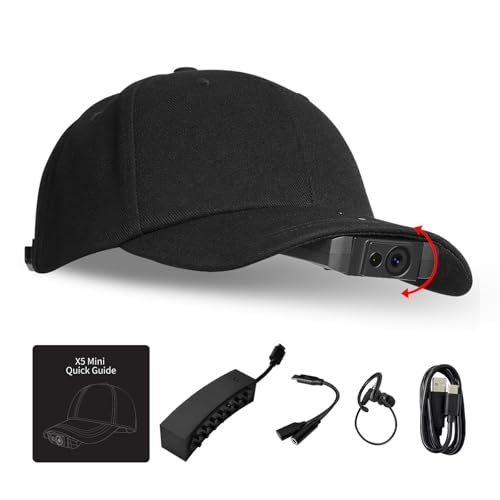


Why adjustable lens tilt matters
When recording an automotive repair, the wearer’s natural head position may not align perfectly with the work area.
For example, someone working underneath a dashboard may need a different camera angle than someone inspecting an engine bay.
The adjustable lens helps compensate for some of these differences without requiring the entire baseball cap to be repositioned.
The 140-degree field of view can also introduce wide-angle distortion near the edges of the frame.
For precision demonstrations, checking the framing before recording remains important.
Lightweight Baseball Cap Design for Hands-Free Recording
One of the Drift X5 Mini’s most distinctive features is its integrated baseball cap mounting system.
Instead of relying on a conventional chest harness or helmet attachment, the camera mounts to a compatible cap.
The manufacturer advertises a combined hat-and-camera weight of approximately 5.99 ounces (170 grams).
This lightweight arrangement is intended to make extended wearable recording more comfortable.
The included baseball cap features an adjustable headband and a built-in camera clip.
For automotive content creators, this design offers several advantages.
A cap-mounted camera can capture a natural view of work being performed, while leaving both hands available for tools and components.
It can also simplify filming in situations where a larger camera rig would be inconvenient.
Comfort will vary depending on head size, camera position, activity, and recording duration.
The cap-mounted design is not a substitute for protective headgear in environments where safety equipment is required.
Hands-Free Voice Control for Recording and Photos
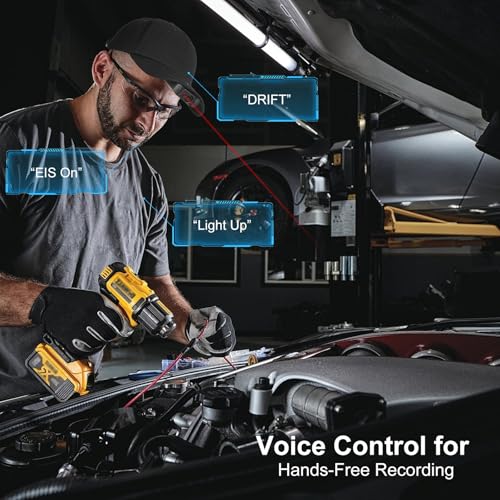
The Drift X5 Mini supports voice commands for selected camera functions.
According to the manufacturer, users can start or stop recording, capture photographs, and switch supported modes without physically touching the camera.
This can be particularly useful during mechanical work.
Imagine replacing an automotive sensor or demonstrating how to remove an interior panel.
With a conventional camera, the user may need to stop working to operate recording controls.
Voice commands can reduce interruptions during suitable demonstrations.
Voice recognition may be affected by environmental noise, accents, microphone placement, and operating conditions.
In loud garages or workshops, users should verify that the camera has responded correctly before continuing.
Built-In Laser Aiming Indicator
The Drift X5 Mini includes a laser aiming feature intended to indicate the center of the camera’s view.
This can help users align the camera before beginning a recording.
For close-up demonstrations, knowing where the camera is pointed can reduce the risk of missing important details.
For example, a mechanic recording an electrical connector repair may use the aiming indicator to check the camera’s approximate alignment.
Laser safety is important: Never direct the laser toward anyone’s eyes, reflective surfaces that could redirect the beam, or moving traffic. Disable it when it is not needed, and follow the manufacturer’s laser safety instructions.
The aiming indicator should not be treated as a substitute for reviewing actual recorded framing.
6-Axis Gyroscope-Assisted Electronic Image Stabilization
The Drift X5 Mini is advertised with a 6-axis motion-sensing system and electronic image stabilization, commonly called EIS.
Electronic stabilization uses motion data and image processing to reduce the appearance of camera shake.
For wearable recording, this can help improve footage when the user walks, turns their head, or moves between work areas.
The stabilization system may be particularly useful for automotive walkarounds, workshop demonstrations, and general travel footage.
However, electronic stabilization does not eliminate all movement.
Rapid head turns, vibration, poor lighting, and sudden impacts can still affect image quality.
Some stabilization systems also crop the image to provide room for digital correction.
The exact stabilization modes and resulting field of view should be confirmed against the manufacturer’s documentation.
External Power Bank Support for Extended Recording
The Drift X5 Mini supports connection to a compatible external power bank.
The manufacturer describes a power connection positioned toward the rear of the baseball cap, helping keep the wearable setup organized.
This can be useful for longer filming sessions where the internal camera battery alone may not provide sufficient operating time.
For example, an automotive creator documenting a lengthy repair may be able to connect an external power source instead of repeatedly stopping to recharge.
However, the seller’s claim of unlimited recording should be interpreted carefully.
Actual continuous recording depends on available power, storage capacity, camera temperature, file limitations, and other operating conditions.
External power can extend operation, but it does not guarantee uninterrupted recording indefinitely.
When using a power bank, route cables so they cannot catch on moving machinery, tools, or vehicle components.
IPX4 Water Resistance for Outdoor Use
The Drift X5 Mini carries an advertised IPX4 water-resistance rating.
IPX4 indicates protection against splashing water from different directions under specified test conditions.
This can be useful for light rain, outdoor activities, and damp working environments.
However, IPX4 is not a waterproof immersion rating.
The camera should not be submerged or exposed to high-pressure water jets.
The rating also does not automatically establish protection against automotive chemicals, solvents, oil, or other workshop contaminants.
For automotive detailing or outdoor filming, keep the camera away from direct chemical sprays and excessive moisture.
Open SDK for Custom Camera Applications
The Drift X5 Mini is advertised with an open software development kit, or SDK.
An SDK can allow developers to create custom integrations with compatible applications and systems.
Potential uses include specialized recording controls, training applications, and industrial documentation workflows.
For technically inclined creators, this could provide opportunities beyond conventional action-camera recording.
However, the supplied description does not identify supported operating systems, available APIs, licensing terms, or specific integration examples.
Developers should review the current SDK documentation before assuming that a particular custom feature can be implemented.
Why the Drift X5 Mini Is Useful for Automotive DIY Videos
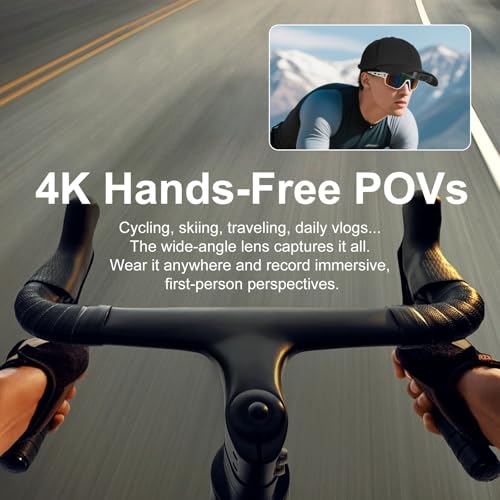
The Drift X5 Mini’s biggest advantage for automotive content is its hands-free perspective.
Many repair videos are filmed from a tripod or a camera positioned outside the vehicle.
Although these angles can be useful, they do not always show exactly what the mechanic sees.
A wearable camera can help document a procedure from the operator’s perspective.
Automotive repair tutorials
Record the process of removing components, disconnecting electrical connectors, or installing replacement parts.
Interior repairs
Capture dashboard disassembly, trim removal, and other work performed in confined spaces.
Engine bay inspections
Show viewers where components are located and how to access them.
Automotive detailing
Document polishing, cleaning, and interior restoration from a first-person perspective.
Technical training
Record demonstrations that can be reviewed later for training or procedural documentation.
Car show coverage
Capture a natural walking perspective while documenting vehicles and displays.
For more automotive DIY tutorials, maintenance guides, and technical articles, visit My Pro Street Online.
Drift X5 Mini vs. Drift Ghost XL
Although both cameras are designed for wearable recording, they serve different purposes.
| Feature | Drift X5 Mini | Drift Ghost XL |
|---|---|---|
| Primary design | Baseball cap POV camera | Motorcycle-oriented action camera |
| Advertised resolution | 4K | 1080p |
| Field of view | 140 degrees | 140 degrees |
| Adjustable lens | 15-degree tilt | Rotatable lens |
| Stabilization | 6-axis gyro-assisted EIS | Not specified in supplied listing |
| Voice control | Yes | Not specified in supplied listing |
| Water resistance | IPX4 | IPX7 |
| Battery endurance | Not specified | Up to 9 hours advertised |
| External power | Power bank compatible | Compatible external power connection |
| Dash cam mode | Not specified | Yes |
| Primary application | Hands-free tutorials and POV filming | Motorcycle commuting and long rides |
The Drift X5 Mini is better positioned for creators who want a lightweight cap-mounted camera for hands-on demonstrations.
The Drift Ghost XL is more specifically oriented toward motorcycle riders who prioritize long battery life, stronger water resistance, and dash cam functionality.
Drift X5 Mini Technical Specifications
| Specification | Details |
|---|---|
| Brand | Drift, as listed |
| Model | X5 Mini |
| Camera type | Wearable POV video camera |
| Advertised video resolution | 4K |
| Field of view | 140 degrees |
| Lens adjustment | 15-degree tilt |
| Stabilization | 6-axis gyro-assisted EIS |
| Voice commands | Supported |
| Laser aiming indicator | Included |
| Combined camera and cap weight | Approximately 170g / 5.99oz |
| Mounting system | Baseball cap with camera clip |
| Cap adjustment | Adjustable headband |
| External power | Compatible power bank |
| Water resistance | IPX4 |
| Developer functionality | Advertised open SDK |
| Video frame rate | Not specified |
| Image sensor size | Not specified |
| Internal battery capacity | Not specified |
| Storage specifications | Not specified |
Product verification note: The supplied description inconsistently refers to the product as both Drift X5 Mini and Waft X5 Mini. Confirm the manufacturer, exact model designation, and official specifications before publishing the product listing or creating structured product data.
How to Set Up the Drift X5 Mini for POV Recording
Step 1: Adjust the baseball cap
Fit the cap securely and comfortably using its adjustable headband.
Step 2: Attach the camera
Install the X5 Mini using the compatible mounting clip.
Check that the camera is properly secured.
Step 3: Adjust the lens angle
Use the 15-degree lens adjustment to aim the camera toward the intended recording area.
Step 4: Configure video settings
Select the supported recording resolution and stabilization settings.
Step 5: Test voice commands
Verify that the camera recognizes the supported recording commands in your environment.
Step 6: Check the aiming indicator
Use the laser indicator only in a safe environment to confirm approximate alignment.
Turn it off before recording if it is unnecessary.
Step 7: Connect external power if needed
For longer sessions, connect a compatible power bank and secure the cable away from tools and moving equipment.
Step 8: Record a test clip
Review the footage to confirm framing, stabilization, image clarity, and audio quality.
For automotive tutorials, verify that the work area remains visible when you naturally move your head.
Frequently Asked Questions
Does the Drift X5 Mini record in 4K?
Yes. The product is advertised as supporting 4K video recording. The supplied information does not specify the maximum 4K frame rate.
How much does the Drift X5 Mini weigh?
The manufacturer advertises a combined weight of approximately 170 grams, or 5.99 ounces, for the camera and baseball cap.
Can you record without touching the camera?
Yes. Supported voice commands allow users to start and stop recording, capture photos, and change selected modes.
Is the Drift X5 Mini waterproof?
It has an advertised IPX4 splash-resistance rating. It is not rated for underwater immersion.
Can the Drift X5 Mini use a power bank?
Yes. The camera is advertised as supporting compatible external power banks for extended recording sessions.
Does the Drift X5 Mini have image stabilization?
Yes. The supplied specifications describe a 6-axis gyro-assisted electronic image stabilization system.
Is the Drift X5 Mini suitable for automotive repair videos?
Yes. Its hands-free cap-mounted design and wide-angle lens make it a useful option for recording first-person repair demonstrations, provided the camera does not interfere with required safety equipment.
Is the Drift X5 Mini Worth Buying?
The Drift X5 Mini offers an interesting approach to hands-free video production.
Instead of requiring a traditional helmet mount or handheld stabilizer, the camera attaches to a lightweight baseball cap.
Its advertised 4K recording, 140-degree field of view, adjustable lens, and voice commands make it particularly relevant for creators documenting tasks that require both hands.
The inclusion of electronic stabilization, external power support, and an open SDK adds further flexibility.
However, buyers should verify the product’s exact branding, recording frame rates, battery specifications, and storage requirements before purchasing.
Final verdict: The Drift X5 Mini is worth considering for automotive DIY creators, technicians, trainers, and vloggers who want a lightweight, hands-free 4K POV camera for documenting practical work and everyday activities.
For automotive performance parts, replacement components, and maintenance accessories, explore Pro Street Online.
Editorial note: Features and specifications are based on the supplied seller description. The manufacturer’s identity and certain technical details require verification. No independent hands-on testing has been performed.



There are no reviews yet.