



Automotive slow-motion filming ideas
- Detailed shots of wheels and brake components.
- Slow-motion footage of a vehicle rolling through a controlled filming area.
- Close-ups of engine components during suitable demonstrations.
- Automotive detailing and polishing sequences.
- Cinematic car show footage.
- Product demonstrations and installation highlights.
DJI notes that a single continuous 4K/120fps slow-motion recording is limited to approximately 22 minutes under specified laboratory conditions, or approximately 18 minutes in Europe.
Actual recording duration can vary depending on temperature, firmware, and operating conditions.
3-Axis Mechanical Gimbal Stabilization
The Osmo Pocket 3 features a built-in 3-axis mechanical gimbal.
Unlike cameras that rely exclusively on electronic stabilization, the Pocket 3 physically adjusts its camera orientation to compensate for movement.
This helps produce smoother footage while walking, panning, and following subjects.
For automotive creators, mechanical stabilization can be particularly useful when recording vehicle walkarounds.
Instead of relying on a large handheld stabilizer, creators can capture smooth footage using the compact Pocket 3.
The gimbal also helps when moving between different parts of a vehicle during a presentation.
However, mechanical stabilization does not eliminate every form of camera movement, and the Pocket 3 should not be treated as a rugged exterior vehicle-mounted action camera.
ActiveTrack 6.0 Automatically Follows Your Subject
The DJI Osmo Pocket 3 incorporates ActiveTrack 6.0, DJI’s intelligent subject-tracking system.
This feature allows the camera to follow supported subjects while adjusting its gimbal position.
For creators filming alone, ActiveTrack can simplify certain recording situations.
For example, a presenter can place the Pocket 3 on a stable tripod and move within the camera’s supported tracking area while explaining a repair or product.
The camera can adjust its framing to follow the selected subject.
This is particularly useful for stationary garage tutorials, automotive product demonstrations, and talking-head videos.
Tracking performance depends on subject visibility, lighting, movement, and the camera’s operating limits.
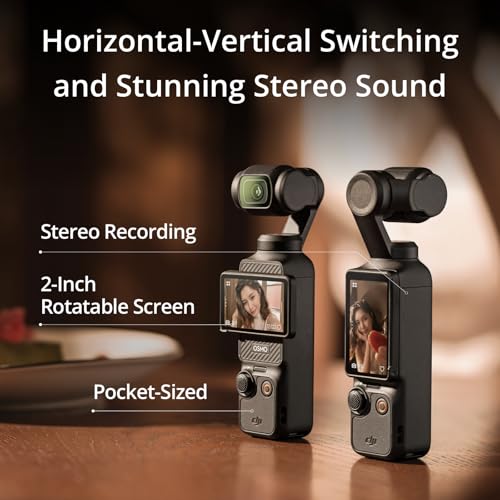
Rotating 2-Inch Touchscreen for Horizontal and Vertical Video
The Osmo Pocket 3 features a 2-inch rotating touchscreen.
This provides a convenient way to switch between supported horizontal and vertical recording configurations.
For automotive creators publishing on multiple platforms, this flexibility can be valuable.
Horizontal footage is commonly used for long-form YouTube videos, while vertical footage is useful for YouTube Shorts, Instagram Reels, and TikTok.
The touchscreen also provides access to camera settings and helps users monitor framing during recording.
Actual recording resolution and crop behavior can vary between horizontal and vertical modes.
10-Bit D-Log M for Cinematic Color Grading
The DJI Osmo Pocket 3 supports 10-bit color recording and DJI’s D-Log M color profile in compatible modes.
These features provide additional flexibility during post-production.
10-bit recording offers more tonal precision than conventional 8-bit video, helping preserve smoother gradients and providing greater flexibility for supported color adjustments.
D-Log M is designed to retain image information that can be used during color grading.
For automotive content, this can be especially useful when filming reflective paint, bright skies, deep shadows, and high-contrast scenes.
A creator filming a dark-colored sports car in direct sunlight may benefit from the additional grading flexibility.
However, D-Log M footage generally requires color correction to achieve a finished appearance.
For quick uploads, a standard color profile may be more convenient.
DJI Mic 2 Transmitter Included With Creator Combo
One of the biggest reasons to consider the Creator Combo instead of the standard Osmo Pocket 3 package is the included DJI Mic 2 transmitter.
Audio quality is particularly important for automotive videos.
Engine noise, power tools, wind, and crowded events can make it difficult to capture clear speech using a camera’s built-in microphones.
A compatible wireless microphone can help position the microphone closer to the speaker.
This is useful for automotive interviews, garage tutorials, and on-camera commentary.
The Osmo Pocket 3 supports direct wireless connection to compatible DJI Mic 2 and DJI Mic Mini transmitters.
The camera can connect to up to two supported transmitters, allowing suitable two-person recording configurations.
The Creator Combo includes one DJI Mic 2 transmitter. A second transmitter is not included unless separately specified by the seller.
Stereo Audio Recording
In addition to wireless microphone compatibility, the Osmo Pocket 3 includes built-in stereo audio recording.
This allows creators to capture environmental sound without always using external microphones.
For automotive content, stereo audio can help preserve the atmosphere of a car show or workshop.
However, built-in microphones may struggle with loud exhaust systems, wind, and high-noise environments.
For spoken presentations, the included DJI Mic 2 transmitter may provide a more practical recording option.
Creator Combo Battery Handle for Extended Filming
The Osmo Pocket 3 has an integrated 1300mAh battery.
The Creator Combo adds a dedicated battery handle, which provides additional power for supported recording sessions.
This can be particularly useful when filming automotive events or longer tutorial sequences.
DJI advertises fast charging for the Pocket 3.
According to the supplied manufacturer information, the built-in battery can charge to approximately 80% in 16 minutes and 100% in 32 minutes under specified laboratory conditions using a compatible DJI 65W PD charger.
The charger used for these laboratory figures is sold separately.
DJI also recommends a compatible 30W USB-C charger for normal use.
Actual charging times depend on the charger, cable, battery temperature, and operating conditions.
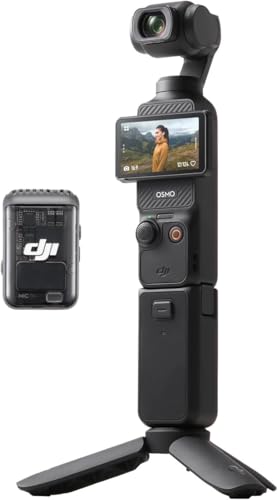
What’s Included in the DJI Osmo Pocket 3 Creator Combo?
The Creator Combo builds on the standard Osmo Pocket 3 package with additional audio and filming accessories.
| Included accessory | Purpose |
|---|---|
| DJI Osmo Pocket 3 camera | 4K video recording and mechanical stabilization |
| Protective cover | Camera protection during storage |
| Wrist strap | Additional handheld security |
| Handle with 1/4-inch thread | Accessory and tripod mounting |
| DJI Mic 2 transmitter | Wireless audio capture |
| DJI Mic 2 windscreen | Helps reduce wind interference |
| DJI Mic 2 clip magnet | Microphone attachment |
| Osmo Pocket 3 battery handle | Extended operating time |
| Osmo mini tripod | Stable tabletop positioning |
| Carrying bag | Equipment storage and transport |
| USB-C charging cable | Compatible charging and connection |
Confirm the exact retailer bundle contents before purchasing.
A dedicated battery charger and microSD card should not be assumed to be included.
Does the DJI Osmo Pocket 3 Need a microSD Card?
Yes.
The DJI Osmo Pocket 3 records footage to a compatible microSD card installed in the camera.
Unlike some cameras with substantial internal storage, the Pocket 3 requires removable storage for normal video recording.
For 4K footage, choose a microSD card that meets DJI’s current speed and compatibility recommendations.
High-resolution recording can generate large video files, so storage capacity is an important consideration.
Approximate video storage requirements
| Recording bitrate | Approximate storage per hour |
|---|---|
| 50 Mbps | 22.5GB |
| 75 Mbps | 33.8GB |
| 100 Mbps | 45GB |
| 130 Mbps | 58.5GB |
These figures are mathematical estimates rather than guaranteed Pocket 3 recording bitrates or file sizes.
Actual storage use depends on the selected codec, resolution, frame rate, and camera settings.
Why the DJI Osmo Pocket 3 Is Useful for Automotive YouTubers
Automotive video production often requires switching between wide vehicle shots, close-up mechanical demonstrations, and on-camera explanations.
The Osmo Pocket 3 is particularly well suited to creators who want one compact handheld camera for several of these tasks.
Car show walkarounds
The 3-axis gimbal helps capture smooth footage while walking around vehicles.
Automotive interviews
The included DJI Mic 2 transmitter provides a useful wireless audio option for owner interviews and commentary.
Garage repair tutorials
ActiveTrack 6.0 can help keep a presenter framed during supported stationary demonstrations.
Cinematic project-car videos
The 1-inch sensor, 4K recording, and 10-bit D-Log M provide flexibility for polished automotive footage.
YouTube Shorts and Instagram Reels
The rotating touchscreen makes it easier to work with supported vertical recording modes.
Product demonstrations
The camera can capture automotive accessories, diagnostic tools, and replacement parts in detailed 4K video.
For more automotive DIY guides, project-car stories, and technical content, explore My Pro Street Online.
DJI Osmo Pocket 3 Creator Combo vs. Standard Combo
Both versions use the same Osmo Pocket 3 camera.
The difference is the included accessories.
| Feature | Standard Package | Creator Combo |
|---|---|---|
| Osmo Pocket 3 camera | Included | Included |
| 1-inch CMOS sensor | Yes | Yes |
| 4K/120fps Slow Motion | Yes | Yes |
| 3-axis mechanical gimbal | Yes | Yes |
| ActiveTrack 6.0 | Yes | Yes |
| DJI Mic 2 transmitter | Not included | Included |
| Battery handle | Not included | Included |
| Mini tripod | Not included | Included |
| Carrying bag | Not included | Included |
For creators who already own compatible audio equipment and accessories, the standard package may be sufficient.
For automotive YouTubers who want wireless audio and additional filming accessories from the beginning, the Creator Combo offers a more complete starting package.
DJI Osmo Pocket 3 Creator Combo Technical Specifications
| Specification | Details |
|---|---|
| Brand | DJI |
| Model | Osmo Pocket 3 |
| Package | Creator Combo |
| Camera type | Handheld gimbal vlogging camera |
| Image sensor | 1-inch CMOS |
| Maximum advertised resolution | 4K |
| Maximum 4K frame rate | 120fps in Slow Motion mode |
| Stabilization | 3-axis mechanical gimbal |
| Subject tracking | ActiveTrack 6.0 |
| Display | 2-inch rotating touchscreen |
| Color recording | 10-bit D-Log M in supported modes |
| Autofocus | Supported |
| Built-in audio | Stereo microphones |
| Wireless microphone support | Compatible DJI Mic 2 and Mic Mini |
| Included wireless microphone | One DJI Mic 2 transmitter |
| Internal battery capacity | 1300mAh |
| Additional battery accessory | Included battery handle |
| Storage | Compatible microSD card required |
| Companion application | DJI Mimo |
| Mini tripod | Included |
| Carrying bag | Included |
How to Set Up the DJI Osmo Pocket 3 for Automotive Filming
Step 1: Charge the camera
Charge the Pocket 3 using a compatible USB-C power source.
Attach and charge the battery handle according to DJI’s instructions.
Step 2: Install a microSD card
Insert a compatible microSD card and confirm that the camera recognizes it.
Step 3: Update the firmware
Check the official DJI documentation and update the camera firmware if necessary.
Step 4: Choose recording settings
Select the desired resolution, frame rate, and color profile.
Use 4K/120fps only when the dedicated Slow Motion mode is appropriate.
Step 5: Connect the DJI Mic 2 transmitter
Pair the included microphone with the camera and verify audio levels.
Step 6: Configure ActiveTrack
Enable the appropriate tracking mode when recording a supported moving subject.
Step 7: Set the camera orientation
Use the rotating touchscreen to select the appropriate horizontal or vertical shooting configuration.
Step 8: Record a test clip
Check stabilization, focus, exposure, framing, and audio before beginning the main recording.
DJI Mimo App Installation
DJI notes that its Mimo application may not be available through Google Play on Android devices.
For the latest official application and firmware information, visit the DJI website.
Avoid downloading camera software from unverified third-party sources.
Is the DJI Osmo Pocket 3 Creator Combo Worth Buying?
The DJI Osmo Pocket 3 Creator Combo offers a compelling combination of image quality, stabilization, portability, and creator-focused accessories.
Its 1-inch CMOS sensor and mechanical gimbal make it particularly useful for smooth handheld footage.
ActiveTrack 6.0 can simplify certain solo recording workflows, while the included DJI Mic 2 transmitter improves the package’s usefulness for interviews and spoken presentations.
The rotating touchscreen and supported vertical recording modes also make the camera suitable for creators publishing across multiple social platforms.
The main limitations include the need for a separate microSD card, the lack of rugged action-camera construction, and the fact that 4K/120fps is restricted to Slow Motion mode.
Final verdict: The DJI Osmo Pocket 3 Creator Combo is an excellent option to consider for automotive YouTubers, vloggers, and content creators who want a compact handheld camera with smooth 4K footage, intelligent tracking, and wireless audio accessories.
For automotive replacement parts, performance upgrades, and maintenance accessories featured in your content, visit Pro Street Online.
Editorial note: Product specifications and performance claims are based on the supplied manufacturer description. No independent hands-on testing has been performed. Verify current firmware, accessory compatibility, and retailer bundle contents before purchasing.



There are no reviews yet.