


DJI Osmo Nano video specifications
| Feature | Advertised specification |
|---|---|
| Maximum video resolution | 4K |
| Maximum 4K frame rate | 60fps |
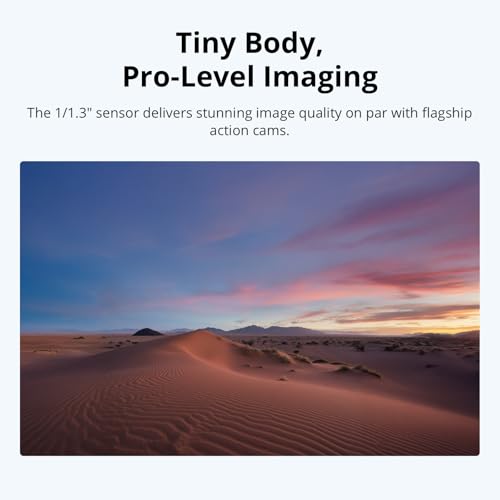
| Image sensor | 1/1.3-inch CMOS |
| Field of view | 143 degrees |
| Color depth | 10-bit in supported modes |
| Color profile | D-Log M |
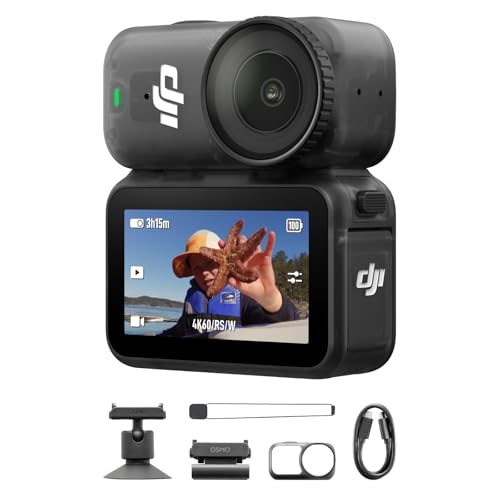
| Camera design | Compact, wearable |
| Internal storage | 128GB |
143-Degree Ultra-Wide Field of View
The DJI Osmo Nano features a 143-degree ultra-wide field of view.
This wide perspective allows the camera to capture more of the surrounding environment without requiring the user to stand far away from the subject.
For automotive videos, a wide-angle camera can be especially useful when recording from tight spaces.
Examples include filming inside a vehicle cabin, documenting an engine bay, or capturing a first-person view of a repair.
The wide field of view also helps preserve more of the surrounding scene during wearable recording.
As with other ultra-wide cameras, objects near the edges of the image may appear distorted depending on the selected recording and correction settings.
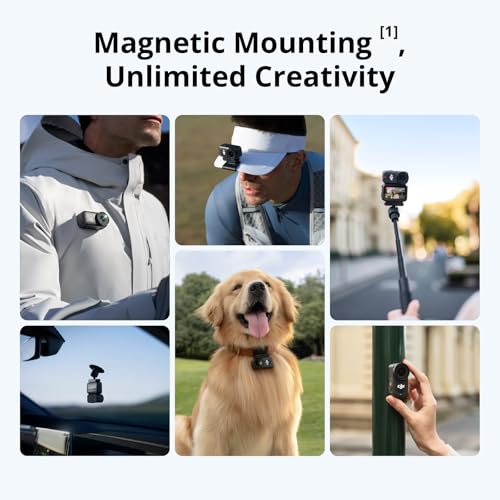
Magnetic Mounting for Hands-Free POV Filming
The Osmo Nano’s magnetic mounting design is one of its biggest practical advantages.
Instead of relying exclusively on conventional action-camera mounting hardware, the compact camera can attach to compatible magnetic accessories.
This allows users to experiment with different camera positions and recording perspectives.
For automotive content creators, hands-free mounting can be particularly useful when both hands are needed for a task.
Automotive filming applications
Garage repairs: Capture a first-person view while demonstrating mechanical work.
Vehicle inspections: Record close-up footage of components, interior features, and maintenance procedures.
Car shows: Film immersive walkaround footage without holding a large camera.
Automotive detailing: Document cleaning, polishing, and restoration work from a natural POV perspective.
Product demonstrations: Show how accessories or replacement components are installed.
Always confirm that magnetic accessories are fully secured before recording.
Magnetic mounting alone should not be assumed suitable for exterior vehicle mounting, high-speed driving, or other demanding conditions.
10-Bit Color and D-Log M for More Flexible Editing
The DJI Osmo Nano supports 10-bit color recording and DJI’s D-Log M color profile in compatible recording modes.
For creators who edit their footage, these features provide additional flexibility when adjusting color and exposure.
Compared with conventional 8-bit recording, 10-bit video can represent substantially more tonal values per color channel.
This can help reduce visible banding in gradients and provide more room for supported color-grading workflows.
D-Log M is designed to retain image information for post-production color adjustments.
For automotive footage, this can be useful when working with reflective paint, bright skies, shaded engine compartments, and high-contrast scenes.
However, D-Log M footage generally requires appropriate color correction to achieve a finished appearance.
Creators who prefer a faster workflow may choose a standard color profile instead.
128GB Built-In Storage With microSD Expansion
The DJI Osmo Nano Standard Combo includes 128GB of built-in camera storage.
This allows users to begin recording without immediately purchasing a separate memory card.
For creators who frequently record short clips, tutorials, or event footage, built-in storage can simplify the setup.
The Osmo Nano system also supports microSD storage expansion through compatible docking hardware.
Because storage access and recording behavior depend on the camera and dock configuration, buyers should confirm how internal footage is transferred and how the dock’s microSD slot is used.
How much video can 128GB hold?
Actual recording duration depends on video resolution, frame rate, codec, and bitrate.
The following estimates illustrate theoretical recording capacity at different bitrates.
| Recording bitrate | Approximate theoretical capacity |
|---|---|
| 40 Mbps | 7.1 hours |
| 60 Mbps | 4.7 hours |
| 80 Mbps | 3.6 hours |
| 100 Mbps | 2.8 hours |
These are storage calculations, not guaranteed DJI Osmo Nano recording durations.
Actual available recording time will be affected by formatted capacity, file overhead, recording settings, and thermal or battery limitations.
Up to 200 Minutes of Advertised Battery Operation
DJI advertises up to 200 minutes of extended operating time for the Osmo Nano system under specified conditions.
This figure is associated with the supported camera-and-dock operating configuration and should not be interpreted as 200 minutes of standalone camera recording at 4K/60fps.
Actual battery life depends on resolution, frame rate, temperature, screen use, wireless functions, and other settings.
For automotive creators filming longer events, external charging and compatible docking accessories can help support extended recording workflows.
The Osmo Nano also supports fast charging under the appropriate conditions.
Direct Connection to Two Compatible Microphones
Audio quality is an important consideration when recording automotive content.
A clear explanation of a repair or modification can be difficult to follow if the recording is overwhelmed by wind, shop equipment, or engine noise.
The DJI Osmo Nano supports direct connection to up to two compatible microphones through supported DJI wireless audio functionality.
This can be useful for interviews, automotive commentary, and collaborative videos.
For example, two creators discussing a project vehicle may be able to record separate microphone sources using compatible equipment.
Microphones are not necessarily included in the Standard Combo.
Buyers should verify supported microphone models and connection requirements before purchasing additional audio accessories.
Waterproof Camera Design for Outdoor Adventures
The Osmo Nano camera unit is advertised as waterproof to depths of up to 10 meters under the manufacturer’s specified conditions.
This makes it suitable for certain wet-weather and underwater recording applications.
The compatible Vision Dock has a separate IPX4 splash-resistance rating.
These ratings are not interchangeable.
The camera’s waterproof rating does not mean the Vision Dock can be submerged.
For automotive creators, the camera’s water resistance can be useful when recording outdoor activities or working in damp conditions.
Always follow DJI’s instructions for sealing, cleaning, drying, and operating the camera around water.
Compact Camera Design and Thermal Management
Small cameras generate heat during high-resolution recording.
DJI specifically notes that the Osmo Nano may become warm during demanding recording sessions.
The camera includes thermal protection that can automatically stop recording if internal temperatures become excessive.
This is a protective feature intended to reduce the risk of hardware damage.
For longer recording sessions, DJI recommends using Endurance Mode where appropriate.
Creators should also avoid blocking ventilation, exposing the camera to unnecessary heat, or assuming that 4K/60fps recording can continue indefinitely.
This is particularly important when filming inside hot vehicles or outdoors in direct sunlight.
DJI Osmo Nano vs. Traditional Action Cameras
The DJI Osmo Nano is designed around portability and wearable recording.
Traditional action cameras often use larger housings and more conventional mounting systems.
| Feature | DJI Osmo Nano | Typical Full-Size Action Camera |
|---|---|---|
| Maximum advertised resolution | 4K/60fps | Model-dependent |
| Image sensor | 1/1.3-inch CMOS | Varies |
| Camera design | Compact wearable | Larger integrated body |
| Mounting | Magnetic accessory system | Model-dependent |
| Field of view | 143 degrees | Varies |
| Color recording | 10-bit D-Log M | Model-dependent |
| Internal storage | 128GB | Often microSD-based |
| Waterproofing | Camera rated to 10m | Model-dependent |
| Primary strength | Hands-free POV filming | General action recording |
For automotive creators who prioritize first-person perspectives and minimal camera bulk, the Osmo Nano offers an appealing alternative.
For applications requiring specialized vehicle mounts, extreme environmental protection, or prolonged continuous recording, a different camera system may be more appropriate.
DJI Osmo Nano Standard Combo 128GB Specifications
| Specification | Details |
|---|---|
| Brand | DJI |
| Product | Osmo Nano |
| Configuration | Standard Combo |
| Internal storage | 128GB |
| Camera type | Wearable action camera |
| Image sensor | 1/1.3-inch CMOS |
| Maximum video resolution | 4K |
| Maximum 4K frame rate | 60fps |
| Field of view | 143 degrees |
| Color support | 10-bit, D-Log M |
| Mounting system | Magnetic |
| Microphone connectivity | Up to two compatible microphones |
| Extended battery claim | Up to 200 minutes under specified conditions |
| Charging | Fast charging supported |
| Camera waterproof rating | Up to 10m |
| Vision Dock water resistance | IPX4 |
| Storage expansion | Compatible microSD support through docking system |
| Companion application | DJI Mimo |
| Thermal protection | Automatic recording interruption when necessary |
How to Set Up the DJI Osmo Nano for Automotive Filming
Step 1: Charge the camera and compatible dock
Before recording, fully charge the Osmo Nano using the appropriate DJI charging equipment.
Step 2: Check available storage
Confirm that sufficient internal storage is available.
If using compatible microSD expansion, verify the card and dock configuration.
Step 3: Choose a mounting position
Select an appropriate magnetic accessory and mounting location.
For hands-free garage tutorials, position the camera where it can capture the work without interfering with tools or personal protective equipment.
Step 4: Select recording settings
Choose 4K/60fps for high-resolution footage with smoother motion or another supported mode based on your project.
Step 5: Configure color settings
Use D-Log M if you plan to perform color grading.
Choose a standard color profile for a simpler editing workflow.
Step 6: Configure audio
If using compatible DJI microphones, pair and test them before recording.
Step 7: Record a test clip
Check the framing, exposure, stabilization, and audio quality.
Step 8: Monitor recording conditions
For longer sessions, monitor battery life, available storage, and camera temperature.
DJI Mimo App Compatibility
The DJI Osmo Nano uses DJI’s companion software for supported camera management and editing functions.
DJI notes that its Mimo application may need to be downloaded directly from the official DJI website on Android devices rather than through Google Play.
For the latest supported installation instructions, visit the official DJI website.
Avoid downloading camera-management applications from unverified third-party websites.
Is the DJI Osmo Nano Standard Combo 128GB Worth Buying?
The DJI Osmo Nano offers an interesting combination of compact wearable design, high-resolution imaging, and advanced color recording.
Its 1/1.3-inch CMOS sensor and 4K/60fps capability make it attractive for creators who want detailed footage without carrying a larger camera.
The magnetic mounting system is particularly useful for first-person recording, while the 128GB built-in storage provides convenient recording capacity.
Support for 10-bit D-Log M and compatible wireless microphones also makes the camera relevant to more advanced production workflows.
However, buyers should understand the difference between the camera’s standalone operating time and DJI’s extended battery claim, as well as the separate water-resistance ratings for the camera and Vision Dock.
Final verdict: The DJI Osmo Nano Standard Combo 128GB is worth considering for automotive enthusiasts, vloggers, and content creators who want a compact 4K wearable camera for immersive hands-free POV recording.
For more automotive DIY tutorials, enthusiast stories, and technical guides, explore My Pro Street Online.
For automotive performance upgrades, replacement parts, and maintenance accessories, visit Pro Street Online.
Editorial note: Specifications and performance claims are based on the supplied product description. No independent hands-on testing has been performed. Battery life, recording capabilities, and accessory compatibility should be confirmed against DJI’s current product documentation.




There are no reviews yet.