
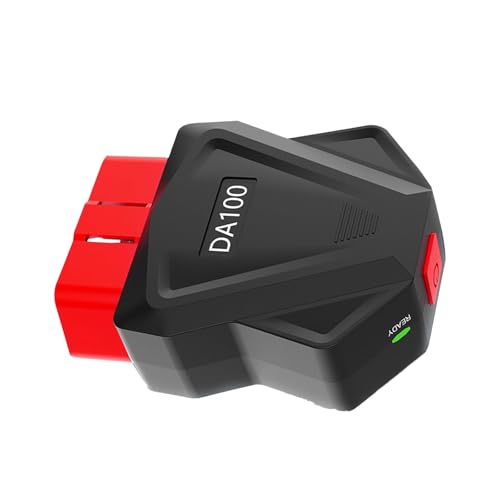


Bluetooth OBD2 Scanner for iPhone, Android & Windows — 25K80 Check Engine Code Reader
Turn your smartphone, tablet or compatible Windows device into a convenient vehicle diagnostic display with this Bluetooth OBD2 scanner featuring a 25K80 processor.
Designed for everyday DIY diagnostics, this compact OBD-II adapter plugs into your vehicle’s diagnostic port and communicates wirelessly with compatible software to help you:
- Read check engine trouble codes
- Clear supported engine diagnostic trouble codes
- Turn off the Check Engine Light after an appropriate repair
- Monitor live engine data
- View engine RPM
- Monitor vehicle speed
- Check supported temperature data
- Retrieve freeze-frame information
- Research diagnostic trouble codes
- Monitor vehicle operating conditions from your phone
A built-in physical power switch also lets you turn the adapter off when you’re finished instead of leaving it continuously powered through the OBD-II port.
Whether you’re chasing a P0300 misfire, P0171 lean condition, P0420 catalyst code or simply want an inexpensive way to monitor live OBD2 data, this Bluetooth scanner gives DIY enthusiasts a useful first step into vehicle diagnostics.
Original price was: $25.99.$22.99Current price is: $22.99.
Bluetooth OBD2 Scanner Specifications
| Specification | Details |
|---|---|
| Product | Bluetooth OBD2 Diagnostic Scanner |
| Processor | 25K80 chip |
| Connection | Bluetooth / BLE |
| Supported Platforms | iOS, Android and compatible Windows software |
| Code Reading | Supported OBD-II engine diagnostic codes |
| Code Clearing | Supported |
| Check Engine Light Reset | Supported after clearing applicable DTCs |
| Live Data | Supported |
| Engine RPM | Supported |
| Vehicle Speed | Supported |
| Temperature Data | Vehicle/app dependent |
| Freeze Frame | Supported where reported by vehicle |
| Physical Power Switch | Yes |
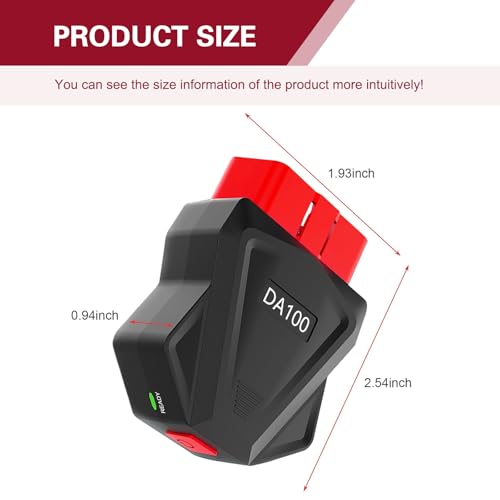
| Dimensions | 2.54″ × 1.93″ × 0.94″ |
| Quantity | 1 scanner |
| Installation | OBD-II diagnostic port |
| Color | Black |
Read Your Check Engine Light From Your Phone
When the Check Engine Light comes on, the first question is usually:
What code caused it?
This Bluetooth OBD2 code reader lets a compatible phone, tablet or computer communicate with the vehicle’s OBD-II system and retrieve stored diagnostic trouble codes.
Instead of guessing which component failed, you can begin with the actual trouble code stored by the vehicle.
Common examples include:
- P0300 — Random/multiple cylinder misfire
- P0301–P0308 — Cylinder-specific misfires
- P0171 — System too lean
- P0172 — System too rich
- P0420 — Catalyst efficiency below threshold
- P0440-series — EVAP system faults
- P0500-series — Vehicle speed/idle-related faults
- P0700 — Transmission control system malfunction notification
Once you’ve retrieved the code, use the Pro Street OBD-II DTC Doctor to determine what it actually means:
https://my.prostreetonline.com/dtc-obdii/
You can also browse our complete P-Code OBD-II library:
https://my.prostreetonline.com/dtc-doctor/p-code-obd-ii-codes/
A Code Reader Is the Beginning of Diagnosis — Not the End
An OBD-II code identifies the system or operating condition that detected a problem.
It does not necessarily identify the failed part.
For example, a P0171 lean code might be caused by:
- Vacuum leak
- Intake leak
- MAF sensor problem
- Low fuel pressure
- Injector issue
- Exhaust leak
- Sensor or wiring fault
Replacing whatever component appears in the code description can quickly turn troubleshooting into an expensive parts cannon.
Our guide to the most common diagnostic trouble codes explains how to use codes properly:
https://my.prostreetonline.com/2026/07/16/most-common-obd2-codes-explained/
Clear Check Engine Codes
The scanner can send a request to clear supported engine diagnostic trouble codes from compatible vehicles.
This can also turn off the Check Engine Light when the underlying condition is no longer present.
But remember:
Clearing a code does not repair the problem.
If the underlying malfunction remains, the vehicle will usually detect it again and the code may return.
Use the scanner to:
- Read the code.
- Record the code.
- Review freeze-frame information.
- Diagnose the problem.
- Perform the repair.
- Clear the fault.
- Verify that the repair was successful.
That is a much better strategy than repeatedly deleting the Check Engine Light and hoping the car forgets what happened.
Important: Clearing Codes Can Reset Readiness Monitors
Clearing diagnostic trouble codes may also reset OBD-II emissions readiness monitors.
That matters if you’re preparing the vehicle for:
- Smog inspection
- Emissions testing
- State inspection
A car with recently reset monitors may need to complete one or more drive cycles before the monitors become ready again.
Learn more about OBD-II diagnosis and emissions monitoring here:
https://my.prostreetonline.com/category/dtc-obdii/
For official U.S. emissions information, visit the Environmental Protection Agency:
https://www.epa.gov/vehicle-and-fuel-emissions-testing
Real-Time OBD2 Data Monitoring
One of the most useful features of a Bluetooth OBD2 adapter is the ability to watch vehicle data while the engine is running.
Depending on the vehicle and diagnostic application, available data may include:
- Engine RPM
- Vehicle speed
- Engine coolant temperature
- Intake air temperature
- Throttle position
- Engine load
- Fuel trim
- Oxygen sensor data
- Manifold pressure
- Mass airflow
- Ignition timing
- Fuel-system status
Not every vehicle reports every parameter.
Available PIDs depend on the vehicle’s ECU and the diagnostic software being used.
Monitor Engine RPM
Engine RPM is one of the basic parameters available through OBD-II.
Watching RPM data can be useful while diagnosing:
- High idle
- Low idle
- Stalling
- Throttle issues
- Idle-control problems
For example, if your scan returns P0507, check our full diagnostic guide:
https://my.prostreetonline.com/dtc-doctor/p0507-code-idle-control-system-rpm-higher-than-expected/
Monitor Vehicle Speed
Compatible vehicles can report road-speed information through the OBD-II system.
This lets supported apps display vehicle speed alongside other engine data.
It can be useful for:
- Diagnostic testing
- Data logging
- Comparing sensor readings
- Building a customizable dashboard display
Do not operate or interact with diagnostic software while driving unless it can be done safely and legally.
Monitor Coolant Temperature
On compatible vehicles, OBD-II live data can provide actual coolant-temperature information rather than relying only on the dashboard gauge.
This can help diagnose:
- Overheating
- Thermostat problems
- Cooling fan operation
- Coolant-temperature sensor faults
- Slow engine warmup
For more cooling-system troubleshooting, browse My Pro Street’s automotive technical guides:
https://my.prostreetonline.com/
Freeze-Frame Data
Freeze frame is one of the most valuable standard OBD-II diagnostic features.
When certain faults occur, the ECU may capture a snapshot of operating conditions at or near the time the code was stored.
Depending on the vehicle, freeze-frame information may include:
- RPM
- Vehicle speed
- Coolant temperature
- Engine load
- Fuel trim
- Throttle position
- Other supported parameters
That can help answer an important diagnostic question:
What was the engine doing when the fault occurred?
A misfire that happens at idle may have a different root cause from one that appears only under heavy load.
25K80 Processor
The adapter uses a 25K80 processor according to the supplied product specifications.
The seller describes the processor as providing faster operation and reduced power consumption compared with unspecified standard chips.
Because no standardized benchmark was supplied for those performance claims, we would not treat claims such as:
“1.3× faster”
or:
“1.4× lower power consumption”
as independently verified specifications.
The more useful purchasing consideration is whether the adapter communicates reliably with the vehicle and the diagnostic application you plan to use.
Built-In Power Switch
One useful feature is the physical:
ON/OFF switch.
Many basic OBD-II adapters receive power whenever they’re plugged into the diagnostic connector.
With this unit, the scanner can be switched off when not in use.
That provides a convenient alternative to repeatedly unplugging the adapter after each diagnostic session.
For long-term parking, unplugging accessory diagnostic devices remains the safest way to prevent unnecessary battery draw.
Bluetooth Low Energy Connectivity
The adapter is advertised as supporting:
BLE Bluetooth communication.
This makes wireless diagnostics possible without running a cable between the vehicle and your mobile device.
The basic process is:
- Locate the vehicle’s OBD-II connector.
- Plug in the scanner.
- Switch the adapter on.
- Enable Bluetooth on your device.
- Open compatible diagnostic software.
- Connect to the adapter.
- Select the vehicle or communication protocol where required.
- Begin scanning.
Exact pairing procedures depend on the operating system and application.
Bluetooth OBD2 Scanner for iPhone and iPad
The supplied product information lists:
iOS compatibility.
Bluetooth Low Energy support can make this style of adapter useful with compatible:
- iPhone
- iPad
diagnostic applications.
Compatibility still depends on the specific software.
Before purchasing, verify that your preferred iOS OBD-II application supports the adapter’s Bluetooth communication method.
Bluetooth OBD2 Scanner for Android
The adapter is also advertised for:
Android devices.
Compatible Android phones and tablets can use supported OBD-II applications to display vehicle information and retrieve diagnostic trouble codes.
Different applications may provide different functionality, including:
- Code reading
- Code clearing
- Live gauges
- Logging
- Freeze frame
- Fuel economy information
- Custom dashboards
Advanced functionality depends on both the app and vehicle.
OBD2 Scanner for Windows
The supplied specifications also list:
Windows support.
Windows compatibility depends heavily on:
- Bluetooth hardware
- Bluetooth drivers
- Windows version
- Diagnostic software
- Adapter communication support
Verify that the Windows diagnostic application you intend to use supports this Bluetooth adapter before purchasing.
Is This OBD2 Scanner Really Universal?
It is better described as:
a multi-vehicle OBD-II scanner
rather than literally universal.
In the United States, standardized OBD-II became widespread on 1996-and-newer light-duty vehicles, but actual compatibility can depend on:
- Vehicle year
- Market
- Fuel type
- Diagnostic protocol
- ECU implementation
- Software
Vehicles sold outside the United States may follow different implementation dates.
If you’re working on an older car, imported vehicle or unusual application, verify OBD-II compatibility before purchasing.
Where Is the OBD2 Port?
The standardized diagnostic connector is generally located inside the passenger compartment and accessible from the driver’s seating position.
Common locations include:
- Under the driver’s dashboard
- Near the steering column
- Above the driver’s footwell
- Behind a small removable dashboard cover
The location varies by vehicle.
Plug-and-Play Installation
No permanent wiring should be necessary for standard use.
Simply connect the adapter to the vehicle’s compatible OBD-II diagnostic connector.
This makes it useful for:
- Home garages
- DIY mechanics
- Used-car inspections
- Road-trip tool kits
- Enthusiast vehicles
- Basic troubleshooting
Its compact 2.54″ × 1.93″ × 0.94″ housing makes it easy to store in a glove box or toolbox.
Build a Digital Dashboard
Compatible apps can use incoming OBD-II data to transform a phone or tablet into a customizable vehicle display.
Depending on the app and vehicle, you may be able to create gauges for:
- RPM
- Speed
- Coolant temperature
- Throttle position
- Intake temperature
- Engine load
- Fuel trim
- Manifold pressure
This makes the scanner useful beyond simply reading a Check Engine Light.
Diagnose Misfire Codes
Misfire faults are among the most common reasons to own an OBD-II scanner.
Codes may include:
- P0300
- P0301
- P0302
- P0303
- P0304
- P0305
- P0306
- P0307
- P0308
If the scanner returns one of these codes, don’t immediately replace the ignition coil.
Possible causes include:
- Spark plug
- Ignition coil
- Fuel injector
- Vacuum leak
- Compression loss
- Fuel pressure
- Wiring
- Mechanical engine problems
Start with our complete P-Code library:
https://my.prostreetonline.com/dtc-doctor/p-code-obd-ii-codes/
Diagnose Lean Codes
A code such as:
P0171 — System Too Lean Bank 1
can have numerous causes.
Our full P0171 diagnostic guide covers the code here:
https://my.prostreetonline.com/dtc-doctor/p0171-code-system-too-lean-bank-1/
Reading the DTC with this scanner gives you the starting point.
Live fuel-trim and airflow information, where supported, can then provide more evidence.
Understanding P0700
If your scanner returns:
P0700
remember that P0700 itself does not identify a specific transmission failure.
It indicates that the transmission-control system has reported a malfunction.
Our P0700 guide explains the difference:
https://my.prostreetonline.com/dtc-doctor/p0700-code-transmission-control-system-malfunction/
Also remember that a basic generic OBD-II scanner may not be able to retrieve every manufacturer-specific transmission code stored in a separate control module.
What This Scanner Is Best At
This product is primarily suited to:
- Check Engine Light diagnosis
- Generic OBD-II engine codes
- Clearing supported DTCs
- Viewing generic live data
- Freeze-frame retrieval
- Basic vehicle monitoring
That makes it a useful tool for the majority of DIY engine-diagnostic situations.
What This Scanner May Not Do
Do not assume a basic Bluetooth OBD2 adapter can perform every function offered by a professional bidirectional scan tool.
Unless explicitly supported by the vehicle and software, do not expect functions such as:
- ABS diagnosis
- SRS/airbag diagnosis
- TPMS programming
- Key programming
- Immobilizer programming
- Electronic parking-brake service
- Steering-angle calibration
- Injector coding
- Battery registration
- ABS bleeding
- Transmission relearn
- ECU coding
- Module programming
- Bidirectional actuator tests
Some third-party applications may provide manufacturer-specific capabilities with compatible vehicles and adapters, but those features are not guaranteed by basic OBD-II support.
Bluetooth OBD2 Scanner vs Professional Scan Tool
Bluetooth OBD2 Adapter
Best for:
- DIY troubleshooting
- Reading Check Engine codes
- Clearing codes
- Live engine data
- Freeze frame
- Smartphone dashboards
- Affordable home diagnostics
Professional Scan Tool
Better for:
- ABS
- Airbag systems
- Body control modules
- Manufacturer-specific systems
- Active tests
- Adaptations
- Programming
- Service functions
The Bluetooth adapter is not intended to replace every professional diagnostic tool.
It’s designed to put useful OBD-II information in your pocket.
Great Tool for Used-Car Shopping
A compact scanner can also be useful when evaluating a used vehicle.
Before purchasing, it may help you check:
- Stored trouble codes
- Pending codes
- Check Engine Light status
- Readiness monitors
- Available freeze-frame data
However, diagnostic data should be considered alongside a complete mechanical inspection.
A code-free ECU does not guarantee a problem-free car.
Check Readiness Monitors on a Used Car
Readiness status can be particularly informative during a pre-purchase inspection.
If many monitors show:
Not Ready
it may indicate that:
- The battery was recently disconnected
- Codes were recently cleared
- ECU memory was reset
- The vehicle has not completed the required drive cycle
That does not prove someone intentionally erased faults, but it is a reason to investigate further.
Don’t Just Clear the Check Engine Light Before Smog
If your vehicle has an emissions-related problem, clearing the code shortly before inspection is usually not a solution.
The ECU typically needs to rerun its OBD-II monitors.
Diagnose and repair the actual problem first.
For more information, visit our OBD-II diagnostic section:
https://my.prostreetonline.com/category/dtc-obdii/
Small Enough for the Glove Box
At approximately:
2.54″ × 1.93″ × 0.94″
the scanner is compact enough to keep with your basic roadside tools.
That makes it useful for:
- Commuting
- Road trips
- Project cars
- Track support
- Used-car inspections
- Everyday troubleshooting
When the Check Engine Light appears away from home, knowing the actual code is considerably more useful than staring at the dashboard and asking the car what you’ve done to offend it.
Who Should Buy This Bluetooth OBD2 Scanner?
This scanner is a good fit for:
- DIY mechanics
- Automotive enthusiasts
- Home garages
- Used-car buyers
- Students learning diagnostics
- Drivers who want to understand Check Engine Lights
- Owners who want live vehicle information
- People who maintain multiple OBD-II vehicles
Who Needs a More Advanced Scan Tool?
Consider a higher-level diagnostic scanner if your primary work involves:
- ABS
- Airbags
- Advanced transmission diagnosis
- Body electronics
- Key programming
- ECU coding
- Active testing
- Dealer-level service functions
This product’s strength is affordable, convenient generic OBD-II diagnosis.
What’s Included?
The package includes:
1 × Bluetooth OBD2 Scanner
Scanner dimensions:
2.54″ × 1.93″ × 0.94″
Color:
Black
How to Use the Scanner
Step 1 — Find the OBD-II Connector
Locate the diagnostic connector underneath or around the driver’s dashboard.
Step 2 — Plug In the Adapter
Insert the scanner firmly into the OBD-II port.
Step 3 — Turn It On
Use the physical power switch.
Step 4 — Open Compatible Software
Launch your preferred compatible OBD-II application.
Step 5 — Connect
Establish the Bluetooth/BLE connection according to the app’s instructions.
Step 6 — Scan for Codes
Read:
- Stored codes
- Pending codes
- Freeze frame
- Available live data
Step 7 — Diagnose
Look up the code using Pro Street’s DTC Doctor:
https://my.prostreetonline.com/dtc-obdii/
Step 8 — Repair the Problem
Diagnose the underlying cause rather than simply replacing the component named in the code.
Step 9 — Clear the Code
After completing the repair, clear the supported DTC and confirm that it does not return.
Why Every DIY Garage Should Have an OBD-II Scanner
Modern vehicles rely on electronic engine management for almost everything from:
- Fuel delivery
- Ignition timing
- Emissions
- Throttle control
- Variable valve timing
- Turbocharger control
- Transmission monitoring
Without a scanner, diagnosing these systems becomes much more difficult.
An affordable Bluetooth OBD2 scanner gives you access to information the ECU already knows.
That’s often the difference between:
diagnosing the problem
and:
guessing until the credit card gives up.
Shop Automotive Parts and Diagnostic Products
Find more tools, replacement parts and automotive products at:
Pro Street Online carries parts and products for:
- Engine repair
- Cooling systems
- Electrical systems
- Drivetrain
- Performance upgrades
- Automotive maintenance
- Diagnostic work
Learn How to Diagnose OBD-II Codes
After retrieving your DTC, don’t stop at the five-word scanner description.
Use Pro Street’s diagnostic library to research:
- Code definition
- Severity
- Symptoms
- Common causes
- Diagnostic procedures
- Repairs
- Related trouble codes
Complete OBD-II DTC Doctor
https://my.prostreetonline.com/dtc-obdii/
Complete P-Code Library
https://my.prostreetonline.com/dtc-doctor/p-code-obd-ii-codes/
Most Common OBD-II Codes Explained
https://my.prostreetonline.com/2026/07/16/most-common-obd2-codes-explained/
OBD-II Diagnostic Articles
https://my.prostreetonline.com/category/dtc-obdii/
Final Take
The 25K80 Bluetooth OBD2 Scanner for iPhone, Android and compatible Windows devices is an affordable way to add basic vehicle diagnostics to your phone or tablet.
Use it to:
Read Check Engine codes
Clear supported codes
Monitor live engine data
View RPM and speed
Retrieve freeze-frame information
and:
research faults before buying parts.
Its physical power switch is another practical feature for drivers who want to leave the adapter installed temporarily without keeping it continuously active.
Just remember what an OBD-II scanner is supposed to do.
It gives you information.
It doesn’t magically tell you which part to replace.
Use the code, freeze-frame data and live parameters as evidence, then use the Pro Street OBD-II DTC Doctor to work through the diagnosis:
https://my.prostreetonline.com/dtc-obdii/
That’s how a $20-style diagnostic adapter can potentially save you from throwing hundreds of dollars of unnecessary parts at a Check Engine Light.
Specification: Bluetooth OBD2 Scanner for iPhone, Android & Windows — 25K80 Check Engine Code Reader
|
User Reviews
Be the first to review “Bluetooth OBD2 Scanner for iPhone, Android & Windows — 25K80 Check Engine Code Reader”
You must be logged in to post a review.



There are no reviews yet.