

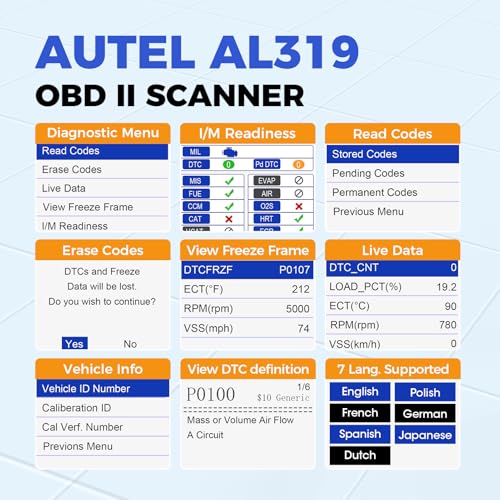


Autel AutoLink AL319 OBD2 Scanner — Check Engine Code Reader with Live Data & I/M Readiness
Diagnose a Check Engine Light without Bluetooth, subscriptions, or smartphone apps with the Autel AutoLink AL319 OBD2 Scanner.
The AL319 is a compact handheld OBD-II code reader designed for common engine and emissions diagnostics on compatible domestic and imported vehicles. Plug it directly into the vehicle’s diagnostic connector and the scanner powers from the vehicle, giving you fast access to:
- Stored trouble codes
- Pending trouble codes
- Generic OBD-II codes
- Supported manufacturer-specific codes
- On-screen DTC definitions
- Live PCM data
- Freeze-frame information
- I/M readiness status
- Vehicle information
- VIN, CIN and CVN information where supported
- Check Engine Light clearing after diagnosis and repair
Autel also equips the AL319 with a dedicated One-Click I/M Readiness button, color-coded LEDs, a built-in speaker, and a color TFT display.
For drivers who want a dedicated scanner that can stay in the toolbox or glove box, the AL319 offers considerably more credibility and documentation than a generic no-name code reader.
Autel AL319 Specifications
| Specification | Details |
|---|---|
| Brand | Autel |
| Model | AutoLink AL319 |
| Product Type | Handheld OBD-II code reader |
| Display | TFT color display |
| Display Resolution | 220 × 176 |
| Read Stored DTCs | Yes |
| Read Pending DTCs | Yes |
| Generic Codes | Yes |
| Manufacturer-Specific Codes | Supported OBD-II DTCs |
| DTC Definitions | Displayed on scanner |
| Clear Codes | Yes |
| Live PCM Data | Yes |
| Freeze Frame | Yes |
| I/M Readiness | Yes |
| One-Click I/M Button | Yes |
| Color Readiness LEDs | Yes |
| Built-In Speaker | Yes |
| Vehicle Information | Yes |
| VIN Retrieval | Yes, where supported |
| CIN / CVN Retrieval | Yes, where supported |
| Battery Required | No |
| External Power | 8–18V through vehicle |
| Dimensions | 117 × 72 × 18 mm |
| Weight | Approx. 0.21 kg with cable |
| Operating Temperature | 0–60°C / 32–140°F |
| Updateable | Yes, through Autel software |
| Vehicle Coverage | Most compatible 1996+ OBD-II/CAN domestic and import vehicles |
Original price was: $35.99.$27.99Current price is: $27.99.
Read Check Engine Light Codes
The Autel AL319 can retrieve supported diagnostic trouble codes from the vehicle’s emissions-related OBD-II system.
Common codes may include:
- P0171 — System Too Lean Bank 1
- P0300 — Random/Multiple Cylinder Misfire
- P0301–P0308 — Cylinder-specific misfire
- P0420 — Catalyst System Efficiency Below Threshold
- P0440-series — EVAP system faults
- P0507 — Idle Control System RPM Higher Than Expected
- P0700 — Transmission Control System Malfunction notification
Once you retrieve a code, continue troubleshooting with the Pro Street DTC Doctor:
https://my.prostreetonline.com/dtc-obdii/
Complete P-Code library:
https://my.prostreetonline.com/dtc-doctor/p-code-obd-ii-codes/
Generic and Manufacturer-Specific DTC Support
Autel documents support for:
- P0 codes
- P1 codes
- P2 codes
- P3 codes
- U0 codes
- U1 codes
within the AL319’s supported OBD-II diagnostic scope.
Generic DTCs follow standardized definitions, while manufacturer-specific DTCs may require additional service information to diagnose correctly.
A displayed code definition tells you what the ECU detected.
It does not necessarily tell you which part failed.
Built-In DTC Lookup
Instead of forcing you to immediately search every trouble code on a phone, the AL319 can display DTC definitions directly on its color screen.
For example, if the scanner retrieves:
P0171 — System Too Lean Bank 1
that does not automatically mean the oxygen sensor needs replacement.
Possible causes can include:
- Vacuum leak
- Intake leak
- Low fuel pressure
- Dirty or failing MAF sensor
- Injector problem
- Exhaust leak
- Wiring issue
See the Pro Street P0171 diagnostic guide:
https://my.prostreetonline.com/dtc-doctor/p0171-code-system-too-lean-bank-1/
Clear Check Engine Codes
The AL319 can erase supported DTCs and turn off the Malfunction Indicator Lamp when appropriate.
The correct diagnostic sequence is:
- Read the code.
- Record the DTC.
- Review freeze-frame information.
- Check relevant live data.
- Diagnose the underlying problem.
- Repair the vehicle.
- Clear the code.
- Verify it does not return.
Clearing a code does not repair the vehicle.
If the malfunction remains, the ECU can detect it again and illuminate the Check Engine Light.
Live PCM Data
The AL319 can display a live PCM data stream from supported vehicles.
Depending on the vehicle, available data may include:
- Engine RPM
- Vehicle speed
- Engine coolant temperature
- Calculated load
- Throttle position
- Short-term fuel trim
- Long-term fuel trim
- Intake-air temperature
- Mass airflow
- Manifold pressure
- Oxygen-sensor data
- Ignition timing
- Fuel-system status
Not every vehicle supports every PID.
Why Live Data Matters
A trouble code tells you what the computer detected.
Live data can help show what the engine is doing right now.
For example, when troubleshooting a lean condition, you might compare:
- Short-term fuel trim
- Long-term fuel trim
- MAF readings
- MAP readings
- Engine RPM
- Oxygen-sensor behavior
That is much more useful than simply replacing whatever component is mentioned first in an internet search.
Freeze-Frame Data
The AL319 can display supported:
freeze-frame information.
Freeze frame records selected engine conditions around the time certain DTCs are set.
Depending on the vehicle, it may show:
- RPM
- Vehicle speed
- Coolant temperature
- Calculated load
- Fuel trims
- Throttle position
This helps answer:
What was happening when the ECU detected the problem?
One-Click I/M Readiness
One of the AL319’s standout features is Autel’s dedicated:
One-Click I/M Readiness Key.
Instead of navigating through several menus, you can quickly access emissions-monitor status.
This makes the scanner particularly useful for drivers preparing for:
- Smog checks
- State emissions inspections
- OBD-II emissions testing
Color-Coded Emissions LEDs
The AL319 includes color-coded LEDs designed to make readiness status easier to understand at a glance.
Combined with the built-in speaker, the scanner can provide visual and audible readiness indications.
That is especially useful for someone who wants a simple answer without digging through multiple screens.
Check Readiness Before a Smog Test
The AL319 can display emissions readiness monitors for supported systems.
These may include:
- Misfire
- Fuel system
- Comprehensive components
- Catalyst
- Heated catalyst
- EVAP
- Secondary air
- Oxygen sensor
- Oxygen sensor heater
- EGR/VVT
The exact list depends on the vehicle.
For federal emissions information:
https://www.epa.gov/vehicle-and-fuel-emissions-testing
Clearing Codes Can Reset Readiness Monitors
This is important if you’re planning to take the vehicle for emissions testing.
Clearing DTCs can reset several readiness monitors to:
Not Ready.
The vehicle may then need to complete the appropriate drive cycle before those monitors run again.
Don’t erase a Check Engine Light in the parking lot outside the smog station and expect the car to magically be ready.
Repair the problem.
Clear the codes if needed.
Complete the drive cycle.
Then check readiness again with the AL319.
Drive Cycle Verification
Autel specifically positions the One-Click I/M feature for:
state emissions readiness checks and drive-cycle verification.
That makes the AL319 a useful tool after:
- Battery disconnection
- Clearing DTCs
- Emissions repairs
- Catalyst repairs
- EVAP repairs
- Oxygen-sensor repairs
You can periodically check whether the required monitors have completed.
Vehicle Information
The AL319 can retrieve supported vehicle information including:
- VIN
- CIN
- CVN
where the vehicle provides that information through OBD-II.
VIN
Vehicle Identification Number.
CIN
Calibration Identification Number.
CVN
Calibration Verification Number.
Available information varies by ECU and vehicle.
TFT Color Display
Autel uses a:
220 × 176 TFT color display
on the AL319.
The color screen provides a clearer interface than very basic monochrome code readers and works alongside the scanner’s color-coded readiness LEDs.
Built-In Speaker
The AL319 also contains a built-in speaker.
This provides audible feedback for supported readiness functions and complements the visual LED indicators.
It’s a small feature, but useful when you’re performing a quick emissions check without staring continuously at the screen.
No Smartphone Required
Unlike Bluetooth diagnostic adapters, the AL319 is completely self-contained.
You do not need:
- iPhone
- Android phone
- Bluetooth
- Wi-Fi
- Mobile app
- App account
- Subscription
Plug it in and start diagnosing.
No Batteries Required
The AL319 receives power directly from the vehicle’s diagnostic connector.
Autel specifies an operating input range of:
8.0–18.0 volts.
There are no batteries to charge or replace.
Compact Handheld Design
Autel lists the AL319 at approximately:
117 × 72 × 18 mm
and about:
0.21 kg / 0.46 lb with its cable.
That makes it small enough for:
- Glove boxes
- Toolboxes
- Road-trip kits
- Used-car inspection kits
- Home garages
Most 1996+ OBD-II Vehicles
Autel states that the AL319 works with most:
1996 and newer OBD-II and CAN vehicles
including domestic and imported models.
Potential applications include vehicles from manufacturers such as:
- Toyota
- Honda
- Nissan
- Ford
- Chevrolet
- Dodge
- Jeep
- BMW
- Mercedes-Benz
- Volkswagen
- Subaru
- Mazda
- Hyundai
- Kia
Compatibility depends on the vehicle’s OBD-II implementation.
Does the AL319 Work With Every 1996+ Vehicle?
No scanner should be described as literally universal.
The AL319 works with most compatible OBD-II vehicles, but exact support can depend on:
- Country of sale
- Model year
- ECU
- OBD protocol
- Vehicle classification
For a specific application, confirm compatibility before purchase.
OBD-II and CAN Support
Autel specifically lists:
OBD II & CAN
vehicle compatibility.
The AL319 is intended to communicate with the standardized protocols used by compliant vehicles across different generations.
It automatically communicates through the supported OBD-II interface rather than requiring users to select protocols manually.
Multilingual Interface
Autel documents multilingual menus and DTC definitions.
Languages vary with the software version.
The supplied seller listing advertises seven-language support, while Autel distributes multiple regional language firmware packages.
For that reason, it is safer to describe the AL319 as:
multilingual
and confirm the desired language before purchase.
Internet Updateable
Autel officially lists the AL319 as:
internet updateable.
Autel currently provides update support for the AL319 through its MaxiLinkII software and downloadable update packages.
Official Autel downloads:
https://www.autel.com/download.jhtml
Autel support:
Lifetime Free Updates?
The supplied marketplace listing advertises:
lifetime free updates.
Autel clearly confirms that AL319 software is updateable and continues to provide downloadable support tools.
However, unless the exact seller warranty and update entitlement are documented for your inventory source, I would avoid promising “lifetime free updates” as an unconditional manufacturer guarantee.
Safer product wording:
Internet-updateable through supported Autel software.
12-Month Warranty
The marketplace description advertises a:
12-month warranty.
Warranty eligibility can depend on:
- Seller
- Region
- Purchase channel
- Product registration
- Autel policy
For that reason, list the 12-month coverage only if your supplier confirms it applies to the exact inventory being sold by Pro Street Online.
Does the AL319 Read ABS Codes?
The AL319 should not be marketed as an ABS scanner.
Its documented feature set focuses on:
standard OBD-II engine and emissions diagnostics.
If ABS module diagnostics are required, choose an Autel scanner specifically designed for ABS access.
Does It Read Airbag Codes?
The same applies to:
SRS / airbag diagnostics.
The AL319 is not a full-system vehicle scanner.
Standard OBD-II powertrain/emissions support should not be confused with access to every control module in the vehicle.
Does It Diagnose TPMS?
The AL319 is not a dedicated TPMS service tool.
Do not advertise it for:
- TPMS sensor programming
- TPMS relearning
- TPMS sensor activation
unless a specific function is documented separately.
Does It Perform Oil Resets?
The AL319 is a code reader, not a service-reset platform.
Do not advertise it for:
- Oil-service reset
- EPB reset
- BMS registration
- Throttle adaptation
- Injector coding
- ABS bleeding
- Key programming
Those require more advanced diagnostic equipment.
Can It Read Transmission Codes?
Some standardized transmission-related P-codes can be visible through generic OBD-II.
For example:
P0700
may indicate that the transmission controller has requested illumination of the Check Engine Light.
The actual underlying TCM fault may require direct manufacturer-specific transmission module access.
See:
https://my.prostreetonline.com/dtc-doctor/p0700-code-transmission-control-system-malfunction/
Used-Car Inspection Tool
The AL319 can also be a useful tool when evaluating a used vehicle.
Before buying, you can potentially check:
- Stored engine DTCs
- Pending codes
- Freeze frame
- Readiness status
- Vehicle information
If several emissions monitors show:
Not Ready
the ECU may have recently been reset or lost power.
That isn’t proof somebody cleared codes intentionally, but it is a reason to investigate further.
AL319 vs Generic M6 Scanner
Generic M6
Best for:
- Basic code reading
- Simple I/M readiness
- Low-cost diagnostics
Autel AL319
Adds the benefit of a documented brand platform with:
- Live PCM data
- Freeze frame
- On-screen DTC definitions
- One-click I/M readiness
- Color readiness LEDs
- Built-in speaker
- VIN/CIN/CVN information
- Autel software updates
For buyers comparing two similarly priced handheld scanners, the Autel’s published specifications and support ecosystem are significant advantages.
Autel AL319 vs V011 Bluetooth Scanner
V011
Uses:
- Smartphone
- Bluetooth
- OBD Home app
- Live-data graphing
Autel AL319
Uses:
- Dedicated built-in display
- Physical controls
- No app
- No Bluetooth
- No phone
The AL319 is better for someone who wants a tool that simply works when plugged into the vehicle.
Autel AL319 vs Veepeak BLE+
Veepeak emphasizes:
- Smartphone diagnostics
- Third-party apps
- Custom live-data displays
- iOS and Android flexibility
The AL319 emphasizes:
- Standalone operation
- Quick emissions checks
- Built-in DTC definitions
- Dedicated hardware
They appeal to very different users.
Autel AL319 vs TOPDON CarPal
TOPDON CarPal operates in a more advanced diagnostic category with supported:
- Full-system scanning
- Multiple control modules
- Service/reset functions
The AL319 is much simpler.
It is designed primarily for:
engine and emissions OBD-II diagnostics.
If that’s all you need, the simplicity is an advantage rather than a limitation.
Who Should Buy the Autel AL319?
The AL319 is an excellent fit for:
- DIY mechanics
- Everyday drivers
- Used-car shoppers
- Home garages
- First-time scanner buyers
- Smog-check preparation
- Road-trip emergency kits
- Drivers who don’t want smartphone apps
Who Needs a More Advanced Scanner?
Choose a higher-level scan tool if you regularly need:
- ABS codes
- SRS codes
- Full-system scanning
- Bidirectional controls
- Oil-service reset
- EPB service
- BMS registration
- TPMS programming
- ECU coding
- Key programming
The AL319 is strongest when used for what it was designed to do:
fast, dependable OBD-II engine and emissions diagnosis.
How to Use the Autel AL319
1. Locate the OBD-II Connector
Find the vehicle’s 16-pin diagnostic port, usually underneath the driver’s side dashboard.
2. Connect the AL319
Plug the scanner cable securely into the diagnostic connector.
3. Turn the Ignition On
The scanner receives power from the vehicle automatically.
4. Read Trouble Codes
Retrieve stored and pending DTCs.
5. Record the Codes
Save the information before clearing anything.
6. Check Freeze Frame
Review operating conditions when the fault was stored.
7. Review Live Data
Compare relevant PCM parameters where necessary.
8. Diagnose the Cause
Use the Pro Street DTC Doctor:
https://my.prostreetonline.com/dtc-obdii/
9. Repair the Vehicle
Correct the actual mechanical or electrical fault.
10. Clear the Codes
Erase supported DTCs after the repair.
11. Check I/M Readiness
Use the dedicated readiness button to verify monitor status after completing the appropriate drive cycle.
Official Autel Resources
Autel AutoLink AL319
https://www.autel.com/mk1/3239.jhtml
Autel Downloads
https://www.autel.com/download.jhtml
Autel Support
Pro Street Diagnostic Resources
DTC Doctor
https://my.prostreetonline.com/dtc-obdii/
P-Series Code Library
https://my.prostreetonline.com/dtc-doctor/p-code-obd-ii-codes/
OBD-II Articles
https://my.prostreetonline.com/category/dtc-obdii/
Most Common OBD2 Codes Explained
https://my.prostreetonline.com/2026/07/16/most-common-obd2-codes-explained/
Shop Automotive Diagnostic Tools
Find more scanners, diagnostic accessories and automotive repair products at:
Final Take
The Autel AutoLink AL319 OBD2 Scanner occupies a useful middle ground.
It is more sophisticated and much better documented than the typical bargain-bin handheld code reader, but it remains easy enough for someone who simply wants to know:
Why is my Check Engine Light on?
The AL319 gives you:
stored and pending trouble codes
on-screen DTC definitions
live PCM data
freeze frame
I/M readiness
vehicle information
and Autel’s convenient:
One-Click I/M Readiness system.
There is no Bluetooth connection to troubleshoot.
No phone app to download.
No account to create.
No subscription required just to read a code.
Plug it in, retrieve the diagnostic information and start troubleshooting.
Just don’t confuse it with one of Autel’s much more expensive full-system diagnostic platforms.
The AL319 is an:
OBD-II engine and emissions diagnostic tool.
For that job, its combination of standalone operation, live data, freeze frame, color readiness indicators and Autel’s established diagnostic ecosystem makes it a strong step up from a generic code reader.
Once you retrieve the fault code, continue the diagnosis here:
https://my.prostreetonline.com/dtc-obdii/
Specification: Autel AutoLink AL319 OBD2 Scanner — Check Engine Code Reader with Live Data & I/M Readiness
|
User Reviews
Be the first to review “Autel AutoLink AL319 OBD2 Scanner — Check Engine Code Reader with Live Data & I/M Readiness”
You must be logged in to post a review.



There are no reviews yet.