
Check the Factory Control Method
The factory display also needs a practical way to control the CB6 interface.
Ideal systems support one or more of the following:
- Touchscreen
- Factory touchpad
- Rotary controller
- Compatible physical controls
For factory displays that are difficult to control, ATOTO offers the optional AC-44F9 wireless remote for compatible installations.
This matters because the CB6 does not replace the screen.
It uses the screen and control hardware already installed in the car.
Compatibility Warning
Before ordering, verify compatibility for the exact year, make, model and infotainment system.
The supplied CB6 package information specifically excludes applications such as:
- BMW
- Tesla
- Most Subaru vehicles
- Wireless-only factory CarPlay/Android Auto systems
- Unsupported aftermarket head units
ATOTO has published broader compatibility language for some CB6 variants, so checking the exact SKU and vehicle application is important.
If there is any doubt, verify before ordering.
Finding out after opening the dashboard is considerably less entertaining.
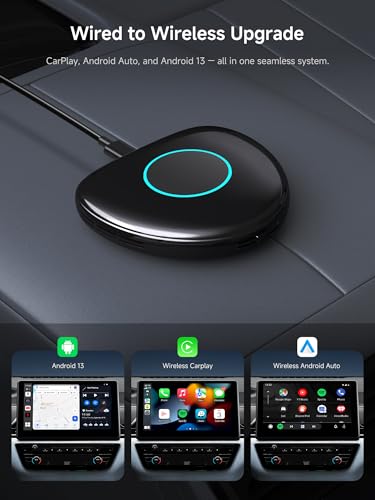
Converts Wired CarPlay to Wireless CarPlay
For compatible vehicles, one of the CB6’s simplest functions is also one of its most useful.
It removes the need to plug the iPhone into the vehicle every time you drive.
Once configured, wireless CarPlay can provide access to familiar functions including:
- Apple Maps
- Google Maps
- Waze
- Music
- Podcasts
- Calls
- Messages
- Siri
For a quick commute or grocery run, leaving the phone in your pocket makes the factory infotainment system feel considerably newer.
Plugging in a USB cable every time you get into the car isn’t exactly difficult.
Neither was rewinding a cassette with a pencil.
We moved on anyway.
Converts Wired Android Auto to Wireless Android Auto
The CB6 provides the same convenience for compatible Android phones.
Wireless Android Auto can provide access to:
- Google Maps
- Waze
- Music
- Podcasts
- Calls
- Messages
- Google Assistant
- Compatible Android Auto apps
Again, the phone no longer needs to remain physically connected during normal use.
Full Android 13 Operating System
The CB6 goes much further than normal wireless adapters because it runs a full Android 13 operating system.
That allows compatible apps to operate directly on the CB6 instead of being projected from the phone.
This can include:
- Navigation
- Streaming music
- Video applications
- Vehicle tools
- OBD-II applications
- Internet radio
- Offline maps
- Travel applications
It essentially places an Android computer between the factory USB interface and the factory display.
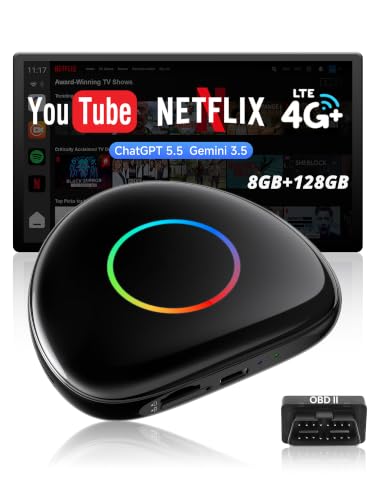
QCM6115 Octa-Core Processor
Current CB6D hardware uses the Qualcomm QCM6115 platform with an octa-core processor.
The processor is paired with a comparatively generous memory configuration designed for multitasking rather than simply converting CarPlay from wired to wireless.
That becomes important when Android is simultaneously handling navigation, music, Bluetooth accessories, cellular data and other background services.
8GB RAM
The CB6 provides 8GB of RAM.
That puts it much closer to ATOTO’s flagship Android hardware than its simpler wireless adapters.
Eight gigabytes gives the system room for:
- Multiple Android apps
- Navigation
- Streaming
- OBD-II services
- DriveChat
- TrackHU
- Background connectivity
This matters because an AI box is essentially an Android computer with no screen of its own.
If the hardware struggles, the factory display will happily show you every second of that struggle.
128GB Internal Storage
The CB6 also includes 128GB of internal storage.
That provides space for:
- Android applications
- Offline maps
- Music
- Downloaded media
- Navigation data
- Vehicle applications
- Other compatible files
For drivers who use the Android side regularly, the larger storage configuration is much more useful than the 16GB or 32GB memory found in entry-level AI boxes.
microSD Expansion Up to 256GB
Current CB6D specifications also support microSD storage up to 256GB.
That provides another option for local media and files without consuming internal storage.
This is particularly useful if you maintain a large offline music or video collection.
Cellular data is convenient.
A microSD card has never sent anyone a monthly bill.
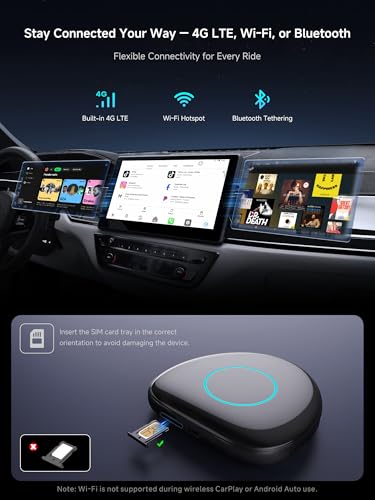
Built-In 4G LTE
One of the CB6’s biggest advantages over the CB4 series is built-in 4G LTE.
With compatible service, the CB6 can maintain its own internet connection.
That means the Android operating system does not have to depend entirely on a smartphone hotspot.
This can support:
- Google Maps
- Online navigation
- Streaming music
- Android apps
- TrackHU
- DriveChat
- Online services
For someone who uses the CB6 Android environment frequently, independent cellular connectivity is a major upgrade.
Physical Cellular Service
The CB6 supports cellular connectivity through compatible service arrangements.
Depending on the specific hardware version and region, that can involve supported physical-SIM or integrated data-service options.
Because carrier, Cloud SIM and regional support can change, verify the data-service options available for the exact CB6 SKU before choosing a plan.
The important hardware distinction is that the CB6 contains its own cellular communication system.
The CB4DT does not.
Built-In GPS
The CB6 also contains its own GPS hardware.
That means Android navigation does not have to borrow location data entirely from the connected smartphone.
Independent GPS supports applications such as:
- Google Maps
- Waze
- Offline navigation
- Trip recording
- TrackHU
- Route history
This makes the CB6 much more useful as a standalone Android platform.
Offline Navigation
Because the CB6 has built-in GPS and substantial internal storage, compatible offline navigation apps and downloaded map data can continue functioning where cellular service is poor.
That is useful for:
- Road trips
- Mountain routes
- Rural travel
- Overland vehicles
- Areas with unreliable cellular coverage
Your navigation system should ideally continue navigating after your phone changes from five bars to “Good luck.”
Google Play and FindApps
Unlike the simpler CB4CT and CB4DT boxes, the CB6 supports Google Play in addition to ATOTO’s FindApps ecosystem.
That gives users substantially more flexibility when adding compatible Android applications.
FindApps can also provide access to software selected for ATOTO’s in-vehicle platforms.
App availability can still vary by:
- Region
- Android compatibility
- DRM requirements
- App developer
- Streaming-service certification
A full Android operating system does not guarantee every Play Store application behaves perfectly on a factory automotive display.
Built-In Wi-Fi
The CB6 also supports both 2.4GHz and 5GHz Wi-Fi.
Wi-Fi can be used for internet connectivity and supported networking functions when the wireless CarPlay or Android Auto connection is not occupying the Wi-Fi hardware.
There is an important limitation here.
Wi-Fi Is Unavailable During Wireless CarPlay or Android Auto
When wireless CarPlay or wireless Android Auto is active, the CB6 uses Wi-Fi for the phone-projection connection.
ATOTO specifies that normal Wi-Fi internet connectivity is therefore unavailable during that session.
The solution is the built-in cellular connection or another supported network path.
This is one of the reasons the CB6’s 4G modem matters.
Without it, wireless smartphone projection and the Android side’s internet access could end up competing for the same Wi-Fi hardware.
Dual Bluetooth
The CB6 also uses a dual-Bluetooth architecture.
Bluetooth connections can handle functions including:
- Smartphone communication
- Audio-related connections
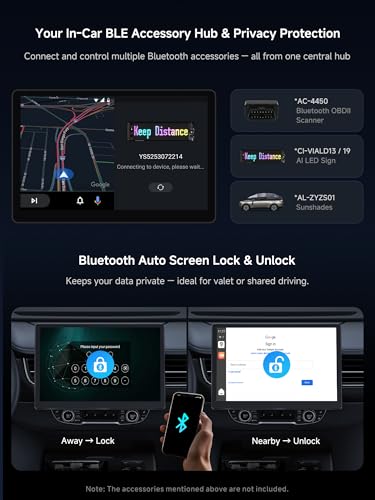
- OBD-II scanner
- Supported BLE accessories
- Bluetooth tethering
This provides more expansion flexibility than a basic wireless CarPlay adapter.
Included AC-4450 OBD-II Scanner
This particular CB6 bundle includes ATOTO’s AC-4450 Bluetooth OBD-II scanner.
That turns the AI box into something more interesting for enthusiasts.
With a compatible vehicle and application, the CB6 can display supported information such as:
- Engine RPM
- Coolant temperature
- Vehicle speed
- Intake temperature
- Fuel trims
- Diagnostic trouble codes
- Other supported powertrain data
The exact data available depends on the vehicle, protocol and application.
OBD-II Does Not Mean Every Vehicle Module
Standard OBD-II guarantees access primarily to emissions and powertrain-related diagnostic information.
Access to systems such as:
- ABS
- Airbag
- Body electronics
- HVAC
- Chassis modules
depends on the vehicle and diagnostic software.
Don’t assume an inexpensive Bluetooth OBD-II adapter automatically becomes a dealership scan tool simply because it has Bluetooth.
That would certainly make dealership scan tools easier to explain.
DriveChat and Vehicle Data
DriveChat can use supported vehicle information from compatible OBD hardware to make raw data easier to understand.
That can include helping explain:
- Diagnostic trouble codes
- Vehicle warnings
- Basic vehicle status
- Possible next steps
This can make OBD-II data much more approachable for someone who doesn’t spend weekends memorizing SAE trouble-code definitions.
A Trouble Code Is Not a Failed Part
This point deserves its own section.
If DriveChat explains that a code relates to an oxygen sensor circuit, coolant-temperature sensor or fuel trim, that does not mean the named sensor has automatically failed.
A diagnostic code may be caused by:
- Wiring
- Connector damage
- Ground problems
- Reference-voltage faults
- Vacuum leaks
- Mechanical problems
- Sensor failure
- Other related systems
AI can help explain the code.
It does not repeal automotive diagnostics.
The parts cannon should remain unloaded until testing gives it a target.
ScenePilot Software Ecosystem
ATOTO’s newer connected devices are increasingly organized around its ScenePilot 2.0 software architecture.
ScenePilot brings together information from systems such as:
- GPS
- Vehicle data
- Cameras on supported devices
- Bluetooth accessories
- Connected services
- Android applications
The idea is to make these devices behave more like a unified in-car platform rather than a collection of unrelated apps.
For CB6 owners, this direction is particularly relevant because the hardware already combines Android, GPS, cellular connectivity, Bluetooth and OBD-II data.
Bluetooth Accessory Integration
Compatible Bluetooth and BLE accessories can also be integrated into ATOTO’s connected ecosystem.
Depending on the accessory and software support, this can include:
- OBD-II hardware
- Ambient lighting
- Other supported BLE devices
The exact accessory list can evolve as ATOTO updates the platform.
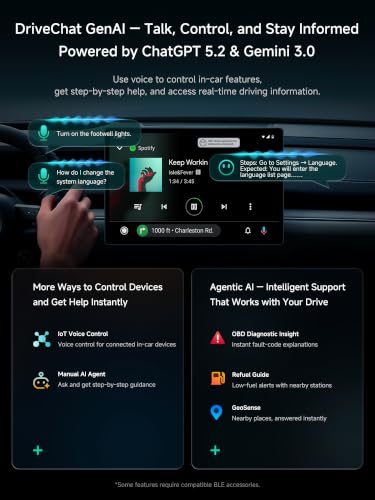
DriveChat AI Assistant
The CB6 includes ATOTO’s DriveChat voice-assistant platform.
DriveChat is designed to provide conversational interaction with supported services while reducing the need to navigate menus manually.
Possible uses include:
- Asking questions
- Route planning
- Trip information
- Vehicle-data explanations
- General information
- Supported system functions
ATOTO continues updating the platform through software.
For evergreen ecommerce copy, it is better to sell DriveChat functionality than permanently tie the hardware to a specific ChatGPT or Gemini version.
AI model names change much faster than vehicle dashboards do.
Context-Aware Assistance
ATOTO has also been expanding DriveChat toward more context-aware behavior.
Examples may include:
- Low-fuel reminders
- OBD-related alerts
- Trip suggestions
- Vehicle-status explanations
- Location-aware information
The specific functions available can depend on current firmware and connected hardware.
OTA updates are therefore particularly important on the CB6.
Bluetooth Proximity Privacy Lock
The CB6 supports proximity-based privacy functions using an authorized Bluetooth device.
When the authorized phone leaves the vehicle, the interface can automatically lock.
When the phone reconnects, the system can unlock again.
That can help protect:
- Google accounts
- Navigation history
- Streaming accounts
- Browsing history
- App data
This is particularly useful when handing the vehicle to:
- Valet attendants
- Repair shops
- Friends
- Other drivers
A modern AI box can contain substantially more personal information than the factory stereo ever did.
Your old six-disc changer was much less interested in your digital life.
TrackHU GPS Tracking
The CB6 supports ATOTO’s TrackHU platform.
With its built-in GPS and internet connectivity, compatible TrackHU features can provide vehicle-location and trip information.
Depending on current service support, this may include:
- Current vehicle location
- Route history
- Trip records
- Geofence-related functionality
Independent GPS and LTE make TrackHU much more practical on the CB6 than on an adapter that depends entirely on a connected phone.
OTA Updates
The CB6 supports over-the-air firmware updates.
That is particularly important for an Android AI box because many of its functions are software-defined.
Updates may improve:
- System stability
- DriveChat
- CarPlay compatibility
- Android Auto compatibility
- Bluetooth accessories
- GPS functions
- Networking
- User-interface behavior
- Other supported capabilities
That gives the CB6 room to improve after installation instead of remaining permanently frozen at the firmware version printed on the box.
Y-Cable for More Stable Power
AI boxes place more demand on a vehicle’s USB port than a simple flash drive.
The CB6 package includes a Y-cable designed to provide more stable power in installations where the factory USB port may not provide enough current.
That can help prevent symptoms such as:
- Random restarts
- Disconnects
- Boot loops
- Freezing
- CarPlay connection drops
This can become particularly important in vehicles with aggressive engine start/stop systems or USB circuits that reduce power under certain conditions.
If an AI box behaves strangely, check power before assuming the processor has developed personal issues.
Plug-and-Play Installation
For a compatible vehicle, installation is dramatically simpler than replacing the factory head unit.
The basic process is:
- Connect the CB6 to the factory wired CarPlay/Android Auto USB port.
- Complete the initial setup.
- Pair the phone.
- Configure internet access.
- Connect optional accessories such as the OBD-II scanner.
There is normally no need to remove the radio or splice the factory harness.
That’s one of the CB6’s strongest selling points.
CB6 vs Basic Wireless CarPlay Adapter
A basic wireless adapter does one important job:
wired CarPlay → wireless CarPlay
The CB6 does considerably more.
Basic adapter:
- Wireless CarPlay
- Possibly wireless Android Auto
- Small
- Simple
- Lower cost
CB6:
- Wireless CarPlay
- Wireless Android Auto
- Full Android 13
- 8GB RAM
- 128GB storage
- Built-in 4G LTE
- Built-in GPS
- Google Play
- FindApps
- DriveChat
- TrackHU
- OBD-II integration
- OTA updates
- microSD expansion
If your only goal is eliminating the phone cable, a simple adapter may make more sense.
If you want to turn the factory screen into an Android infotainment platform, the CB6 is playing a different game.
CB6 vs ATOTO CB4DT
The CB4DT is the most important comparison within ATOTO’s own adapter lineup.
CB4DT offers:
- Wireless CarPlay
- Wireless Android Auto
- Android-based apps
- 4GB RAM
- 32GB storage
- HDMI output
- Dual Wi-Fi
- DriveChat
- USB media playback
CB6 offers:
- Wireless CarPlay
- Wireless Android Auto
- Full Android 13
- 8GB RAM
- 128GB storage
- Built-in 4G LTE
- Built-in GPS
- Google Play
- TrackHU
- microSD expansion
- More standalone operation
The CB4DT’s major advantage is HDMI output.
The CB6D’s major advantage is independence.
It has its own cellular connection and GPS.
Does the CB6 Have HDMI Output?
The standard CB6D does not provide the HDMI output found on the CB4DT.
That’s an important distinction.
If your priority is mirroring the AI-box interface to:
- Headrest monitor
- Passenger display
- Rear entertainment screen
the CB4DT or a higher model with the appropriate HDMI hardware may be the better choice.
If your priority is built-in LTE, GPS and standalone Android capability, the CB6 is the stronger option.
CB6 vs CB4CT
The difference is even larger compared with the entry-level CB4CT.
The CB4CT is primarily aimed at wireless smartphone conversion with a lighter Android platform.
The CB6 moves into full Android-computer territory with:
- 8GB RAM
- 128GB storage
- Cellular connectivity
- GPS
- Google Play
- TrackHU
The CB6 costs more because it contains considerably more hardware.
CB6 vs Replacing the Factory Head Unit
This is arguably the most important purchase decision.
Choose the CB6 if:
- You like the factory screen
- Factory audio works well
- The vehicle already has wired CarPlay/Android Auto
- You want wireless phone projection
- You want Android apps
- You want LTE and GPS
- You don’t want to disturb factory integration
Replace the head unit if:
- The factory system has no CarPlay/Android Auto
- The factory display is poor
- You want better RCA audio outputs
- You need advanced DSP
- You want larger-screen hardware
- You want more camera inputs
- The original radio is already failing
The CB6 enhances the factory system.
It does not replace the factory system.
That distinction matters.
Who Should Buy the ATOTO CB6?
The CB6 is particularly attractive for newer vehicles that already have decent factory infotainment but are limited by wired smartphone connectivity.
Good candidates include drivers who want:
- Wireless CarPlay
- Wireless Android Auto
- Full Android apps
- Independent navigation
- Built-in cellular data
- OBD-II information
- Vehicle tracking
- AI-assistant functions
- Minimal installation
It is also appealing to someone who leases a vehicle or wants an upgrade that can be removed later.
Unplug it and the factory system is still there.
Who Should Skip the CB6?
The CB6 is not the right solution for everyone.
Skip it if:
- Your car does not have supported wired CarPlay or Android Auto
- Your factory controls cannot operate the interface
- Your vehicle is explicitly excluded
- You primarily want a major audio-quality upgrade
- You need multiple camera inputs
- You need HDMI output
- You want a much larger display
- You need to replace a failing factory stereo
It is an adapter and computing platform.
It is not a substitute for every aftermarket head unit.
Is the ATOTO CB6 Worth It?
For the right vehicle, the CB6 is considerably more capable than the phrase “wireless CarPlay adapter” suggests.
It combines:
- Wired-to-wireless CarPlay conversion
- Wired-to-wireless Android Auto conversion
- Full Android 13
- Qualcomm QCM6115 processing
- 8GB RAM
- 128GB storage
- Built-in 4G LTE
- Built-in GPS
- Google Play
- FindApps
- DriveChat
- TrackHU
- Dual Bluetooth
- OBD-II integration
- microSD expansion
- OTA updates
And this particular package adds the AC-4450 OBD-II scanner.
That creates an interesting middle ground between a $30 wireless dongle and replacing the entire factory infotainment system.
The factory screen remains.
The factory controls remain.
The factory amplifier remains.
But the system suddenly gains Android apps, cellular data, independent GPS, vehicle diagnostics and wireless smartphone projection.
For many newer vehicles, that’s a much cleaner upgrade than ripping apart a dashboard that was already doing most things correctly.
Sometimes improving the factory stereo is smarter than replacing it.
Especially when removing it requires discovering why the climate controls, parking sensors and half the vehicle’s settings apparently live inside the radio now.







There are no reviews yet.