

Factory Controls Matter Too
The factory infotainment system also needs a practical way to control the CB6 interface.
Ideally, your vehicle should provide one or more of the following:
- Touchscreen control
- Factory touchpad
- Rotary controller
- Compatible remote control
If the screen itself is not touch-sensitive, a factory rotary controller or touchpad can still make the system usable in supported applications.
ATOTO also offers compatible wireless remote-control options for certain setups.
Important Compatibility Exclusions
The supplied CB6 compatibility information excludes several applications.
These include:
- BMW
- Tesla
- Most Subaru vehicles
- Unsupported aftermarket head units
- Factory systems with wireless-only CarPlay
- Factory systems with wireless-only Android Auto
Vehicle compatibility can vary even within the same make and model depending on infotainment hardware and production year.
Verify the exact factory system before ordering.
The vehicle owner’s manual is considerably cheaper to consult than learning compatibility after opening the package.
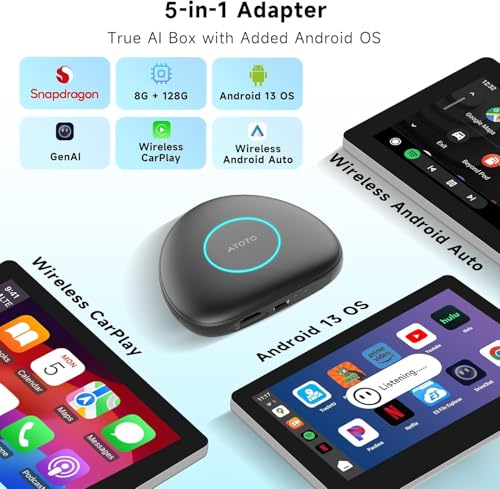
Converts Wired CarPlay to Wireless CarPlay
For many owners, the first improvement is simple.
No more cable.
Once configured with a compatible iPhone, the CB6 can automatically reconnect to wireless CarPlay during normal startup.
You can access familiar functions including:
- Apple Maps
- Google Maps
- Waze
- Music
- Podcasts
- Calls
- Messages
- Siri
- Supported CarPlay apps
The phone can remain in your pocket, bag or center console.
Plugging in your phone every drive isn’t exactly unbearable hardship.
Neither was turning a key to start the car.
Convenience tends to win anyway.
Wireless Android Auto
Compatible Android phones receive the same basic upgrade.
The CB6 converts supported wired Android Auto systems to wireless Android Auto.
That gives access to:
- Google Maps
- Waze
- Spotify
- Calls
- Messages
- Podcasts
- Google Assistant
- Supported Android Auto applications
Once paired, the system can reconnect automatically during future drives.
Full Android 13 Operating System
Wireless phone projection is only part of the CB6’s functionality.
It also runs a full Android 13 operating system independently of the phone.
That means compatible Android apps can run directly from the box.
Possible uses include:
- Navigation
- Music streaming
- Internet radio
- Video applications while parked
- OBD-II tools
- Travel applications
- Offline maps
- Vehicle utilities
This is the fundamental difference between an AI box and a basic wireless CarPlay dongle.
The dongle removes a cable.
The AI box adds an operating system.
Qualcomm QCM6115 Octa-Core Processor
Current CB6 4GB/64GB hardware uses the Qualcomm QCM6115 octa-core platform.
This processor handles the Android operating system along with tasks such as:
- Navigation
- Streaming
- Wireless smartphone projection
- DriveChat
- Vehicle-data applications
- GPS tracking
- Bluetooth accessories
It is considerably more sophisticated than the low-power hardware used in basic wireless adapters.
4GB RAM
This CB6 configuration includes 4GB of RAM.
That gives Android enough working memory for everyday in-car multitasking.
A typical drive might involve:
- Navigation
- Music streaming
- TrackHU
- DriveChat
- OBD-II data
- Bluetooth accessories
all operating in the same environment.
Four gigabytes is not flagship territory anymore.
But for a device whose job is primarily navigation, media and vehicle connectivity, it remains a practical amount of memory.
64GB Internal Storage
The CB6 includes 64GB of internal storage.
That provides room for:
- Android apps
- Offline navigation
- Music
- Maps
- Application data
- Downloaded media
It offers substantially more flexibility than a basic wireless adapter that contains only enough storage for its own firmware.
microSD Expansion up to 256GB
ATOTO also supports compatible microSD storage up to 256GB on current CB6 hardware.
That can be useful for:
- Offline music
- Downloaded media
- Map files
- Other compatible local content
External USB storage is not supported in the same way on current CB6 models, so the microSD slot is the more useful expansion path.
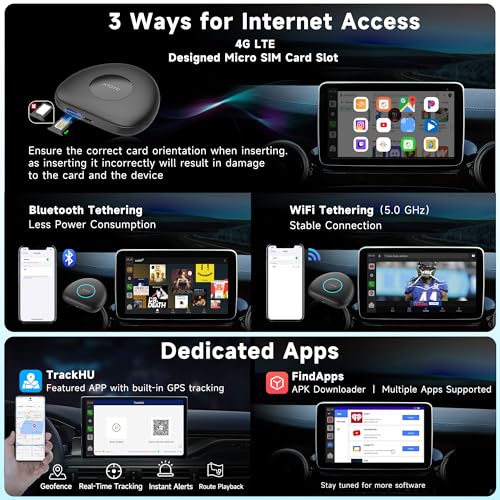
Built-In 4G LTE
One of the CB6’s most important upgrades is its built-in cellular modem.
With compatible service, the CB6 can maintain its own internet connection.
That means Android apps do not have to rely solely on your phone hotspot.
Independent cellular service can support:
- Navigation
- Live traffic
- Streaming music
- Android apps
- DriveChat
- TrackHU
- Online searches
- Software services
That turns the CB6 from an accessory dependent on your phone into a much more independent infotainment platform.
Physical SIM and Cellular Options
ATOTO supports cellular connectivity on the CB6 through compatible service options.
Some current configurations support physical data SIM arrangements and ATOTO also markets cloud-based connectivity options on applicable variants.
Carrier and regional compatibility can change, so verify the exact service supported by the SKU you are buying before selecting a data plan.
The important hardware feature is simpler:
The CB6 contains its own cellular modem.
Independent GPS
The CB6 also includes its own GPS receiver.
That means it does not need to borrow all navigation information from the connected smartphone.
Independent GPS can support:
- Google Maps
- Waze
- Offline navigation
- Trip history
- TrackHU
- Geofencing
- Location services
This is particularly useful when using Android apps directly from the CB6.
Navigation Without Draining Your Phone
A normal Android AI box without built-in GPS and LTE may still depend heavily on the phone for location or internet access.
The CB6 reduces that dependency.
You can run navigation directly through the box while the phone remains disconnected from hotspot duties.
That can reduce:
- Phone battery drain
- Heat
- Reconnection hassles
- Hotspot interruptions
Your phone can go back to its traditional automotive role:
Sliding between the seat and center console.
Google Play and FindApps
Current CB6 hardware supports Android applications through Google Play and ATOTO’s FindApps platform.
That opens access to compatible software for:
- Navigation
- Streaming
- Vehicle information
- Travel
- Entertainment
- Utilities
Compatibility will still vary by application.
Some streaming services have device-certification or DRM requirements, and not every Android app is designed for an automotive display.
Built-In Dual-Band Wi-Fi
The CB6 supports both:
- 2.4GHz Wi-Fi
- 5GHz Wi-Fi
That provides another way to connect the Android operating system to the internet when appropriate.
You can use a compatible phone hotspot or another available Wi-Fi source.
Wireless CarPlay Uses the Wi-Fi Connection
There is an important technical limitation to understand.
Wireless CarPlay and wireless Android Auto rely on Wi-Fi for their high-bandwidth connection.
That means the CB6’s normal Wi-Fi internet connection cannot simultaneously operate in the same way while wireless phone projection is active.
This is one reason built-in 4G LTE is so valuable.
Wireless CarPlay can use Wi-Fi while the CB6’s Android operating system stays online through cellular service.
Dual Bluetooth Architecture
The CB6 also uses a multi-Bluetooth architecture for different types of connections.
Bluetooth can support functions including:
- Smartphone connectivity
- Bluetooth tethering
- OBD-II scanner
- Supported BLE accessories
- Other compatible devices
That provides more flexibility than an adapter using a single Bluetooth radio for everything.
Included AC-4450 OBD-II Scanner
This CB6 package includes ATOTO’s AC-4450 OBD-II scanner.
When connected to a compatible vehicle, it can provide access to supported diagnostic and live-data information.
Depending on the vehicle and software, that may include:
- Engine RPM
- Coolant temperature
- Vehicle speed
- Intake-air temperature
- Fuel trims
- Diagnostic trouble codes
- Other supported engine data
This is where the CB6 becomes particularly interesting for enthusiasts.
It combines infotainment and basic vehicle diagnostics on the same factory display.
CarlOTHub and Connected Accessories
ATOTO’s newer software ecosystem uses CarlOTHub to bring supported vehicle data and compatible Bluetooth accessories into a common interface.
That can include hardware such as:
- OBD-II scanners
- Ambient lighting
- Other supported BLE accessories
The exact accessory ecosystem is likely to evolve with future software updates.
ScenePilot Integration
ATOTO is also developing the CB6 around its newer ScenePilot software architecture.
The basic idea is to connect information from:
- GPS
- Vehicle data
- Bluetooth accessories
- AI services
- Navigation
- Connected applications
instead of treating each system as an isolated app.
For a device like the CB6, that makes sense.
It already knows where the vehicle is, can access supported OBD data and has an internet connection.
The interesting part is what the software can do when those data sources begin working together.
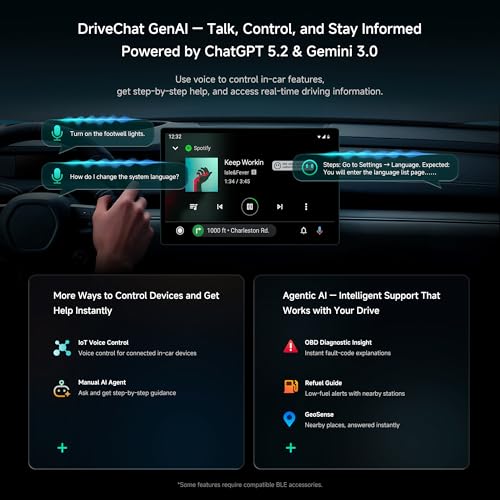
DriveChat AI Assistant
The CB6 includes ATOTO’s DriveChat AI assistant.
DriveChat is designed for natural voice interaction rather than requiring the driver to navigate multiple menus.
Supported functions can include:
- General questions
- Trip information
- Navigation assistance
- Entertainment requests
- Vehicle-data explanations
- Supported device controls
ATOTO continues to develop DriveChat and related AI functionality through software updates.
Avoid Locking the Product Page to One AI Model
The supplied copy specifically advertises particular ChatGPT and Gemini model versions.
I would avoid making those model numbers the center of permanent ecommerce copy.
Cloud AI services evolve constantly.
The CB6 hardware remains installed in the vehicle.
The durable feature is DriveChat with ATOTO’s evolving AI integration, not whichever cloud-model version happens to be active this month.
OBD-II Data in Plain English
Pairing DriveChat with the included AC-4450 can make vehicle data easier to understand.
For example, instead of simply presenting a diagnostic code such as:
P0171
the system can help explain that the engine computer has detected a lean condition and provide general information about what that means.
That can be genuinely useful for someone who does not spend their spare time memorizing SAE diagnostic standards.
A Trouble Code Does Not Diagnose the Car
AI explanation still does not replace actual testing.
A diagnostic trouble code can be caused by:
- Faulty sensors
- Wiring problems
- Damaged connectors
- Vacuum leaks
- Fuel-delivery issues
- Mechanical faults
- Reference-voltage problems
- Ground problems
A code tells you what the computer detected.
It does not tell you which replacement part Amazon can deliver fastest.
For detailed trouble-code diagnosis, use the code as the beginning of the process rather than the end.
Driving Guidance From Vehicle Data
ATOTO is also developing more context-aware behavior around connected OBD information.
Possible functions can include:
- Explaining warning conditions
- Fuel-related reminders
- Finding nearby services
- Speed-related alerts
- General next-step guidance
These features depend on current software support and the data available from the vehicle.
They should be treated as assistance—not a replacement for professional mechanical judgment when a serious warning appears.
Automatic Privacy Lock
One of the CB6’s more useful quality-of-life features is its Bluetooth-based automatic privacy lock.
With a compatible authorized phone, the system can lock when the driver walks away.
When the phone returns and reconnects, the interface can unlock.
That helps protect information such as:
- Google account access
- Navigation history
- Streaming accounts
- Browser history
- Application data
This becomes particularly useful when handing the vehicle to:
- A valet
- Repair shop
- Friend
- Family member
A factory radio once knew your six favorite FM stations.
Modern infotainment hardware potentially knows considerably more.
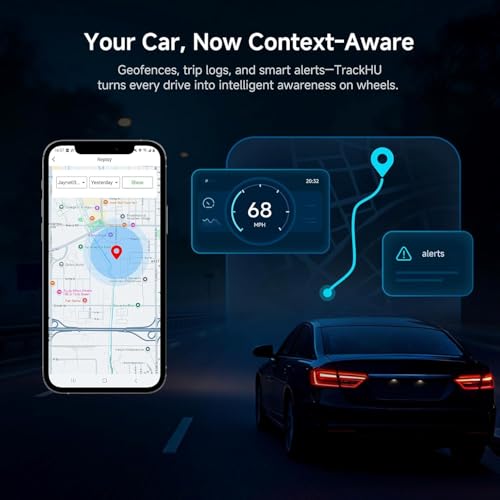
TrackHU GPS Tracking
The CB6 also supports ATOTO’s TrackHU platform.
Because the box includes its own GPS and internet connection, supported tracking functionality can operate independently of the driver’s phone.
Depending on current software and service support, TrackHU can provide features such as:
- Vehicle location
- Route history
- Trip records
- Geofencing
- Location alerts
This can be useful for:
- Shared vehicles
- Project cars
- Road trips
- Fleet-like use
- Theft awareness
OTA Firmware Updates
The CB6 supports over-the-air firmware updates.
That matters more on an AI box than it does on a traditional radio because so much of the experience is software-defined.
Updates may improve:
- CarPlay compatibility
- Android Auto compatibility
- DriveChat
- Bluetooth accessories
- ScenePilot
- Networking
- GPS behavior
- Application support
- User-interface functions
- System stability
The hardware can therefore continue receiving software improvements after installation.
Included Power Y-Cable
The CB6 includes a Y-cable designed to improve power stability in vehicles where the factory USB connection may not provide sufficient current under every operating condition.
Insufficient USB power can create symptoms including:
- Random reboots
- Freezing
- Connection drops
- Boot loops
- CarPlay disconnects
- Android Auto disconnects
This can be particularly noticeable in vehicles with aggressive automatic start/stop systems.
Before blaming software for every random restart, make sure the little Android computer you’re powering through USB is actually receiving enough power.
Plug-and-Play Installation
Installation is one of the CB6’s strongest advantages.
For a compatible vehicle, there is typically no need to:
- Remove the factory radio
- Cut wiring
- Install a dash kit
- Replace the amplifier
- Reconfigure steering-wheel controls
The CB6 connects through the existing factory USB interface.
A basic installation generally consists of:
- Connect the CB6 to the compatible wired CarPlay/Android Auto USB port.
- Allow the system to boot.
- Complete initial setup.
- Pair the phone.
- Configure the internet connection.
- Connect the included OBD-II adapter if desired.
That’s considerably easier than replacing an integrated factory infotainment system.
CB6 4GB/64GB vs CB6 8GB/128GB
This is an important comparison because ATOTO now offers higher-memory CB6 configurations.
CB6 4GB/64GB
Best suited for:
- Wireless CarPlay
- Wireless Android Auto
- Navigation
- Streaming
- DriveChat
- OBD-II data
- Normal Android apps
CB6 8GB/128GB
Better suited for:
- Heavier multitasking
- More Android applications
- Larger offline-map libraries
- More local media
- Buyers wanting maximum performance headroom
Both share the basic CB6 concept.
The main question is how heavily you intend to use Android independently of your phone.
For normal navigation and media use, 4GB/64GB is still a practical configuration.
For someone treating the CB6 as a full-time Android computer, the 8GB/128GB model provides more breathing room.
CB6 vs CB4DT
The CB4DT and CB6 target slightly different priorities.
CB4DT advantages:
- Lower-cost AI-box approach
- Wireless CarPlay
- Wireless Android Auto
- Android apps
- HDMI output
- Useful for adding a second display
CB6 advantages:
- Built-in 4G LTE
- Built-in GPS
- Google Play
- TrackHU
- More independent Android operation
- OBD-II integration
- More connected-vehicle functionality
The major CB4DT advantage is HDMI.
The major CB6 advantage is independence from the phone.
CB6 vs a Basic Wireless CarPlay Adapter
A normal wireless CarPlay adapter is still the better purchase for many people.
Buy a simple adapter if you only want:
- Wireless CarPlay
- Wireless Android Auto
- No cable
- Low cost
- Minimal setup
Buy the CB6 if you want:
- Android apps
- 4G LTE
- GPS
- OBD-II
- Vehicle tracking
- DriveChat
- More onboard storage
- OTA expansion
If all you want is to stop plugging in your iPhone, the CB6 is overkill.
If you want to substantially expand what the factory screen can do, that’s where it begins to make sense.
CB6 vs Replacing the Factory Stereo
There is also a larger decision to make.
Keep the factory stereo and use CB6 if:
- You already like the factory display
- Factory audio quality is acceptable
- The car has wired CarPlay or Android Auto
- Factory integration is complicated
- You want reversible installation
- You want Android features without changing the dashboard
Replace the factory stereo if:
- The factory system does not support CarPlay
- The factory display is outdated
- You want much better RCA audio outputs
- You need advanced DSP
- You want a larger screen
- You need multiple camera inputs
- The factory radio is failing
The CB6 expands factory infotainment.
It does not replace every benefit of an aftermarket head unit.
Who Should Buy the CB6 4GB/64GB?
This CB6 makes the most sense for someone with a relatively modern vehicle whose factory infotainment system works well but lacks the flexibility of a full Android platform.
Good candidates include drivers who want:
- Wireless CarPlay
- Wireless Android Auto
- Built-in 4G LTE
- Independent GPS
- Android applications
- OBD-II integration
- Vehicle tracking
- AI assistance
- Reversible installation
It is particularly attractive when replacing the factory head unit would interfere with other vehicle functions.
Who Should Skip It?
The CB6 is not a universal solution.
Skip it if:
- Your vehicle does not have compatible wired CarPlay or Android Auto
- Your factory system is explicitly unsupported
- You need a major sound-quality upgrade
- You need multiple camera inputs
- You want HDMI output
- You need a larger display
- You are replacing a failed factory radio
- You only need a cheap wireless CarPlay converter
Matching the upgrade to the problem saves money.
And usually several hours of wondering why the dashboard suddenly has three warning lights.
Is the ATOTO CB6 4GB/64GB Worth It?
For the right vehicle, yes.
The CB6 combines a surprisingly broad group of features without requiring replacement of the factory infotainment system.
You get:
- Wireless Apple CarPlay
- Wireless Android Auto
- Android 13
- Qualcomm QCM6115 octa-core hardware
- 4GB RAM
- 64GB storage
- microSD expansion
- Built-in 4G LTE
- Independent GPS
- Dual-band Wi-Fi
- Bluetooth 5.0
- Google Play
- FindApps
- DriveChat
- TrackHU
- OBD-II integration
- Included AC-4450 scanner on this package
- Privacy locking
- OTA firmware updates
- Plug-and-play installation
The 8GB/128GB CB6 provides more performance and storage.
The CB4DT provides HDMI.
A basic wireless dongle costs less.
But the 4GB/64GB CB6 sits in a useful middle ground for someone who wants the factory screen to do far more than it did when the vehicle left the dealership.
And unlike replacing the entire head unit, you can unplug the CB6 and return the vehicle to stock.
For modern vehicles where the stereo controls half the dashboard, sometimes the smartest aftermarket upgrade is the one that leaves the dashboard alone.







There are no reviews yet.