
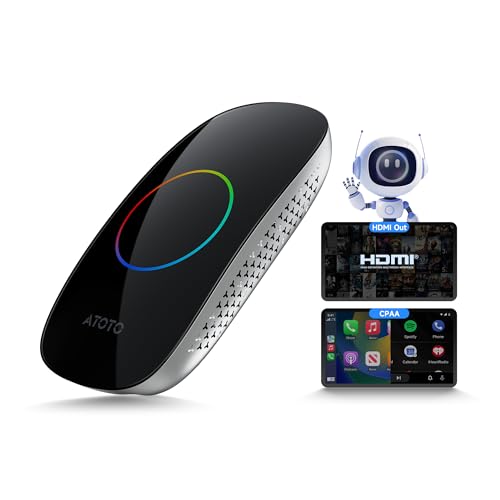
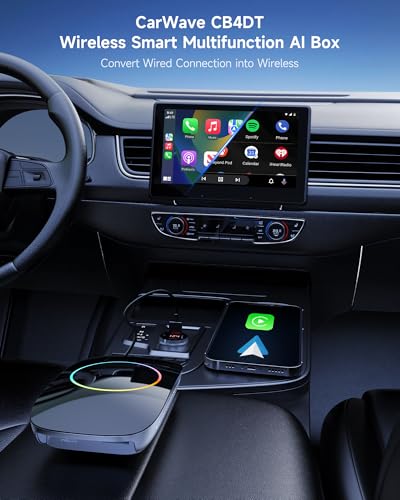
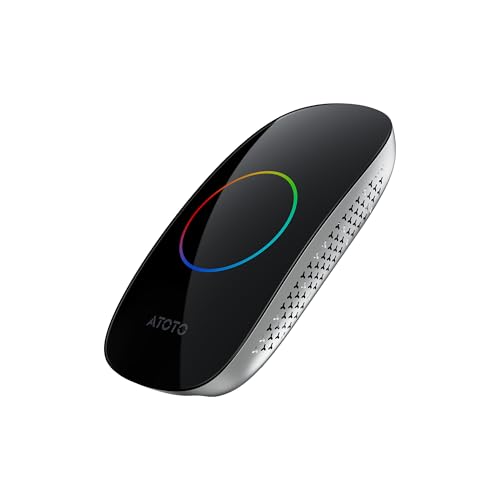
Turns Wired Apple CarPlay Into Wireless CarPlay
The most obvious reason to install the CB4DT is simple:
Stop plugging the phone in every time you get into the car.
Once paired with a compatible iPhone, the CB4DT can automatically reconnect and provide wireless access to normal CarPlay functions including:
- Apple Maps
- Google Maps
- Music
- Podcasts
- Phone calls
- Messages
- Siri
- Supported CarPlay apps
Your phone can remain in your pocket, bag or wireless charging tray.
It sounds like a small convenience.
Then you use wireless CarPlay for a month and suddenly plugging in a USB cable feels like operating telegraph equipment.
Converts Wired Android Auto to Wireless Too
The CB4DT isn’t limited to Apple devices.
Compatible vehicles with wired Android Auto can also use the adapter to create a wireless Android Auto connection.
That provides wireless access to compatible functions such as:
- Google Maps
- Waze
- Music apps
- Calls
- Messages
- Podcasts
- Google Assistant
Families with both iPhone and Android users can switch the box between CarPlay and Android Auto modes.
ATOTO uses a small CP/AA selector.
Hold the selector for approximately five seconds to change modes:
Green: CarPlay
Blue: Android Auto
That is worth knowing if the device appears connected but your factory stereo only supports one of the two interfaces.
Check Compatibility Before Buying
This is the most important section of the entire product page.
The CB4DT does not add CarPlay to a vehicle that never had CarPlay or Android Auto in the first place.
Your existing factory stereo must already support:
wired Apple CarPlay or wired Android Auto.
The factory system must also allow the CB4DT interface to be controlled using a compatible method such as:
- Touchscreen
- Touchpad
- Factory control knob
- Compatible remote/controller
The CB4DT is not intended for every infotainment system.
ATOTO specifically lists incompatibility with:
- BMW vehicles
- Most Subaru vehicles
- Aftermarket head units
- Factory systems that support wireless-only CarPlay or Android Auto
If you’re unsure, verify your year, make, model and factory stereo configuration before ordering.
This isn’t the kind of product where “the USB plug fits” automatically means the vehicle is compatible.
Does CB4DT Work With Aftermarket Car Stereos?
ATOTO’s current compatibility guidance says no.
The CB4DT is intended around compatible OEM wired CarPlay or Android Auto systems rather than aftermarket head units.
That’s important for Pro Street customers because many of our readers already have upgraded radios.
If your vehicle uses an aftermarket Double DIN stereo, check the stereo manufacturer’s own wireless CarPlay options rather than assuming the CB4DT will work.
4GB RAM and 32GB Storage
The CB4DT uses 4GB of RAM and 32GB of internal storage.
That makes it the higher-memory CB4 configuration compared with ATOTO’s CB4CT, which uses 2GB RAM and 16GB storage.
The additional memory is useful when switching between applications, running split-screen functions and using the entertainment interface for longer periods.
This still isn’t intended to replace a high-performance Android tablet.
It is an automotive AI/media box optimized around a specific job.
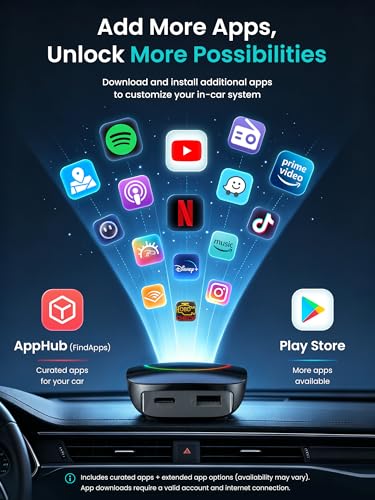
Android-Based Magic AI Box
The CB4DT also provides an Android-based environment beyond CarPlay and Android Auto.
This allows the factory display to access selected applications through the CB4 interface.
ATOTO includes its FindApps platform for supported software.
Compatible apps may include services for:
- Online video
- Music
- Entertainment
- Media playback
- ATOTO connected functions
There is one important limitation:
No Google Play Store
The CB4DT does not provide normal Google Play Store access.
Applications are installed through ATOTO’s FindApps ecosystem and supported preinstalled software.
That distinction matters if you’re comparing the CB4DT with a complete Android stereo such as the A5L, S8 or X10.
Those products are designed as Android head units.
The CB4DT is primarily an AI/media adapter built around the factory CarPlay interface.
If your goal is installing a huge library of arbitrary Android apps, a full Android head unit is the better tool.
HDMI Output for Passenger Screens
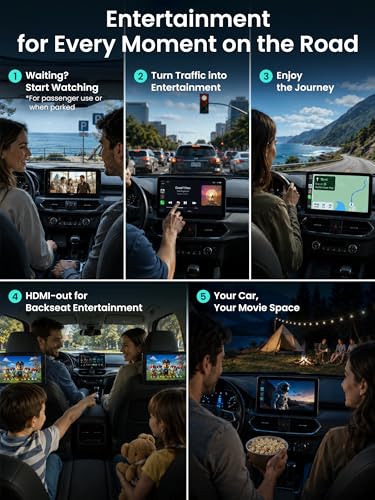
One of the CB4DT’s most useful upgrades beyond wireless CarPlay is its HDMI output.
The box can mirror its interface to a compatible external screen such as:
- Headrest monitor
- Passenger display
- Visor monitor
- Other compatible HDMI display
The main factory screen continues controlling the CB4DT while the secondary display mirrors the content.
This can be particularly useful during:
- Long road trips
- EV charging stops
- School pickup
- Parked waiting periods
- Family travel
The HDMI connection is output only.
The secondary screen mirrors what the CB4DT is displaying rather than becoming an independent second Android system.
Passenger Entertainment Without Replacing the Factory Stereo
This is where the CB4DT becomes more interesting than a simple wireless CarPlay adapter.
A basic adapter removes the cable.
The CB4DT can also give compatible passengers access to entertainment through an additional display.
That can be particularly useful in vehicles that never had a factory rear-entertainment system.
Instead of replacing the radio and redesigning the interior, you can use the factory infotainment screen as the control center and add a compatible HDMI display elsewhere.
Video should be used by passengers or while parked, subject to applicable local laws.
The driver already has plenty to watch.
Most of it is outside the windshield.
Dual Wi-Fi Solves an Important Wireless CarPlay Problem
Wireless CarPlay and Android Auto rely heavily on Wi-Fi.
That creates a problem for some AI boxes.
If the device’s Wi-Fi radio is already occupied maintaining the wireless phone connection, how does the box also stay connected to an internet hotspot?
The CB4DT addresses this with two dedicated Wi-Fi connections.
One handles:
Wireless CarPlay or Android Auto
while the other can connect the CB4DT to:
a phone hotspot or compatible in-car Wi-Fi network.
That allows supported online applications to remain connected without constantly switching the wireless CarPlay connection on and off.
It’s one of the more important technical differences between a proper AI box and a cheap wireless adapter.
Internet Access Still Requires Another Connection
The CB4DT does not include its own 4G LTE modem.
It needs an external internet source for online applications.
That usually means:
- Smartphone hotspot
- In-car Wi-Fi
- Another compatible wireless network
This is another important difference between the CB4DT and ATOTO’s higher-end CB6 or full Android head-unit products with integrated cellular capabilities.
CarPlay and Android Auto themselves continue using the connected phone as designed.
The separate internet connection is primarily for the CB4DT’s Android-based online functions.
USB Media Playback Up to 256GB
Not every road trip has reliable cellular coverage.
The CB4DT supports compatible USB storage drives up to 256GB for offline media.
That lets passengers keep local copies of compatible:
- Music
- Video
- Movies
- Other supported media
without relying completely on streaming.
This can be especially useful on long drives through areas where your carrier apparently believes cellular infrastructure is optional.
A USB drive is sold separately.
Split-Screen Multitasking
The CB4DT supports split-screen operation with compatible applications.
That lets two supported apps appear side by side rather than constantly switching between them.
Depending on the software and use case, that can make it easier to manage:
- Media
- Vehicle information
- Entertainment
- Other supported CB4 applications
The 4GB RAM configuration also gives the CB4DT more breathing room than ATOTO’s lower-memory CB4CT when multitasking.
DriveChat AI Assistant
The CB4DT includes ATOTO’s DriveChat system.
DriveChat provides conversational assistance and supported CB4 control through voice interaction.
Depending on current software functionality, it can help with:
- General questions
- Trip-related information
- Entertainment questions
- Supported CB4 commands
- Opening supported applications
A compatible factory voice-control button can be used to access supported DriveChat functions.
There is an important limitation:
DriveChat does not directly control native vehicle systems simply because the CB4DT is connected to the factory radio.
It doesn’t suddenly gain authority over your windows, climate control, engine management or other OEM modules.
CarPlay AI box does not mean Skynet gets the CAN bus.
Bluetooth Accessory Support
The CB4DT can also communicate with compatible Bluetooth accessories.
Examples may include:
- OBD-II readers
- Ambient-lighting accessories
- Selected ATOTO BLE devices
ATOTO’s CIoTHub system can provide a central interface for compatible accessories.
Actual support depends on the accessory and current software.
Add an OBD-II Scanner
A compatible Bluetooth OBD-II scanner can provide vehicle information such as supported:
- Engine RPM
- Vehicle speed
- Coolant temperature
- Sensor information
- Diagnostic trouble codes
That can put useful vehicle data onto a factory display without installing an entirely separate gauge screen.
As always, reading a trouble code is not the same as diagnosing the failure.
A code tells you what the control module detected.
It does not give you permission to replace the first part whose name appears in the description.
That’s why Pro Street’s OBD-II technical library exists.
Bluetooth Auto-Lock Adds Privacy
The CB4DT also includes an Unlock with Bluetooth privacy feature.
Authorized phones can be designated so that the CB4 interface automatically locks when no approved device is connected.
When an authorized phone returns, the interface can unlock again.
That can help protect:
- Signed-in applications
- Account information
- Entertainment accounts
- Stored preferences
when the vehicle is:
- Shared
- Serviced
- Valet parked
- Loaned to another driver
Anyone without an authorized phone can be required to use the appropriate password.
A small Android box connected to your car may contain considerably more account information than it appears to.
Dual Bluetooth Connectivity
ATOTO also uses separate Bluetooth functions to help the CB4DT manage the phone connection and supported external accessories.
This allows the system to remain connected to compatible devices without giving up normal smartphone functionality.
That’s useful if you’re simultaneously using:
- Wireless CarPlay
- OBD-II data
- DriveChat
- Another supported Bluetooth accessory
Power Requirements Matter
One of the easiest CB4DT installation problems to avoid has nothing to do with software.
It needs sufficient USB power.
ATOTO specifies a minimum supply of approximately 800mA.
Some factory USB ports—particularly older ones—may not provide stable enough current.
Symptoms of insufficient power can include:
- Random restarting
- Connection drops
- Boot loops
- Unstable operation
ATOTO includes a Y-cable that can draw supplemental power from another USB source when necessary.
If the device repeatedly reboots, don’t immediately blame CarPlay, Bluetooth, Wi-Fi, your phone, Mercury being in retrograde or the entire automotive electronics industry.
Check the power supply first.
Automatic Reconnection
After initial configuration, the CB4DT can automatically reconnect to a previously paired compatible phone.
That is really the feature that makes a wireless CarPlay adapter useful.
A system that requires six menus and a Bluetooth ritual every morning would technically be wireless but would have missed the point.
Once properly configured, navigation and media should be ready with considerably less interaction.
CB4DT vs Basic Wireless CarPlay Adapter
A normal wireless CarPlay adapter has one primary job:
Convert wired CarPlay to wireless.
The CB4DT goes further.
A basic adapter typically provides:
- Wireless CarPlay
- Automatic reconnection
CB4DT adds:
- Wireless CarPlay
- Wireless Android Auto
- Android-based AI-box interface
- 4GB RAM
- 32GB storage
- HDMI output
- USB media playback
- Split-screen
- FindApps
- DriveChat
- Bluetooth accessories
- Privacy locking
- OTA updates
If all you want is to eliminate the USB cable, a simpler adapter may be enough.
If you also want passenger entertainment and additional connected functions, the CB4DT becomes much more interesting.
CB4DT vs Full Android Head Unit
The other comparison is with products like the ATOTO A5L, S8 and X10.
Those are complete replacement stereos.
The CB4DT isn’t.
Choose CB4DT if you want to:
- Keep the factory stereo
- Preserve the OEM appearance
- Add wireless CarPlay
- Add wireless Android Auto
- Add HDMI passenger output
- Avoid installing a new radio
Choose a full Android head unit if you want:
- Complete stereo replacement
- More Android applications
- Google Play access on supported models
- More storage
- Built-in DSP audio controls
- RCA preamp outputs
- Amplifier integration
- Integrated GPS
- Built-in LTE on applicable models
- Full aftermarket audio flexibility
That’s an important distinction for Pro Street customers.
The CB4DT upgrades the factory infotainment experience.
It does not replace the audio architecture of the vehicle.
CB4DT vs CB4CT
ATOTO’s CB4DT and CB4CT provide largely the same core functions.
The biggest difference is memory.
CB4CT:
2GB RAM / 16GB storage
CB4DT:
4GB RAM / 32GB storage
The additional RAM makes the CB4DT the better choice for frequent application switching, split-screen use and longer entertainment sessions.
For occasional wireless CarPlay use, either may work.
For the more complete AI-box experience, the CB4DT is the stronger configuration.
CB4DT vs CB6
ATOTO’s CB6 sits above the CB4DT in the Magic Box lineup.
The CB6 family can add features such as:
- More RAM and storage
- Built-in cellular connectivity on applicable configurations
- Integrated GPS
- Broader application access
The CB4DT’s advantages are simplicity and HDMI output.
For a customer mainly interested in converting wired CarPlay to wireless and adding a passenger screen, the CB4DT can be the more focused choice.
Who Should Buy the ATOTO CB4DT?
This adapter makes the most sense for drivers who already like their factory infotainment system but wish it did a little more.
Good use cases include:
- Factory wired CarPlay vehicles
- Factory wired Android Auto vehicles
- Family road-trip cars
- Vehicles receiving a headrest monitor
- EVs where passengers spend time waiting at chargers
- Drivers tired of connecting a cable every trip
- Owners who want additional entertainment without replacing the OEM radio
It is particularly attractive for newer vehicles where replacing the factory stereo is either difficult or simply unnecessary.
Who Should Not Buy It?
Skip the CB4DT if:
- Your car does not already support wired CarPlay or Android Auto
- Your system is wireless-only
- You have an incompatible BMW
- You have one of the incompatible Subaru applications
- You use an aftermarket head unit
- You expect unrestricted Google Play access
- You need built-in cellular LTE
- You want HDMI input rather than output
- You want to replace the actual factory audio system
Those limitations aren’t minor footnotes.
They determine whether this product is the right category of device for your vehicle.
Is the ATOTO CB4DT Worth It?
For a compatible factory stereo, the CB4DT offers considerably more functionality than a basic wireless CarPlay dongle without requiring the dashboard to be torn apart.
You get:
- Wireless Apple CarPlay
- Wireless Android Auto
- Automatic reconnection
- Android-based entertainment
- 4GB RAM
- 32GB storage
- Dual Wi-Fi
- HDMI passenger-screen output
- USB media playback
- Split-screen support
- DriveChat
- Bluetooth accessory integration
- OTA updates
Its biggest advantage may simply be that it leaves the OEM stereo alone.
Modern factory infotainment systems increasingly integrate audio, cameras, vehicle settings, steering-wheel controls and other functions that can be expensive to reproduce with aftermarket hardware.
If the factory screen already works well, replacing it just because the manufacturer forgot wireless CarPlay can be unnecessary.
The CB4DT fixes that problem and adds a surprising amount of functionality along the way.
Just check compatibility first.
Because nothing ruins the wireless lifestyle quite like discovering your new wireless adapter won’t talk to the car.







There are no reviews yet.