

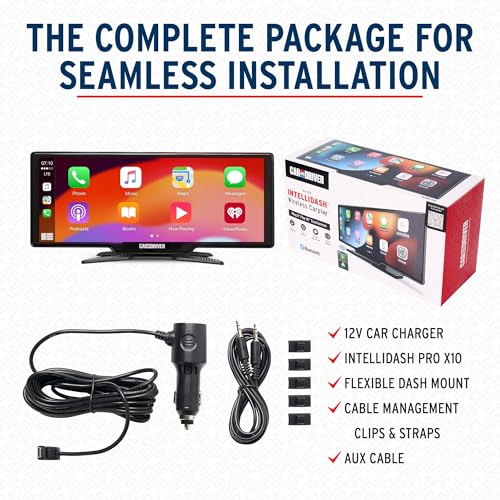
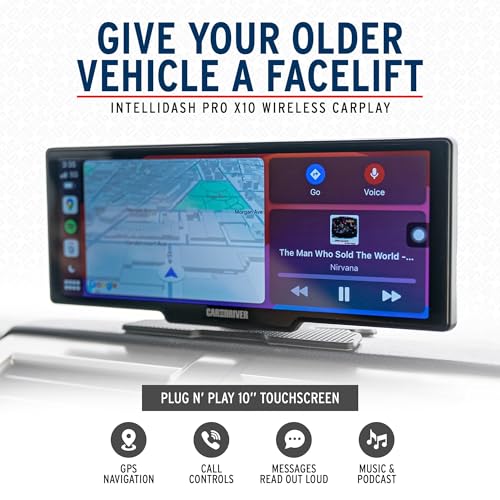


Easy Plug-and-Play CarPlay Installation
One of the biggest advantages of the IntelliDash Pro X10 is its simplified installation.
Traditional aftermarket head unit upgrades often require dashboard disassembly, wiring harness adapters, antenna adapters, and vehicle-specific installation kits.
The IntelliDash Pro X10 avoids much of that work by mounting directly to your dashboard and receiving power through a 12V accessory outlet.
Basic Installation Steps
-
Position the IntelliDash Pro X10 in a secure location with clear driver visibility.
-
Attach the supplied mounting hardware according to the manufacturer’s instructions.
-
Connect the display to your vehicle’s 12V accessory outlet.
-
Pair your compatible smartphone using the supported wireless connection procedure.
-
Select your preferred audio output method.
-
Configure Apple CarPlay or Android Auto and verify navigation and audio operation.
Ensure the display does not obstruct your windshield, vehicle controls, or airbag deployment areas.
Four Ways to Connect Audio to Your Factory Car Stereo
The IntelliDash Pro X10 provides several audio output options, making it useful for vehicles with different generations of factory sound systems.
| Audio connection | Best application |
|---|---|
| Bluetooth | Compatible factory or aftermarket radios supporting the required audio connection |
| AUX input | Vehicles equipped with a 3.5mm auxiliary audio input |
| FM transmitter | Older vehicles with an FM radio but no modern audio input |
| Built-in speaker | Standalone audio playback without connecting to the factory stereo |
For the cleanest available connection, an AUX input is often preferable to FM transmission because it avoids interference from nearby radio stations.
Bluetooth audio performance and compatibility depend on the vehicle’s existing radio.
Upgrade an Older Car Without Losing Its Original Dashboard
Many older vehicles have reliable factory stereos but lack modern smartphone connectivity.
Replacing these radios can sometimes introduce additional complications involving factory amplifiers, steering-wheel controls, dashboard fitment, and vehicle-specific wiring.
The IntelliDash Pro X10 provides an alternative for owners who want wireless CarPlay and Android Auto while preserving their original dashboard layout.
It’s particularly appealing for classic cars, older Japanese imports, project vehicles, and trucks where retaining the factory interior is important.
IntelliDash Pro X10 vs. Traditional Double DIN Stereo
| Feature | IntelliDash Pro X10 | Traditional Double DIN upgrade |
|---|---|---|
| Installation | Portable dashboard mount | In-dash installation |
| Factory stereo replacement | Not required | Usually required |
| Wireless CarPlay / Android Auto | Yes | Depends on model |
| Dashboard modifications | Generally unnecessary | May require installation kit |
| Audio amplifier | Uses existing system or built-in speaker | Often includes internal amplifier |
| Speaker wiring changes | Not required | May require harness adapters |
| Portability | Can be removed | Generally fixed installation |
The IntelliDash Pro X10 is ideal for drivers who prioritize convenience, smartphone connectivity, and factory stereo retention.
A traditional aftermarket stereo may be preferable for enthusiasts planning a complete audio system with dedicated amplifier outputs, DSP tuning, or upgraded speaker wiring.
Improve Your Factory Audio System Alongside IntelliDash
Although the IntelliDash Pro X10 adds modern multimedia features, it does not directly increase the power delivered to your vehicle’s speakers.
If your factory speakers are damaged, distorted, or simply outdated, upgrading them separately can improve the listening experience.
For enthusiasts planning additional stereo modifications, understanding factory speaker connections and audio signal routing is essential.
A properly installed speaker upgrade can complement the IntelliDash by improving the sound reproduced through your existing car stereo.
Frequently Asked Questions
Does the IntelliDash Pro X10 work with older vehicles?
Yes, it is designed for a wide range of vehicles with a compatible 12V power source and sufficient mounting space.
Do I need to remove my factory stereo?
No. The IntelliDash Pro X10 is a standalone portable display that works alongside your existing radio.
Does it support wireless Apple CarPlay?
Yes. It supports wireless Apple CarPlay and Android Auto with compatible smartphones.
Can I play music through my car’s speakers?
Yes, using a compatible Bluetooth, AUX, or FM audio connection.
Does the IntelliDash Pro X10 have built-in GPS?
The advertised navigation functionality operates through compatible smartphone navigation applications. Do not assume the display has independent GPS navigation without a connected phone.
Will this improve my factory speaker sound quality?
Not directly. Audio quality depends primarily on your existing radio, speakers, amplifier, and selected audio connection.
Can I move the IntelliDash between vehicles?
Its portable design makes relocation possible, provided the mounting and power requirements are met.
Bring Wireless CarPlay and Android Auto to Your Vehicle Today
Modernizing your vehicle’s infotainment system doesn’t have to involve replacing the factory radio.
The Car and Driver IntelliDash Pro X10 Wireless Apple CarPlay and Android Auto Display combines a large 10-inch touchscreen, convenient smartphone connectivity, flexible audio options, and plug-and-play installation in one portable system.
Whether you’re updating a daily commuter, weekend project car, classic truck, or RV, the IntelliDash Pro X10 makes modern navigation and multimedia features more accessible.
Shop the Car and Driver IntelliDash Pro X10 at Pro Street Online and explore our selection of automotive electronics, speakers, stereo components, and car audio accessories.







There are no reviews yet.