

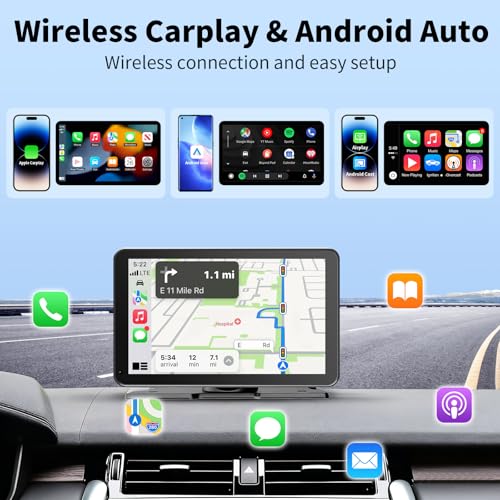
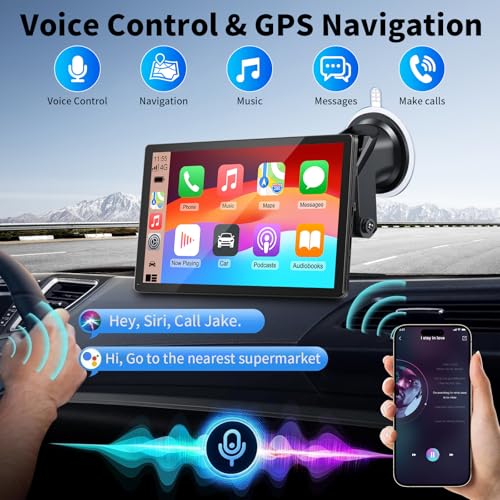

Siri and Google Assistant Voice Control
The screen supports voice assistant functionality through compatible smartphones.
With Siri or Google Assistant, drivers can use supported voice commands to:
- Request navigation directions
- Make hands-free phone calls
- Control music playback
- Send supported messages
- Access compatible smartphone features
Voice control can reduce the need for manual touchscreen interaction, although drivers should always remain attentive to road conditions.
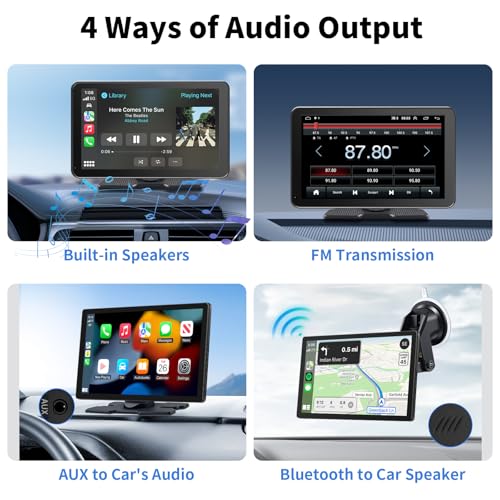
Four Audio Playback Options
This portable CarPlay screen offers multiple ways to hear navigation instructions, music, and supported phone audio.
Bluetooth Audio
Use supported Bluetooth connectivity to route audio through compatible devices and vehicle audio systems.
FM Transmission
Play supported audio through your vehicle’s FM radio using an appropriate frequency.
AUX Audio Output
Connect the display to a compatible auxiliary input for wired audio playback.
Built-In Speaker
Use the display’s integrated speaker when an external audio connection is unavailable.
These options make the screen useful for vehicles with different factory and aftermarket stereo configurations.
Actual audio routing depends on the connected smartphone, vehicle stereo, and supported connection modes.
Phone Mirror Link for Compatible Smartphones
In addition to Apple CarPlay and Android Auto, the display advertises phone mirroring functionality.
Mirror Link allows supported smartphone content to appear on the larger 9-inch screen.
This may be useful for viewing photos and compatible media while the vehicle is parked.
Safety notice: Video entertainment and screen mirroring should only be used while safely parked and where permitted by law. Drivers must not watch video content while operating a vehicle.
Some applications may restrict screen mirroring because of content protection requirements.
Hands-Free Calling and Communication
The portable display supports hands-free communication through compatible smartphone connections.
Drivers can access supported phone functions using the touchscreen or Siri and Google Assistant.
This makes the system a practical upgrade for older vehicles that lack modern smartphone integration.
Microphone performance and calling functionality depend on the device’s hardware, smartphone compatibility, and audio configuration.
Plug-and-Play Installation Without Replacing Your Stereo
The 9-inch portable CarPlay screen is designed for straightforward installation.
Unlike traditional Double DIN aftermarket stereos, this display does not require removing the original radio or installing a vehicle-specific dashboard conversion kit.
The manufacturer advertises power through a compatible cigarette lighter or accessory power outlet.
A suction cup mounting system allows the display to be positioned in a suitable location.
General Installation Steps
- Choose a mounting position that does not obstruct road visibility, airbags, or vehicle controls.
- Secure the display using the supplied suction cup mount.
- Connect the compatible power adapter to the vehicle’s accessory outlet.
- Turn on the display.
- Pair your compatible smartphone using Apple CarPlay or Android Auto.
- Configure the preferred audio output.
- Test navigation, music, voice commands, and hands-free calling.
- Confirm the display is securely mounted before driving.
Installation requirements may vary depending on the vehicle’s power outlet and dashboard layout.
A Practical Upgrade for Older Cars and Trucks
Many older vehicles remain excellent daily drivers but lack factory Apple CarPlay and Android Auto.
Replacing the original stereo can require additional wiring harnesses, dashboard adapters, and installation work.
A portable CarPlay screen provides another option.
For example, owners of a first-generation Lexus IS300 can add modern smartphone navigation and hands-free calling while preserving the factory stereo.
The same concept applies to many older Honda, Toyota, Nissan, Subaru, and domestic vehicles.
For drivers considering a permanent aftermarket stereo installation, read our Car Audio Wiring Diagram Explained guide.
For additional audio installation advice, our How to Wire a Car Amplifier Without Noise guide covers grounding and signal routing fundamentals.
Product Specifications
| Specification | Details |
|---|---|
| Product type | Portable wireless CarPlay and Android Auto display |
| Display size | 9 inches |
| Display type | HD touchscreen |
| Exact screen resolution | Not specified |
| Apple CarPlay | Wireless |
| Android Auto | Wireless |
| GPS navigation | Smartphone-based navigation support |
| Voice assistants | Siri and Google Assistant |
| Phone mirroring | Supported for compatible smartphones |
| Hands-free calling | Supported |
| Audio options | Bluetooth, FM transmitter, AUX, built-in speaker |
| Power connection | Compatible vehicle accessory outlet |
| Mounting system | Suction cup mount |
| Factory stereo replacement required | No |
| Backup camera | Not specified |
| Dash camera | Not specified |
| Manufacturer | Not specified |
| Warranty | Not specified |
Frequently Asked Questions
Does this 9-inch screen support wireless Apple CarPlay?
Yes. The display supports wireless Apple CarPlay with compatible iPhones.
Does it work with Android Auto?
Yes. Wireless Android Auto is supported for compatible Android smartphones.
Can I use Google Maps and Waze?
Yes, through compatible smartphones using Apple CarPlay or Android Auto.
Does it have built-in GPS navigation?
The supplied description advertises GPS navigation support but does not confirm independent GPS hardware. Navigation should be treated as smartphone-based.
Can I make hands-free phone calls?
Yes. The system supports hands-free calling through compatible smartphone connections.
Does it support Siri and Google Assistant?
Yes. Voice assistant functionality is supported through compatible smartphones.
Can I play music through my factory speakers?
Yes, where compatible, using Bluetooth audio routing, AUX, or FM transmission.
Does it support phone screen mirroring?
Yes. The display advertises Mirror Link functionality for compatible smartphones.
Do I need to replace my factory stereo?
No. The screen is designed as a portable accessory that works alongside the original radio.
Does it include a backup camera?
A backup camera is not mentioned in the supplied product specifications.
Does it record driving footage?
Dash camera recording functionality is not specified.
Will it fit my vehicle?
The display is designed for broad compatibility, but power, mounting clearance, and audio connections should be verified before purchasing.
Upgrade Your Dashboard with Wireless CarPlay
The 9-Inch Wireless Apple CarPlay and Android Auto Screen brings modern smartphone navigation, music streaming, hands-free calling, and voice assistant functionality to vehicles without factory infotainment systems.
With a large HD touchscreen, flexible audio connections, phone mirroring, and plug-and-play installation, this portable display provides a practical way to modernize your vehicle while retaining the original radio.
Shop Wireless CarPlay Screens at Pro Street Online and explore portable car stereos, navigation displays, and automotive electronics accessories.









There are no reviews yet.