


Built-In OBD2 Check-Engine Scanner
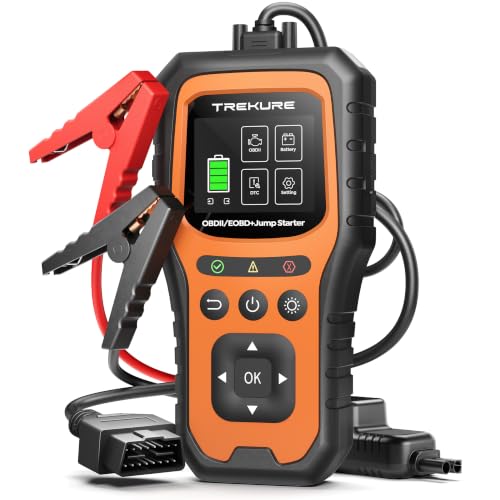
Connect the supplied 16-pin cable to access the TK40’s diagnostic functions. The scanner supports generic OBD-II emissions information and can help identify why the check-engine light has illuminated.
Available functions include:
- Reading stored and pending engine codes
- Clearing supported emissions-related codes
- Displaying live engine data
- Viewing freeze-frame information
- Checking I/M readiness monitors
- Reading vehicle-identification information
- Looking up diagnostic trouble-code definitions
- Displaying battery-voltage activity
A diagnostic code identifies the system or operating condition that detected a problem. It does not automatically identify the failed part. Our guide explaining how to use an OBD-II scan tool covers how to interpret codes without firing the parts cannon at your engine bay.
What the TK40 Cannot Diagnose
The TK40 is a basic emissions-focused reader. It does not provide complete vehicle-system diagnostics.
It does not support:
- ABS fault codes
- Airbag or SRS diagnostics
- Transmission-module diagnostics
- Body-control modules
- HVAC modules
- Manufacturer-specific service functions
- Bidirectional controls
- OBD-I vehicles
- Coding, programming or module resets
Some powertrain-related faults may also require an enhanced or manufacturer-specific scanner. Compare scanner capabilities in our guide to the best OBD2 diagnostic scanners.
Readiness-Monitor Warning
Only erase a trouble code after recording the stored codes, freeze-frame information and relevant live data.
Clearing codes also resets emissions readiness monitors. The vehicle may then require one or more complete drive cycles before those monitors return to “ready.” EPA documentation confirms that emissions-related faults can illuminate the MIL and store both a diagnostic code and operating conditions in PCM memory. epa.gov
Deleting the evidence before diagnosing the fault is the automotive equivalent of shredding the map because you dislike where it says you are.
Battery-Voltage Monitoring
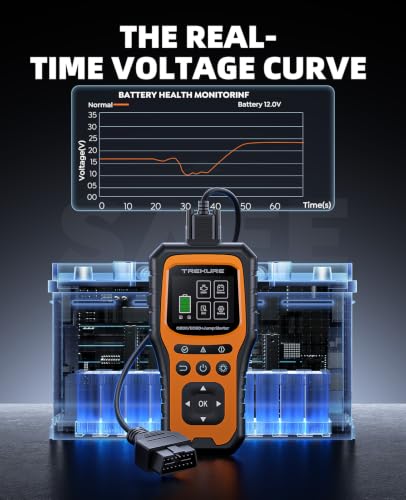
The TK40 can graph vehicle voltage through the OBD-II connection, helping users identify:
- Low resting voltage
- Voltage drop during cranking
- Charging-voltage changes
- Unstable electrical-system voltage
Voltage monitoring is useful, but it is not a complete battery-health test. It cannot independently measure cold-cranking capacity, internal resistance or reserve capacity. A battery can show more than 12 volts and still collapse under starter load.
For a complete diagnosis, combine the TK40’s voltage display with a proper conductance or load test.
Built-In DTC Lookup
The scanner includes an advertised database of 83,100 code definitions. This can provide a quick description without requiring a network connection.
For deeper research, use the Pro Street P-code diagnostic library to review possible causes, symptoms and testing procedures.
16,800mAh USB Power Bank
The integrated 16,800mAh power bank can recharge compatible phones, tablets and other USB devices during roadside emergencies or outdoor use.
The manufacturer advertises up to 24 months of standby time, but the unit should still be inspected and recharged periodically. Leaving any jump pack untouched in the trunk for two years is an excellent way to discover that batteries also enjoy disappointing people.
Three-Mode Emergency Light
A wide-angle emergency light provides three operating modes:
- Steady flashlight
- Strobe
- SOS signal
The light can illuminate battery terminals, assist with nighttime repairs or make a disabled vehicle more visible while occupants wait for help.
Color Display and Language Support
The 2.8-inch color display presents diagnostic information without requiring a phone or internet connection. Its interface supports 13 languages and provides direct access to scanning, voltage-monitoring and DTC-lookup functions.
Vehicle Compatibility
The TK40 is intended for:
- Most 1996-and-newer U.S.-market OBD-II vehicles
- Many 2000-and-newer European and Asian vehicles
- Compatible cars, light trucks and SUVs
- Domestic and imported OBD-II/CAN vehicles
- 12-volt battery systems
Fitment should be confirmed before purchase. A physical adapter cannot convert an OBD-I vehicle into an OBD-II vehicle because the communication protocol and diagnostic architecture remain different.
How to Jump-Start a Vehicle
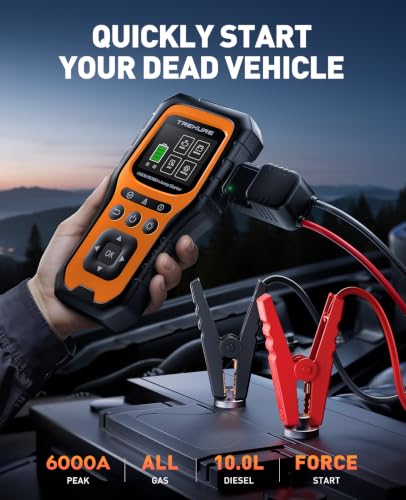
- Charge the TK40 before use.
- Switch off the vehicle and all accessories.
- Connect the jumper-cable assembly to the jump pack.
- Attach the red clamp to the positive battery terminal.
- Attach the black clamp to the designated negative terminal or approved ground.
- Confirm the polarity indicator shows a safe connection.
- Start the vehicle according to the supplied instructions.
- Disconnect the clamps in the manufacturer’s specified order.
- Recharge the jump pack after use.
How to Scan a Check-Engine Light
- Locate the vehicle’s 16-pin OBD-II connector.
- Connect the supplied diagnostic cable.
- Turn the ignition on without starting the engine unless instructed otherwise.
- Select the OBD-II diagnostic menu.
- Read and record every stored and pending code.
- Save freeze-frame and readiness information.
- Diagnose and repair the underlying fault.
- Clear the code only after completing the repair.
- Rescan the vehicle and verify that the fault does not return.
Additional definitions are available through our OBD-II trouble-code guide.
Product Specifications
| Specification | Details |
|---|---|
| Model | TK40 |
| System voltage | 12 volts |
| Advertised peak current | 6000A |
| Gasoline-engine rating | All gasoline engines |
| Diesel-engine rating | Up to 10 liters |
| Power-bank capacity | 16,800mAh |
| Display | 2.8-inch color screen |
| Operating temperature | -4°F to 140°F |
| Diagnostic connection | 16-pin OBD-II |
| Diagnostic coverage | Generic emissions-related OBD-II |
| Code library | Advertised 83,100 definitions |
| Light modes | Flashlight, strobe and SOS |
| Language support | 13 languages |
| Return coverage | Two years, according to manufacturer |
| Technical support | Lifetime, according to manufacturer |
Final Verdict
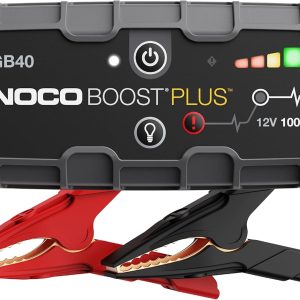
The TK40 makes sense for drivers who want one emergency tool capable of starting a dead battery and reading a basic check-engine code. Its OBD-II functions provide live data, freeze-frame information and readiness status, while the jump pack, power bank and emergency light cover common roadside needs.
Just understand the limits. This is not a full-system professional scan tool, and its voltage graph is not a complete battery analyzer. Used within those boundaries, it is a practical addition to a trunk, garage or roadside emergency kit.









There are no reviews yet.