


One Tool for Engine and Electrical Diagnosis
A vehicle that will not start does not automatically have a bad battery. A Check Engine Light does not automatically mean the engine has one isolated failed component.
The AL500B helps separate several common possibilities by testing two different areas:
- The OBD2 engine-management system
- The battery, starter and charging system
This combination is useful because voltage problems can create misleading symptoms, including:
- Slow cranking
- Multiple warning lights
- Intermittent communication faults
- Erratic sensor readings
- Lost learned values
- Transmission warnings
- Electronic steering warnings
- Stop/start malfunctions
- Random module codes
Testing the battery and charging system before chasing electronic faults can prevent a great deal of unnecessary parts replacement.
Complete Generic OBD2 Functions
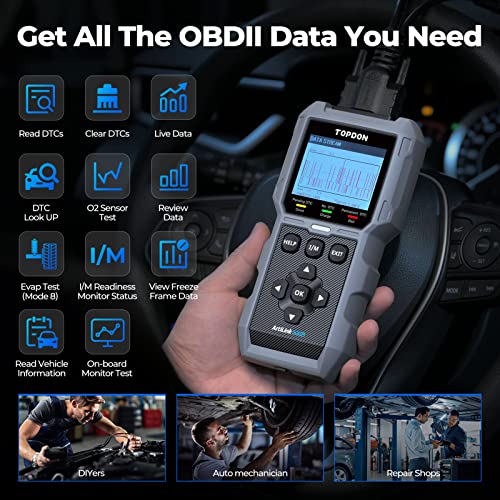
The TOPDON AL500B supports all 10 standardized OBD2 test modes on compatible vehicles.
Its diagnostic functions include:
- Reading diagnostic trouble codes
- Clearing diagnostic trouble codes
- Viewing freeze-frame data
- Displaying live powertrain data
- Graphing supported data parameters
- Checking I/M readiness
- Viewing oxygen-sensor test results
- Reviewing onboard-monitor test results
- Performing supported component tests
- Retrieving vehicle information
- Reading permanent codes
- Looking up code definitions
These are generic OBD2 powertrain functions. The AL500B is not a full-system scanner for ABS, airbags, body modules or electronic parking brakes.
That distinction keeps the tool affordable and focused on the jobs most home mechanics perform regularly.
Read and Clear Check Engine Light Codes
The AL500B can retrieve emissions-related powertrain codes stored by the engine or transmission controller.
Examples include:
- Misfire codes
- Fuel-trim codes
- Oxygen-sensor faults
- Catalyst-efficiency codes
- EVAP-system codes
- Throttle-related faults
- Airflow and pressure-sensor codes
- Coolant-temperature faults
- Transmission-related P-codes
Once the scanner retrieves a code, use the My Pro Street DTC Doctor to research its meaning, likely causes and correct testing sequence.
The complete P-code OBD-II library provides dedicated diagnostic guides for powertrain faults.
A trouble code identifies what the powertrain control module detected. It does not necessarily identify which part should be replaced.
For example, a P0302 code indicates that the PCM detected a combustion problem associated with Cylinder 2. The cause could involve ignition, fuel delivery, an intake leak or mechanical sealing. The P0302 Cylinder 2 misfire guide explains how to separate those possibilities.
View Freeze-Frame Data Before Clearing Codes
Freeze-frame data captures operating conditions from the moment the control module detected a fault.
Depending on the vehicle and code, it may include:
- Engine speed
- Vehicle speed
- Calculated load
- Coolant temperature
- Intake-air temperature
- Throttle position
- Fuel trims
- Manifold pressure
- Fuel-system status
This information can reveal whether the fault occurred during:
- Cold starting
- Hot idle
- Acceleration
- Highway cruising
- Deceleration
- High engine load
Always record the code and freeze-frame data before clearing anything.
Clearing a code can erase valuable evidence and reset emissions monitors. The warning light may disappear, but the failed part is rarely intimidated by menu navigation.
Graph Live Vehicle Data
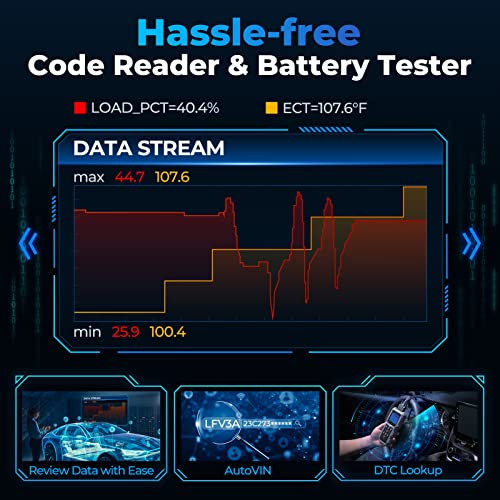
The AL500B can display supported live OBD2 data as numerical values or waveform graphs.
Useful parameters may include:
- Engine speed
- Coolant temperature
- Intake-air temperature
- Throttle position
- Mass airflow
- Manifold pressure
- Oxygen-sensor voltage
- Short-term fuel trim
- Long-term fuel trim
- Battery or control-module voltage
- Vehicle speed
Graphing makes changes and intermittent behavior easier to recognize than watching numbers scroll across the display.
For example, the P0069 diagnostic guide explains a correlation fault between manifold-pressure and barometric-pressure information. Comparing live sensor behavior can help identify an implausible reading before a sensor is condemned.
The AL500B is not an oscilloscope. Its graphing function is useful for observing scan-data trends, not capturing high-speed ignition or network waveforms.
One-Touch I/M Readiness Check
A dedicated I/M button gives the AL500B fast access to emissions-monitor status.
It can help determine whether the vehicle’s onboard monitors are ready before a smog inspection.
Common monitors include:
- Misfire
- Fuel system
- Comprehensive components
- Catalyst
- Heated catalyst
- Evaporative emissions
- Secondary air
- Oxygen sensor
- Oxygen-sensor heater
- Exhaust-gas recirculation
The tool uses simple status indicators to show whether the vehicle:
- Has no detected OBD2 faults
- Contains pending trouble codes
- Contains permanent trouble codes
- Has incomplete readiness monitors
A monitor marked “not ready” does not necessarily indicate a failed component. It may mean the battery was disconnected, codes were recently cleared or the necessary drive cycle has not been completed.
The AL500B helps determine readiness but cannot guarantee that the vehicle will pass an official emissions inspection.
Built-In DTC Lookup
The AL500B contains a diagnostic trouble-code library that can display definitions directly on the tool.
This saves time when the scanner retrieves an unfamiliar generic or manufacturer-specific powertrain code.
A code definition is only the first step. It should be followed by:
- Checking for related codes
- Reviewing freeze-frame data
- Inspecting relevant live data
- Consulting vehicle-specific service information
- Testing the circuit or system
- Confirming the repair
For deeper diagnostic direction, pair the built-in definition with the DTC Doctor code guides.
12-Volt Battery Health Testing
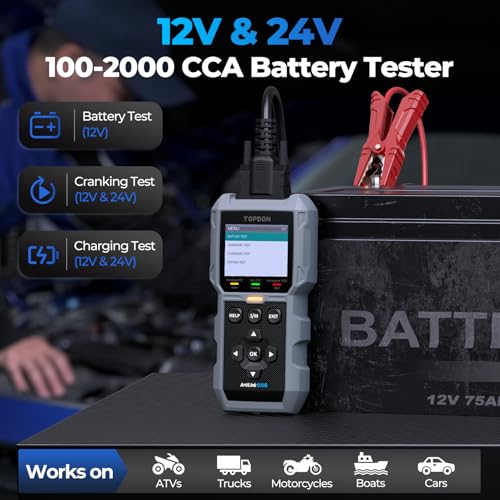
The dedicated battery-test cable allows the AL500B to evaluate compatible 12-volt lead-acid batteries.
The tool can report information such as:
- Battery health
- State of charge
- Measured voltage
- Internal resistance
- Measured cranking capability
- Entered rated CCA
- Overall battery condition
Depending on the test result, the scanner may indicate that the battery is:
- Good
- Good but needs charging
- In need of replacement
- Producing an inconclusive result requiring retesting
The battery’s rated standard and capacity must be entered correctly. Using an incorrect CCA rating or battery standard can produce misleading results.
Supported Battery Types
Confirm compatibility with the exact battery before testing. The AL500B is designed around common automotive lead-acid battery applications.
These may include:
- Conventional flooded batteries
- Maintenance-free batteries
- AGM batteries
- Spiral AGM batteries
- EFB batteries
- Gel batteries where supported
It is not a universal tester for every lithium, powersports or high-voltage hybrid battery.
Never connect the tester to a high-voltage electric or hybrid propulsion battery.
What Battery Health Means
A battery can show acceptable voltage and still fail under load.
A fully charged battery may measure around 12.6 volts at rest, but voltage alone does not reveal:
- Available starting current
- Plate deterioration
- Excessive internal resistance
- Reduced capacity
- Intermittent internal connections
The AL500B uses battery-test data to estimate the battery’s condition and starting capability.
This is more useful than testing resting voltage alone, particularly when the vehicle starts normally one day and behaves like the battery retired without notice the next morning.
12/24-Volt Cranking Test
The AL500B can test cranking performance on supported 12-volt and 24-volt systems.
During the test, it evaluates information such as:
- Cranking voltage
- Cranking time
- Voltage behavior while the starter operates
- Whether the starting system appears normal
A low cranking-voltage result may point toward:
- Weak or discharged battery
- Excessive cable resistance
- Corroded battery terminals
- Poor engine ground
- Starter-motor problems
- Excessive mechanical load
- Incorrect battery capacity
The cranking test does not automatically identify which component caused the voltage drop. Additional voltage-drop and starter-current testing may be required.
12/24-Volt Charging-System Test
The charging test evaluates alternator or generator-system output on compatible 12-volt and 24-volt vehicles.
It can help identify:
- Low charging voltage
- Excessive charging voltage
- Unstable alternator output
- Charging that changes incorrectly under load
- Possible regulator problems
- Poor battery or charging connections
A proper test may involve checking voltage:
- At idle
- At increased engine speed
- With electrical loads switched on
- With lights, blower motor and rear defroster operating
Charging voltage varies by vehicle. Modern computer-controlled charging systems may intentionally operate outside the older fixed-voltage ranges found in traditional repair manuals.
Always compare the result with vehicle-specific specifications.
Battery Testing Before a Roadside Failure
A battery often provides clues before it leaves the vehicle stranded.
Warning signs include:
- Slower-than-normal cranking
- Clicking during startup
- Headlights dimming during cranking
- Intermittent electronic warnings
- Stop/start system becoming unavailable
- Repeated clock or memory loss
- Battery requiring frequent charging
- Corrosion around terminals
- Swollen battery case
Testing the battery periodically can reveal declining performance before a cold morning turns the driveway into an involuntary waiting room.
The AL500B is useful for:
- Seasonal battery checks
- Pre-trip inspections
- Used-car evaluations
- Preventive maintenance
- Diagnosing slow cranking
- Checking alternator performance
- Confirming battery replacement
OBD2 and Battery Reports
The AL500B stores diagnostic and battery-test information for later review.
Using its mini-USB connection and compatible computer software, users can:
- Update the tool
- Transfer test information
- Print diagnostic reports
- Print battery-health results
- Save records for customers or personal maintenance files
Printed reports can be useful for:
- Repair orders
- Used-car inspections
- Battery warranty claims
- Pre-repair documentation
- Post-repair verification
- Customer explanations
The scanner does not contain an internal printer. A compatible office computer and external printer are required.
No Built-In Battery Required
The AL500B receives operating power from the connection being used.
During OBD2 diagnosis, it receives power through the vehicle’s diagnostic connector. During battery testing, it receives power through the battery-test leads.
This means there is no internal rechargeable battery to maintain.
It also means the scanner will not power on normally until it is correctly connected to the vehicle or battery.
Wide Vehicle Compatibility
The AL500B supports generic OBD2 diagnosis across more than 50 claimed vehicle brands.
In the United States, OBD2 generally applies to:
- Most gasoline passenger vehicles from 1996 onward
- Compatible light trucks from 1996 onward
- Many later diesel passenger vehicles
- Imported OBD2-compliant vehicles
Compatibility depends on the vehicle’s market, model year and protocol.
A diagnostic connector under the dashboard does not always guarantee complete OBD2 compatibility, particularly on vehicles built for non-U.S. markets.
Contact the seller or TOPDON with the complete year, make, model and engine information when compatibility is uncertain.
Seven Supported Languages
The AL500B supports seven languages:
- English
- French
- German
- Spanish
- Italian
- Portuguese
- Japanese
Language availability may depend on the installed software version and region.
How to Use the AL500B as an OBD2 Scanner
- Park the vehicle safely.
- Switch the ignition off.
- Locate the 16-pin diagnostic connector.
- Connect the supplied OBD2 cable.
- Turn the ignition on without starting the engine unless instructed.
- Allow the AL500B to establish communication.
- Read stored and pending trouble codes.
- Save or record the codes.
- Review freeze-frame data.
- Check emissions readiness.
- Examine relevant live data.
- Research the code before replacing parts.
- Clear codes only after repairs or as part of a planned test.
- Complete the required drive cycle.
- Rescan the vehicle to confirm the repair.
How to Perform a Battery Test
- Switch the ignition and all electrical accessories off.
- Identify the battery’s type, voltage and rated CCA.
- Inspect the case for leakage, swelling or physical damage.
- Clean excessive corrosion from the terminals if necessary.
- Connect the red clamp to the positive terminal.
- Connect the black clamp to the negative terminal.
- Select the correct battery type and rating standard.
- Enter the battery’s rated capacity.
- Run the battery-health test.
- Review voltage, internal resistance and available starting capacity.
- Charge and retest the battery if instructed.
- Replace the battery only when the result and physical inspection support it.
Wear eye protection and keep sparks, flames and cigarettes away from the battery. The official manual also instructs users to perform running-engine tests in a well-ventilated area and follow the battery manufacturer’s precautions. ManualsLib
What the TOPDON AL500B Does Not Do
The AL500B does not provide:
- ABS code scanning
- Airbag code scanning
- Full-system diagnostics
- Bidirectional active tests
- Oil-service resets
- Electronic parking-brake resets
- Battery registration
- TPMS relearns
- ABS automated bleeding
- Injector coding
- ECU coding
- Module programming
- Key programming
- Wireless Bluetooth diagnosis
Its battery-testing function should also not be confused with BMS registration. The AL500B can test battery condition, but it does not register a replacement battery with a vehicle’s battery-management system.
Keeping that boundary clear prevents this page from competing with TOPDON’s full-system and bidirectional scanner pages.
Who Should Buy the TOPDON AL500B?
The AL500B is a practical choice for:
- DIY vehicle owners
- Home garages
- Used-car shoppers
- Small repair businesses
- Roadside-assistance kits
- Owners maintaining several vehicles
- Drivers preparing for emissions inspections
- Anyone diagnosing a Check Engine Light and weak battery
- Buyers who prefer a standalone tool over a smartphone app
It is especially useful for a garage that needs both tools but does not require advanced module access.
Who Needs a More Advanced Scanner?
Choose a full-system or bidirectional tool if you need to:
- Diagnose ABS warning lights
- Read airbag codes
- Access body modules
- Command vehicle components
- Perform maintenance resets
- Register replacement batteries
- Conduct ABS bleeding
- Perform injector coding
- Calibrate steering sensors
- Access secured vehicle gateways
For a broader comparison, see the 7 Best OBD2 Diagnostic Scanners for Garage Builds.
Frequently Asked Questions
Is TOPDON AL500B the same as ArtiLink500B?
Yes. TOPDON uses the ArtiLink500B name for the AL500B combination code reader and battery tester.
Does the AL500B scan ABS codes?
No. It is a generic OBD2 powertrain scanner and does not provide full-system ABS diagnosis.
Can it clear the Check Engine Light?
Yes. It can clear supported powertrain codes after the underlying problem has been repaired.
Does it support all OBD2 test modes?
TOPDON states that the AL500B supports all 10 standardized OBD2 modes on most compatible vehicles.
Can it test a 12-volt battery?
Yes. It can evaluate the health, charge, voltage, internal resistance and starting capability of supported 12-volt lead-acid batteries.
Can it test a 24-volt battery?
The supplied specifications list battery-health testing for 12-volt batteries. Cranking and charging tests are supported for compatible 12/24-volt systems.
Can it test an alternator?
It can evaluate charging-system voltage and performance. Further testing may be required to distinguish an alternator problem from wiring, connection or control-system faults.
Can it test the starter?
The cranking test evaluates voltage and cranking time. It does not directly measure starter current, so additional testing may be necessary.
Does it register a new battery?
No. Battery registration requires a scanner with a supported BMS reset or matching function.
Does it show live data?
Yes. Supported powertrain data can be displayed numerically or as waveform graphs.
Can it check readiness before a smog test?
Yes. A dedicated I/M button provides quick access to emissions-monitor status.
Does it require a subscription?
The AL500B is a standalone handheld tool. No recurring subscription is listed for its normal OBD2 or battery-test functions.
Can reports be printed directly from the scanner?
The tool does not contain a printer. Reports can be transferred through a compatible computer and printed using an external printer.
Does it work on vehicles older than 1996?
Generic OBD2 compatibility is primarily intended for compliant vehicles from 1996 onward in the United States. Some older or non-U.S. vehicles may not be supported.
Final Verdict
The TOPDON AL500B OBD2 Scanner and Battery Tester combines two of the most useful diagnostic tools in a home garage.
Its strongest features include:
- All 10 generic OBD2 test modes
- Read-and-clear code capability
- Freeze-frame information
- Graphable live data
- One-touch emissions readiness
- Built-in code definitions
- 12-volt battery-health testing
- 12/24-volt cranking tests
- 12/24-volt charging tests
- Printable diagnostic reports
- Computer-based updates
- No subscription requirement
It cannot diagnose ABS or airbag faults, perform active tests or register a replacement battery. That is not its job.
The AL500B is designed to answer two common questions: why is the Check Engine Light on, and is the battery or charging system about to ruin the rest of the day?
For many home garages, getting both answers from one compact tool is considerably more useful than owning a scanner with 40 impressive menus nobody opens.









There are no reviews yet.