

Download Apps Directly to the Stereo
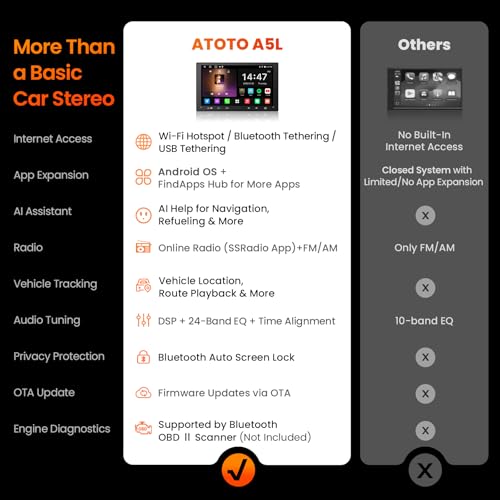
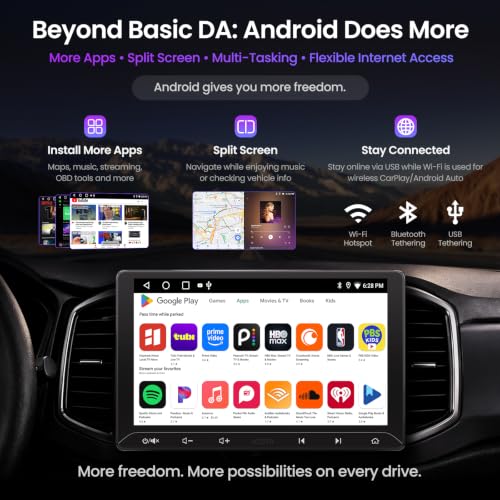
The A5L can access thousands of compatible applications through Google Play.
ATOTO also includes its FindApps utility for finding applications optimized or otherwise suitable for the head unit.
Depending on application compatibility, that opens the door to categories including:
- GPS navigation
- Music streaming
- Podcasts
- Internet radio
- Vehicle information
- OBD-II applications
- Media players
- Utilities
This is one area where a standalone Android head unit has an advantage over CarPlay and Android Auto alone.
CarPlay and Android Auto intentionally limit which applications can appear on the dashboard.
Android running directly on the receiver gives owners considerably more freedom.
Obviously, “the stereo can run it” and “you should interact with it while driving” are two entirely different sentences.
10-Inch 1280×720 QLED Touchscreen
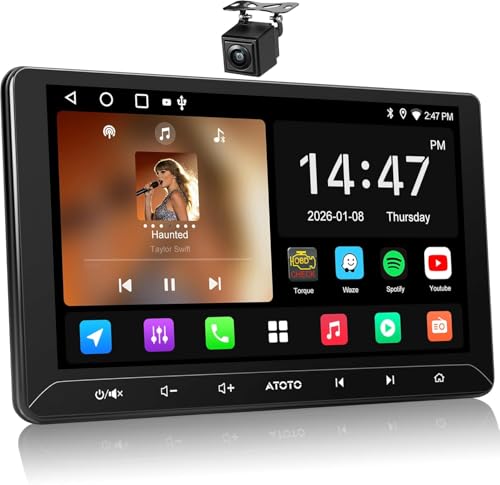
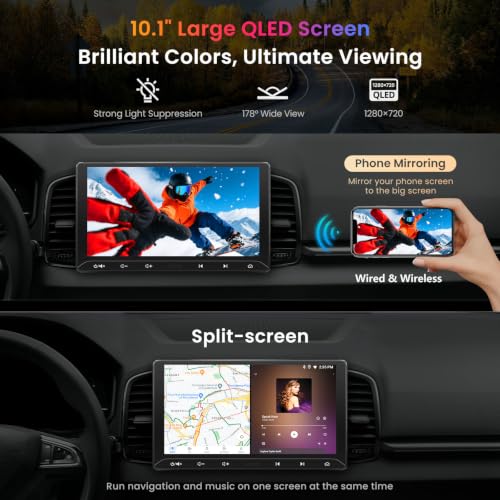
The centerpiece of this A5L is its 10-inch 1280×720 QLED touchscreen.
That larger display provides significantly more room for maps, cameras, media controls and Android applications than a conventional 7-inch Double DIN receiver.
Navigation is where the difference becomes especially useful.
A larger map can display more surrounding roads while making upcoming turns and interface controls easier to see at a glance.
The same applies to the included rear camera.
Instead of squeezing the camera image onto a small display, the A5L gives the feed considerably more usable screen area.
Make Sure a 10-Inch Screen Actually Fits
Large displays create an important installation consideration.
The chassis may be compatible with a Double DIN installation while the screen itself still needs enough physical clearance around the dashboard.
Before purchasing, check the location of:
- HVAC vents
- Climate controls
- Hazard switch
- Factory buttons
- Shifter
- Dashboard trim
- Storage compartments
Our Single DIN vs Double DIN guide explains the underlying radio formats and why a Double DIN designation doesn’t automatically guarantee a perfect vehicle-specific fit.
Measure first.
The dashboard has already survived this long without being attacked by a rotary tool.
Three Ways to Connect the A5L to the Internet
Because Android applications often need internet access, ATOTO gives the A5L several connection options.
The stereo can get online through:
- Wi-Fi hotspot
- Bluetooth tethering
- USB tethering
Each method has advantages.
Wi-Fi Hotspot
Using your smartphone’s hotspot generally provides the most straightforward high-speed wireless connection.
This is useful for navigation, streaming and downloading applications.
Bluetooth Tethering
Bluetooth tethering can consume less phone power and may be sufficient for applications that don’t require large amounts of bandwidth.
USB Tethering
USB tethering provides data while the connected phone charges.
That can make it particularly useful on longer trips where maintaining battery life matters.
Unlike the S8 Gen4, however, the A5L does not have built-in cellular LTE.
Your phone or another internet source provides the data connection.
Wireless Apple CarPlay
The A5L supports wireless and wired Apple CarPlay.
After the initial Bluetooth and Wi-Fi setup, the stereo can automatically reconnect to a previously paired compatible iPhone.
CarPlay provides access to supported:
- Navigation
- Music
- Podcasts
- Calls
- Messages
- Siri functions
For everyday driving, many owners may spend most of their time inside CarPlay even though the stereo itself runs Android.
That’s perfectly reasonable.
The benefit of the Android operating system is having additional flexibility when you want it.
Wireless Android Auto
The A5L similarly supports wireless and wired Android Auto.
Compatible Android phones can connect through ATOTO’s ZLink interface and automatically reconnect after initial setup.
Android Auto provides a familiar interface for Google Maps, compatible music applications, calls, messages and Google Assistant.
Again, the important distinction is that Android Auto is only one part of the A5L.
The stereo’s own Android operating system can still run applications independently.
Phone Mirroring
ATOTO also provides phone-mirroring functionality.
This can allow compatible content that isn’t normally available through CarPlay or Android Auto to appear on the 10-inch display.
That’s useful when parked or when another passenger is operating the system.
It is not an invitation to turn the center console into Netflix Raceway while driving.
Eyes belong on the road.
Included 720P AHD Backup Camera
This A5L package includes ATOTO’s AC-HD01LR rearview camera.
The camera provides a 720P AHD image with an approximately 140-degree viewing angle.
That wider perspective can make it easier to see objects near the rear corners of the vehicle when:
- Parking
- Reversing from driveways
- Backing out of parking spaces
- Maneuvering around obstacles
- Connecting a trailer
The camera also provides enhanced low-light performance for nighttime use.
Live Rear View
The included camera isn’t restricted to reverse gear.
ATOTO’s Live Rear View functionality allows the rear-camera feed to be displayed while the vehicle is moving forward when the system is properly installed and configured.
That can be particularly useful for:
- Monitoring trailers
- Checking bicycles on a rear rack
- Watching cargo
- Improving rearward visibility
- Monitoring traffic behind the vehicle
A camera remains an additional visibility aid, not a replacement for properly adjusted mirrors and physically checking your surroundings.
Technology is wonderful.
Necks still work too.
Built-In DSP Audio Processing
The A5L also offers considerably more audio adjustment than a basic factory replacement.
Its built-in DSP provides a 24-band equalizer with nine presets, allowing the system to be tuned around the speakers and vehicle interior.
This can help compensate for the acoustic problems created by real-world cabins.
Cars are terrible listening rooms.
Speakers point in different directions, one is three feet closer to you than another, glass reflects sound and door panels resonate.
DSP controls give installers additional tools for dealing with those problems.
For a deeper explanation of building and tuning an aftermarket audio system, see our Car Audio System Guide.
4 × 24-Watt RMS Internal Amplifier
ATOTO rates the A5L’s integrated amplifier at:
Peak output: 4 × 45 watts
RMS output: 4 × 24 watts
The RMS rating is the more meaningful figure when evaluating continuous output.
Twenty-four watts RMS per channel can work well with factory speakers and efficient aftermarket replacements.
Drivers building a more powerful component-speaker or subwoofer system should still consider external amplification.
The head unit is the beginning of an audio system.
It doesn’t need to personally power everything you’ve managed to bolt into the trunk.
Bluetooth Multi-Device Connectivity
The A5L can maintain connections with compatible Bluetooth accessories in addition to normal smartphone functionality.
That allows supported devices such as:
- OBD-II scanners
- TPMS accessories
- Bluetooth vehicle devices
to remain connected without necessarily interrupting calls or music.
This is particularly useful on an Android head unit because compatible vehicle-monitoring applications can display information directly on the large screen.
Using an OBD-II Scanner With the A5L
Pairing a compatible Bluetooth OBD-II adapter with an Android stereo can effectively turn part of the dashboard into a vehicle-information display.
Depending on the vehicle, adapter and software, available information can include parameters such as:
- Engine RPM
- Coolant temperature
- Intake temperature
- Vehicle speed
- Diagnostic trouble codes
- Fuel-related data
- Sensor information
That can be useful for monitoring and preliminary troubleshooting.
But don’t confuse reading a diagnostic trouble code with diagnosing the vehicle.
A P-code tells you what the control module detected. It does not necessarily tell you which component failed.
For actual diagnostic procedures, our growing My Pro Street technical library includes OBD-II trouble-code guides, sensor testing procedures and automotive electrical tutorials.
Bluetooth Auto-Lock
There’s another Bluetooth feature that’s easy to overlook.
The A5L can automatically lock its interface when an authorized paired device moves away and unlock after that device reconnects.
That’s increasingly useful because Android head units can contain personal information such as:
- Navigation history
- Account information
- App data
- Contacts
- Connected services
A factory radio from 2002 might remember six radio presets.
A modern Android stereo potentially knows considerably more about you.
Security matters a little more now.
DriveChat AI Integration
ATOTO also includes its DriveChat platform.
The current implementation is promoted as using AI models including ChatGPT and Gemini to provide conversational assistance through the vehicle interface.
The concept is to make certain information accessible through voice rather than requiring drivers to manually work through applications.
Because DriveChat is a software service, specific model availability, functionality and connected features can change as ATOTO updates the platform.
The underlying point remains useful: voice-first interaction can reduce the need to manually navigate menus while driving.
OTA Software Updates
The A5L supports over-the-air software updates.
That’s an important feature for a modern Android receiver.
Unlike an old radio where the feature set was effectively frozen the moment it left the factory, an Android head unit depends on continued compatibility with:
- Android software
- Bluetooth devices
- CarPlay
- Android Auto
- Applications
- Connected services
OTA updates give ATOTO a way to distribute eligible fixes and improvements without requiring owners to manually install firmware from external media.
ATOTO A5L 10-Inch vs A5L 9-Inch
The 9-inch and 10-inch A5L models target very similar buyers.
The primary difference is obvious:
screen size.
Choose the 10-inch A5L if you prioritize:
- Larger navigation display
- Bigger camera image
- Easier touchscreen controls
- More visual impact
- Big-screen Android applications
Choose the 9-inch A5L if you prioritize:
- Slightly smaller dashboard footprint
- Better clearance around vents
- Less obstruction of factory controls
- A more restrained installation
An extra inch doesn’t sound enormous on paper.
Inside a dashboard, it can make a significant difference.
Measure your vehicle rather than assuming bigger is automatically better.
ATOTO A5L vs F7WE
The A5L and F7WE represent two different approaches to aftermarket infotainment.
The A5L is an Android head unit.
The F7WE is primarily a CarPlay and Android Auto multimedia receiver.
Choose the A5L if you want:
- Standalone Android applications
- More customization
- Android navigation
- Bluetooth accessories
- App-based vehicle monitoring
- A larger display
Choose the F7WE if you mainly want:
- CarPlay
- Android Auto
- Simpler operation
- Strong smartphone integration
- Less Android management
Neither philosophy is inherently superior.
The better choice depends on whether you want your smartphone or the head unit itself to do most of the work.
ATOTO A5L vs S8 Gen4
This comparison is more straightforward.
The A5L is positioned as the more accessible Android option.
The S8 Gen4 provides considerably more advanced hardware and connectivity.
A5L advantages:
- Lower-cost Android entry point
- Core Android app functionality
- Wireless CarPlay
- Wireless Android Auto
- Large QLED display
- Included rear camera
- DSP audio controls
S8 Gen4 advantages:
- Faster processor platform
- 4GB RAM
- 64GB storage
- Built-in 4G LTE
- 32-band DSP
- 4V preamp outputs on applicable configurations
- Digital audio outputs
- More advanced expansion capability
For a straightforward street-car upgrade, the A5L may provide everything most drivers actually use.
For a more elaborate audio or connected-car project, the S8 Gen4 makes considerably more sense.
Who Should Buy the ATOTO A5L 10-Inch?
The A5L 10-inch is particularly well suited to an older vehicle that needs several technology upgrades at once.
Instead of separately adding navigation, Bluetooth, a backup camera and smartphone integration, one installation can address all of them.
It can make sense for:
- Older daily drivers
- Trucks
- SUVs
- Japanese tuner cars
- Muscle cars
- Project vehicles
- Restomods
- Vehicles without factory navigation
- Cars without backup cameras
- Owners wanting Android apps without moving to a premium head unit
For many older enthusiast cars, this type of upgrade can make the vehicle substantially easier to live with without changing the mechanical character that made it worth owning in the first place.
Is the ATOTO A5L 10-Inch Worth It?
The A5L isn’t trying to be ATOTO’s ultimate Android head unit.
That’s actually part of its appeal.
It combines the features most buyers are likely to use—Android applications, wireless CarPlay, wireless Android Auto, a large QLED screen, internet tethering, DSP audio controls, Bluetooth accessories and a backup camera—without requiring the more advanced hardware of an S8-series system.
The biggest limitation is the 2GB RAM and 32GB storage configuration.
That’s sufficient for ordinary navigation, music and light application use, but buyers planning heavy multitasking should consider a higher-spec Android receiver.
For everyone else, the value proposition is straightforward.
Take an older car.
Give it a 10-inch navigation screen, wireless smartphone connectivity, Android applications, better audio controls and a backup camera.
Then continue driving the car you actually like instead of replacing it because the factory stereo thinks six CDs constitute cloud storage.
That seems like a pretty good upgrade.






There are no reviews yet.